Repository navigation
Home
Welcome to the ootss wiki! Also see Maps, Stalker 2, Supraworld, SupraTools, Subnautica, and Sokoban wikis.
- Interactive Map: https://joric.github.io/ootss/
- GitHub Project: https://github.com/joric/ootss
- Solution Player: https://joric.github.io/ootss/play.html
- PuzzleScript: https://github.com/joric/ootss/blob/main/scripts/ootss.pz
- Reddit: https://reddit.com/r/OrderOfTheSinkingStar/comments/1uaotqz/order_of_the_sinking_star_interactive_map_with/
The map was updated to Order of the Sinking Star release build (click to expand)
- 2026-10-10 Updated to release version (8 Oct 2026), 920 levels
- 2026-06-22 Updated to Demo Phase 2 (20 Jun 2026), 105 levels
- 2026-06-20 Initial version, Demo Phase 1 (15 Jun 2026), 75 levels
Track game updates here: https://steamdb.info/app/499170/patchnotes/
- Since ootss-cmd updated the solutions, you don't need to solve most of the game: https://github.com/qiekn/ootss-cmd
- Progress tracker, monitors game save, implements pathfinding: https://github.com/xPaw/order-of-the-sinking-cost
- An ootss solution player project, claims to have a real solver (closed source): https://sinkingstar.wikitactics.com
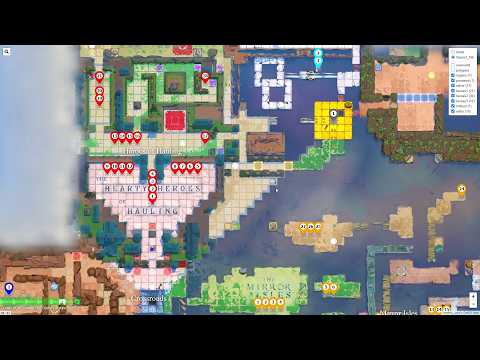
Press Escape or click on the image in the marker popup to toggle image gallery (swiper lib). Select map image in the gallery, click on it (or press Enter) and it brings you to location. You can also reverse search image by pasting it with Ctrl+V in the map.
I used my own numbering back then and it was way off, so I thought I'd rather use map names from the game engine.

YouTube video with arbitrary numbering. Courtesy of YouTube, https://youtu.be/lOzOaELzQ_Q
I don't know any cheats or console commands to load the levels. The names are just to identify the levels properly. The general idea for the map was to use the original naming. Wasn't worth it, names are kind of random and don match the order.
Launch game, launch Sysinternals Process Monitor. Add filters Process Name - is - sinking_star.exe, Operation - is - CreateFile, Path - contains - levels. Load the level in the game, you will see all the file names the game reads.
The release version doesn't read from levels anymore but you can filter on .history.
- 10 Oct. 2026: I started adding release levels to heroes3 area, see
compactor_v2, etc. Level screenshots are webp with quality 70, saved withvips webpsave <src.png> <dest.webp> --Q 70 --vips-progress. Sliced tileset is from #9.
Upd. you can load level by name with https://github.com/qiekn/ootss-cmd, study the tool, it's fantastic. Put my markers.json geojson to data/marker.json ("marker.json", singular, not a typo, v0.3 specific), and use switch command, e.g. switch heroes1_1 and it opens the level. You can also quickly peek up level name with show level command and use show position command to get coordinates.
- New markers by qiekn, 920 markers ripped from overworld.entities, https://github.com/qiekn/ootss-cmd/issues/1
- My Python script to export markers, based on ootss-cmd: https://github.com/joric/ootss/blob/main/scripts/simp_tool.py
Also see Custom Levels, Save Format, Progression Rules.
A new tool, ootss-cmd supports map capture, that's how the release map was made. See scripts in scripts/capture. Run console command, e.g. capture start C:\Temp\Capture\plan.json to save chunks to plan directory. Use stitch_map.py to combine tiles into a map (you can also feed it to vips for very high-resolution maps). Capture resolution depends on z and crop_world_size (tile size in game units), with z=16 and crop_world_size 4, the output map is about 8192x8192 pixels. You must be in the play mode, (not in the overview mode) to start capture. Zoom 20 is roughly equal to play mode, zoom 32 is local map, zoom 64 is overview. Don't forget to unfog before and fog after. The overworld size is 190,156 with offset -24,-2.
- ootss-cmd: https://github.com/qiekn/ootss-cmd
- Scripts: https://github.com/joric/ootss/tree/main/scripts/capture (need ootss-cmd)
Also see Map Capture.
Original plan.json (click to expand)
{
  "version": 3,
  "run_id": 133890000000000000,
  "scene": "overworld",
  "xmin": -40,
  "ymin": -20,
  "xmax": 180,
  "ymax": 170,
  "z": 80,
  "ground": 0,
  "overlap": 0.3,
  "crop_world_size": 9,
  "settle_ms": 200,
  "center_first": true,
  "center_x": 80,
  "center_y": 69,
  "freeze_time": true,
  "require_map_view": true
}
Old method with 16k virtual display (click to expand)
On the 1920x1080 overhead screenshot the grid size is precisely 10 pixels with map center at 860,740 but the resolution is low. Download Universal Virtual Display Driver. Unpack to C:\IddSampleDriver. Edit option.txt, add 16384, 9216, 30. Do not install .inf from explorer, use Device Manager - Action - Add legacy hardware - Display Drivers - Have disk. Set virtual display resolution to 16384x9216, run the game, open map, press Win+Shift+Right to move the game to Virtual Display, press PrnScr, paste image into editor. I tried to capture at 8192x8192 but apparently the game doesn't like square geometry (cuts the map). Meshes are broken, because the map draws in lowest LOD. Local maps (Q) can't be used because of perspective projection.
Used the same tech as in Subnautica 2 (raster map traced with rasterio and cleaned up with mapshaper). Regions appear to be slightly off in the demo, e.g. heroes2_10 entry point does not belong to any region at all. These are real in-game regions that you can track by observing how region labels appear and disappear as you walk.
Real regions use Markers with script_name="local_area", targeting an Area_Pin, see https://github.com/xPaw/order-of-the-sinking-cost/issues/1
Added grid and new overworld overlay image in 3840x2160 from the YouTube trailer to the map. Seems kind of aligned to fog of war (especially on the demo overworld map). I couldn't really find a good fit for the grid. Fog of war seems a bit off, and the cell size is weird (my version is 19x13 units), so I am pretty sceptical about this. Many regions on the map simply don't fit this grid. People already tried to align the game map to the grid, the grid size varies but still doesn't fit: https://redd.it/1ualmcn
According to this video with internal ootss editor there is a grid still https://youtu.be/Kl9RqnZXWCI it looks like 19x13 cells.
Game save is in C:\Users\user\Saved Games\Order of the Sinking Star\default\Status.sokoban_status. It's a binary format, it contains all names of currently opened levels, can be used for tracking the items. Example script to read .status tables:
Also see Save Format.
The 069,104 plaque implies that you are the 069,105th person to enter (it's an old Zork-related joke, see #1).
Shortly after start, in the introductory world there's a plaque with number 069,104. Looks like location on the map.

The cage in the center of the map is at 80,69 and Y grows up (you can search for player coordinates in memory)

- CheatEngine file: sinking_star.CT
After centering the overworld map at 80,69, the point at 69,104 is to the left of heroes region, nothing fancy there.

In the introductory world (pick up a map item above the level exit to zoom out), 069,104 is in the credits hall.

- https://www.reddit.com/r/OrderOfTheSinkingStar/comments/1u9vanc/069_104/
- https://www.reddit.com/r/OrderOfTheSinkingStar/comments/1u8q385/what_do_numbers_069104_mean/
It's always the same keybinds, reserved for the future when characters start to crossover.
| Key | Class | Name | Subtitle ID | Comment |
|---|---|---|---|---|
| 1 | Warrior | Valens | warrior | Fighter in the Puzzlescript code |
| 2 | Thief | Tif | thief | A girl kleptomaniac |
| 3 | Wizard | Isidore | wizard | Wiki says Isidore is a male name |
| 4 | Cleric | ? | priestess | Subtitle id "priestess", so a girl |
| 5 | Bard | ? | bard | Also a girl, why not bardess then |
| 6 | Druid | ? | druid | Can turn everything into stone and back |
| 9 | Trader | ? | trader, trader_clone_1 | Mirror guy, shares 9 shortcut with a clone |
Some levels (e.g. heroes1_19_jail) change the character swap order on C, Thief is selected second after Wizard, though it would be Warrior on other levels. Probably depends on character's location (heroes1_19_jail is the only affected level so far).
All levels (except promesst) have text solutions recorded in RLE format (see data/solutions.txt). There are a few solution players:
- AutoHotkey player.ahk (loads from
../data/solutions.txt). Alt+E to play, Ctrl+E to record, Alt+[] to step, ESC to stop. - Puzzlescript OotSS port, that runs level solutions in a browser (allows to play too): https://joric.github.io/ootss/play.html
- ootss-cmd by @qiekn, https://github.com/qiekn/ootss-cmd - a new one, provides better solution UI, recommended!
AutoHotkey solution player sends keystrokes with 150 ms interval by default, so record carefully, use single keypresses.

- Related issue https://github.com/qiekn/ootss-cmd/issues/2
From: https://x.com/banteg/status/2067583047491289256
The four main Order of the Sinking Star sections/sub-games map pretty directly to earlier free puzzle games - more than "inspired by," really: they were licensed/expanded and then smashed together.
| Sinking Star section | Original inspiration / starting point | Designer | Core idea |
|---|---|---|---|
| North: The Hearty Heroes of Hauling | Heroes of Sokoban I–III | Jonah Ostroff | Sokoban, but with RPG-party classes: warrior pushes, thief pulls, wizard swaps, etc. |
| East: The Mirror Isles | Mirror Isles | Alan Hazelden / Draknek | Move mirrors, swap with reflections, eventually duplicate yourself. |
| South: Skipping Stones to Lonely Homes | Skipping Stones to Lonely Homes | Alan Hazelden / Draknek | Stones skip across water; lily pads/rivers create chain-reaction routing puzzles. |
| West: The Promise | Promesst / Promesst series | Sean Barrett | Gems and colored beams grant abilities like smashing boulders, phasing through walls, opening barriers. |
Also see: https://www.reddit.com/r/OrderOfTheSinkingStar/comments/1pnfkl3/who_we_know_has_helped_design_ootss/
Rules are about the same, many levels are new, some are flipped or copied almost verbatim, water levels seem original.
- https://www.puzzlescript.net/play.html?p=219a7db6511dad557b84 Mirror Isles by Alan Hazelden
- https://www.puzzlescript.net/play.html?p=d6fd6fcf84de185e2584 Skipping Stones to Lonely Homes by Alan Hazelden
- https://www.puzzlescript.net/play.html?p=6860122 Heroes of Sokoban by Jonah Ostroff
- https://www.puzzlescript.net/play.html?p=6891949 Heroes of Sokoban 2: Monsters by Jonah Ostroff
- https://www.puzzlescript.net/play.html?p=7072276 Heroes of Sokoban 3: Bard and Druid by Jonah Ostroff
- https://silverspaceship.com/promesst/ Promesst by Sean Barrett ("inspired by Corrypt and Game Title")
- https://silverspaceship.com/promesst2/ Promesst 2 by Sean Barrett
"Corrypt" and "Game Title" by Michael Brough ("promesst" is an anagram of "smestorp"): https://www.smestorp.com
For the Puzzlescript games, you may click the "hack" link to open Puzzlescript editor. Promesst is not made in Puzzlescript, but there is an open-source remake by @szymor: https://github.com/szymor/promesst
Also see post by draknek here: https://bsky.app/profile/draknek.bsky.social/post/3m7qybidq7k2s
There are a lot of PuzzleScript forks besides the original PuzzleScript by Increpare.
- PuzzleScript (GitHub) (Editor) - base version by Increpare (an author of Stephen's Sausage Roll).
- Pattern:Script (GitHub) (Editor) - Open Source HTML5 Game Engine based on PuzzleScript
-
PuzzleScriptPlus (GitHub) (Editor) - Supports
level_selectso you can implement level menu or a hub. -
PuzzleScriptNext (GitHub) (Editor) - Supports
load_imagesso you can use a spritesheet in png format. - Super-Puzzlescript (GitHub) - Vanilla PuzzleScript wrapped in UMD module, used that in my first solution player.
- PuzzleScriptNext fork by xxuurruuii (GitHub) (Editor) adds features like 3d and more action keys (only exist in this fork).
My PuzzleScript port has all levels from the demo, except "The Promise" which was written in C++. Some demo levels are taken from the prototypes and mirrored or flipped, but most are completely new. It features an updated rule set to match the solutions and uses xxuurruuii's fork for keybinding and 3D support (use RMB to rotate).
- Most PuzzleScript engines only support one "fire" button (X, C, and Space all do the same thing) and no other keybindings at all. Picking action from context breaks existing solutions. It's possible to use action modifiers - fire, left/right to select, fire to confirm, and emulate X/C in the solution player (example: test.pz). You could also use @xxuurruuii's fork.
It's pretty easy, you bound object creation like
actionkey c CharacterSwapand then do[ CharacterSwap MirrorGuy ] [ SMirrorGuy] -> [ SMirrorGuy] [ MirrorGuy ]. You would need an UMD wrapper for the player (see #16). Upd. it's actually easier to use global API fromplay.html. Working version: https://joric.github.io/ootss/play.html - Some levels calculate the length of secondary reflection wrong. Commit 133469cd and a few following commits supposed to fix this but there was an issue with reflective crates so I had too roll it back. Finally fixed in 0e19f375.
- Levels with Bard and crates in water introduce a new mechanics. Nothing fancy, just a lot of new rules.
- Inverted doors. Currently solved with a few extra states and an initialization code.
- Sublevel or "basement" doors. Vanilla PuzzleScript allows one symbol per cell, so that would exhaust the entire symbol budget. Solved with a "seed" object that "digs" holes in a cross shape. The level geometry allows this so far.
- Some levels (
one_fire_v2) allowed dragons to make a move on character switch, failing the solution, it was fixed also.
Sokoban solvers are all about heuristics, fixed rules and meta-moves, it's hard to make a solver that's both fast and universal.
Puzzlescript Plus solver works with any rules, can even solve some mirror isles, but it's quite slow (chokes on the 3rd level).

The first Mirror Isles map (it's flipped, I had to flip it back) the solution is "drdrx llxll llllu", and it works.
- Mirror Isles in PS+: https://auroriax.github.io/PuzzleScript/editor.html?hack=219a7db6511dad557b84
- To load level into level editor, simply Ctrl+click on the level text in the text editor, then click "Solve".
- There's also that PuzzleScript solver: https://github.com/icelabMIT/PuzzleScriptAI
- There's also that Solvers article in my Sokoban wiki.
- Wikitactics claims to have a solver that solves the release version of the game: https://redd.it/1x66cdd
- Progression tracker by xPaw, uses game data for pathfinding: https://github.com/xPaw/order-of-the-sinking-cost
- Wikitactics, claims to have 679+ solutions: https://sinkingstar.wikitactics.com, reddit: https://redd.it/1x66cdd
- @PassionSausage for finding the memory locations for the player's coordinates, and the true center or the map.
- @TEEHEETUMMYTUMMS for a more than a half of demo solutions, it's a huge amount of work, thank you, man!
- @Silverbee-byte for optimizing a bunch of solutions, for bonus PuzzleScript maps, and for general help.
- @qiekn for capturing the overworld map and a fantastic in-game console tool https://github.com/qiekn/ootss-cmd.
- @xPaw for helping with jai headers, and the the progress tracking tool https://github.com/xPaw/order-of-the-sinking-cost
- @rhenandias for 900+ level images used in reverse search and investigating new features (audio logs, subtitles, etc.)
- https://store.steampowered.com/app/499170/Order_of_the_Sinking_Star/
- https://steamcommunity.com/app/499170/discussions/0/569290593938787992/
- https://github.com/qiekn/ootss Wiki-like notes of Order of the Sinking Star
- https://youtu.be/lOzOaELzQ_Q My Mirror Isles solutions from Demo Phase 1
- https://youtu.be/H01krPef69U Demo Phase 1 speedrun in 32 minutes
- https://youtu.be/evjZ_kY9hOk Demo Phase 2 full playthrough, 105 levels
- https://youtu.be/4QAmwa5BHzM The Promise solution in 3:49
- https://youtu.be/oY_Oc9b9R4o Sped-up run of prologue+Promise in 1:11
- https://www.youtube.com/@Silvergrooves42 speedruns by Silver Grooves
- https://www.youtube.com/@jasonmiller7474 speedruns by Jason Miller
- https://youtu.be/b5QdpY1YZho Gamirror China, July 30, 2026, Full Video of Speech/Q&A