TUI
ambits -p .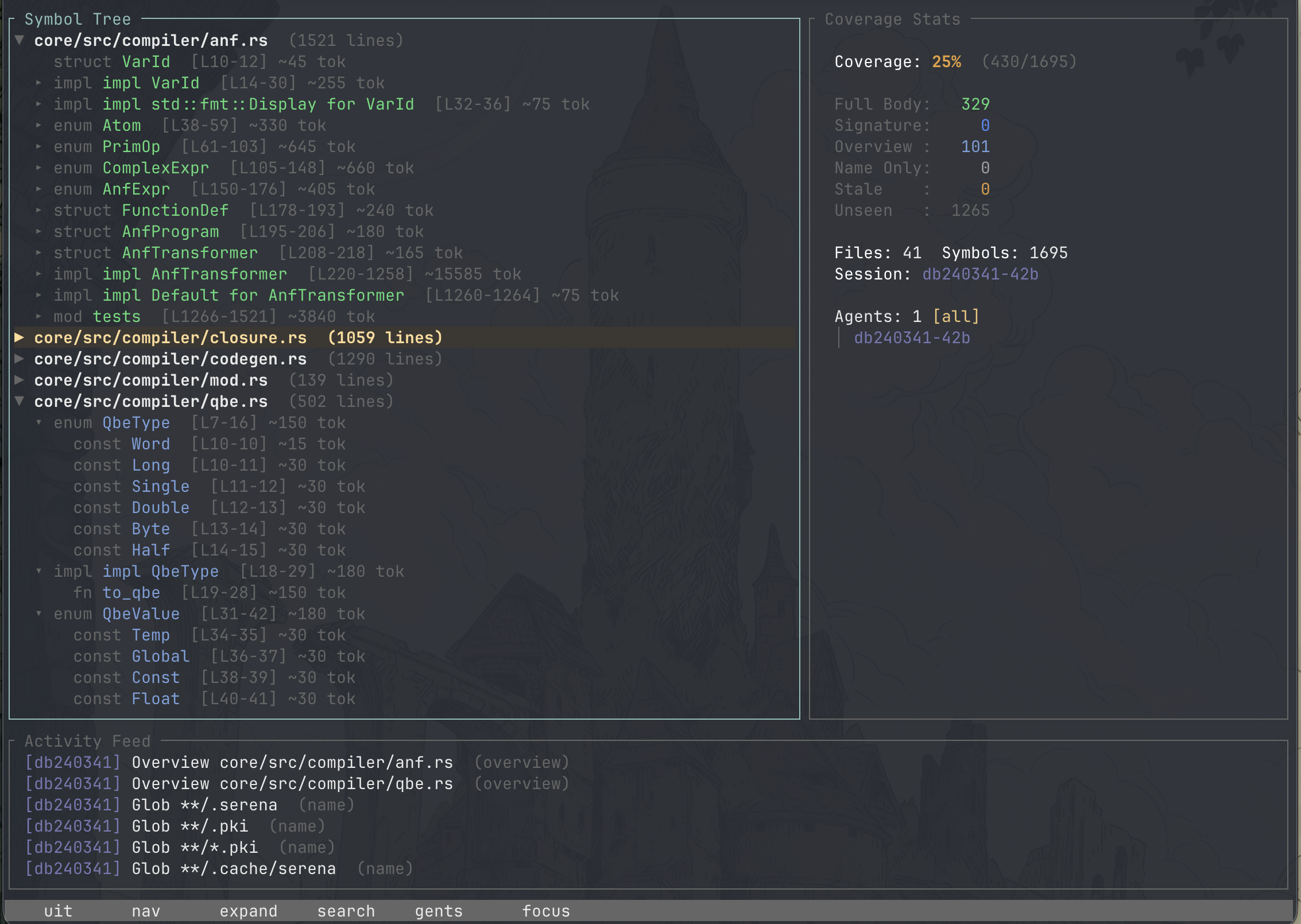
Tails the session log and updates live. Three panels — symbol tree, coverage
stats, activity feed — cycled with Tab.
Files start collapsed, including ones created while the TUI is running; expanding a file shows its full outline. A file you expanded stays expanded across edits and editor saves.
It watches your source files too, re-parsing one when it changes so the tree
and the coverage numbers follow your edits without a restart. The watcher
honours the project's .gitignore, so generated code stays out of the tree —
without that, a build tool writing into target/ (rust-analyzer running
cargo check, say) pushes rows in for files you never wrote. Deleted files
leave the tree rather than lingering until you quit.
- Depth-aware coloring — every symbol shaded by how deeply it was read
-
Per-file counts —
seen/totalon each file header, so partial coverage shows without expanding - Sortable tree — alphabetical, or grouped by coverage to surface half-read files first
-
Search —
/to jump to a symbol by name -
Compaction history —
Cfor this session's compaction boundaries -
Sub-agent alignment —
dcompares two agents file by file: where they read the same code, and where only one looked (see Coverage and Multi-Agent)
Symbols carried over from before a compaction render dimmed — the read happened, but it is no longer in the agent's live context.
While it runs, the TUI is also the sole writer of the read journal.
| Key | Action |
|---|---|
j / k, ↓ / ↑
|
Move down / up (tree, or agent list when Stats is focused) |
h / l, ← / →
|
Collapse / expand tree nodes |
Enter |
Expand a node with children; on a leaf, open it in your editor; selects an agent when Stats is focused |
Tab |
Cycle panel focus (Tree / Stats / Activity) |
Shift+Tab |
Cycle agent filter backward |
/ |
Search symbols |
s |
Toggle sort (alphabetical / coverage) |
a / A
|
Cycle agent filter forward / backward |
d |
Sub-agent alignment view |
C |
Compaction history ([ / ] to page) |
g / G
|
Jump to first / last |
PgUp / PgDn
|
Scroll by page |
Esc |
Close the alignment view, or cancel a search |
q, Ctrl+C
|
Quit |
Symbols, by read depth:
| Color | Meaning |
|---|---|
| Dark gray | Unseen |
| Light gray | Name only (appeared in a glob or listing) |
| Pale blue | Overview (grep match, symbol listing) |
| Blue | Signature seen |
| Green | Full body read |
File headers, by coverage:
| Color | Meaning |
|---|---|
| White | Nothing seen |
| Amber | Partially covered |
| Yellow-green | All symbols seen, not all at full depth |
| Green | Every symbol read in full |
Enter on a leaf row — a symbol with no children, or a file with none — opens
that file in an external editor, jumped to the symbol's declaration line. A row
with children still expands and collapses.
The editor is resolved in this order:
-
--editor <TEMPLATE>on the command line -
[editor]intools.toml(whichever one is in use — see Configuration) $VISUAL$EDITOR- none —
Entershows a message in the status bar instead of guessing
A resolved value is a command template. Plain EDITOR=vim or --editor code
still jumps to the right line: a short built-in table supplies the line-jump
syntax for common editors, keyed off the command's basename.
| Editor | Template |
|---|---|
vim, nvim, vi
|
{editor} +{line} {file} |
emacs, emacsclient
|
{editor} +{line} {file} |
nano |
{editor} +{line} {file} |
code, code-insiders
|
{editor} --goto {file}:{line} |
subl, sublime_text
|
{editor} {file}:{line} |
zed |
{editor} {file}:{line} |
| anything else |
{editor} {file} (opens the file, no line jump) |
If your editor isn't in the table, or its binary goes by a different name
(invoked by full path, say), write the template explicitly. A template
containing {file}/{line} is used verbatim, with no basename guessing:
[editor]
command = "/path/to/some-editor --line {line} {file}"
A spawn failure or nonzero exit doesn't crash the TUI — it shows the error in the status bar and leaves everything else running.