장르 : 액션 퍼즐 게임
개발 참여인원 : 3명
개발 기간 : 한 달
- 공 움직임
- 공 리스폰
- 인 게임 UI
- 회전판 기믹
- 오브젝트 배치
공 움직임, 인 게임 UI, 충돌 이펙트
공 움직임은 BallMove()에서 입력 방향에 따라 AddForce 하도록 구현하였습니다.
인 게임 UI의 공을 감싸고 있는 고리는 CanvasFollow()와 CanvasSizeUp()이 담당하고 있습니다. 이전 위치와 현재 위치의 차이만큼 고리 UI 위치에 더하여 공을 따라다니도록
만들었습니다. 공 컬라이더의 반지름만큼 UI scale에 더하여 크기를 키웁니다.
OnCollisionEnter() 에서 공의 속도크기를 판단하여 충돌 이펙트 처리를 할지 말지 정합니다.
using System.Collections;
using System.Collections.Generic;
using UnityEngine;
using UnityEngine.UI;
using DG.Tweening;

public class BallController : MonoBehaviour
{
    private GameManager gameManager = null;
    private PlayerInput playerInput = null;
    private PlayerFirstObjScript playerFirst = null;
    private Rigidbody rigid = null;

    // 공 움직임 관련 변수
    [SerializeField]
    private LayerMask whatIsMovable;
    [Header("공 기본 속도")]
    [SerializeField]
    private float moveSpeed = 2f;
    public float MoveSpeed { get { return moveSpeed; } set { moveSpeed = value; } }
    [SerializeField]
    private float rotationSpeed = 3f;
    public float RotationSpeed { get { return rotationSpeed; } set { rotationSpeed = value; } }
    [SerializeField]
    private float jumpHeight = 10f;
    [Header("공 최대 속도")]
    [SerializeField]
    private float maxSpeed = 11f;
    private bool canMove = false;
    private Transform cam;
    [SerializeField]
    private GameObject particle;

    // 이전 값 관련 변수
    private float totalTime = 0f;
    private float radius;
    private float yDelta;
    private float ColRadius;
    private Vector3 startPos;

    // 캔버스 관련 변수
    private GameObject canvas;
    public GameObject Canvas { get { return canvas;} }
    public GameObject sizeCanvas;
    public Image sizeImage;
    public Text sizeText;
    [Header("사이즈 캔버스 커지는 정도")]
    [SerializeField]
    private float size = 2f;

    // 캔버스 높이 조절 변수
    [Header("사이즈 캔버스 높이")]
    [SerializeField]
    private float canvasHeight = -2f;

    void Start()
    {
        gameManager = GameManager.Instance;

        rigid = GetComponent<Rigidbody>();

        playerInput = GetComponent<PlayerInput>();
        playerFirst = GetComponent<PlayerFirstObjScript>();

        cam = Camera.main.gameObject.transform;

        startPos = transform.position; // 이전 위치
        radius = playerFirst.MyCol.radius; // 이전 반지름 길이

        canvas = Instantiate(sizeCanvas, startPos + new Vector3(0, canvasHeight, 0), Quaternion.Euler(90, 0, 0));
    }

    void FixedUpdate()
    {
        BallMove();
    }

    void Update()
    {
        CanvasFollow(canvas);
        CanvasSizeUp(canvas);
    }

    private void OnCollisionEnter(Collision collision)
    {
        // 부딪힘 이펙트
        Vector3 point;
        int layerMask = LayerMask.NameToLayer("GROUND");

        if (rigid.velocity.magnitude > 2.5f) {
            if (collision.gameObject.layer != layerMask) {
                for (int i = 0; i < collision.contacts.Length; i++) {
                    point = collision.contacts[i].point;
                    GameObject effect = Instantiate(particle, point, Quaternion.identity);
                    Destroy(effect, 1f);
                }
            }
        }
    }

    private void OnCollisionStay(Collision collision)
    {
        if (collision.collider.CompareTag("Movable")) {
            canMove = true;
        }
    }

    private void OnCollisionExit(Collision collision)
    {
        if (collision.collider.CompareTag("Movable")) {
            canMove = false;
        }
    }

    private void BallMove()
    {
        if (canMove) { //Ball 이동관련
            if (playerInput.XMove > 0) {
                rigid.AddForce(cam.forward * moveSpeed, ForceMode.Impulse);
            }
            else if (playerInput.XMove < 0) {
                rigid.AddForce(-cam.forward * moveSpeed, ForceMode.Impulse);
            }
            if (playerInput.ZMove > 0) {
                rigid.AddForce(cam.right * moveSpeed, ForceMode.Impulse);
            }
            else if (playerInput.ZMove < 0) {
                rigid.AddForce(-cam.right * moveSpeed, ForceMode.Impulse);
            }
            rigid.velocity = Vector3.ClampMagnitude(rigid.velocity, maxSpeed); //공 속도제한
        }
    }

    private void CanvasFollow(GameObject canvas) // 사이즈 이미지 함수
    {
        Vector3 delta = transform.position - startPos;  // 현재 공의 위치 - 이전 공의 위치 (두 점 사이의 거리)
        float colDelta = playerFirst.MyCol.radius - radius;

        Vector3 pos = canvas.transform.position;
        pos.x += delta.x;
        pos.z += delta.z;
        pos.y += delta.y - colDelta; // 사잇값 - 컬라이더 커진 값

        canvas.transform.position = pos;

        startPos = transform.position; // 반복
        radius = playerFirst.MyCol.radius; // 반복
    }

    private void CanvasSizeUp(GameObject image)
    {
        Vector3 scale = image.transform.localScale;
        float radius = playerFirst.MyCol.radius + size;

        scale.x = radius;
        scale.y = radius;

        image.transform.DOScale(scale, 0.4f);
    }
}
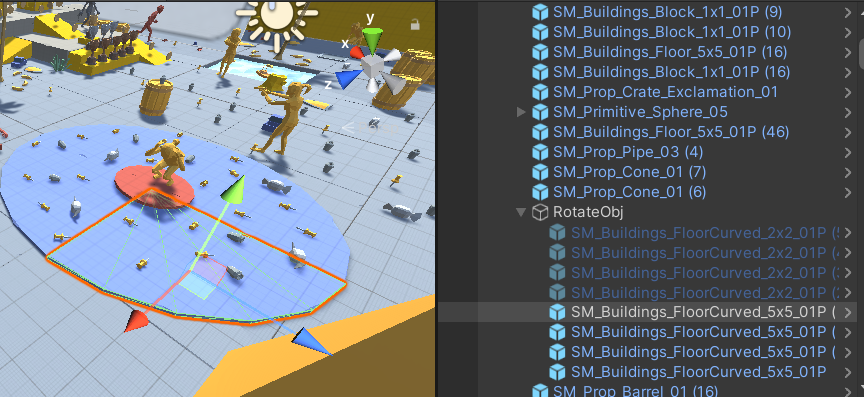
회전판 기믹
판 조각에 스크립트를 부착하여 회전하게끔 구현하였습니다.
using System.Collections;
using System.Collections.Generic;
using UnityEngine;

public class Rotate : MonoBehaviour
{
    [SerializeField]
    private float rotatePower = 50;

    void Update()
    {
        ObjRotate();
    }

    private void ObjRotate()
    {
        transform.Rotate(0, rotatePower * Time.deltaTime, 0);
    }

    private void OnCollisionStay(Collision collision)
    {
        collision.transform.parent.SetParent(transform);
    }

    private void OnCollisionExit(Collision collision)
    {
        collision.transform.parent.SetParent(null);
    }
}