Releases: kaanncavdar/ratica
Release list
Ratica v0.1.4 (beta)

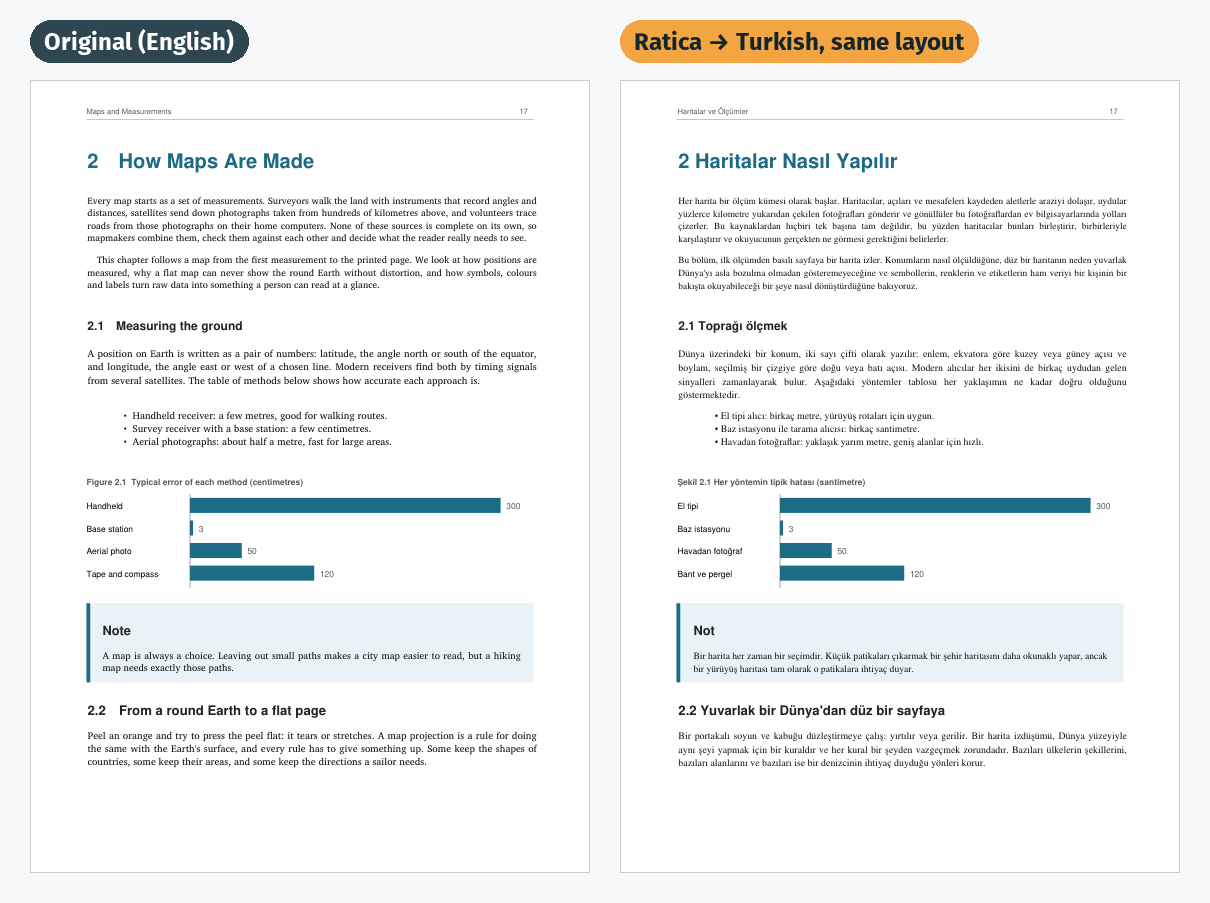
Ratica translates PDF books on your own computer and keeps the original page layout. Free, open source, offline. This is a beta: please report anything that goes wrong.
What's new in 0.1.4
- Fix: the translation engine could keep running after Ratica crashed or was closed during a translation,
holding GPU memory so that every later translation failed with an out-of-memory error. The engine now always
ends with Ratica, and engines left behind by an earlier version are stopped when Ratica starts.
In 0.1.3
- macOS: signed and notarized by Apple. Ratica opens with a double click, without the "Apple could not
verify" warning. - Free up space: the window shows how much the downloaded engine and model take and can delete them.
The Windows uninstaller asks whether to delete them too.
Earlier: translate from any supported language, recognised from the book (0.1.1); Applications shortcut in the
macOS disk image (0.1.2).
Which file do I need?
| Your computer | Download | How to install |
|---|---|---|
| Windows 10/11 (64-bit) | Ratica-…-Windows-Setup.exe |
Run it. The installer is not code-signed yet, so Windows may show "Windows protected your PC": click More info → Run anyway. |
| Mac with Apple Silicon (M1, M2, M3, M4) | Ratica-…-macOS-AppleSilicon.dmg |
Open it and drag Ratica onto Applications, then open it from there. The app is signed and notarized by Apple. |
| Linux (x64) | Ratica-…-Linux-x64.tar.gz |
tar xzf Ratica-*-Linux-x64.tar.gz && ./Ratica/Ratica |
First start
Ratica downloads its translation engine and AI model once (about 5–6 GB) and measures your computer's speed. After that it works offline.
- NVIDIA GPU (6 GB or more): recommended, uses CUDA.
- Apple Silicon Mac: supported, uses Metal.
- AMD / Intel GPU: should work through Vulkan; not tested yet, reports welcome.
- No GPU: works, but a book takes many hours.
How to use
- Choose a PDF (or drop it on the window) and pick a language.
- Press Translate. You can pause and resume; progress is saved.
book.<language>.pdf(same layout) andbook.<language>.epubappear next to the original.
A 30-second intro video is in the README.
Known limitations
- Scanned PDFs (pages that are images) are not translated yet.
- Text inside images and pages rotated sideways stay in the original language.
- A phrase in italics or a coloured link inside a paragraph takes the paragraph's main style.
Full Changelog: v0.1.3...v0.1.4
Ratica v0.1.3 (beta)
Ratica translates PDF books on your own computer and keeps the original page layout. Free, open source, offline. This is a beta: please report anything that goes wrong.
What's new in 0.1.3
- macOS: signed and notarized by Apple. Ratica opens with a double click, without the "Apple could not
verify" warning. - Free up space: the window shows how much the downloaded engine and model take and can delete them.
The Windows uninstaller asks whether to delete them too.
Earlier: translate from any supported language, recognised from the book (0.1.1); Applications shortcut in the
macOS disk image (0.1.2).
Which file do I need?
| Your computer | Download | How to install |
|---|---|---|
| Windows 10/11 (64-bit) | Ratica-…-Windows-Setup.exe |
Run it. The installer is not code-signed yet, so Windows may show "Windows protected your PC": click More info → Run anyway. |
| Mac with Apple Silicon (M1, M2, M3, M4) | Ratica-…-macOS-AppleSilicon.dmg |
Open it and drag Ratica onto Applications, then open it from there. The app is signed and notarized by Apple. |
| Linux (x64) | Ratica-…-Linux-x64.tar.gz |
tar xzf Ratica-*-Linux-x64.tar.gz && ./Ratica/Ratica |
First start
Ratica downloads its translation engine and AI model once (about 5–6 GB) and measures your computer's speed. After that it works offline.
- NVIDIA GPU (6 GB or more): recommended, uses CUDA.
- Apple Silicon Mac: supported, uses Metal.
- AMD / Intel GPU: should work through Vulkan; not tested yet, reports welcome.
- No GPU: works, but a book takes many hours.
How to use
- Choose a PDF (or drop it on the window) and pick a language.
- Press Translate. You can pause and resume; progress is saved.
book.<language>.pdf(same layout) andbook.<language>.epubappear next to the original.
A 30-second intro video is in the README.
Known limitations
- Scanned PDFs (pages that are images) are not translated yet.
- Text inside images and pages rotated sideways stay in the original language.
- A phrase in italics or a coloured link inside a paragraph takes the paragraph's main style.
Full Changelog: v0.1.2...v0.1.3
Ratica v0.1.2 (beta)
Ratica translates PDF books on your own computer and keeps the original page layout. Free, open source, offline. This is a beta: please report anything that goes wrong.
What's new in 0.1.2
- macOS: the disk image now shows an Applications shortcut to drag Ratica onto.
- Clearer first-start steps for macOS 15 and Windows (see the table below).
New in 0.1.1: translate from any supported language (recognised from the book), and into English too.
Which file do I need?
| Your computer | Download | How to install |
|---|---|---|
| Windows 10/11 (64-bit) | Ratica-…-Windows-Setup.exe |
Run it. The installer is not code-signed yet, so Windows may show "Windows protected your PC": click More info → Run anyway. |
| Mac with Apple Silicon (M1, M2, M3, M4) | Ratica-…-macOS-AppleSilicon.dmg |
Open it and drag Ratica onto Applications. The app is not notarized by Apple yet, so macOS blocks the first start once: click Done, open System Settings → Privacy & Security, scroll down, click Open Anyway next to the Ratica message, enter your password and choose Open. After that it opens normally. |
| Linux (x64) | Ratica-…-Linux-x64.tar.gz |
tar xzf Ratica-*-Linux-x64.tar.gz && ./Ratica/Ratica |
First start
Ratica downloads its translation engine and AI model once (about 5–6 GB) and measures your computer's speed. After that it works offline.
- NVIDIA GPU (6 GB or more): recommended, uses CUDA.
- Apple Silicon Mac: supported, uses Metal.
- AMD / Intel GPU: should work through Vulkan; not tested yet, reports welcome.
- No GPU: works, but a book takes many hours.
How to use
- Choose a PDF (or drop it on the window) and pick a language.
- Press Translate. You can pause and resume; progress is saved.
book.<language>.pdf(same layout) andbook.<language>.epubappear next to the original.
A 30-second intro video is in the README.
Known limitations
- Scanned PDFs (pages that are images) are not translated yet.
- Text inside images and pages rotated sideways stay in the original language.
- A phrase in italics or a coloured link inside a paragraph takes the paragraph's main style.
Full Changelog: v0.1.1...v0.1.2
Ratica v0.1.1 (beta)
Ratica translates PDF books on your own computer and keeps the original page layout. Free, open source, offline. This is a beta: please report anything that goes wrong.
What's new in 0.1.1
- Translate from any supported language, not only English. Ratica recognises the language of the book
and preselects it; you can change it in the new Translate from box. - English is now a target language too, so you can translate books into English.
- On the command line,
--sourceis detected from the book unless you give it.
Which file do I need?
| Your computer | Download | How to install |
|---|---|---|
| Windows 10/11 (64-bit) | Ratica-…-Windows-Setup.exe |
Run it. Windows may say "Windows protected your PC" because the installer is not code-signed: click More info → Run anyway. |
| Mac with Apple Silicon (M1, M2, M3, M4) | Ratica-…-macOS-AppleSilicon.dmg |
Open it and drag Ratica to Applications. The first time, right-click Ratica → Open → Open, because the app is not notarized by Apple. |
| Linux (x64) | Ratica-…-Linux-x64.tar.gz |
tar xzf Ratica-*-Linux-x64.tar.gz && ./Ratica/Ratica |
First start
Ratica downloads its translation engine and AI model once (about 5–6 GB) and measures your computer's speed. After that it works offline.
- NVIDIA GPU (6 GB or more): recommended, uses CUDA.
- Apple Silicon Mac: supported, uses Metal.
- AMD / Intel GPU: should work through Vulkan; not tested yet, reports welcome.
- No GPU: works, but a book takes many hours.
How to use
- Choose a PDF (or drop it on the window) and pick a language.
- Press Translate. You can pause and resume; progress is saved.
book.<language>.pdf(same layout) andbook.<language>.epubappear next to the original.
A 30-second intro video is in the README.
Known limitations
- Scanned PDFs (pages that are images) are not translated yet.
- Text inside images and pages rotated sideways stay in the original language.
- A phrase in italics or a coloured link inside a paragraph takes the paragraph's main style.
Full Changelog: v0.1.0...v0.1.1
Ratica v0.1.0 (beta)
Ratica translates PDF books on your own computer and keeps the original page layout. Free, open source, offline. This is a beta: please report anything that goes wrong.
Which file do I need?
| Your computer | Download | How to install |
|---|---|---|
| Windows 10/11 (64-bit) | Ratica-…-Windows-Setup.exe |
Run it. Windows may say "Windows protected your PC" because the installer is not code-signed: click More info → Run anyway. |
| Mac with Apple Silicon (M1, M2, M3, M4) | Ratica-…-macOS-AppleSilicon.dmg |
Open it and drag Ratica to Applications. The first time, right-click Ratica → Open → Open, because the app is not notarized by Apple. |
| Linux (x64) | Ratica-…-Linux-x64.tar.gz |
tar xzf Ratica-*-Linux-x64.tar.gz && ./Ratica/Ratica |
First start
Ratica downloads its translation engine and AI model once (about 5–6 GB) and measures your computer's speed. After that it works offline.
- NVIDIA GPU (6 GB or more): recommended, uses CUDA.
- Apple Silicon Mac: supported, uses Metal.
- AMD / Intel GPU: should work through Vulkan; not tested yet, reports welcome.
- No GPU: works, but a book takes many hours.
How to use
- Choose a PDF (or drop it on the window) and pick a language.
- Press Translate. You can pause and resume; progress is saved.
book.<language>.pdf(same layout) andbook.<language>.epubappear next to the original.
A 30-second intro video is in the README.
Known limitations
- Scanned PDFs (pages that are images) are not translated yet.
- Text inside images and pages rotated sideways stay in the original language.
- A phrase in italics or a coloured link inside a paragraph takes the paragraph's main style.
Full Changelog: https://github.com/kaanncavdar/ratica/commits/v0.1.0