🎬 Live Demo
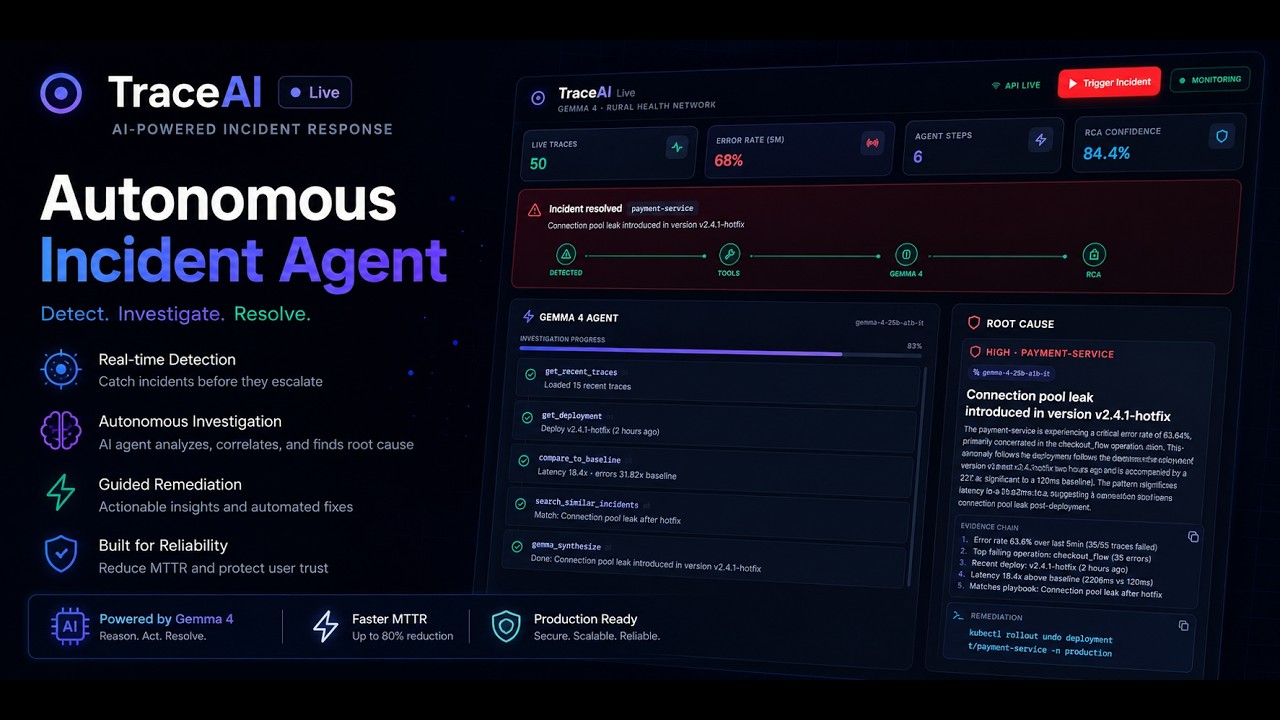




TraceAI is a high-performance, autonomous SRE (Site Reliability Engineering) Agent powered by Google's next-generation Gemma 4 model. It is specifically designed for high-stakes, low-resource organizations—such as rural health networks, clinics, and critical NGOs—that run vital digital systems but lack the resources to maintain 24/7 on-call SRE teams.
When critical systems start failing or payment APIs degrade at 2:00 AM, TraceAI autonomously ingests telemetry, executes diagnostic tools, performs automated comparison baselines, and generates actionable, fully auditable Root Cause Analysis (RCA) and playbooks—all in seconds.
A rural medical clinic in an underserved area runs a critical, low-margin digital registration and copay payment system. At 2:00 AM, the payment service starts dropping transactions. Latency spikes to 3.5 seconds. There is no dedicated SRE engineer to wake up. The clinic's digital systems freeze, causing delays in patient admissions.
TraceAI is their SRE on call.
- The anomaly detector triggers on a latency surge and error spike.
- The TraceAI Agent activates, spinning up a targeted incident workspace.
- It autonomously runs 5 distinct telemetry and registry tools to collect facts.
- Gemma 4 correlates the tools' output, diagnosing that the recent
v2.4.1-hotfixdeploy contains a connection pool leak, and instantly outputs a exact shell rollback command. - In less than 5 seconds, the issue is understood, diagnosed, and remediated—preventing patient admission delays and saving the NGO clinic thousands of dollars in lost operational hours.
TraceAI is built with a decoupled, event-driven async architecture featuring a SQLite WAL high-throughput telemetry base, background worker queues, and an agentic tool-use layer that feeds directly into Gemma 4.
graph TD
    %% Telemetry Ingestion
    Telemetry[Telemetry Ingress /api/v1/ingest] -->|SQLite WAL| DB[(SQLite Database)]

    %% Anomaly Detection & Queueing
    DB -->|Detect Anomaly| Detector[Anomaly Manager]
    Detector -->|Enqueue Event| Queue[asyncio.Queue]

    %% Agentic Execution
    Queue -->|Process Event| Worker[Agent Worker]
    Worker -->|1. Run Diagnostics| Agent[Gemma 4 SRE Agent]

    %% SRE Agent Tools
    Agent -->|Tool 1: Error Breakdown| T1[get_error_breakdown]
    Agent -->|Tool 2: Recent Traces| T2[get_recent_traces]
    Agent -->|Tool 3: Deploy Registry| T3[get_deployment]
    Agent -->|Tool 4: Baselines| T4[compare_to_baseline]
    Agent -->|Tool 5: Playbooks| T5[search_similar_incidents]

    %% Analysis & Synthesis
    T1 & T2 & T3 & T4 & T5 -->|Evidence Bundle| Synthesis[Gemma 4 LLM Synthesis]
    Synthesis -->|Structured JSON RCA| ReportDB[(DB / ai_reports)]

    %% Frontend Updates
    ReportDB -->|HTTP SSE / Live Feed| UI[React Glassmorphism UI]
To prevent hallucinations, the SRE Agent does not inspect code or logs blindly. It queries an advanced, telemetry-focused tool belt:
get_error_breakdown: Analyzes absolute error counts, error rates, and identifies top-failing operations in the lastNminutes.get_recent_traces: Pulls distributed trace ids, durations, and detailed status arrays from the active production databases.get_deployment: Inspects the active registry to find the exact timestamp, version, and environment tag of the latest deployment.compare_to_baseline: Compares the active anomaly against standard baseline telemetry for error rates (multipliers) and average latencies.search_similar_incidents: Uses contextual symptom matching to find relevant playbooks and previous remediation paths.
- Python 3.10+
- Node.js 18+ & npm
# Clone the repository
git clone https://github.com/kanklc34/traceai
cd Trace-AI

# Create and activate virtual environment
# Windows:
python -m venv venv
venv\Scripts\activate

# macOS / Linux:
# python3 -m venv venv
# source venv/bin/activate

# Install dependencies
pip install -r requirements.txt

# Copy environment template
copy .env.example .env  # Windows
# cp .env.example .env   # macOS/Linux
Configure your .env file with your Google AI Studio API key:
GEMMA_API_KEY=your_google_ai_studio_api_key_here
TRACEAI_DEV_MOCK=0
Note: If you want to run the system without an active API key or offline, set
TRACEAI_DEV_MOCK=1. The SRE engine will automatically switch to Evidence-Only Mode, running all diagnostic tools, performing data synthesis, and presenting rich, local calculations in the UI!
Now, run the FastAPI backend server:
cd backend
python main.py
The backend will run on http://localhost:8000 and automatically create the WAL database at backend/data/traceai_demo.db.
Open a new terminal window:
cd frontend-v2
npm install
npm run dev
The React frontend will spin up at http://localhost:3000 (or http://localhost:5173). Open this URL in your browser.
You can trigger a live payment service breakdown scenario using either the "Trigger Incident" button directly on the dashboard header, or by running the script from the root of the project:
# Return to the root folder and run:
python trigger_demo_spike.pyTraceAI supports fully offline inference using Gemma 4 locally:
ollama pull gemma4Then set in .env:
TRACEAI_USE_OLLAMA=1
OLLAMA_MODEL=gemma4- The injector simulates three distinct phases: Latency degradation (800ms+), Instability (flapping error status), and Critical failure (spikes of 3000ms+ and error rates).
- Within ~5 seconds, the backend anomaly manager flags the incident and queues it.
- The Gemma Agent runs its 5 telemetry tools sequentially, collecting a comprehensive evidence bundle.
- Gemma 4 evaluates the bundle, synthesizes the root cause, calculates impact levels, and outputs a recommended remediation plan.
- The React UI displays the live step-by-step SRE tool feed and the final RCA board dynamically!
- Model Core: Google
gemma-4-26b-a4b-it(primary model) andgemma-4-31b-it(fallback model). - Backend framework:
FastAPI(Asynchronous endpoints, lightweight routing). - Database & ORM:
SQLite(optimized with Write-Ahead Logging for high telemetry ingestion) &SQLAlchemy + aiosqlite(fully async operations). - Agent Core: Async Python workers using dynamic system tools, JSON parsing fallbacks, and deterministic evidence engines.
- Frontend UI:
React (TypeScript)+Vite+Tailwind CSS. - Visual Assets & Icons:
Lucide React& premium dark-glassmorphism HSL custom palettes.
- Endpoint:
POST /api/v1/ingest - Payload:
{
  "trace_id": "demo-ab12d",
  "service": "payment-service",
  "timestamp": "2026-05-17T11:45:00Z",
  "spans": [{
    "span_id": "sp-29ca",
    "operation": "checkout_flow",
    "status": "error",
    "latency_ms": 3200.0,
    "metadata": {"env": "production", "version": "v2.4.1-hotfix"}
  }]
}
- Endpoint:
GET /api/v1/incidents/latest - Returns: The active incident details, tool execution stages, and Gemma 4 generated root cause analysis.
- Endpoint:
GET /api/v1/agent-steps - Returns: The chronological steps taken by the Gemma agent during the diagnostic run.
Distributed under the MIT License. See LICENSE for more information.
Developed with 💜 for the Gemma 4 Good Hackathon. Let's build robust, intelligent, and affordable digital infrastructure for every clinic, community, and team around the globe.