This repository contains the various mini projects (GUI based games) developed pertaining to the course "An Introduction to Interactive Programming in Python" by Rice University on Coursera.
- At the starting of every game file, a URL link to my code is provided. One could just copy that link and paste it in their web browser.
- One could just copy the code from the uploaded files and paste it on CodeSkulptor, which provides an online IDE specially developed by Rice University for this course. After using any of the above options, one could press the Play/Run Button (Leftmost Button on the CodeSkulptor toolbar) to run the code.
A variant of the classical arcade game Asteroids with sounds and interactive images. The player has limited number of lives and he/she needs to destroy the respawning asteroids coming in its way.
Arrow Keys for movement. Space bar for shooting the bullets.
Refer:
On pressing the play/run button, the player is displayed a GUI window, with three buttons 'Deal', 'Hit' and 'Stand'.
It is based on the card game Memory, in which players need to turn over pairs of matching cards. This can be played with an opponent. The winner could be the one with least number of guesses.
On pressing the play/run button, the player is displayed a GUI window, with 16 folded cards (numbers). Player can click on two cards to reveal their numbers. A 'Turns' counter is also displayed.
It is based on the classic arcade game simulating table tennis. The player controls an in-game paddle by moving it vertically across the left side of the screen, and another player controlling a second paddle on the opposing side. Players use the paddles to hit a ball back and forth. The aim for each player is to beat its opponent by scoring more points. Points are earned when one fails to return the ball to the other.
Paddle Movements:
- Arrow keys for player one.
- 'W' and 'S' for player two.
The player needs to guess a number (randomly generated) in range [0,100) / [0,1000) in fixed number of guesses to win the game.
On pressing the play/run button, the player is displayed a GUI window, in which he/she can enter their enter their guess. The result of each guess will be displayed on the console ouput (right most window of the website).
The player needs to stop the clock at an integral value. This game tests how fast you can click and stop at an integral value of time.
On pressing the play/run button, the player is displayed a GUI window, with a stopwatch and 'Start', 'Stop' and 'Reset' buttons.
On pressing the play/run button, the player is displayed a GUI window, in which he/she can enter their enter their guess. The result of each guess will be displayed on the console ouput (right most window of the website).
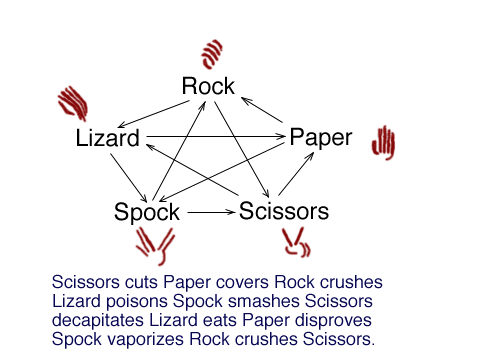
The game is an expansion of the game Rock, Paper, Scissors. Each player picks a variable and reveals it at the same time. The winner is the one who defeats the others. The game satisfies the Law of Fives i.e.
- Scissors cuts Paper
- Paper covers Rock
- Rock crushes Lizard
- Lizard poisons Spock
- Spock smashes Scissors
- Scissors decapitates Lizard
- Lizard eats Paper
- Paper disproves Spock
- Spock vaporizes Rock
- Rock crushes Scissors
- Source
On pressing the play/run button, the player is displayed a GUI window, in which he/she can select their next selection. The result of each round will be displayed on the console ouput (right most window of the website).