Install inspectable engineering workflows into Codex, Claude Code, Cursor, Gemini CLI, or OpenCode, with a plain Markdown export for manual use elsewhere.
The v0.3.0 release candidate contains 21 evidence-oriented workflow bundles plus an offline CLI that installs them safely inside a project. It gives coding agents explicit inputs, prerequisites, observable steps, decision points, approval gates, expected outputs, and completion criteria for work such as pull-request review, CI debugging, migrations, security review, testing, and documentation. The historical schema version 3 corpus retains its recorded editorial dispositions, but the current schema version 4 migrations still require one cross-cutting human review before publication, and the new autonomous bundle requires its own human domain review.
Read in Brazilian Portuguese | Documentation | Workflow catalog | npm package
- Start from a complete, reviewable procedure instead of rebuilding a long prompt for every task.
- Preview the exact files and content before installing a workflow.
- Export the same canonical recipe to the project-local format expected by each supported agent.
- Update or remove managed bundles without silently discarding local edits.
- Keep structural validation, installation tests, external-agent execution, and human outcome review as separate evidence states.
- Discover autonomous designs separately from their engineering domain and from evidence that an agent actually ran them.
A recipe is a seven-file data and documentation bundle, not an executable plugin. The CLI serializes that bundle for a selected agent and writes it locally, but it never executes the recipe or grants permission for the effects described by it.
The public CLI package requires Node.js 22 or newer.
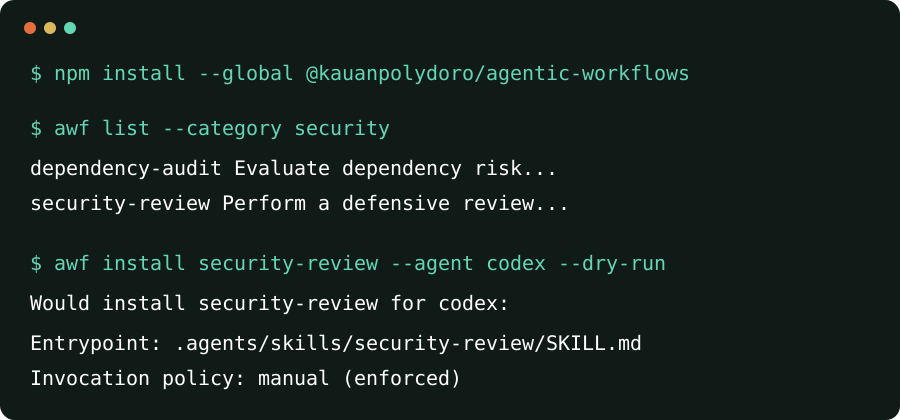
Install it globally once to make awf available from any project:
npm install --global @kauanpolydoro/agentic-workflowsVersion 0.3.0 introduces schema version 4, the autonomous recipe, and --execution-mode.
Until the candidate clears its recorded human review gates and is published, use a source checkout for those features.
For a repository or CI job that must pin the CLI, use the exact-version setup instead.
Run the following Codex example from the root of an existing project that has no AWF configuration and no installed review-pull-request bundle:
cd path/to/your-project
awf --version
awf context
awf init --agent codex
awf list
awf show review-pull-request
awf install review-pull-request --dry-run --show-content
awf install review-pull-request
awf status
awf context reports the selected project root without changing files.
Stop if that path is not the project you intended to modify, or select it explicitly with awf --project-root <directory> context.
awf init --agent codex writes persistent project defaults to .agentic-workflows/config.yml, and the later commands reuse them.
The dry run then shows every planned file and its complete generated content without changing the installation target.
The second install command writes the reviewed bundle and its hash-bearing manifest.
If .agentic-workflows/config.yml already exists, do not rerun awf init; inspect the retained defaults with awf doctor and continue with them.
If review-pull-request is already installed, use awf update review-pull-request --dry-run --show-content instead of installing it again.
Use awf init --force only after backing up and reviewing an existing configuration that you intentionally want to replace.
Confirm these checkpoints before continuing:
| After | Expected checkpoint |
|---|---|
awf context |
Project root: names the project you intended to modify |
awf init --agent codex |
Created .agentic-workflows/config.yml. and Default agent: codex appear |
| The install dry run | The plan ends with No files were changed. |
| The real install | Installed review-pull-request for codex: and Invoke explicitly with: $review-pull-request appear |
awf status |
The summary reports one healthy installation |
After installation, invoke the workflow explicitly in Codex:
$review-pull-request Review pull request #123 against its stated acceptance criteria.
The successful install output always prints the exact entrypoint and invocation policy. For adapters that define an agent command, it also prints the exact explicit invocation. Generic Markdown has no agent command, so its installed entrypoint is the document to follow manually. Installing the package itself does not start a wizard or modify a project.
Run bare awf for first-use help.
Run bare awf init in an interactive terminal to choose the default agent and target through a short wizard.
Use awf init --wizard to force those prompts when the host cannot report an interactive terminal.
Supplying --agent, --target, or --no-interactive skips the wizard for deterministic scripts and CI, and those options cannot be combined with --wizard.
Use the value in the second column with awf init --agent <agent> or awf install <workflow-id> --agent <agent>.
| Destination | Agent value | Installed entrypoint | Explicit invocation |
|---|---|---|---|
| Generic Markdown | generic |
.agentic-workflows/workflows/<workflow-id>/workflow.md |
Open and follow the installed document manually |
| Claude Code | claude-code |
.claude/skills/<workflow-id>/SKILL.md |
/<workflow-id> |
| OpenAI Codex | codex |
.agents/skills/<workflow-id>/SKILL.md |
$<workflow-id> |
| Cursor | cursor |
.cursor/skills/<workflow-id>/SKILL.md |
/<workflow-id> |
| Gemini CLI | gemini-cli |
.gemini/commands/<workflow-id>.toml |
/<workflow-id> |
| OpenCode | opencode |
.opencode/commands/<workflow-id>.md |
/<workflow-id> |
For example, a Claude Code, Cursor, Gemini CLI, or OpenCode installation of review-pull-request is invoked with:
/review-pull-request Review pull request #123 against its stated acceptance criteria.
Supported means the format is confirmed, the exporter is implemented, and local generation plus installation contract tests pass. It does not mean that an external agent executed the workflow or that a human reviewed its outcome. See the adapter source research and generated compatibility matrix for the exact active evidence behind each status.
Use the complete package scope with either package runner:
npx --yes @kauanpolydoro/agentic-workflows@latest list
bunx @kauanpolydoro/agentic-workflows list
Only the scoped package name identifies this CLI.
Do not shorten package-runner commands to agentic-workflows; keep @kauanpolydoro/agentic-workflows even though the installed binary is named awf.
These @latest examples are intentionally for one-off evaluation, not reproducible automation.
Install the exact repository version and commit the resulting manifest plus lockfile for project or CI use:
npm install --save-dev --save-exact @kauanpolydoro/agentic-workflows@0.3.0
npx awf context --json
npx awf list --json
That exact pin selects the schema version 4 and execution-mode contract after v0.3.0 is published.
If awf is unavailable after a global installation, use the installation troubleshooting guide to check Node.js, npm's prefix, PATH, and permissions.
review-pull-requestreviews correctness, regressions, security, maintainability, and test evidence.debug-failing-cimoves from the first causal log through falsifiable hypotheses to a minimal fix.database-migration-reviewevaluates locks, data loss, mixed-version compatibility, and rollout recovery.security-reviewstays strictly defensive and requires explicit authorized scope.resolve-github-issuesdefines a finite unattended issue campaign with checkpoints, isolated review subagents, serialized merges, and honest stop states; its editorial status isblockedpending the required human domain review, so the candidate is not publication-ready.
Browse all 21 workflows or find autonomous designs in the v0.3.0 candidate with awf list --execution-mode autonomous.
You can combine that facet with --category <category>, --agent <agent>, or --tag <tag>.
Execution mode describes the recipe design. It does not prove that a particular host completed an unattended run, which remains a separate execution-evidence state.
The write-release-notes golden recipe includes a self-contained synthetic input and its complete expected release-note artifact.
Every material statement in that expected output maps to an evidence ID from the input.
The pair is an editorial reference maintained in the repository, not evidence that an external agent executed the recipe or that a real release outcome was approved.
The reproducible demonstration also checks maintained reference outputs for debug-failing-ci, review-pull-request, and synchronize-documentation against their output contracts.
See the reference-evaluation record for claim traces and the explicit verification boundary.
- Inspect the canonical Markdown and strict YAML metadata under
recipes/. - Ask
awfto serialize one recipe for a selected agent and preview the resulting lifecycle plan. - Install the reviewed bundle inside the selected project root.
- Use the retained manifest and hashes for safe status checks, updates, or removal.
- Record external-agent execution and human outcome evidence separately when those activities actually occur.
The repository keeps each responsibility explicit:
| Location | Responsibility |
|---|---|
recipes/ |
Canonical YAML and Markdown recipe data |
packages/core/ |
Schemas, parsing, path safety, hashes, manifests, filters, compatibility, and adapter serialization |
packages/cli/ |
Terminal interaction and local filesystem lifecycle orchestration |
scripts/generate.ts |
JSON Schema, catalog JSON, workflow pages, and compatibility documentation generation |
The CLI operates offline during normal use, has no telemetry, and never executes recipe instructions. It validates project containment, symlink parents, overwrite intent, and managed-file hashes under tested local filesystem conditions. It refuses to overwrite unmanaged files or silently remove modified managed files. These controls are not a security boundary against a privileged process racing filesystem changes.
The project reports four independent verification stages:
| Stage | What it proves |
|---|---|
| Structural validation | The recipe satisfies its schema and directory contract |
| Installation testing | The CLI lifecycle works in a disposable target |
| External-agent execution | A named agent version actually ran the workflow |
| Human outcome review | A reviewer evaluated the produced result against completion criteria |
No external-agent adapter currently has active evidence that promotes external execution or human outcome review to passing.
Generic Markdown reports consumer parsing, external execution, and outcome review as not-applicable because it is documentation rather than an agent integration.
Historical Claude Code and Codex evidence remains retained in the archive, but its source commit left the repository during the intentional history reset and it is not active evidence.
Passing repository tests do not substitute for an external-agent run.
| Command | Purpose |
|---|---|
awf context |
Explain which project root was selected and why |
awf list |
Discover and filter bundled workflows |
awf show <workflow-id> |
Inspect metadata, raw Markdown, or version-matched local documentation |
awf install <workflow-id> |
Preview or install an agent-specific workflow bundle |
awf status [workflow-id] |
Report healthy, drifted, or invalid local installations |
awf update <workflow-id> |
Preview or apply an update while protecting local modifications |
awf remove <workflow-id> |
Preview or remove managed files while protecting local modifications |
awf validate [path] |
Validate a catalog, recipe, manifest, or installation target |
awf doctor |
Diagnose configuration, catalog, installation, and recovery state |
awf init |
Configure project defaults interactively or deterministically |
awf manifest <workflow-id> |
Print the exact installed manifest |
awf completion <shell> |
Generate Bash, Zsh, Fish, or PowerShell completion |
awf show <workflow-id> --open asks the operating system's native document handler to open the version-matched local page.
It does not promise that the handler is a web browser.
Human-readable output is the default.
Machine-readable commands use versioned JSON contracts, and automation should validate them through the public @kauanpolydoro/agentic-workflows/output-contract export.
| Exit code | Meaning |
|---|---|
0 |
Success, including healthy or warning-only reports |
1 |
Operational failure, validation failure, or unhealthy report |
2 |
Invalid command syntax or incompatible options |
130 or 143 |
POSIX interruption through SIGINT or SIGTERM |
Run awf <command> --help for command-specific options.
Read the complete CLI reference for filters, JSON streams, lifecycle semantics, and exit-code details.
Generate shell completion with awf completion bash, awf completion zsh, awf completion fish, or awf completion pwsh.
Add --install-instructions to print persistent setup guidance without modifying your shell profile.
Clone the source repository over HTTPS and build it before invoking the local CLI:
git clone https://github.com/kauanpolydoro/agentic-workflows.git
cd agentic-workflows
corepack enable
pnpm install --frozen-lockfile
pnpm build
pnpm awf list
pnpm awf show review-pull-request
pnpm awf runs compiled output, so pnpm build is required after a fresh clone.
GitHub source archives also require dependency installation and a build.
The npm CLI archive is produced with pnpm --filter @kauanpolydoro/agentic-workflows pack and contains the compiled CLI, bundled catalog, and version-matched offline documentation.
Create a recipe scaffold with:
pnpm new:recipe my-workflowEvery complete recipe contains recipe.yml, workflow.md, checklist.md, README.md, output.schema.json, examples/input.md, and examples/expected-output.md.
That seven-file set is the canonical source recipe.
An adapter installs the agent-facing entry document, checklist, metadata, schema, examples, and any required policy or asset files, but not the recipe's source-side README.md.
Replace every scaffold marker, use original examples, declare support honestly, and follow the recipe quality standard.
The contribution guide is the authoritative source for the complete validation suite required before handoff.
Complete contributor validation suite
pnpm generate:check
pnpm format:check
pnpm lint
pnpm typecheck
pnpm test
pnpm test:coverage
pnpm build
pnpm test:completion
pnpm test:automation
pnpm test:integration
pnpm test:acceptance
pnpm test:package
pnpm test:upgrade
pnpm validate:recipes
pnpm validate:content
pnpm audit:similarity
pnpm test:fixtures
pnpm docs:build
pnpm check:links
pnpm check:clean
The root README.md is canonical for the CLI package.
The build copies it into the npm archive, which keeps the GitHub and npm landing pages synchronized for each published version.
The tarball contains no other root README* file, so npm cannot select a translated document as the package landing page.
Delivery-contract tests compare the section map and first-use commands across both languages, while the package smoke test compares the packaged English README byte for byte with this source.
| Need | Resource |
|---|---|
| Install or troubleshoot the CLI | Installation guide |
| Inspect every CLI flag and output | CLI reference |
| Validate JSON in automation | Output contracts |
| Understand evidence states | Verification model |
| Author or review a recipe | Authoring guide |
| Compare agent support | Compatibility matrix |
| Contribute changes | CONTRIBUTING.md |
| Report a vulnerability privately | SECURITY.md |
| Review shipped and planned work | CHANGELOG.md and ROADMAP.md |
The @kauanpolydoro/agentic-workflows CLI and @kauanpolydoro/agentic-workflows-core library are public on npm.
Releases are tag-driven and use npm trusted publishing, provenance, package smoke tests, and integrity verification before GitHub release synchronization.
The package smoke test proves that the tarball contains only this root README, and the publisher verifies registry dist.integrity, the selected README.md filename, and the registry README bytes after publication.
Before npm publication, the release audits every allowlisted public documentation link so a broken destination blocks the release before an irreversible registry write.
GitHub can show unreleased README changes first, because the npm landing page changes only when a new package version containing those bytes is published.
See the changelog and release process for the current version and delivery contract.
Recipes are untrusted data and documentation. Review a recipe before asking an agent to follow it, and use the private process in SECURITY.md for vulnerabilities.
Released under the MIT License.