Releases: kd9taw/tempo
Release list
Tempo v0.2.0 — IR-HARQ + DX1 full-band (beta)

Tempo v0.2.0 — a beta release. This adds the two flagship modem capabilities and lands the
session's app work. It is simulation- and Windows-cross-build-validated, but not yet on-air
validated — see Status below.
✨ What's new
IR-HARQ — adaptive retransmission combining (now live, on by default)
FT1's signature feature, previously dormant, is finished end-to-end. A frame that fails to decode
on its own (RV0) is recovered by joint-turbo-combining its retransmissions (RV0→RV1→RV2 — each
with distinct Costas sync + punctured LDPC parity). The QSO sequencer drives it automatically
(escalate on implicit NAK, reset on implicit ACK).
- Measured: combiner +1.3 dB (AWGN, 3-TX) / +3.2 dB (1 Hz/1 ms fading); through the full
live pipeline, ≈ +2.5 dB threshold shift and ~2× QSO completion in the −11…−13 dB zone. - Reliable RV detection (coherent CPM-Costas discriminator): >99% accurate, <1% false to −11 dB.
- UI:
HARQ·RVndecode badge, a HARQ on/off toggle (default on, for A/B), and a session rescue counter.
DX1 full-passband acquisition
The DX1 robust tier now decodes every signal across 200–2900 Hz in one slot (like FT1's Costas
search) instead of only the carrier under the green marker. rx_offset_hz becomes a waterfall
marker / TX-pairing hint. Internally a three-stage scan — coarse chirp-correlation carrier sweep
(12.5 Hz grid, pre-folded replicas) → median-threshold peak-pick → full CRC-gated decode per
survivor — running ~3–4 s/slot (vs ~19 min for a naive sweep on Windows; the design's
trig-free hot loop is what makes it tractable on the target).
Also in this release
- Coordinated QSY (announced, Part-97-legal channel moves), passive-launch fix, composer level
meter, FT8/FT4 tier honesty (the unfinished tier no longer mis-advertises), FT1 docs. .wavreplay path — turn a captured slot into a deterministic regression fixture.
✅ Validation
- FT1 AWGN 50% ≈ −15 dB; DX1 AWGN 50% ≈ −18.6 dB with a ~3.7 dB fading penalty.
- Live IR-HARQ: +2.5 dB / ~2× completion in the marginal zone.
- Cross-built and smoke-tested on Windows — all 5 modem exes pass (FT1 −15 dB, DX1 −18 dB,
the 3-signal full-band scan, FT1 acquisition + IR-HARQrvthrough the C-ABI), plustempo.exe
and the installer build clean. - The full headless Rust suite is green;
clippyclean; UI builds clean.
⚠️ Status — this is a beta
Everything above is proven in simulation + on the Windows cross-build. The open gate is real
RF: on-air decode-rate-vs-SNR has not been measured. If you run it on the air, please share
reports in Discussions — that's the feedback the
project most needs.
📦 Install (Windows x64)
- Download
Tempo_0.2.0_x64-setup.exeand run it. The installer bundles the offline WebView2
runtime + Hamlib (rigctld), so CAT works with no separate install. - Optional:
win_smoke.exe— a fully-static modem self-test (FT1 + DX1 round-trip; runs
anywhere, no install).dx1_band_test_standalone.exedemonstrates the new full-band scan
(3 signals decoded in one slot).
Tempo v0.1.0 (beta)
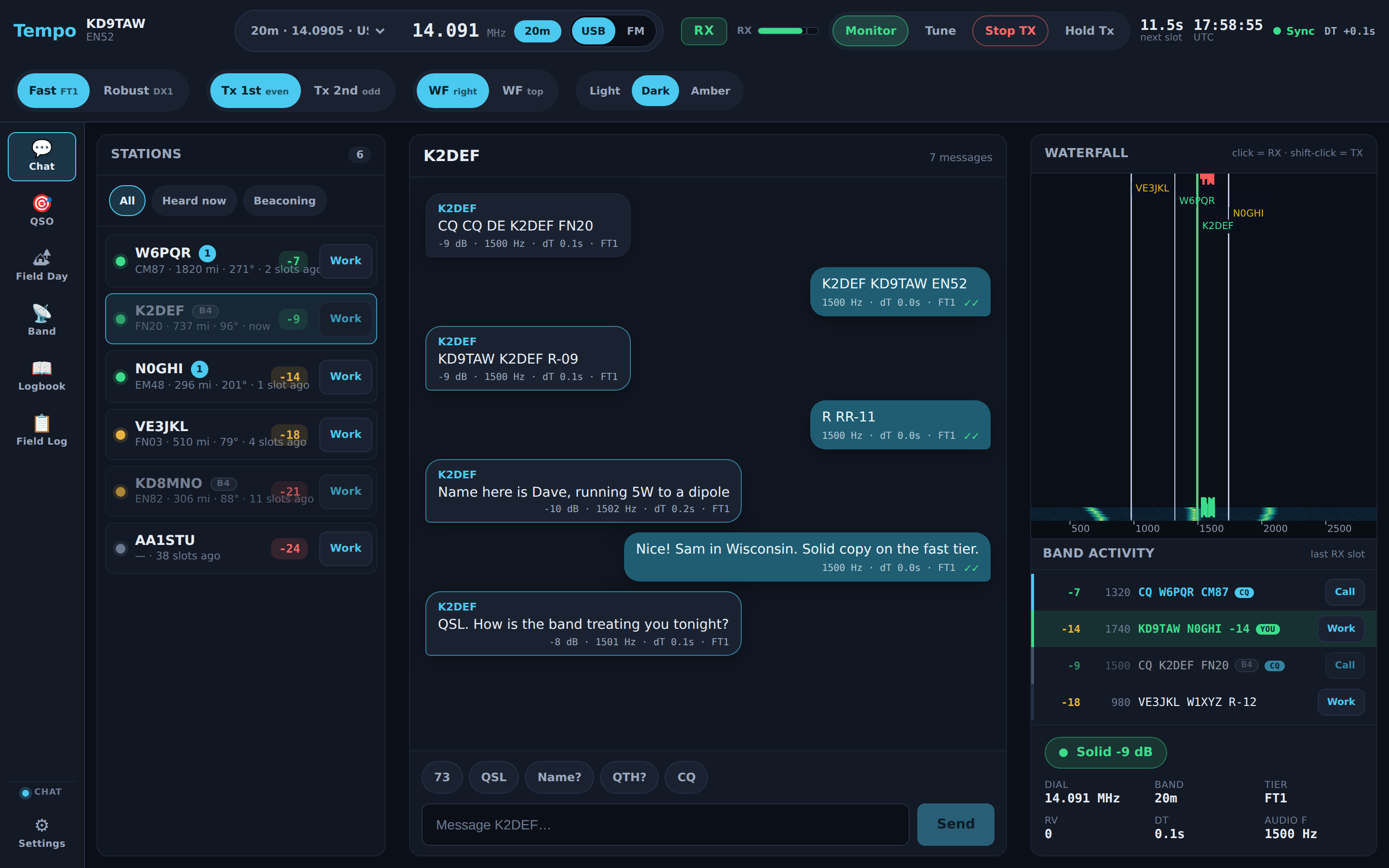
Tempo is a modern, chat-first HF/VHF/UHF text-messaging app for the off-grid /
preparedness ham community — fast conversational two-way text, fading-resilient
reach, presence, store-and-forward, a one-click ARRL Field Day exchange, and
WSJT-X-familiar operating controls + a logbook.
⚠️ Beta — read this. Initial pre-release, updated in place as the build
improves. The FT1 and DX1 waveforms are validated by simulation (AWGN +
fading), not yet on the air. The Windows binary is cross-compiled and
pending real-world validation. Operate within your license privileges.
Try it without installing
▶ Live demo — kd9taw.github.io/tempo runs the
real UI in your browser on simulated data (no radio, no install). Click through
Chat / QSO / Field Day, flip the Fast/Robust tier and the themes.
Download
Tempo_0.1.0_x64-setup.exe — Windows x64 installer (~199 MB).
- Installs per-user (no admin prompt).
- Bundles the WebView2 runtime offline → clean install on an air-gapped PC.
- Bundles Hamlib (
rigctld) → CAT rig control with zero extra installs (a verified 56-rig dropdown).
SHA-256: d7d951a4404ac080c888a5ba333b3c399e318d84e66b45ada7945094271abc5f
Get-FileHash .\Tempo_0.1.0_x64-setup.exe -Algorithm SHA256 # verify after downloadFirst run
- Run the installer, then launch Tempo.
- Settings → callsign/grid; rig (CAT model + COM port, or VOX/serial);
pick your audio input/output device and set the Tx power so the RX
meter sits mid-scale (not clipping). Pick a band or type a frequency. - It starts passive (hunt-and-pounce) — it listens; it does not auto-call CQ.
Full walkthrough: Getting Started.
What's in this build
- Two weak-signal tiers: FT1 (fast, coherent) and DX1 (robust,
non-coherent, fading-resilient) — operator-visible toggle. - Tempo frequency plan (HF + VHF/UHF): US-General-legal, CW-clear calling
frequencies off the FT8/FT4/JS8 watering holes; one-tap band selector + manual
entry. See docs/FREQUENCIES.md. - WSJT-X-familiar operating controls: RX level meter, Tx power,
audio-device selection; Tune / Monitor / Stop-TX; time-sync
health + a Tx watchdog. - Work a station + ADIF logbook: click a heard station (or decode) to start a
directed QSO; a persistent logbook auto-logs contacts and shows worked-before
(B4); inbound WSJT-X Reply (GridTracker/JTAlert double-click) drives Tempo. - Live decode feed + alerts: color-coded decode list (CQ / calling-you /
worked / new) and audio+visual alerts on your call / CQ / new station. - Comforts: UTC clock, great-circle bearing, editable quick-reply macros,
three field themes, a prominent waterfall. - Chat / QSO / Field Day modes; store-and-forward; open broadcast; ADIF/Cabrillo
export; WSJT-X-compatible UDP API + PSK Reporter.
Documentation
- Operator manual — the complete guide
(Getting Started, Operating Guide, Rig & Audio Setup, Frequency Plan, Tiers,
Building, FAQ, Troubleshooting). - README · Discussions for on-air reports.
Known limitations
- On-air decode-rate-vs-SNR validation is pending (the next gate).
- The FT8/FT4 tier is Phase 2 (internals exist in
libft1; decode not wired). - DX1 receive currently decodes at the calling carrier (no full-band search yet).
- Frequencies are proposed, editable defaults — override any dial manually;
VHF/UHF FM channels are band-plan segments, confirm with your local coordinator. - The installer is unsigned (cross-compiled on Linux); SmartScreen may warn —
More info → Run anyway.
GPL-3.0-or-later · Seth McCallister (KD9TAW) · kd9taw@protonmail.com