



comins-grid-layout is a React dashboard layout module powered by GridStack. It combines serializable React state with widget CRUD, drag, resize, responsive columns, maximize/minimize flows, persistence, and an advanced escape hatch to the underlying GridStack API.
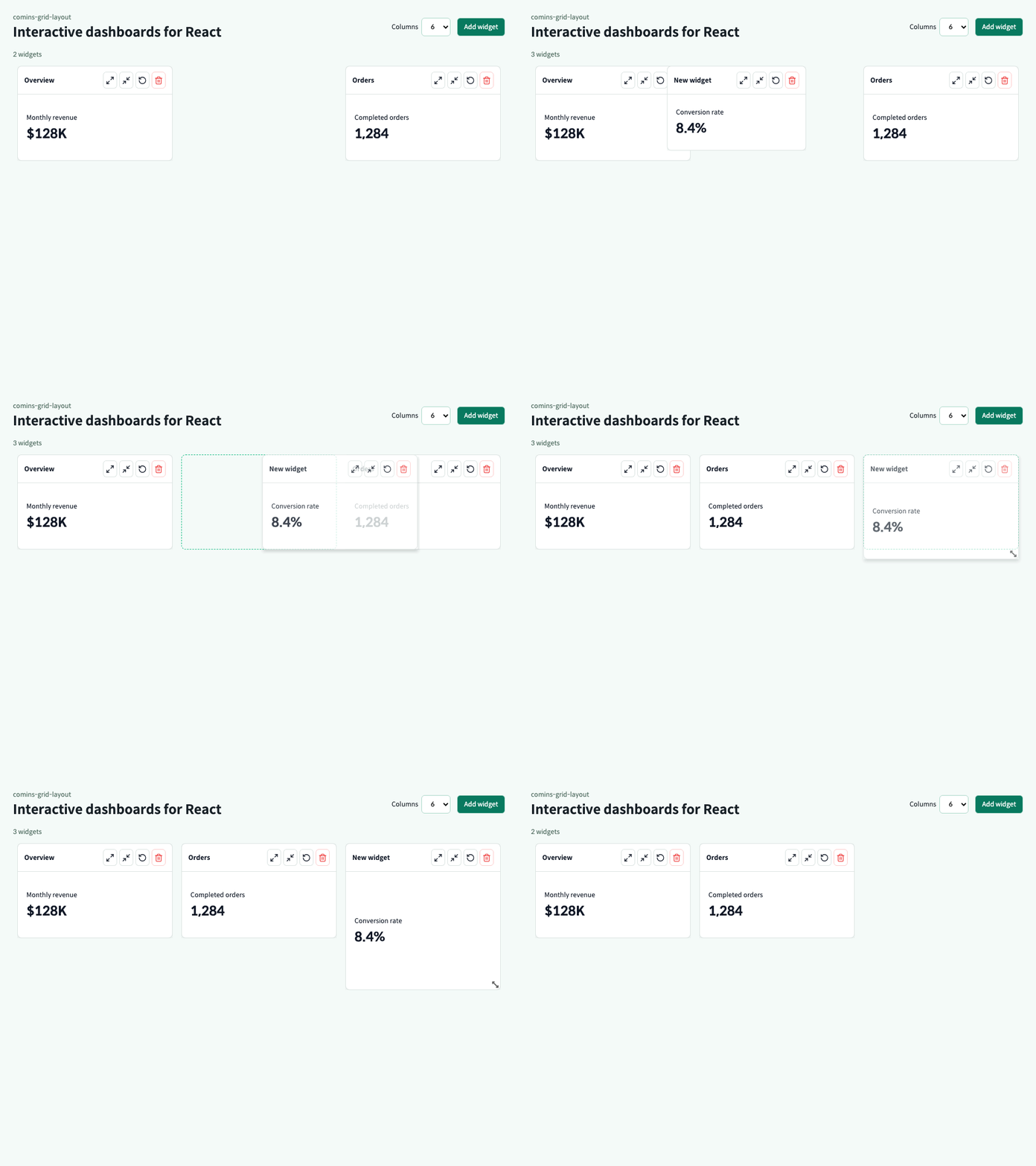
- Create, render, update, remove, clear, maximize, minimize, restore, arrange, and serialize widgets.
- Drag and resize with desktop pointer input and mobile touch input.
- Change the runtime column count from 1 through 12 manually or through responsive GridStack breakpoints.
- Keep application data in serializable React state while GridStack owns browser interaction.
- Schedule resize-frame notifications for charts, tables, canvases, and other responsive widget content.
- Report typed drops on consumer-owned HTML targets without mutating controlled widget state.
- Configure the supported GridStack 13 engine surface and access the complete public instance through an optional advanced ref handle.
- Render 100 or more widgets with repeated runtime column changes covered by the resource gate.
| Surface | Supported contract |
|---|---|
| React / React DOM | >=18.0.0 <20.0.0 peer dependencies |
| TypeScript | Declarations and declaration maps included; verified with TypeScript 6 |
| Desktop browsers | Current Chromium-based Chrome and Edge plus Firefox; automated with Playwright Chromium and Firefox |
| Mobile browsers | Current mobile Chrome touch behavior; automated with the Pixel 7 Chromium profile |
| WebKit / Safari | Desktop engine compatibility is automated with Playwright WebKit; branded Safari on macOS and iOS is not directly verified |
| SSR frameworks | Import and render inside a client boundary; the package does not use Next.js-only APIs |
| Runtime network behavior | No package-owned requests, remote assets, telemetry, or error reporting |
Before 1.0.0, only the latest published version receives security fixes.
npm install comins-grid-layout react react-domImport both stylesheets once in the client bundle:
import "gridstack/dist/gridstack.min.css";
import "comins-grid-layout/styles.css";import { DashboardGrid, useDashboardGrid, type DashboardWidget } from "comins-grid-layout";
import "gridstack/dist/gridstack.min.css";
import "comins-grid-layout/styles.css";
type Metric = { label: string; value: string };
const initialWidgets: DashboardWidget<Metric>[] = [
{
id: "sales",
title: "Sales",
layout: { id: "sales", x: 0, y: 0, w: 3, h: 2 },
data: { label: "Monthly revenue", value: "$128K" },
},
];
export function DashboardPage() {
const dashboard = useDashboardGrid({ initialColumns: 12, initialWidgets });
return (
<DashboardGrid
columns={dashboard.columns}
refreshKey={dashboard.refreshVersion}
widgets={dashboard.widgets}
actionLabels={{ maximize: "Maximize", minimize: "Minimize", restore: "Restore", remove: "Remove" }}
onMaximizeWidget={dashboard.commands.maximizeWidget}
onMinimizeWidget={dashboard.commands.minimizeWidget}
onRemoveWidget={dashboard.commands.removeWidget}
onRestoreWidget={dashboard.commands.restoreWidget}
onLayoutCommit={dashboard.commands.applyLayoutSnapshot}
renderWidget={(widget) => (
<div>
<span>{widget.data?.label}</span>
<strong>{widget.data?.value}</strong>
</div>
)}
/>
);
}widgets is the React source of truth. Connect onLayoutCommit to applyLayoutSnapshot so columns and every committed widget geometry update are applied in one React reducer action. onWidgetLayoutChange remains available for consumers that intentionally persist widgets individually.
type DashboardWidget<TData = unknown> = {
  id: string;
  title?: string;
  layout: {
    id: string;
    x: number;
    y: number;
    w: number;
    h: number;
    minW?: number;
    minH?: number;
    maxW?: number;
    maxH?: number;
  };
  data?: TData;
  minimized?: boolean;
  maximized?: boolean;
  locked?: boolean;
  movable?: boolean;
  resizable?: boolean;
};
Widget IDs are preserved across CRUD, movement, resize, serialization, restore, maximize, and minimize flows.
| Prop | Type | Default | Purpose |
|---|---|---|---|
widgets |
DashboardWidget<TData>[] |
required | Controlled widget models and layout geometry |
renderWidget |
(widget) => ReactNode |
required | Consumer-owned widget content renderer |
columns |
DashboardColumnCount |
12 |
Runtime column count from 1 through 12 |
responsive |
DashboardResponsiveOptions |
— | Lets GridStack select the active 1–12 column count from width or explicit breakpoints |
engineOptions |
DashboardGridEngineOptions |
— | Configures the supported GridStack rendering, rows, handles, direction, and CSP options |
externalDropTargets |
ReadonlyArray<DashboardExternalDropTarget> |
— | Maps target IDs to same-document CSS selectors |
editable |
boolean |
true |
Enables both movement and resize when their flags also allow it |
movable |
boolean |
true |
Enables grid-wide movement |
resizable |
boolean |
true |
Enables grid-wide resize |
className |
string |
— | Additional class on the grid section |
refreshKey |
number |
— | Requests an adapter refresh when the value changes |
showControls |
boolean |
true |
Shows widget header actions |
actionLabels |
Partial<DashboardWidgetActionLabels> |
built-in labels | Overrides accessible action labels |
onColumnsChange |
(columns) => void |
— | Receives an actual responsive engine column change once per animation frame |
onLayoutCommit |
(snapshot) => void |
— | Receives a committed layout snapshot |
onWidgetLayoutChange |
(id, layout) => void |
— | Receives each committed widget geometry update |
onWidgetResizeFrame |
(event) => void |
— | Receives animation-frame-scheduled content dimensions during resize |
onWidgetExternalDrop |
(event: DashboardWidgetExternalDropEvent) => void |
— | Reports a final pointer or touch release inside a configured target |
onWidgetDragStart / onWidgetDragStop |
(event) => void |
— | Receives drag lifecycle events with the widget ID and geometry |
onWidgetResizeStart / onWidgetResizeStop |
(event) => void |
— | Receives resize lifecycle events with the widget ID and geometry |
onMaximizeWidget |
(id) => void |
— | Handles maximize action |
onMinimizeWidget |
(id) => void |
— | Handles minimize action |
onRestoreWidget |
(id) => void |
— | Handles restore action |
onRemoveWidget |
(id) => void |
— | Handles remove action |
onWidgetHeaderDoubleClick |
(id) => void |
— | Handles a widget header double-click |
Targets are ordinary consumer-owned HTML, not GridStack widgets or Comins wrappers. The package emits a typed, non-destructive onWidgetExternalDrop callback; it does not remove widget DOM or mutate controlled React state. For a deletion target, the consumer decides to call its existing removeWidget command:
<DashboardGrid
  externalDropTargets={[
    { id: "trash", selector: "#widget-trash" },
  ]}
  onWidgetExternalDrop={({ widgetId, targetId }) => {
    if (targetId === "trash") {
      dashboard.commands.removeWidget(widgetId);
    }
  }}
  {...dashboardProps}
/>

<div id="widget-trash" style={{ width: 300, height: 300 }}>
  Drop here to delete
</div>
Selectors resolve at release time, so a target may mount after grid initialization. When targets overlap, the first configured target wins. Only same-document light DOM targets are supported; cross-frame targets and targets inside a shadow root are outside this contract. onWidgetExternalDrop is the package event surface and no DOM CustomEvent is dispatched. GridStack removable remains outside the controlled Comins engine options.
engineOptions supports cellHeight, margin, float, animate, staticGrid, rtl, minRow, maxRow, sizeToContent, dragHandle, resizeHandles, alwaysShowResizeHandle, and nonce. Unsupported GridStack construction, nested-grid, removable, callback, and lifecycle options stay outside the controlled Comins surface; use getGridStack() for one-off public engine commands.
<DashboardGrid
  columns={dashboard.columns}
  widgets={dashboard.widgets}
  engineOptions={{ cellHeight: 88, margin: 8, dragHandle: ".widget-title" }}
  responsive={{
    columnMax: 12,
    breakpointForWindow: true,
    breakpoints: [
      { maxWidth: 720, columns: 1, layout: "list" },
      { maxWidth: 1200, columns: 6, layout: "moveScale" },
    ],
  }}
  onLayoutCommit={dashboard.commands.applyLayoutSnapshot}
  renderWidget={renderWidget}
/>
Without responsive, columns is authoritative. With responsive, columns is the initial/fallback count and GridStack owns the active count. Runtime-capable engine options are synchronized in place; rtl and sizeToContent changes safely reinitialize the package-owned adapter while preserving controlled React state. nonce is initialization-only: remount the grid to change it, and never persist it in layout state. Invalid public configuration throws DashboardGridConfigurationError without including the rejected value.
| Command | Signature | Purpose |
|---|---|---|
addWidget |
(widget) => void |
Add a widget while preserving its ID |
updateWidget |
(id, patch) => void |
Update widget data, title, state, or interaction flags |
updateWidgetLayout |
(id, patch) => void |
Update serializable geometry |
removeWidget |
(id) => void |
Remove one widget |
clearWidgets |
() => void |
Remove every widget |
maximizeWidget |
(id) => void |
Expand a widget and retain its previous layout |
minimizeWidget |
(id) => void |
Collapse a widget and retain its previous layout |
restoreWidget |
(id) => void |
Restore the retained layout |
autoArrangeWidgets |
() => void |
Compact widgets with the package layout rule |
fitWidgetsToColumns |
() => void |
Fit every widget into the current columns |
fitWidgetToColumns |
(id) => void |
Fit one widget to the current columns |
setColumns |
(columns) => void |
Clamp and apply a runtime column count from 1 through 12 |
applyLayoutSnapshot |
(snapshot) => void |
Atomically apply active columns and all matching widget geometry |
resetLayout |
(snapshot?) => void |
Reset to the initial state or a supplied layout/state snapshot |
restoreLayout |
(snapshot) => void |
Restore a complete state snapshot |
refreshLayout |
() => void |
Increment refreshVersion for adapter refresh |
serializeLayout |
() => DashboardLayoutSnapshot |
Serialize columns and geometry only |
serializeState |
() => DashboardStateSnapshot<TData> |
Serialize columns, widgets, and previous layouts |
Use a ref only when the package commands do not cover an engine-level operation:
import { useRef } from "react";
import { DashboardGrid, type DashboardGridHandle } from "comins-grid-layout";

const gridRef = useRef<DashboardGridHandle>(null);

<DashboardGrid ref={gridRef} widgets={widgets} renderWidget={renderWidget} />;

const grid = gridRef.current?.getGridStack();
grid?.batchUpdate();
grid?.float(true);
grid?.batchUpdate(false);

const snapshot = gridRef.current?.commitLayout();
const compacted = gridRef.current?.compact("compact", true);
gridRef.current?.refresh();| Handle method | Return type | Purpose |
|---|---|---|
getGridStack |
GridStack | null |
Borrow the live engine instance while the grid is mounted |
refresh |
void |
Recalculate sizing and dynamic handles without reordering widgets |
compact |
DashboardLayoutSnapshot | null |
Run GridStack compact() explicitly, commit once, and return the snapshot |
commitLayout |
DashboardLayoutSnapshot | null |
Commit direct engine geometry changes to the controlled callback contract |
getGridStack()returnsnullbefore initialization and after unmount.- GridStack methods that emit
changeare committed automatically;commitLayout()is for commands that do not emit it and suppresses identical duplicate commits. ForbatchUpdate(), callcommitLayout()afterbatchUpdate(false). - A committed interaction calls
onWidgetLayoutChange, thenonLayoutCommit, then the corresponding drag/resize stop callback. High-frequency drag events remain available only on the borrowed GridStack instance. - Use Comins
addWidgetandremoveWidgetfor React content. Raw GridStack CRUD only changes engine/DOM state and may be replaced by the next controlled React render. - Do not call
destroy()or remove package listeners on the borrowed instance;DashboardGridowns the engine lifecycle.
Use serializeState() for complete persistence, including the previousLayouts required by maximize/minimize restore. Use serializeLayout() only when widget data and view state are stored elsewhere.
const stored = dashboard.commands.serializeState();
localStorage.setItem("dashboard", JSON.stringify(stored));

const restored = JSON.parse(localStorage.getItem("dashboard") ?? "null");
if (restored) dashboard.commands.restoreLayout(restored);Public CSS classes and custom properties are scoped under .comins-grid-layout. The package does not apply a global reset or require a Comins design system. Override package variables on a local container when needed.
npm run verifyruns sensitive-data gates, TypeScript, Vitest, and the production build.npm run verify:fulladds desktop Chromium, Firefox, Playwright WebKit, mobile Chromium touch behavior, and the isolated 100-widget Chromium resource gate.- Vulnerabilities must be reported privately through GitHub Private Vulnerability Reporting.
- See the security policy, changelog, and complete example.
MIT. Runtime and peer dependencies remain external to the package bundle; see Third-Party Notices for their SPDX identifiers and upstream license links. comins-grid-layout is independent and is not affiliated with or endorsed by GridStack.