-
Notifications
You must be signed in to change notification settings - Fork 114
Codex
Mother — out of the box Houdini Pipeline Toolkit under control of Shotgun management system.
This section is on the early stage of developing, it does not intend to have valuable public content. I mean, skip it!
Despite the Houdini data management part is not developed yet, the whole VFX pipeline structure is based on Animation DNA ideas, so we have a concept for the project folder structure, assets structure etc.
Environment variables allow to setup variables and values in Houdini.
List all available variables: run cmds, run command hconfig.exe -a
Check the variable value in Houdini: in Texport window run echo $<VAR_NAME>
Variables which works with paths divided into 2 types:
- Location (HIP, JOB, etc), one specific directory
- Path (HOUDINI_SCRIPT_PATH, etc), list of dirs
JOB - root for Houdini project.
HIP - path where Houdini scene is.
HOME - Houdini settings for the user
HFS - Houdini install dir
HOUDINI_PATH - Modify (add items) or override standard Houdini behavior.
Run Windows > Shell (which runs cmds). Enter hconfig-ap
How we sort all project data
The default structure of the final product (film, clip etc) is:
FILM > SEQUENCE > SHOT
For bigger projects like animation feature, it has a sense to group sequences into reels:
FILM > REEL > SEQUENCE > SHOT
The default Shotgun schema match this structure.
EDIT — Editing and grading brunch:
- OUT — Output of editing branch, final movie will be rendered into this folder
- PROJECT — Editing software project files (Final Cut, Premiere etc)
PREP — Preproduction brunch
PROD — Production brunch
3D:
- geo [geometry (and other) caches: FBX, ABC, etc]
- hda [Houdini digital assets]
- lib [librarys of animations, materials, etc]
lib structure needs to be developed. It does not fit into ASSETS or SHOTS structure scheme.
Characters and props: caches (bgeo.sc - geo/SHOTS/010/SHOT_010/ROMA/001/E010_S010_ROMA_001.$F.bgeo.sc)
Cameras: caches (Alembic - geo/SHOTS/010/010/SHOT_010/CAM/E010_S010_001.abc)
Environments: HDA (HDA - hda/ASSETS/ENVIRONMENTS/...).
Internal animation in HDA (traffic in a city): caches (bgeo.sc - geo/ASSETS/ENVIRONMENTS/...)
In the modeling scene $JOB/scenes/ASSETS/CHARACTERS/ROMA/GEO/GEO_ROMA_001.hip load material library HDA to the root, rename it to MATERIALS. Assign materials from HDA library to asset parts with material SOP via groups(create a primitive group for each material, or use groups from transforms in case of alembic SRC geometry: Prim Groups = NameGroup Using Transform Node Name). It will create attribute @shop_materialpath. Export asset geometry to bgeo.sc. Load material library HDA and asset geometry to a render scene. Materials assigned automatically. For the ROMA character save material data to a database to be able to convert FBXs from MIXAMO to geo cashes with material assignment.
Create material stylesheet for a geometry node containing crowds. Setup materials for character parts (30_Material Stylesheets.MP4 from Crowds for feature films course): Add Stylesheet parameter > Add Style > Add Target > Add Subtarget > Add Override. Disclaimer: crowds stylesheets does not work as expected, need to use one mat for all agents.
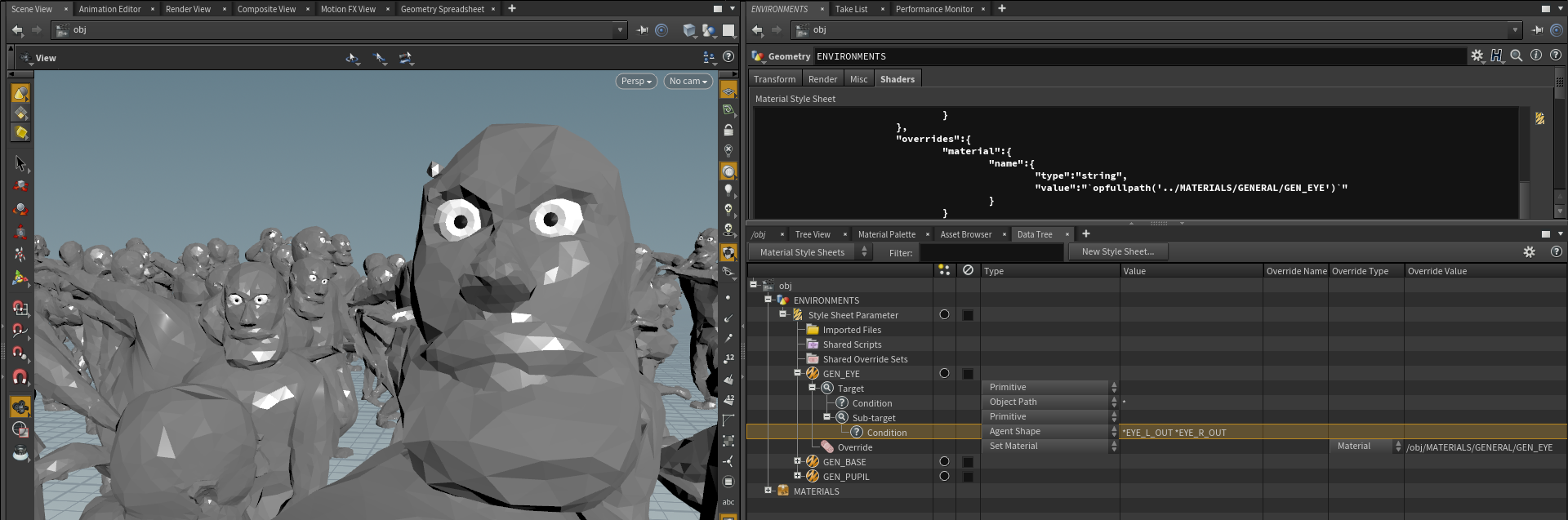
- Save scene to $JOB/scenes/RENDER/010/SHOT_010/RND_E010_S010_001.hipnc
- Set shot frame range
- Create CHARACTERS and ENVIRONMENT geometry nodes. Add ROMA cache to CHARACTERS node, add CITY HDA to ENVIRONMENT node.
- Create materials HDA, rename to MATERIALS
- Get shot camera
Here we will record pipeline developing process
Currently, I consider 3 main option to explore: Ftrack($10/month), Shotgun($30/month), JSON file (Free but hard to edit).
There are 2 files ASSETS.json and SHOTS.json in <rootProject>\PREP\PIPELINE\MOTHER\database.
The question is how to setup a list of assets and a list of shots. It could be nested dictionaries (current) or list o dictionaries. Conserns: list of dictionaries may be more close-to Shotgun database type, so it would be more easy to switch from JSON to SG later. But nested dictionaries more easy to work with.
Let's switch to lists of dictionaries in a joined file DATABASE.json: {ASSETS: {CHAR: [{code:ROMA, materials:[GEN_BASE:[list of objects]]}, {}], ENV: [], PROPS: []}, SHOTS: {010:[{SHOT_010}]}}
All project data located in one folder on the network drive.
All project data structured as ASSETS and SHOTS. Shots are the part of one project.
All project management data and record of project data changes are located in Shotgun.
What is PP
Pipeline covers:
- Communications
- Data storage, exchange and tracking
There is a well-known VFX production structure with strict vertical hierarchy and tasks division between departments. We well research agile project management option with task division between teams.
The term "production pipeline" by itself defines our perception of movie making process. Obviously, we see the similarity between movie production and any other manufacturing where we use machines, tools and other mechanical devices. Such conception gives quite successful results.
However, we try to look at production process from the biological point of view and get some interesting ideas. The difference between machine and organism is similar to the difference between nodes and layers — the same task could be achieved differently and perception could define algorithms. Organic pipeline research is our goal here.
We are going to breed shots with Mother...
At the highest level, there are two options for defining the relation between a pipeline and projects:
- One pipeline driving all projects
- Each project has its own pipeline version
The first option more suitable when you have a limited amount of big and complex long-term projects (like animation feature), second fits better for a bunch of fast tasks, like commercials. Here we will design the first option.
Sure, there is a third option available, a combination of this two methods, when you have one pipeline driving all projects and each project has the ability to customize pipeline individually.
This is basically pipeline for pipeline developing. Where you keep source code, how you modify it and track changes, how you deliver pipeline to a production for the studio and for outsourcers.
Download repository as a zip file, extract to any temp location and run setupProject.bat. Select directory to hold the project, enter project name and press "CREATE PROJECT" to build a project folder structure with a pipeline.
Install GitHub Desktop. Clone this repo to a PIPELINE folder of a project used to develop the pipeline E:\256\PROJECTS\NSI\PREP\PIPELINE.
Create a project in PyCharm, set PIPELINE folder as root.
Exclude PyCharm project folder (.idea) from GitHub commits: go to PIPELINE/.git/info, add .idea line to "exclude" file.
Modify code, commit changes, Fetch Origin!
Pripeline root folder: <projectName>/PREP/PIPELINE
runHoudini.py — Houdini wrapper to launch app. Set Houdini environment
createProject.py — Create project tool
MOTHER — folder with pipeline files:
- houdini — folder mapped to HOUDINI_PATH, additional to Houdini install dir.
jump.pref— add bookmarks to File Open dialog in Houdini.
MainMenuCommon.xml— modify menu, add MOTHER.- toolbar — custom MOTHER shelves
- scripts:
- 123.py — run when Houdini is launching
- 456.py — ren wen open or create a new scene
$JOB/render/010/SHOT_010/001/E010_S010_001.$F.pic E:/256/PROJECTS/NSI/PROD/2D/RENDER/010/SHOT_010/E010_S010_v001.mov