

Quickstart · Commands · The AI kit · Security · Docs
npm install -g @knowalabs/meridian
meridian generate
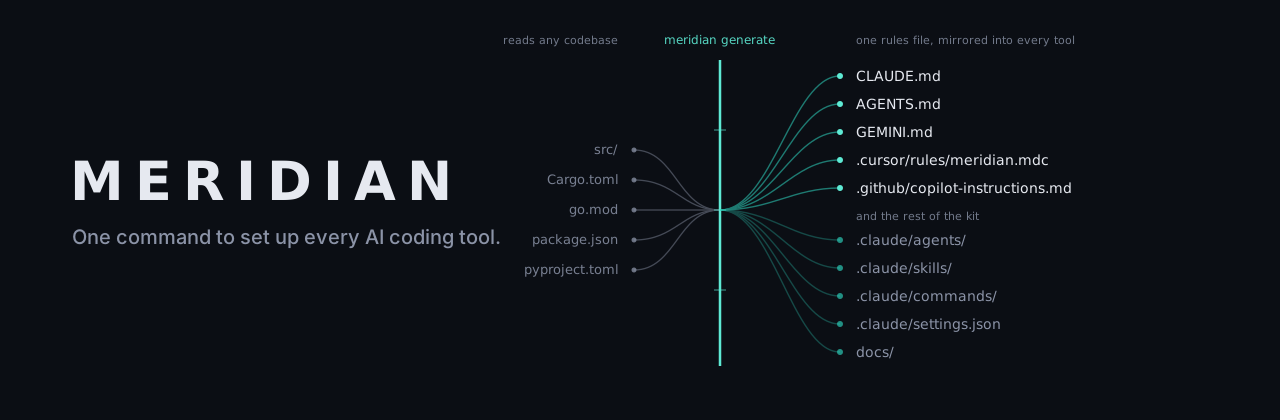
That's it. Meridian reads your codebase and writes the complete AI kit — project context, rules mirrored into every tool's format, Claude Code subagents, skills and slash commands, harness permissions, reusable prompts and a professional docs/ suite. You never hand-write an AI config file again.
- One kit, every tool. Claude Code, Codex CLI, Gemini CLI, Cursor and Copilot each want their own instruction file. Write the rules once; Meridian mirrors them into all five and keeps them identical.
- Grounded in your actual code.
generateis AI-first: it builds a deep digest of your repo, has your best provider read it and write a codebase review, then generates every artifact from that review — not from a template with your project name pasted in. - The kit stays alive.
meridian syncdetects when the codebase has drifted and refreshes only what's stale; hand-edited files are always preserved.meridian sync --checkis a zero-config CI gate that fails the build when the kit goes stale. - Any stack, not just Node. Rust, Go, Python, Flutter, Java, Kotlin, Scala, Ruby, PHP, .NET, Elixir, Swift and Deno are each read through their own manifests, so a generated verification step says
cargo clippyorpytest— never an npm script your project doesn't have.
Meridian itself runs on Node.js ≥ 18, on macOS, Windows and Linux. That's the CLI's own runtime, not a requirement on the project you point it at. No API key required if you're already signed in to Claude Code, Codex CLI or Gemini CLI.
npm install -g @knowalabs/meridian

meridian doctor      # what's installed, which providers work, is this kit stale?
meridian generate    # review the codebase and write the full AI kit
meridian sync        # later: refresh the kit as the code moves
Run meridian with no arguments for the interactive launcher: navigate with ↑/↓ and run with Enter, or just start typing — text filters the menu live, and anything that isn't a menu item runs as a raw command (e.g. install claude). Tab completes the highlighted item, Esc clears, q quits. After each command you land back in the menu.
Monorepos are first-class. npm/yarn/pnpm workspaces, Lerna, Cargo workspaces and go.work are detected, and each package's name, path, scripts and dependencies feed the generated kit — so rules and workflows say which package they apply to and use that package's own commands. Your .gitignore is respected, along with per-ecosystem build output (target/, vendor/, bin/, obj/, Pods/, …), so generated code never crowds real source out of the analysis.
| Command | What it does |
|---|---|
meridian doctor |
Health check: environment, installed tools, which AI providers are usable right now, key vault, and whether this project's kit is stale |
meridian install <tool> | all |
Install and configure supported tools (npm / Homebrew / winget) |
meridian auth [provider] |
Store an API key in the secure vault (OpenAI, Anthropic, Google, OpenRouter, Groq, DeepSeek, Mistral, xAI) |
meridian keys list/remove/repair |
Manage stored keys (always masked, never plaintext) |
meridian generate [kinds…] |
Review the codebase, then generate everything: context, architecture, rules (mirrored to every tool), .claude/agents/, .claude/skills/, .claude/commands/, .claude/settings.json, prompts, docs |
meridian sync [--check] |
Detect drift between the codebase and the generated kit; refresh stale files (hand edits preserved). --check is a CI gate: exit 1 when stale |
meridian mcp search/install/remove/list |
Curated MCP marketplace — one install configures all detected tools (incl. Claude Desktop) |
meridian ask "<prompt>" |
AI router: picks the best provider by cost/speed/quality/context size; streams the answer, and reads piped stdin as context |
meridian router --prefer/--optimize/--model |
Configure routing behavior and the model each provider uses |
meridian update |
Update the CLI and installed tools |
meridian login |
Cloud Sync (on the roadmap, not available yet) |
Global flags and piping
Every command accepts:
--json— machine-readable output (doctor,keys list,mcp list/search,ask,generate)--quiet— errors only--verbose— debug output and stack traces--no-color— plain output (also honorsNO_COLOR)
meridian ask prints routing diagnostics to stderr, so meridian ask "…" | pbcopy pipes only the answer. On a terminal the answer streams as it is generated; when piped or in --json it arrives whole. Piped input becomes context for the question:
meridian doctor --json | jq '.missing'
meridian ask "explain this repo" --json | jq -r .answer
cat build-error.log | meridian ask "what failed here?"
meridian ask "review this diff" --model claude-opus-4-8 < <(git diff)
Checking your setup — meridian doctor
meridian doctoris the first thing to run on a new machine or when something misbehaves. It reports the environment (Node version, Meridian home, config), which AI tools are installed, which providers generate and ask can actually use right now and which one they would route to, the key vault backend and its stored accounts, and whether this project's generated kit is missing, stale or hand-edited — each failure paired with the command that fixes it, ending in a short "next steps" list.
It is offline and read-only, and always exits 0: a missing tool is a normal state, not a broken machine. Parse --json to gate a script, or use meridian sync --check, which is built to fail a build. Add --online to also verify each stored API key against its provider (a free, tokenless request) — the fastest way to find a key that has expired or been revoked.
Knowing the cost before you spend it
meridian generate --estimatereports the digest size, how many AI calls the run makes, a token estimate and a cost range — without making a single AI call. Costs are looked up per model; if Meridian has no price on file for yours it says so instead of guessing. Set your own under router.pricing.<model> in ~/.meridian/config.json:
{ "router": { "pricing": { "claude-opus-4-8": { "inputPerMTok": 15, "outputPerMTok": 75 } } } }Runs are also faster and cheaper by default: artifact kinds are generated concurrently up to a limit each provider can take (tune with --concurrency), and the expensive codebase-review pass is cached per project, provider, model and digest — so meridian sync on an unchanged codebase skips it entirely. --no-cache forces a fresh read.
meridian generate is AI-first: it builds a deep digest of the codebase — layout, dependencies, scripts, conventions and excerpts of the most informative source files — has your best configured provider read it and write a codebase review (saved to .meridian/docs/codebase-review.md), then generates every artifact grounded in that review. It refuses to run without a provider; plain templates are an explicit opt-in via --no-ai.
No API key required if you're signed in to an AI CLI. Meridian automatically detects and uses, in this order of quality: Claude Code (claude-code — your Claude Pro/Max plan, via claude -p), Codex CLI (codex-cli — your ChatGPT plan, via codex exec in read-only sandbox), and Gemini CLI (gemini-cli — your Google account). When several are available, generate shows a picker; persist a choice with meridian router --prefer <id>. Otherwise add an API key with meridian auth, or install Ollama for a free local model. CLI models default to each tool's own configuration and can be overridden via router.models.<id> (note: Antigravity is an IDE without a headless CLI — its Google-account equivalent here is Gemini CLI).
meridian generate                    # everything: context, rules, agents, skills, commands, harness, prompts, docs
meridian generate agents commands    # just those kinds
meridian generate ci                 # opt-in: GitHub Action that fails CI when the kit is stale
meridian generate --dry-run          # preview without writing
meridian generate --force            # regenerate over existing files
meridian generate --no-ai            # static templates only (offline)
Derived files that mirror the code (.meridian/context.md, .meridian/docs/codebase-review.md) are refreshed on every run; everything you might have hand-edited is never overwritten without --force. AI output paths are validated against a per-kind allowlist.
The generated .claude/settings.json pre-approves exactly the commands your project runs constantly — its real test/lint/build/format scripts and read-only git — and denies reads of .env and key files, so a fresh clone of your repo gives every teammate a Claude Code session with fewer permission prompts and safer defaults out of the box.
Keeping the kit fresh — meridian sync
generate records a manifest (.meridian/manifest.json) of what it knew about your project and a hash of every file it wrote. From then on the kit is a living thing:
meridian sync            # detect drift (new scripts, frameworks, modules…) and refresh what's stale
meridian sync --check    # report only; exit 1 when stale — wire this into CI (no AI or keys needed)
meridian sync --dry-run  # preview the refresh
Sync never clobbers your work: any generated file you've hand-edited (its hash no longer matches the manifest) is detected and preserved; only untouched files are refreshed, and deleted files are regenerated. A refresh sees the files already in the kit and updates each under its own path rather than writing a second file beside it; a file the refreshed kit no longer contains is reported and untracked, never deleted. meridian generate ci writes a ready-made GitHub Action that runs the check on every PR.
Runs are resumable. If the provider fails mid-run — say your Claude subscription's 5-hour usage window runs out — Meridian keeps every AI-generated file, writes nothing for the failed kinds (no silent downgrade to generic templates), and exits with a note. Re-run meridian generate after the window resets and it continues where it left off, generating only what's missing; or finish immediately with another provider via --provider.
Model selection
The first time meridian generate runs against a provider it asks which model version you want, and remembers the answer — so it never asks again:
Which Anthropic (Claude) model should write your kit?
   1. claude-sonnet-5    (default — balances quality and cost)
   2. claude-opus-5      (most capable — best for large codebases)
   3. claude-haiku-4-5   (fastest and cheapest)
   4. type a model id…   (anything this provider accepts)
The list is a starting point, not a whitelist — the last entry accepts any model id, so a model released after Meridian was is never out of reach. Ollama is listed from what you have actually pulled (ollama list) rather than from a shipped list.
Change it later, or restore the provider default by omitting the model:
meridian router --model anthropic claude-opus-5
meridian router --model anthropic              # back to the default
Scripts, pipes and --json never see the prompt. --model overrides it for one run, and ~/.meridian/config.json holds the saved choice:
{ "router": { "models": { "anthropic": "claude-opus-5", "openai": "gpt-5" } } }API keys are stored in the strongest secret store available on your platform, and never written to disk in plaintext:
| Platform | Backend |
|---|---|
| macOS | System Keychain (security, service meridian) — secrets passed via stdin, not process args |
| Windows | AES-256-GCM vault; master key wrapped with DPAPI (CurrentUser) and the key directory ACL-restricted |
| Linux | libsecret (secret-tool) when available, else the encrypted file vault |
| Fallback | AES-256-GCM vault in ~/.meridian/keys/vault.enc with a 0600 master-key file |
Set MERIDIAN_VAULT=file to force the file vault (used by CI). MCP configs get ${VAR} environment references — your tokens are never inlined into project files. If a vault ever corrupts, meridian keys repair backs it up and reinitializes.
CLI (commander) → Core (config, vault, exec, errors) → Plugins (tool lifecycle) → Providers (AI APIs)
Every tool plugin implements the same lifecycle: install() · uninstall() · configure() · validate() · update() · doctor().
Full module map, the generate control/data flow and the invariants a change must not break: docs/architecture.md.
npm install
npm run dev -- doctor   # run from source
npm test                # unit tests (vitest)
npm run test:e2e        # runs the built CLI end-to-end in a sandbox
npm run test:coverage   # unit tests + coverage gates
npm run lint            # type-checked eslint
npm run build           # tsc → dist/
CI runs lint, format check, build, unit + e2e tests on ubuntu/macos/windows × Node 18/20/22. Releases are tag-driven with npm provenance.
Releasing
npx changeset            # describe your change
npx changeset version    # bump version + update CHANGELOG.md
git commit -am "release" && git tag v<version> && git push --follow-tags
The publish CI job verifies the tag matches package.json, re-runs the tests, and publishes to npm with --provenance.
| Doc | What's in it |
|---|---|
docs/architecture.md |
Module boundaries, the generate flow, invariants |
docs/conventions.md |
Code style and the reasoning behind it |
docs/cli-reference.md |
Every command, flag and exit code |
docs/security.md |
Vault mechanics, the AI-path allowlist, what needs extra care |
docs/engineer-workflow.md |
Day-one setup, the verification chain, the release process |
docs/roadmap.md |
Where Meridian has been and where it's going |
The core surface today: doctor, install, auth/keys, generate (the AI kit), sync (kit lifecycle + CI gate), MCP marketplace, AI router, updater. Cloud Sync and Team features need the backend and ship next.
MIT © Sonal Sithara