Repository navigation

v6.10.0 (2026-10-17)
Docs: placeholders | mods overview | recommended flow | getting started | installation | quick start | full setup | FAQ | license | brewcode agents | setup-upgrader | brewcode overview | brewcode skills | convention-setup | semble-setup | setup-status | superreview-setup | teams-setup | brewdoc skills | docsync-setup | memory-sync-setup | my-claude | brewtools overview | brewtools skills | agent-deadline-setup | agent-return-setup | agent-router-setup | manager-setup | plugin-update | task-board-setup
What changed for you
❗ Update Claude Code first: the mods need Claude Code 2.1.301 or newer. Run claude update, restart Claude Code (exit, then run claude), and check with claude --version.
/brewtools:plugin-updatenow does the whole update in one run: it updates every installed plugin and mod without asking, prints versions before and after, what changed for you and the next steps, and asks once whether to install the mods and plugins you are missing (brewmod-placeholdersfirst). See plugin-update and watch the whole update run.- New:
/brewcode:setup-status upgradebrings the setups generated in a project up to date in one run. After the update and/reload-plugins, type it in each project: it upgrades every stale setup it may run for you, one subagent at a time, stops at the first problem, never commits, and lists the few commands left for you. Approve the prompts for its writes into.claude/(asked indefaultandacceptEditsmode, denied indontAsk). See setup-status. - New:
/brewdoc:my-claude refreshregenerates the installation guides that are older than your brewdoc, asks nothing and keeps the old files; the guide now also lists your installed plugins and mods. See my-claude. - New recording of
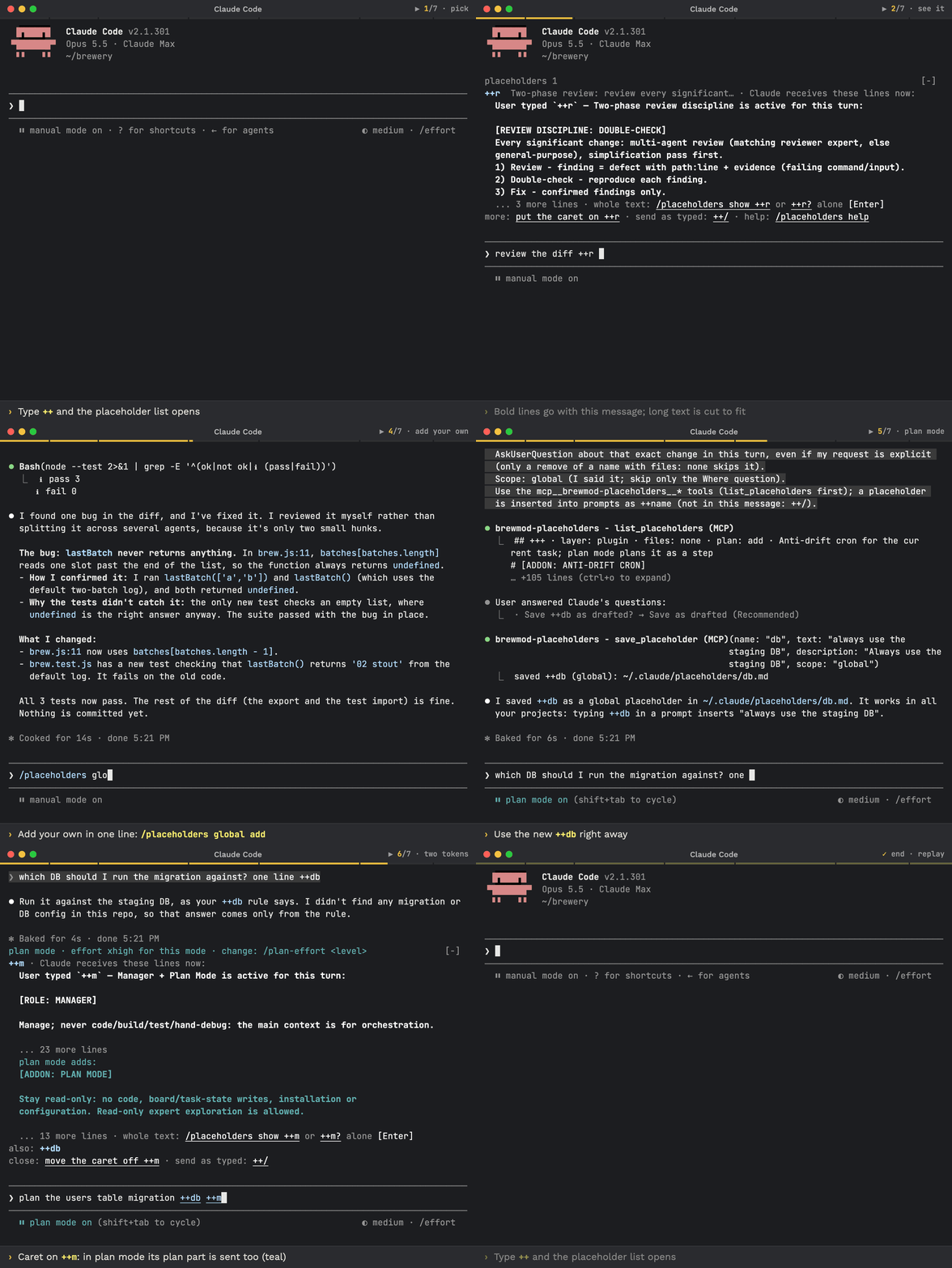
brewmod-placeholders: pick++r, read the band, send, and the review finds database bugs; then add++dbin one line and use it with++min plan mode. Watch it at #demo. - Every skill, agent and hook entry file now carries an MIT license marker, and each plugin ships its
LICENSE. Reuse keeps the copyright notice and credits the project: see the license.
brewcode
Added
- setup-upgrader: an internal agent that
/brewcode:setup-status upgradespawns, one per stale setup. It runs that setup's ownupgradewithout questions, writes only inside the setup's own paths and makes no git write. brewcode ships 7 agents, the four plugins 10. See setup-upgrader. - setup-status upgrade: a second mode next to
report, the default. After each agent it re-checks the setup: the re-check is the verdict, not the agent's claim. It runs one upgrade per team and per installed scope and lists the commands left to you in stage order, with a reason per row.install,enable,uninstall,purge,--forceand a re-copy over an edited file are never run for you; a disabled setup whose files differ from the plugin's copy is listed as "diff it first". When the session still runs an older brewcode than the one installed, it printsRELOAD-NEEDED loaded=X installed=Y scope=S, refuses to upgrade and asks you to run/reload-pluginsfirst. See setup-status. - --unattended: the flag
setup-status upgradepasses to ten setups, all butconvention-setup(heresemble-setup,superreview-setup,teams-setup). Nothing is asked: every question takes its decline branch and the item stays pending, and nothing is committed.teams-setupruns only its plumbing (migration, re-copied scripts, restamp, verify); tuning stays interactive.superreview-setuppromotes its new.template-baseline/only when nothing is pending andvalidatepasses; otherwise the new templates stay staged and the run endspartial.
Fixed
- scope check: the check that
setup-status upgraderuns around every row (shipped withteams-setup,task-board-setupandmemory-sync-setup) now sees new files under.claude/even when a global gitignore ignores that folder; before, a write there went unnoticed. It also ignores the runtime files that hooks, Claude Code and other sessions write there (logs/,plans/,reports/,tmp/,worktrees/,settings.local.jsonand similar), so they no longer count as a write outside the setup. - teams-setup:
upgrade,enableanddisablerestamp theteam.mdheader together with the cellsverifychecks against it (theAgent defaultsdate and version, theintent-guardrow), soverifypasses right after. Team and agent names with accented letters are rejected on every shell, including bash 3.2 under a UTF-8 locale.
brewtools
Added
- --unattended:
agent-deadline-setup,agent-return-setup,agent-router-setup,manager-setupandtask-board-setuptake the flagsetup-status upgradesets. The threeagent-*setups skip a setup you uninstalled (its config is kept) and asettings.jsonthat is invalid, and say which.agent-deadline-setupandagent-return-setupneed exactly one ofprojectorglobalin the prompt, else they skip withno scope token.manager-setupskips withno wall installed.task-board-setupreportspartialwhen it leaves edits for you.
Changed
- plugin-update modes:
update(default),checkandall. The old defaultinteractivemode, with its question per phase, the optional token-cost table and the auto-update and prune questions are gone; the report prints the auto-update hint instead.updateupdates every outdated plugin and mod in every scope without asking, and asks only when offers exist.checkchanges nothing and asks nothing.allisupdateplus every offer, the rows of other marketplaces and aclaude plugin pruneof orphaned auto-installed dependencies (once per installed scope), without asking. - plugin-update report: a title (
brewcode updated: N of M components,brewcode is currentor a failure count), a table of versions before and after per plugin and mod,What changed for youfrom theRELEASE-NOTES.mdof your local marketplace copy (3 bullets per version, 10 in total, never the network) and numbered next steps:/reload-pluginsfirst, then/brewcode:setup-status upgrade(in every project listed), then/brewdoc:my-claude refreshwhen an installation guide is out of date. When that copy has no notes for the newest versions, the report saysNotes for versions after X are not in your local marketplace copy yetand links the release notes. - plugin-update offers: one question at most, two questions in it:
Install the missing mods?(brewmod-placeholdersfirst; a user of the old codewords sees that it replaces them) andInstall the missing plugins?(up to 3, elseInstall all N), each withSkip. Mods are offered only on Claude Code 2.1.301 or newer; below it, or when its version cannot be read, a line says to update Claude Code first. It never runs/reload-plugins, installs a mod outside the offer or patches settings. - plugin-update, offline and failures: when the latest versions cannot be read, the title is
latest versions unknown (offline?)(check:check: latest versions unknown) and the cells saylatest unknown, neveris current. A failed marketplace refresh or prune prints a red line, an unreadable plugin list givesupdate result unknown (plugin list unreadable)withnot verifiedcells, and an install whose project folder is gone showsorphan installand does not count as failed.
Fixed
- manager-setup:
purgein a project without.claude/reports that nothing existed and succeeds; before, it waited five seconds on a lock it could not create and then aborted. - task-board-setup: the leftover-placeholder check scans only the 15 files the generator emits, so task cards that quote
${{ secrets.X }}no longer failinstallorupgrade.
brewdoc
Added
- my-claude refresh:
/brewdoc:my-claude refresh(alsoupdate,regenerate) regenerates each guide that is older than the installed brewdoc, has no version or still holds unfilled{...}placeholders, into a new dated file with its INDEX row updated and the old file kept. It asks nothing. Research guides are regenerated only when you name their slug; guides whose file is gone are only reported; with nothing stale it writes nothing. - my-claude guide: the internal guide has a "Plugins and mods" section from
claude plugin list --json(mods first,brewmod-placeholdersfirst), a Summary row and a "Keeping this current" section with the four update commands. - --unattended:
docsync-setupandmemory-sync-setuptake the flagsetup-status upgradesets.docsync-setupskips withnot installedorwrapped by <launcher>and upgrades a disabled install without enabling it.
brewmod-placeholders
Changed
- docs: the README embeds the new recording under
#demo.
repo
Added
- license:
SKILL.mdfrontmatter carrieslicense: MIT; agents, hook scripts (also the hook assets a setup copies into a project) and the mods' hook modules carry an SPDX and copyright comment; each plugin and mod ships itsLICENSE. Validate fails a file without its marker. License lines alone never make/brewcode:setup-statuscall an installed hook copy modified. The README License section names the copyright holder. - recordings:
placeholders.gifre-recorded from a new story; new light and darkhub-miniGIFs with stills for reduced motion, shown in the README through a<picture>, with the fullhub.gifone link away;plan-effort-bottle.gifre-rendered;placeholders-full-text-bottle.gifremoved; newupdate-flow.gif(with a still) of a real update from 6.9.6 to 6.10.0:/brewtools:plugin-update,/reload-plugins, then/brewcode:setup-status upgrade, athttps://doc-claude.brewcode.app/brewmods/update-flow.gif.
Changed
- update chain: the README, UPDATE.md and the update prompt in each GitHub release describe the chain
/brewtools:plugin-update,/reload-plugins, then/brewcode:setup-status upgradein each project. UPDATE.md tells an LLM to use the "What changed for you" part of the plugin-update report, and that the file grants no permission to run a skill: both commands run only when the user's message names them, otherwise the user types them.
docs
Added
- pages: the
setup-upgraderpage, listed under brewcode agents in the navigation, and a rewrittensetup-statuspage: report and upgrade, the left-to-you table and how the upgrade stays safe.
Changed
- update chain: the FAQ shows the four update commands as a table; the installation, getting started, quick start, full setup and Recommended flow pages, the plugin READMEs and the pages of the changed commands describe the new commands, and the agent counts follow.
docs site
Changed
- update prompt and notice: the install prompt in update mode for
all,brewcode,brewdocandbrewtoolsends with/reload-plugins, then asks you to type/brewcode:setup-status upgradein each project (the model is told not to run it); the update notice at the bottom of a page shows the same chain. - mods overview: the page shows the small hub GIF under
#demo.
New: Claude Code mods. Type ++r before your request and Claude reviews each significant change, double-checks every finding and fixes only the confirmed ones. Watch it in the console (GIF) · Prompt placeholders
❗ Update Claude Code first: the mods need Claude Code 2.1.301 or newer. Run claude update, restart Claude Code (exit, run claude), check with claude --version.
Update with Claude: paste this prompt into Claude Code
Check `claude --version`. Below 2.1.301 (the mods need it), run `claude update`, then stop and tell me to restart Claude Code and paste this prompt again. Otherwise run `claude plugin list` and note the installed brewcode plugin and mod versions. To update to the latest release (v6.10.0 or newer): if brewtools is installed, run `/brewtools:plugin-update` and show me its report; if not, read https://raw.githubusercontent.com/kochetkov-ma/claude-brewcode/main/UPDATE.md and follow it. Then explain in plain words what changed (the report's "What changed for you", else the sections of https://raw.githubusercontent.com/kochetkov-ma/claude-brewcode/main/RELEASE-NOTES.md for every version newer than the one I had), recommend what I should try first, and tell me to type `/reload-plugins` and, in each project, `/brewcode:setup-status upgrade`.
How to update and use it well: UPDATE.md · Recommended flow
Update by hand (Claude Code):
claude --version
claude update      # if it is older; restart Claude Code afterwards
claude plugin marketplace update claude-brewcode
claude plugin update <name>@claude-brewcode   # once per installed plugin: brewmod-placeholders, brewmod-plan-effort, brewcode, brewdoc, brewtools, brewui
Or run /brewtools:plugin-update: it updates the installed plugins and mods, offers the missing mods and plugins once and prints what changed for you. Either way, finish with /reload-plugins and, in each project, /brewcode:setup-status upgrade (it brings the setups generated there current).
Install (Claude Code 2.1.301 or newer), then run /reload-plugins. A paste-in prompt for the same commands: Install in 30 seconds.
claude plugin marketplace add https://github.com/kochetkov-ma/claude-brewcode
claude plugin install brewmod-placeholders@claude-brewcode   # prompt shortcuts: ++r, ++m, your own
claude plugin install brewmod-plan-effort@claude-brewcode    # higher effort while Claude plans
claude plugin install brewcode@claude-brewcode
claude plugin install brewdoc@claude-brewcode
claude plugin install brewtools@claude-brewcode
claude plugin install brewui@claude-brewcode
Docs: Getting started · Mods · Prompt placeholders · Plan-mode effort · brewcode.app