Repository navigation
v6.9.2

v6.9.2 (2026-10-16)
Docs: placeholders | plan-effort | getting started | prompt-injection
What changed for you
❗ Update Claude Code first: the current mods need Claude Code 2.1.301 or newer (this release needed 2.1.292+ for placeholders and 2.1.287+ for plan-effort). Run claude update, restart Claude Code (exit, then run claude), and check with claude --version.
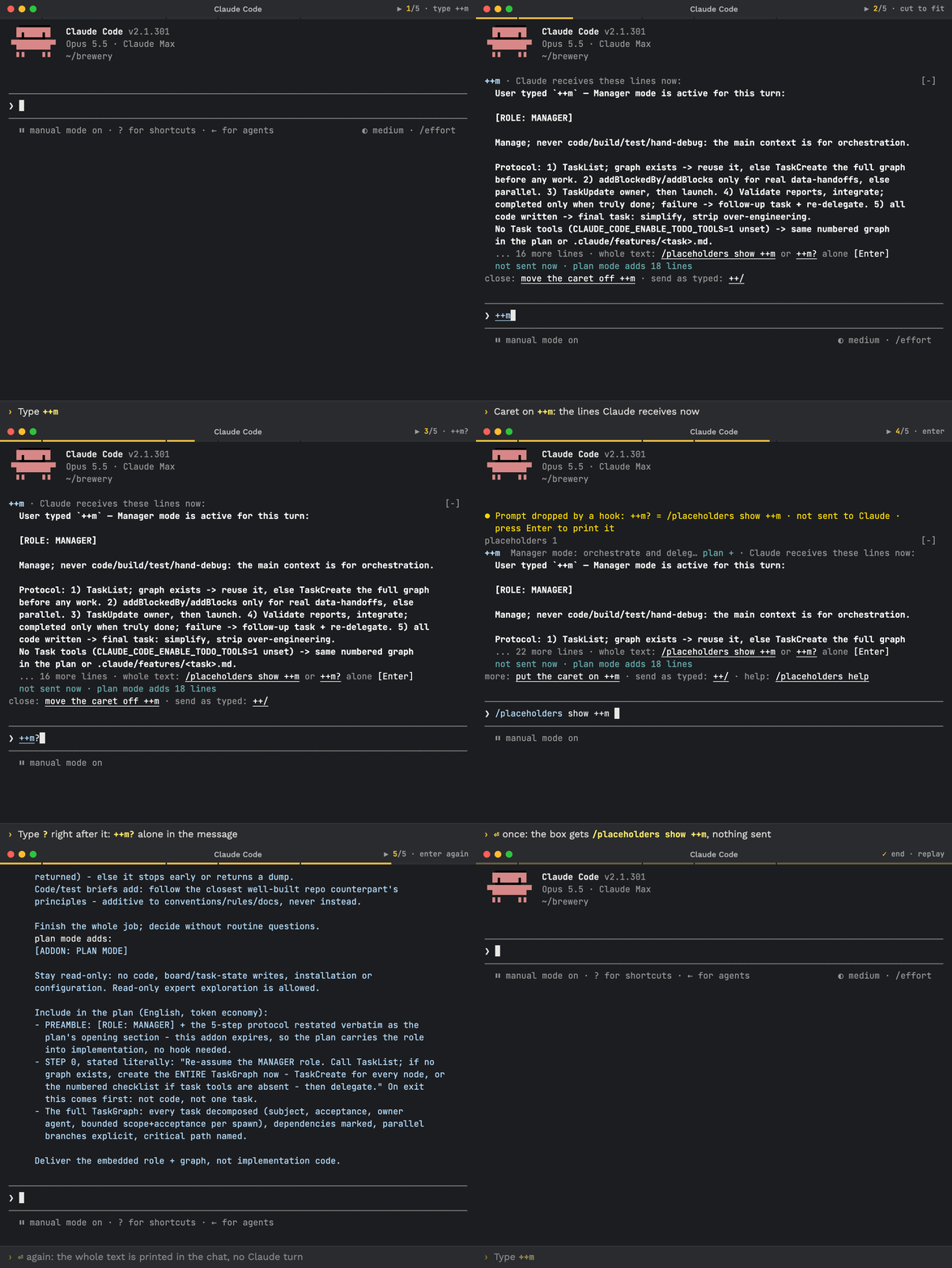
- You can read what a token sends before you send it. Put the caret on a token such as
++rand the band shows its text (up to 15 rows). If the menu cuts it, type?right after the token (++r?) and press Enter: the box fills with/placeholders show ++r, and a second Enter prints the whole text. See prompt placeholders. /placeholders show ++r ++m,listandhelpanswer at once with no Claude turn, and so does a plain "show" request in English or Russian.- Saving your own placeholder now asks where to keep it: Global (all projects, recommended) or Project. Claude asks once before every save or remove, and the confirm reads
Save ++db as drafted?. - A placeholder can have a plan-mode part:
<name>.plan.mdwithplan: addadds text in plan mode only.++/sends a message exactly as typed, with nothing expanded. - The plan-effort docs now say how to enter plan mode:
Shift+Tabtwice from the default mode (manual mode on→accept edits on→plan mode on), or/plan. See plan-mode effort.
Update: /brewtools:plugin-update, or the update prompt at the end of the release page.
More: prompt placeholders on brewcode.app · console GIF with ++r
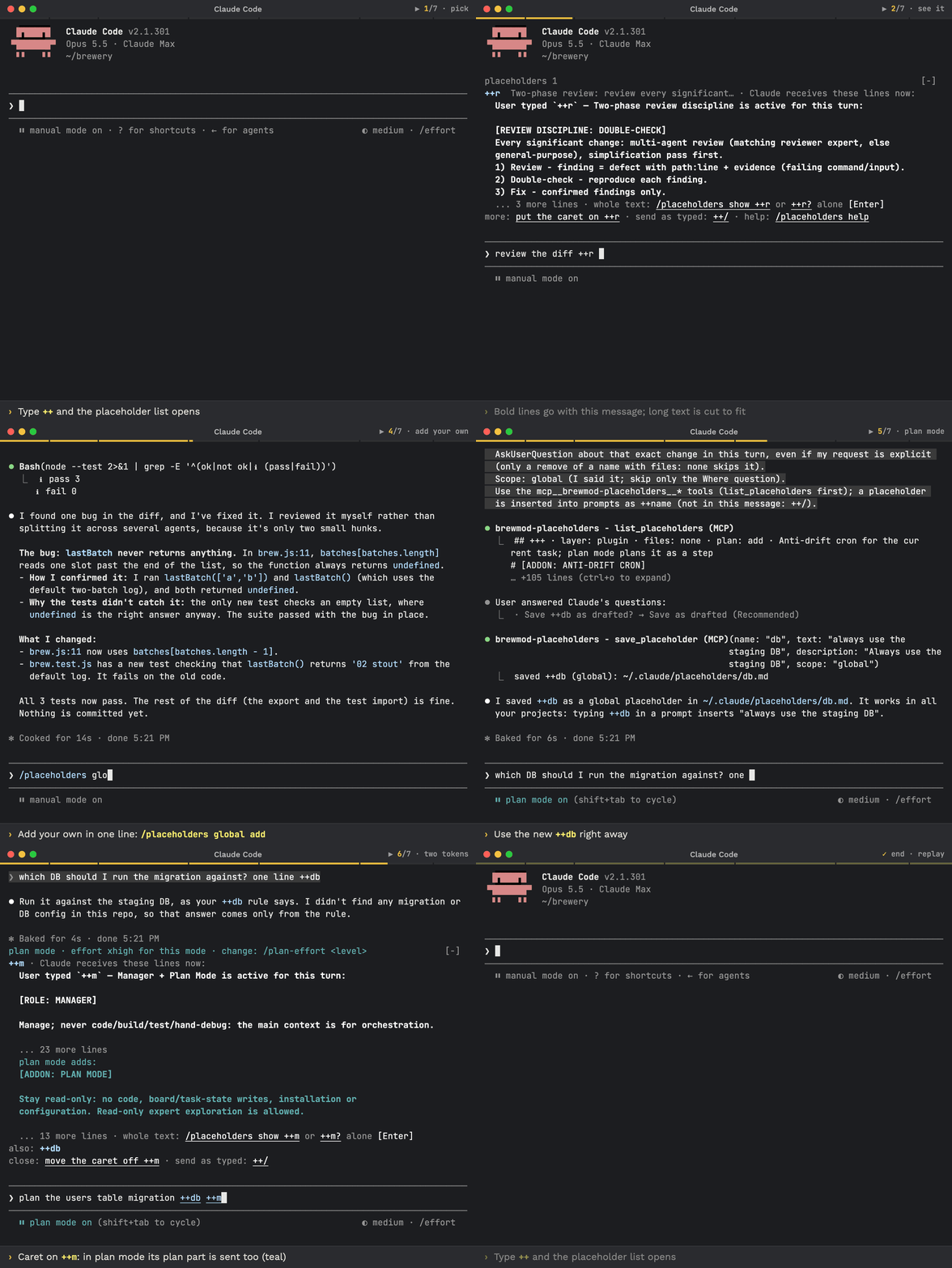
Hotfix: brewmod-placeholders shows what a token sends, answers show, list and help instantly, and gets plan-mode parts and a save scope. The mod and docs pages are rewritten.
brewmod-placeholders
Added
- band text: with the caret on a token the band shows its text (up to 15 rows;
++r?for more when the menu caps it). A message of only++r?fills/placeholders show ++r; Enter again prints it. - instant answers:
/placeholders show ++r ++m,list,helpand natural RU/EN "show" wording are answered at once, with no Claude turn. - escape:
++/(alias++\) sends a message exactly as typed. - save scope:
globalorproject(default global). OneWherequestion, Global recommended; the confirm readsSave ++db as drafted?(the layer shows in theWherequestion and in the result linesaved ++db (global): ~/.claude/placeholders/db.md). - ask first: Claude asks once before every save or remove, even for an explicit request; only a remove of a name with no files skips the question.
- plan-mode parts:
<name>.plan.mdwithplan: addadds text in plan mode only. Shown asplan +andplan mode adds:. A plan part can be removed on its own. placeholders_helptool: the mod's help is available to Claude as a tool.- plan mode in the band:
· plan mode, plus an honest· sent in plan modenote until the first prompt confirms the mode.
Changed
m.plan.md: the shipped file is now an addition (plan: add), so a user'sm.mdoverride flows into plan mode. Plan-mode++moutput is byte-identical.- band: it shows source lines exactly as sent.
- paths: saved and removed files are shown as
~/.claude/placeholders/<file>. - tool descriptions: they use the configured prefix.
- launch in
~: the one folder counts as global.
Fixed
- plan mode: an empty body silences a token there too;
showprints the header actually sent. - 9000-char cap: it never splits an emoji (surrogate pair).
- band: the budget never overflows.
- save:
when: alwaysis written explicitly. - attachments: messages with attachments are skipped by the first-prompt check.
brewmod-plan-effort
Changed
- docs: plan mode is entered by
Shift+Tabtwice from the default mode (manual mode on→accept edits on→plan mode on), or/plan.
repo
Changed
- mod README: rewritten with examples, normal vs plan mode and keys on macOS.
- docs site: one migration notice on the home page and the mod pages.
- GitHub releases: bodies end with the plugin and mod install commands and docs links (
.github/release-footer.md).
New: Claude Code mods. Type ++r before your request and Claude reviews each significant change, double-checks every finding and fixes only the confirmed ones. Watch it in the console (GIF) · Prompt placeholders
❗ Update Claude Code first: the mods need Claude Code 2.1.301 or newer. Run claude update, restart Claude Code (exit, run claude), check with claude --version.
Update with Claude: paste this prompt into Claude Code
Check `claude --version`. Below 2.1.301 (the mods need it), run `claude update`, then stop and tell me to restart Claude Code and paste this prompt again. Otherwise run `claude plugin list` and note the installed brewcode plugin and mod versions, then read https://raw.githubusercontent.com/kochetkov-ma/claude-brewcode/main/UPDATE.md and follow it to update to the latest release (v6.9.2 or newer). Then read the sections of https://raw.githubusercontent.com/kochetkov-ma/claude-brewcode/main/RELEASE-NOTES.md for every version newer than the one I had, explain in plain words what changed, and recommend what I should try first.
How to update and use it well: UPDATE.md · Recommended flow
Update by hand (Claude Code), then run /reload-plugins:
claude --version   # the mods need 2.1.301 or newer
claude update      # if it is older; restart Claude Code afterwards
claude plugin marketplace update claude-brewcode
claude plugin update <name>@claude-brewcode   # once per installed plugin: brewmod-placeholders, brewmod-plan-effort, brewcode, brewdoc, brewtools, brewui
Or run /brewtools:plugin-update: it updates the installed plugins and mods and never installs a mod.
Install (Claude Code 2.1.301 or newer), then run /reload-plugins. A paste-in prompt for the same commands: Install in 30 seconds.
claude plugin marketplace add https://github.com/kochetkov-ma/claude-brewcode
claude plugin install brewmod-placeholders@claude-brewcode   # prompt shortcuts: ++r, ++m, your own
claude plugin install brewmod-plan-effort@claude-brewcode    # higher effort while Claude plans
claude plugin install brewcode@claude-brewcode
claude plugin install brewdoc@claude-brewcode
claude plugin install brewtools@claude-brewcode
claude plugin install brewui@claude-brewcode
Docs: Getting started · Mods · Prompt placeholders · Plan-mode effort · brewcode.app