Repository navigation
Releases: kotilo-dev/kotilo
Release list
Kotilo 0.2.1 (beta)

Beta update. Terminals now look like your usual shell, and finished sessions stop calling for you.
New
- Images in the terminal. Programs that draw pictures in the terminal now work, for example
fastfetch --logo-type sixelor iTerm inline images. The console host built into Windows drops these, so Kotilo now ships Microsoft's console host (ConPTY, the same one Windows Terminal uses). If a terminal misbehaves, turn off Use the bundled console host (ConPTY) in Settings → Terminal and restart Kotilo. - Prompt icons out of the box. If you have a Nerd Font installed (for oh-my-posh, starship and similar prompts), terminals use it in front of the default font. The one you use in Windows Terminal is picked first. Settings → Terminal shows which one; enter a font of your own to override it.
Fixed
- A session whose turn had already finished turned "waiting for your answer" about a minute later, along with a second notification. It now stays finished and you get one "completed" notification. Questions an agent asks during a turn still show as waiting.
- A session started outside Kotilo stayed in the list with its old state after its terminal was closed, until Kotilo restarted. It now updates within a few seconds.
Known limitations (beta)
- Still not code-signed. SmartScreen may warn ("More info → Run anyway"); Smart App Control blocks unsigned apps. Our SignPath Foundation application is pending; see the code signing policy.
- Terminal colour schemes are not configurable yet.
- Windows only; macOS is planned.
Something not working? Please open an issue.
Kotilo 0.2.0 (beta)
Second beta. Two new things to keep an eye on your agents and to ask quick questions without leaving what you're doing.
New
Robot snail on your desktop
Kotilo's mascot can now live on your taskbar and show your agents' combined state at a glance:
- Red with a halo and "!": an agent is waiting for your permission. "?": one is waiting for your answer.
- Amber, walking: agents are working. Sweat drops: the current 5-hour block is projected to cross your usage threshold.
- Blue hop: an agent finished a longer turn. Dim, "Zz": nothing running, or do not disturb.
Click it to jump to the agent that has waited longest, right-click to hide it for an hour or turn it off, drag it along the taskbar. It walks only while agents work (no CPU otherwise), hides during full-screen apps and presentations, and respects Windows' "Animation effects" setting. Off by default: turn it on in Settings → Mascot or from the one-time suggestion.
Assistant chat popup
Press Ctrl+Alt+Space anywhere to open a small chat window for quick questions, answered by the provider you chose for the assistant in Settings → AI: Claude Code, Codex and the other agent CLIs, or any OpenAI-compatible endpoint such as Ollama or LM Studio.
- Answers stream in, with markdown and copyable code blocks; follow-up questions work.
- Nothing is saved. Every opening is a new chat; Kotilo writes no message to disk or logs. Claude Code, Codex and Qwen Code run without keeping their own session files; for Copilot CLI, OpenCode and Gemini CLI, which have no such option, the window tells you they keep a copy.
Escstops an answer or closes the window,Ctrl+Nstarts over,↑edits your last message. The shortcut can be changed or the assistant turned off in Settings → AI.
Upgrading
Installed v0.1.0? Kotilo offers the update by itself (or Settings → About & diagnostics → Check for updates).
Known limitations (beta)
- Still not code-signed. SmartScreen may warn ("More info → Run anyway"); Smart App Control blocks unsigned apps. Our SignPath Foundation application is pending; see the code signing policy.
- The mascot uses the primary monitor only and walks along the bottom of the screen when the taskbar is on the side or top.
- Gemini, Qwen, Droid and Cursor support is still built from their docs, not yet checked against every live setup.
- Windows only; macOS is planned.
Something not working? Please open an issue.
Kotilo 0.1.0 (beta)
First public beta. Kotilo is a Windows desktop workspace for AI coding agents: real terminals plus live agent status, permission handling, usage, costs and limits in one app. Free and open source (Apache-2.0).
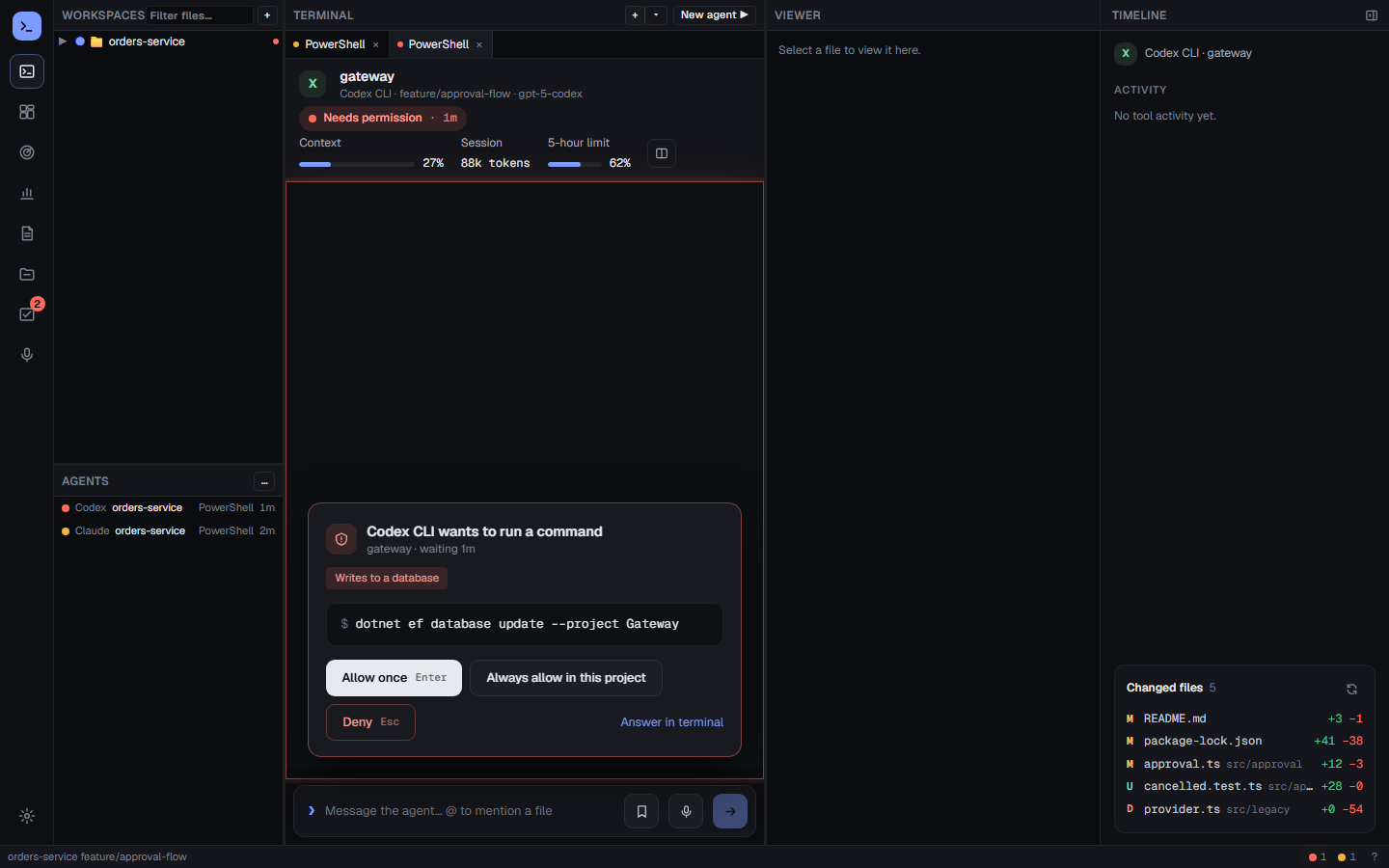
Highlights
- Terminals: tabs and split panes with real shells (ConPTY), agent CLIs and your own commands;
file:linelinks, file tree, diffs. - Live agent status: working / waiting for permission / waiting for input / done / error for every session, including sessions started outside Kotilo.
- Permission card: see the tool, the command or file and a risk label; allow once, always allow or deny with one click.
- Mission control and timeline: every running agent on one screen, with what each session did and changed.
- Usage, cost and limits: tokens and estimated cost by day, 5-hour block, project, model and agent; plan limits where the agent reports them; CSV/Excel export.
- Composer, tasks, reports, local Whisper dictation, English and Turkish UI, auto-updates from GitHub Releases.
- Agents: Claude Code, Codex CLI, GitHub Copilot CLI, Gemini CLI, Qwen Code, Factory Droid, OpenCode, Cursor CLI, plain shells, and your own agent through
adapter.json+ the Agent Integration Protocol. See the support table.
Install
Download Kotilo_0.1.0_x64-setup.exe (or arm64) below and run it. Per-user install, no admin rights. Requires Windows 11 and the WebView2 Runtime (downloaded automatically if missing).
Known limitations (beta)
- The installer is not code-signed yet. SmartScreen may warn about an unknown publisher: choose More info → Run anyway if you trust the download. Smart App Control blocks unsigned apps entirely; with it turned on, wait for a signed release or build from source. Signing via SignPath Foundation is planned; see the code signing policy.
- Gemini CLI, Qwen Code, Factory Droid and Cursor CLI support was built from their documentation and has not been checked against a live install yet.
- Claude Code plan limits are not shown yet; Factory Droid has no permission card keys yet (answer in the terminal).
- Windows only; macOS is planned.
Agents change their hooks and file formats. If something stops working, please open an issue.