


-JavaScript/TypeScript-yellow.svg)
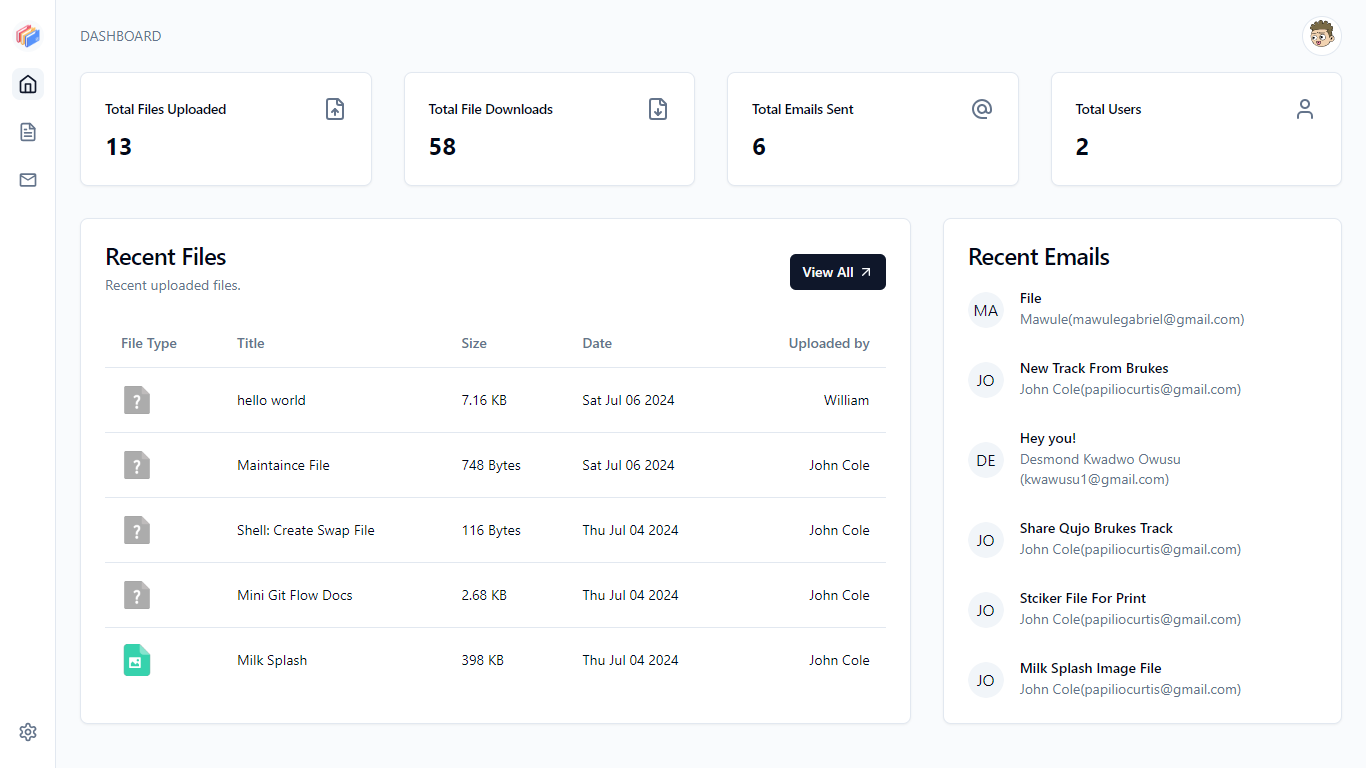
The File Server API provides comprehensive endpoints for file management, including file uploads, downloads, user authentication, email operations, and administrative tasks. The API supports both user and admin roles with specific routes for each.
- Backend: https://file-server-zr8t.onrender.com
- Frontend: https://weserve.onrender.com
- clone repository
cd file-server- install dependencies
npm install- create
.envrc.jsonfile - add environment variables
- run server
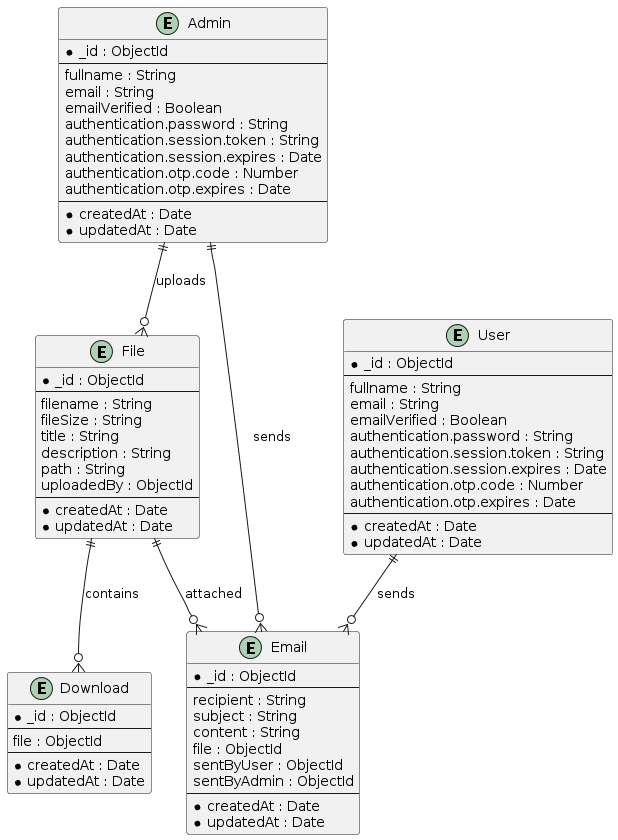
npm run startThe database structure and entity relationships in the File Server API are as follows:
-
Fields:
- fullname
- emailVerified
- authentication
- password
- session
- token
- expires
- otp
- code
- expires
-
Relationships:
File.uploadedByreferencesAdminEmail.sentByAdminreferencesAdmin
-
Fields:
- file (references
File)
- file (references
-
Relationships:
Download.filereferencesFile
-
Fields:
- recipient
- subject
- content
- file (references
File) - sentByUser (references
User) - sentByAdmin (references
Admin)
-
Relationships:
Email.filereferencesFileEmail.sentByUserreferencesUserEmail.sentByAdminreferencesAdmin
-
Fields:
- filename
- fileSize
- title
- description
- path
- uploadedBy (references
Admin)
-
Relationships:
File.uploadedByreferencesAdmin
-
Fields:
- fullname
- emailVerified
- authentication
- password
- session
- token
- expires
- otp
- code
- expires
-
Relationships:
Email.sentByUserreferencesUser
The image below shows the ER diagram
https://file-server-zr8t.onrender.com
All endpoints require authentication via an API key. Include the API key in the Authorization header for each request.
Authorization: Bearer SESSON_TOKEN
Register a new admin user.
- URL:
/admin/register - Method:
POST - Headers:
Content-Type: application/json
- Request Body:
username(required): The username of the admin.password(required): The password of the admin.
- Responses:
201 Created: Admin registered successfully.400 Bad Request: Missing or invalid parameters.500 Internal Server Error: Server encountered an error.
Example Request:
fetch('https://file-server-zr8t.onrender.com/admin/register', {
  method: 'POST',
  headers: {
    'Content-Type': 'application/json'
  },
  body: JSON.stringify({
    username: 'admin',
    password: 'securepassword'
  })
})
        .then(response => response.json())
        .then(data => console.log(data))
        .catch(error => console.error('Error:', error));
Example Response:
{
  "message": "Admin registered successfully."
}Authenticate an admin user.
- URL:
/admin/login - Method:
POST - Headers:
Content-Type: application/json
- Request Body:
username(required): The username of the admin.password(required): The password of the admin.
- Responses:
200 OK: Authentication successful.401 Unauthorized: Invalid username or password.500 Internal Server Error: Server encountered an error.
Example Request:
fetch('https://file-server-zr8t.onrender.com/admin/login', {
  method: 'POST',
  headers: {
    'Content-Type': 'application/json'
  },
  body: JSON.stringify({
    username: 'admin',
    password: 'securepassword'
  })
})
        .then(response => response.json())
        .then(data => console.log(data))
        .catch(error => console.error('Error:', error));
Example Response:
{
  "data": {
    "fullname": "Admin User",
    "email": "LwXpE@example.com",
    "emailVerified": true,
    "authentication": {
      "session": {
        "token": "admin123",
        "expires": "2024-07-06T12:00:00Z"
      },
      "otp": {
        "code": "123456",
        "expires": "2024-07-06T12:00:00Z"
      },
      "password": "securepassword"
      //...other related fields
    }
  }
}Upload a file to AWS S3.
- URL:
/admin/file/upload/aws - Method:
POST - Headers:
Authorization: Bearer SESSON_TOKENContent-Type: multipart/form-data
- Request Parameters:
file(required): The file to be uploaded.
- Responses:
200 OK: File uploaded successfully.400 Bad Request: Missing file parameter.401 Unauthorized: Invalid or missing session token.500 Internal Server Error: Server encountered an error.
Example Request:
const formData = new FormData();
formData.append('file', fileInput.files[0]);

fetch('https://file-server-zr8t.onrender.com/admin/file/upload/aws', {
  method: 'POST',
  headers: {
    'Authorization': 'Bearer SESSON_TOKEN'
  },
  body: formData
})
        .then(response => response.json())
        .then(data => console.log(data))
        .catch(error => console.error('Error:', error));
Example Response:
{
  "data": {
    "id": "file123",
    "name": "example.txt",
    "url": "https://s3.amazonaws.com/yourbucket/example.txt",
    "created_at": "2024-07-06T12:00:00Z"
  }
}Upload a file to the local server storage.
- URL:
/admin/file/upload/local - Method:
POST - Headers:
Authorization: Bearer SESSON_TOKENContent-Type: multipart/form-data
- Request Parameters:
file(required): The file to be uploaded.
- Responses:
200 OK: File uploaded successfully.400 Bad Request: Missing file parameter.401 Unauthorized: Invalid or missing session token.500 Internal Server Error: Server encountered an error.
Example Request:
const formData = new FormData();
formData.append('file', fileInput.files[0]);

fetch('https://file-server-zr8t.onrender.com/admin/file/upload/local', {
  method: 'POST',
  headers: {
    'Authorization': 'Bearer SESSON_TOKEN'
  },
  body: formData
})
        .then(response => response.json())
        .then(data => console.log(data))
        .catch(error => console.error('Error:', error));
Example Response:
{
  "data": {
    "id": "file123",
    "name": "example.txt",
    "url": "https://file-server-zr8t.onrender.com/files/file123",
    "created_at": "2024-07-06T12:00:00Z"
  }
}Delete a file from the server.
- URL:
/admin/file/delete/:fileId - Method:
DELETE - Headers:
Authorization: Bearer SESSON_TOKEN
- Path Parameters:
fileId(required): The ID of the file to delete.
- Responses:
200 OK: File deleted successfully.401 Unauthorized: Invalid or missing session token.404 Not Found: File not found.500 Internal Server Error: Server encountered an error.
Example Request:
fetch('https://file-server-zr8t.onrender.com/admin/file/delete/file123', {
  method: 'DELETE',
  headers: {
    'Authorization': 'Bearer SESSON_TOKEN'
  }
})
        .then(response => response.json())
        .then(data => console.log(data))
        .catch(error => console.error('Error:', error));
Example Response:
{
  "message": "File deleted successfully."
}List all files available on the server.
- URL:
/admin/files - Method:
GET - Headers:
Authorization: Bearer SESSON_TOKEN
- Responses:
200 OK: Files listed successfully.401 Unauthorized: Invalid or missing session token.500 Internal Server Error: Server encountered an error.
Example Request:
fetch('https://file-server-zr8t.onrender.com/admin/files', {
  method: 'GET',
  headers: {
    'Authorization': 'Bearer SESSON_TOKEN'
  }
})
        .then(response => response.json())
        .then(data => console.log(data))
        .catch(error => console.error('Error:', error));
Example Response:
{
  "data": [
    {
      "id": "file123",
      "name": "example.txt",
      "url": "https://file-server-zr8t.onrender.com/files/file123",
      "created_at": "2024-07-06T12:00:00Z"
    },
    {
      "id": "file124",
      "name": "example2.txt",
      "url": "https://file-server-zr8t.onrender.com/files/file124",
      "created_at": "2024-07-06T12:00:00Z"
    }
  ]
}Send a file via email.
- URL:
/admin/send-email - Method:
POST - Headers:
Authorization: Bearer SESSON_TOKENContent-Type: application/json
- Request Body:
email(required): The recipient's email address.fileId(required): The ID of the file to send.
- Responses:
200 OK: Email sent successfully.400 Bad Request: Missing or invalid parameters.401 Unauthorized: Invalid or missing session token.500 Internal Server Error: Server encountered an error.
Example Request:
fetch('https://file-server-zr8t.onrender.com/admin/send-email', {
  method: 'POST',
  headers: {
    'Authorization': 'Bearer SESSON_TOKEN',
    'Content-Type': 'application/json'
  },
  body: JSON.stringify({
    email: 'recipient@example.com',
    fileId: 'file123'
  })
})
        .then(response => response.json())
        .then(data => console.log(data))
        .catch(error => console.error('Error:', error));
Example Response:
{
  "message": "Email sent successfully."
}Register a new user.
- URL:
/user/register - Method:
POST - Headers:
Content-Type: application/json
- Request Body:
username(required): The username of the user.password(required): The password of the user.
- Responses:
201 Created: User registered successfully.400 Bad Request: Missing or invalid parameters.- `500 Internal Server
Error`: Server encountered an error.
Example Request:
fetch('https://file-server-zr8t.onrender.com/user/register', {
  method: 'POST',
  headers: {
    'Content-Type': 'application/json'
  },
  body: JSON.stringify({
    username: 'user',
    password: 'securepassword'
  })
})
        .then(response => response.json())
        .then(data => console.log(data))
        .catch(error => console.error('Error:', error));
Example Response:
{
  "message": "User registered successfully."
}Authenticate a user.
- URL:
/user/login - Method:
POST - Headers:
Content-Type: application/json
- Request Body:
username(required): The username of the user.password(required): The password of the user.
- Responses:
200 OK: Authentication successful.401 Unauthorized: Invalid username or password.500 Internal Server Error: Server encountered an error.
Example Request:
fetch('https://file-server-zr8t.onrender.com/user/login', {
  method: 'POST',
  headers: {
    'Content-Type': 'application/json'
  },
  body: JSON.stringify({
    username: 'user',
    password: 'securepassword'
  })
})
        .then(response => response.json())
        .then(data => console.log(data))
        .catch(error => console.error('Error:', error));
Example Response:
{
  "data": {
    "fullname": "Admin User",
    "email": "LwXpE@example.com",
    "emailVerified": true,
    "authentication": {
      "session": {
        "token": "admin123",
        "expires": "2024-07-06T12:00:00Z"
      },
      "otp": {
        "code": "123456",
        "expires": "2024-07-06T12:00:00Z"
      },
      "password": "securepassword"
      //...other related fields
    }
  }
}Search for a file.
- URL:
/user/file/search/:query - Method:
GET - Headers:
Authorization: Bearer SESSON_TOKEN
- Path Parameters:
query(required): The search query.
- Responses:
200 OK: Files found successfully.401 Unauthorized: Invalid or missing session token.500 Internal Server Error: Server encountered an error.
Example Request:
fetch('https://file-server-zr8t.onrender.com/user/file/search/example', {
  method: 'GET',
  headers: {
    'Authorization': 'Bearer SESSON_TOKEN'
  }
})
        .then(response => response.json())
        .then(data => console.log(data))
        .catch(error => console.error('Error:', error));
Example Response:
{
  "files": [
    {
      "id": "file123",
      "name": "example.txt",
      "url": "https://file-server-zr8t.onrender.com/files/file123",
      "created_at": "2024-07-06T12:00:00Z"
    }
  ]
}Send a file via email.
- URL:
/user/send-email - Method:
POST - Headers:
Authorization: Bearer SESSON_TOKENContent-Type: application/json
- Request Body:
email(required): The recipient's email address.fileId(required): The ID of the file to send.
- Responses:
200 OK: Email sent successfully.400 Bad Request: Missing or invalid parameters.401 Unauthorized: Invalid or missing session token.500 Internal Server Error: Server encountered an error.
Example Request:
fetch('https://file-server-zr8t.onrender.com/user/send-email', {
  method: 'POST',
  headers: {
    'Authorization': 'Bearer SESSON_TOKEN',
    'Content-Type': 'application/json'
  },
  body: JSON.stringify({
    email: 'recipient@example.com',
    fileId: 'file123'
  })
})
        .then(response => response.json())
        .then(data => console.log(data))
        .catch(error => console.error('Error:', error));
Example Response:
{
  "message": "Email sent successfully."
}Download a file from the server.
- URL:
/file/download/:filename - Method:
GET - Responses:
200 OK: File downloaded successfully.404 Not Found: File not found.500 Internal Server Error: Server encountered an error.
Example Request:
fetch('https://file-server-zr8t.onrender.com/file/download/example.txt', {
  method: 'GET'
})
        .then(response => response.blob())
        .then(blob => {
          const url = window.URL.createObjectURL(blob);
          const a = document.createElement('a');
          a.style.display = 'none';
          a.href = url;
          a.download = 'example.txt';
          document.body.appendChild(a);
          a.click();
          window.URL.revokeObjectURL(url);
        })
.catch(error => console.error('Error:', error));Record a file download request.
- URL:
/file/download/request/:fileId - Method:
GET - Responses:
200 OK: Download recorded successfully.404 Not Found: File not found.500 Internal Server Error: Server encountered an error.
Example Request:
fetch('https://file-server-zr8t.onrender.com/file/download/request/file123', {
  method: 'GET'
})
        .then(response => response.json())
        .then(data => console.log(data))
        .catch(error => console.error('Error:', error));
Example Response:
{
  "message": "Download recorded successfully."
}openapi: 3.0.3
info:
title: File Server API
description: API for managing file uploads and downloads
version: 1.0.0
servers:
- url: https://file-server-zr8t.onrender.com
paths:
/admin/register:
post:
summary: Register a new admin user
requestBody:
required: true
content:
application/json:
schema:
type: object
properties:
username:
type: string
password:
type: string
responses:
'201':
description: Admin registered successfully
'400':
description: Missing or invalid parameters
'500':
description: Server encountered an error
/admin/login:
post:
summary: Authenticate an admin user
requestBody:
required: true
content:
application/json:
schema:
type: object
properties:
username:
type: string
password:
type: string
responses:
'200':
description: Authentication successful
content:
application/json:
schema:
type: object
properties:
token:
type: string
'401':
description: Invalid username or password
'500':
description: Server encountered an error
/admin/file/upload/aws:
post:
summary: Upload a file to AWS S3
requestBody:
required: true
content:
multipart/form-data:
schema:
type: object
properties:
file:
type: string
format: binary
responses:
'200':
description: File uploaded successfully
'400':
description: Missing file parameter
'401':
description: Invalid or missing API key
'500':
description: Server encountered an error
/admin/file/upload/local:
post:
summary: Upload a file to the local server storage
requestBody:
required: true
content:
multipart/form-data:
schema:
type: object
properties:
file:
type: string
format: binary
responses:
'200':
description: File uploaded successfully
'400':
description: Missing file parameter
'401':
description: Invalid or missing API key
'500':
description: Server encountered an error
/admin/file/delete/{fileId}:
delete:
summary: Delete a file from the server
parameters:
- name: fileId
in: path
required: true
schema:
type: string
responses:
'200':
description: File deleted successfully
'401':
description: Invalid or missing API key
'404':
description: File not found
'500':
description: Server encountered an error
/admin/files:
get:
summary: List all files available on the server
responses:
'200':
description: Files listed successfully
content:
application/json:
schema:
type: object
properties:
files:
type: array
items:
type: object
properties:
id:
type: string
name:
type: string
url:
type: string
created_at:
type: string
format: date-time
'401':
description: Invalid or missing API key
'500':
description: Server encountered an error
/admin/send-email:
post:
summary: Send a file via email
requestBody:
required: true
content:
application/json:
schema:
type: object
properties:
email:
type: string
fileId:
type: string
responses:
'200':
description: Email sent successfully
'400':
description: Missing or invalid parameters
'401':
description: Invalid or missing API key
'500':
description: Server encountered an error
/user/register:
post:
summary: Register a new user
requestBody:
required: true
content:
application/json:
schema:
type: object
properties:
username:
type: string
password:
type: string
responses:
'201':
description: User registered successfully
'400':
description: Missing or invalid parameters
'500':
description: Server encountered an error
/user/login:
post:
summary: Authenticate a user
requestBody:
required: true
content:
application/json:
schema:
type: object
properties:
username:
type: string
password:
type: string
responses:
'200':
description: Authentication successful
content:
application/json:
schema:
type: object
properties:
token:
type: string
'401':
description: Invalid username or password
'500':
description: Server encountered an error
/user/file/search/{query}:
get:
summary: Search for a file
parameters:
- name: query
in: path
required: true
schema:
type: string
responses:
'200':
description: Files found successfully
content:
application/json:
schema:
type: object
properties:
files:
type: array
items:
type: object
properties:
id:
type: string
name:
type: string
url:
type: string
created_at:
type: string
format: date-time
'401':
description: Invalid or missing API key
'500':
description: Server encountered an error
/user/send-email:
post:
summary: Send a file via email
requestBody:
required: true
content:
application/json:
schema:
type: object
properties:
email:
type: string
fileId:
type: string
responses:
'200':
description: Email sent successfully
'400':
description: Missing or invalid parameters
'401':
description: Invalid or missing API key
'500':
description: Server encountered an error
/file/download/{filename}:
get:
summary: Download a file from the server
parameters:
- name: filename
in: path
required: true
schema:
type: string
responses:
'200':
description: File downloaded successfully
'404':
description: File not found
'500':
description: Server encountered an error
/file/download/request/{fileId}:
get:
summary: Record a file download request
parameters:
- name: fileId
in: path
required: true
schema:
type: string
responses:
'200':
description: Download recorded successfully
'404':
description: File not found
'500':
description: Server encountered an errorThis documentation includes detailed routes for both admin and user functionalities, as well as a complete OpenAPI specification for easy import into tools like Swagger and Postman. This structure ensures clarity and ease of use for developers integrating with the File Server API.