Releases: kushagrasinghx/BitChord
Release list
BitChord v1.3

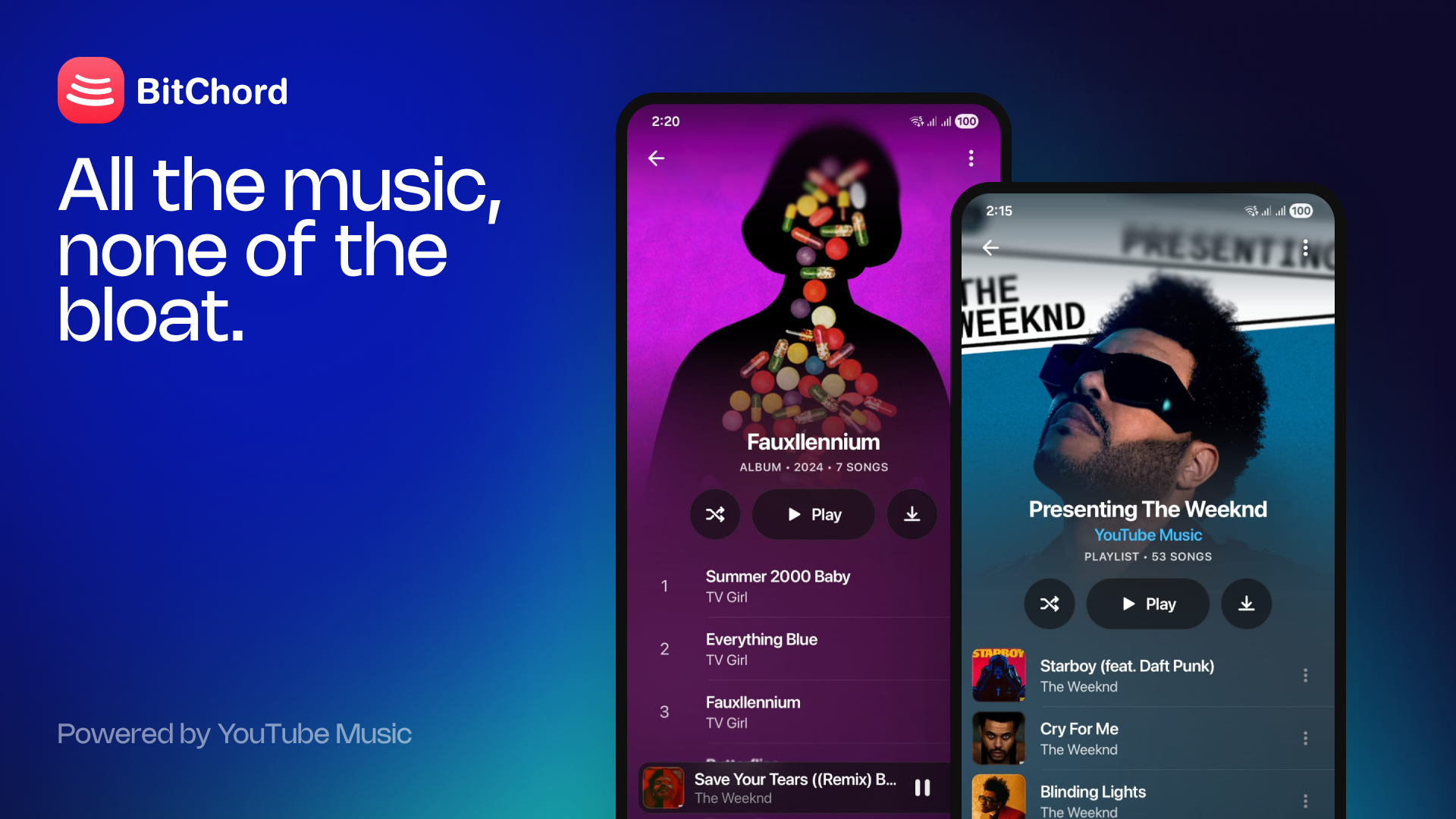
Merges Last.fm/ListenBrainz scrobbling from #3, plus offline downloads, local library, and a round of playback fixes.
Patch notes
- Offline downloads — save tracks to device with embedded metadata + cover art
- Local music library scanning (device storage + downloaded tracks)
- Last.fm + ListenBrainz scrobbling
- Add-to-playlist picker
- Dynamic, artwork-driven theming across player/detail screens
- Draggable bottom nav bar with spring animation
- Optional back gesture to dismiss lyrics page
- Fixed several 403 playback errors (updated client versions, shared HTTP stack)
- Fixed stream-resolve stalls/timeouts
- Fixed ListenBrainz not logging finished tracks
- Fixed queue swipe-to-add triggering on accidental drags
- General UI/bug fixes
Changelog
- Add
LastFM,ListenBrainzManager,ScrobbleManager+ scrobbling settings - Add Account & Scrobbling settings sub-page
- Add
downloadpackage:DownloadService,Downloads,DownloadStore,Downloader - Add
MediaTagger,Mp4Tagger,WebmTaggerfor embedded metadata (+ unit tests) - Add
LocalMediaRepositoryfor local/downloaded track scanning - Add
PlaylistPickerSheet/PlaylistActionsSheet - Add
ArtworkPalette,ArtworkBackdrop,ArtworkWashfor artwork-driven theming - Add shared
Http.ktOkHttp client (fixes address-family mismatches causing 403s) - Add
ANDROID_MUSICplayer client, bump other client versions - Rework
StreamResolverextractor client with its own connection pool + timeout - Raise stream-resolve timeout 45s → 120s
- Pin NewPipeExtractor to v0.26.3
- Fix probe requests hitting 403 on YouTube Music API
- Fix ListenBrainz missing ended songs in recent listens
- Fix queue swipe-to-add threshold
- New storage permissions +
DownloadServicemanifest entry - README/license updates
Install
Download BitChord-v1.3.apk below and sideload it (enable "Install unknown apps" for your browser or file manager). Requires Android 8.0 (API 26) or newer.
Installs straight over v1.2 — same signing key, your session and settings are kept.
BitChord v1.2
Third release of BitChord. This one is about the two things you actually notice: tracks that start and keep going, and a crossfade that finally overlaps instead of dipping.
Highlights
🎚️ A crossfade you can hear
The old crossfade was one player ramping its own volume, which meant it faded down to silence at the join and climbed back out — a hole where the blend should have been. There are now two decoders: the queue advances to the next track immediately and fades up, while a throwaway tail player carries the outgoing track's last seconds down. Both sides ride an equal-power sin/cos curve, so the transition holds constant loudness the whole way through. Because the queue moves on at the start of the fade, the notification, the artwork and the queue index flip to the song you're about to hear rather than trailing the one that's leaving.
Stream resolution was the single biggest source of "it loads and then doesn't play". A player request sent without a visitor id gets answered one of two ways — an honest LOGIN_REQUIRED, or a perfectly normal-looking response whose URLs serve one byte and then 403 every real read. BitChord now mints a visitor id deliberately instead of hoping a browse response carries one, walks a list of player client identities rather than betting on a single one, remembers which one last worked, stands down the ones that get refused, and never hands the player a URL — or caches it — until a byte has actually been fetched from it.
⚡ Streaming at line rate
googlevideo paces an open-ended response down to roughly playback speed. Measured on the same track, over the same connection, seconds apart: 15.5 kB/s for an unbounded GET against 5.7 MB/s for the same bytes requested as a bounded range. That is the difference between a player that can build a buffer and one that can only just keep up, and it's why a stall used to never recover. Player reads are now fetched as a run of ranges, the same way read-ahead already worked.
🔊 Spatial audio
Settings → Playback gains a Spatial audio row: a stereo-widening and cross-feed effect running inside the player's own audio pipeline. It's offered only on devices that ship Dolby Atmos and only runs while the system Atmos switch is on — with Atmos off, the row hands you to the panel that owns that switch, and turning Atmos off mid-track takes the effect down with it rather than waiting for the next song.
✋ Drag to reorder the queue
Queue rows can now be dragged into a new order. Your own queue and AutoPlay's section reorder separately — a drag never crosses the line between them — and each swap goes to the player as it happens, so what's on screen is always the real running order.
💀 Skeletons instead of spinners
Home, search, library and album/artist pages now fill with grey placeholders laid out to the same metrics as the real rows, so nothing jumps when the data lands. Album and playlist pages also stop waiting for the whole track list: the first page is shown at once and the rest fills in underneath while you're already reading.
🔍 Search that refines as you type
Results are cached and matched by prefix, so typing "blinding" shows the results from "blind" while the real query is in flight instead of blanking to a spinner on every letter. The pipeline is one long-lived collector with an 80ms debounce, which also puts an end to the "Software caused connection abort" errors that came from every keystroke tearing down a pooled connection someone else was using.
🖼️ Artwork at the size it's drawn
Covers were being fetched at 544px for squares the size of a fingertip — 84kB where 7.8kB would do. Each surface now asks for what it draws: rows small, cards medium, page headers and the player large, the notification generous. Coil also gets a real cache — 100MB on disk, 20% of memory — so covers survive to tomorrow instead of being evicted at the 10MB default floor.
⚙️ Performance settings
Two new switches under Appearance for older or slower devices: Reduce animation freezes the player's mesh gradient instead of letting it drift, and Reduce dynamic blur swaps every frosted surface — status bar, mini player, bottom fade, lyric focus — for solid fills.
🔔 Update alert
The top bar's update icon now comes with a once-per-launch iOS-style alert when a newer build is out. Both read the same gate, so the icon can't announce it a beat before the alert does, and neither shows up over a page of skeletons.
Also in this release
- Album and single pages now credit their tracks to the artist named in the page header, instead of listing bare titles as "Unknown artist" — and the long-press menu can still open that artist
- Repeat-all now drops AutoPlay's tracks when switched on, and AutoPlay stops extending the queue while it's on, so repeat-all can actually reach the end it's meant to wrap from
- The sleep timer's "after this song" is honoured across a crossfade, which arrives looking exactly like a manual skip from the outside
- Transport failures — a connection reset on mobile data — are retried instead of surfacing as an error; HTTP error statuses still aren't, since repeating the question won't change the answer
- One page gutter shared by every screen and by the floating bars, so row, card and heading edges line up with the bars stacked below them
- Settings footer now links to the GitHub repo and the developer
- A queued song appearing twice no longer collides on the same list key
- NewPipeExtractor 0.26.3 → 0.26.4
Install
Download BitChord-v1.2.apk below and sideload it (enable "Install unknown apps" for your browser or file manager). Requires Android 8.0 (API 26) or newer.
Installs straight over v1.1 — same signing key, so your session and settings are kept.
Full changelog (technical)
Added
PlayerClient— one client identity for theplayerendpoint, carrying the user agent, origin and signature-timestamp requirement that must travel together;StreamResolverwalksCLIENTS(ANDROID_VR first) with per-network gating, a learned order, and aprobethat fetches a byte before anything is handed to the player or cachedInnertube.ensureVisitorData/fetchVisitorData— mints a visitor id offsw.js_data, found by shape rather than by a path that would rot, with a one-shot refresh when a response accuses the session of being a botChunkedDataSource— bounded-range fetching for player reads, passing already-bounded requests straight through;PlaybackServicesets the media request's headers per URL fromPlayerClient.forStreamUrlCrossfadeControllerrewritten around a ghost player:ARMING/LAPPING/FADING/BAILINGphases, silent seek-sync toSYNC_TOLERANCE_MSwith a learned seek lead, equal-powersin/coscurve,consumeAutoAdvance()soPlaybackServicecan tell the lap's seek from a manual skip, andonSkipRequested()to bail before onePlaybackService.buildGhostPlayer— no audio focus, no noisy handling, no session, same audio session id (so the EQ doesn't change halfway), sharing the main media source factory so the tail plays from diskSpatialAudioProcessor— mid/side widening plus a delayed, low-passed cross-feed as an ExoPlayerAudioProcessor; one instance per sink, since the delay line can't be sharedDolbyAtmos— support and on/off detection via the platformSpatializer, the vendor setting and output route changes,settingsIntent()to the OEM panel, and a manifest<queries>block so API 30+ doesn't hide those packages; retiresAppSettings.spatialAudiothe moment Atmos goes offSkeletons.kt— shimmer placeholders for the feed, library, song lists and detail pages, drawn from inside the draw block so a screenful doesn't recompose per frameUpdateAvailableDialog— iOS-shaped alert rendered as an overlay so its glass samples the app's ownHazeState; shown once per launch, gated behind Home settlingInnertube.SongPage+browseSongs/moreSongs, andMainViewModel.fillIn— detail pages render their first page and follow continuations in the background, up toMAX_PAGESInnertube.withRetry— retries transport failures only, never HTTP statuses, never through cancellation- Search pipeline:
searchRequests(DROP_OLDEST), an LRUsearchCache,prefixMatch, andnewestRequestIdso a late answer can't overwrite a newer one InnertubeParser.pageCredit— release-page header credit applied to rows that carry none, with the artist's browse id; releases only, never playlistsSong.artworkAt/String?.artworkAtand theROW_ART_PX/CARD_ART_PX/HEADER_ART_PX/NOTIFICATION_ART_PXconstantsBitChordApplicationimplementsSingletonImageLoader.Factory— 20% memory cache, 100MB named disk cache, 200ms crossfadeAppSettings.spatialAudio,reduceAnimation,reduceDynamicBlur, with their settings rowsrememberQueueDragState+stableQueueKeys— per-section drag-to-reorder off the live queue, keyed stably across reorders and duplicate songs
Changed
Innertube.playertakes a client identity as an argument instead of hardcoding iOS- Back buffer 15 min → 30 s: the byte ceiling counts history too, so a track-wide back buffer spent the whole read-ahead budget on audio already heard and never restarted loading
- After-rebuffer buffer raised again — a stall means the network is genuinely struggling
RestartingBackPlayer→SessionPlayer, which also tells the crossfade about a skip before carrying it out- Thumbnails are taken exactly as offered by the parser; the size is chosen at the point of draw instead of being rewritten to 544px on the way past
LoadingStateremoved in favour of per-surface skeletonsPAGE_GUTTER(10dp),ROW_DIVIDER_INSETandSHELF_CARD_WIDTHreplace the per-screen 20/26/32/34dp paddin...
BitChord v1.1
Second release of BitChord. This one is mostly about playing the right thing, and playing it faster — plus shuffle that actually matches the queue you're looking at.
Highlights
🎵 Songs, not music videos
Home and the charts used to mix catalogue tracks with music-video uploads, so tapping one played the video's audio — wrong title, wrong artwork, and a video entry in your YouTube watch history. BitChord now finds the proper audio release of a track before it ever reaches the queue, and hides video-only shelves and dead-end "N videos" cards entirely.
🔀 Shuffle that matches the queue
Shuffle now rearranges the queue itself instead of playing it in a hidden random order behind your back. What the queue shows is what plays, in that order — and turning shuffle off puts it back exactly as it was.
⏭️ AutoPlay has its own section
Tracks AutoPlay lines up sit under their own heading at the bottom of the queue. Add to queue now drops a song at the end of what you asked for, above the mix, rather than behind it. Turning AutoPlay off takes its tracks back out; turning it on picks up from whatever's playing now.
⚡ Much faster seeking
Scrubbing backwards used to stall for a second or more while the track reloaded and re-decoded from an earlier point. The whole track is now kept buffered behind the playhead, so seeking back is as instant as seeking forward. Playback also starts on far less buffered audio (500ms instead of 2.5s), since the bytes are usually already cached on disk.
♾️ Home keeps loading
The Home feed now pages as you scroll, following YouTube Music's own continuations into mood mixes and more personalised shelves, instead of stopping after one fixed page. Daily/Weekly and Trending charts moved to Explore, where they live in the real app.
💾 Cache limit you control
Settings → Storage gains a Song cache limit slider — 512 MB up to 10 GB — plus a Clear song cache action. More cache means more tracks that replay and seek instantly with no network.
🔔 Update notifications
BitChord now checks GitHub for a newer release on launch and shows an update icon in the top bar when one is out. No more finding out by accident.
Also in this release
- Artist pages now show the artist's own picture and name, instead of inheriting the cover art and the full "A, B & C" credit from whatever track you opened them from
- New frosted bottom fade — content now dissolves under the tab bar instead of sliding under a hard-edged panel
- The Home tab is now Play, with a play icon
- Swiping the album art in the player shows a fast-forward/rewind hint for which way you're about to skip
- The lyrics strip tells you it's looking, instead of sitting blank
- Softer, unclipped blur on out-of-focus lyric lines, and a chevron hinting the strip opens full lyrics
- Settings no longer hides an album or artist page opened from the player
- Expanded README disclaimer
Install
Download BitChord-v1.1.apk below and sideload it (enable "Install unknown apps" for your browser or file manager). Requires Android 8.0 (API 26) or newer.
Installs straight over v1.0 — same signing key, so your session and settings are kept.
Full changelog (technical)
Added
YtMusicRepository.resolveAudio— swaps video-tagged songs for their catalogue audio release before queueing; wired into play, radio, add-to-queue, play-next and AutoPlay extensionQueueShuffle— shuffle as a queue edit, applied withmoveMediaItemso the playing track's stream isn't re-resolvedSong.fromAutoplay+autoplaySectionStart()/dropAutoplayTracks()— AutoPlay as a real queue section, carried onMediaItemextras and persisted inLastPlayedHomeFeed+moreHome()/parseHomeContinuation— Home pagination via FEmusic_home's own continuation tokenDynamicLruCacheEvictor— Media3 LRU evictor with a mutable ceiling, so the cache limit can move without reopeningSimpleCacheAppUpdateChecker— pollsreleases/latest, compares numerically againstBuildConfig.VERSION_NAMEBottomFadeBlur— progressive-blur floor under the floating barsdev/prodproduct flavors — dev ships ascom.dev.bitchordwith its own label and in-app badge, so both can be installed side by side- Settings: song cache limit slider (512 MB – 10 GB) and clear song cache
ArtistPage.thumbnailUrl/.name, parsed off the page headerQueueShuffleTestandQueueSectionsTest(13 new tests)
Changed
FEmusic_chartsmoved from Home to Explore- Back buffer set to 15 min with keyframe retention;
bufferForPlaybackMs2500 → 500, after-rebuffer 5000 → 1000 - Home tab renamed Play; house icon replaced with a play triangle
FloatingBottomBarno longer applies its own blur — it tints over the bottom fade instead- Lyric-line blur uses
BlurredEdgeTreatment.Unbounded - Artist navigation stops passing the source track's artwork through as a placeholder
- Release builds are now
assembleProdRelease versionCode1 → 2,versionName1.0 → 1.1;buildConfigenabled
Fixed
- Music-video uploads reaching the queue, the notification and YouTube watch history in place of the catalogue track
- Shuffle showing one running order while playing another
- Add-to-queue appending behind AutoPlay's mix instead of after the user's own tracks
- Toggling AutoPlay off leaving its tracks in the queue; toggling it on skipping the current track as already-seeded
- Backward seeks stalling on a full buffer reload and re-decode
- Video-compilation shelves and cards linking to pages that parse to nothing
- Settings covering an album/artist page pushed from the player, and surviving a tab switch
- The three-dot menu missing album/artist rows when opened before those ids resolved
BitChord v1.0
First release of BitChord — an unofficial YouTube Music client for Android.
Highlights
- Sign in with your Google account
- Search, browse and play from YouTube Music
- Crossfade, playback speed, skip silence
- Per-network (Wi-Fi / mobile) audio quality
- Synced lyrics, sleep timer, system equalizer
- Dynamic mesh-gradient now-playing background
- Frosted-glass Material 3 UI, light/dark/system theming
Install
Download BitChord-release.apk below and sideload it (enable "Install unknown apps" for your browser/file manager). Requires Android 8.0 (API 26) or newer.
See the README for details on how it works.