Repository navigation
Releases
DropWave 1.11.0: phone to phone, TV remote, Vault

📲 Phone to phone, 📺 TV remote, 🗄️ Vault
Phone to phone, no internet
- Send photos, videos, installed apps, contacts and files to any phone nearby. DropWave makes its own Wi-Fi; the other phone scans a QR code and downloads in its browser: no app needed, iPhones too.
- Both phones with DropWave: Receive › Scan joins and lists the files in one go. On the same Wi-Fi they find each other without a QR.
- Asks before anyone sends to you ("Redmi wants to send 7 files · Accept all"), trusted phones, optional PIN, live speed and time left, history.
- Moving to a new phone? All photos, videos and contacts in one go. Give DropWave itself to a friend.
TV remote (Android TV / Google TV) on the phone and the PC
- Pair once with the code on the TV. D-pad or swipe / mouse pad, volume, channels, numbers, colour buttons, playback, subtitles, audio track.
- Voice search in English, हिंदी, मराठी, தமிழ், and typing from the keyboard. One tap for YouTube, Netflix, Prime Video, JioHotstar, Spotify and more. Several TVs with names.
Also
- Vault: links, notes and files wait when the PC or phone is away, and go by themselves later (both ways).
- Appearance: Auto / Light / Dark, four styles, nine accent colours, a new font, calm or lively motion; redesigned phone home.
- Fixes: call popups that stayed after the call ended (SIM and WhatsApp) and a hide button; the PC app not starting after a Vault item; a one-click fix when Windows treats your Wi-Fi as Public.
Install
- PC:
DropWave-Setup-1.11.0.exe(Windows 10/11). Already installed? It updates itself (Restart to update). - Android:
DropWave-Android-1.11.0.apk(Android 10+), install over the old one.
"Windows protected your PC" / "Install unknown apps" / Play Protect? The installer isn't code-signed yet and the APK isn't from the Play Store, so Windows and Android don't know the app yet: it's about where it comes from, not what it does. Click More info → Run anyway on Windows; on Android allow installs from Chrome/Files (and Install anyway if Play Protect asks). DropWave is open source, has no server and no tracking. More about it in the README.
Check your download (SHA256SUMS.txt is attached):
79fbda2fad3eb8d0b9bd5d96b2c287abc40ddf1a2181c4ba96957b2b70b9d6de  DropWave-Setup-1.11.0.exe
65d5a4ccef7ad62f27fdb1140f66d3b44c2b992f3ce02d1ff208196eebd31b31  DropWave-Android-1.11.0.apk
APK signing certificate SHA-256: c4:86:10:41:ec:a6:7c:dd:b8:a1:21:93:8e:bf:a5:7b:7e:bd:86:b9:b7:4c:51:64:72:30:73:6f:82:dc:87:c2 (the same for every DropWave release).
DropWave 1.10.0: print, scan, and one mouse for two PCs
🖨️ Print and scan from the phone, and one mouse for two PCs
Print on PC
- Share any PDF or photo to DropWave on the phone (or Home › Print & scan › Print on PC). A window opens on the PC with the pages: pick any printer the PC can use (USB or network), copies, paper, black & white, both sides. Nothing prints until you press Print on the PC.
- Or save the pages as PDF, JPG or PNG.
Scan to PC
- Google's document scanner on the phone: live edges, auto capture, clean-up, many pages (phones without Google Play services get DropWave's own camera scanner). The PC can start a scan too: Camera › Scan document.
- On the PC: Magic (no shadows), Auto, Grey, B&W, brightness, contrast, sharpness, straighten, crop, page order.
- Save as PDF, JPG or PNG, with size limits for upload portals: under 200 KB, 500 KB, 1 MB or 2 MB.
One mouse, two PCs
- Settings › One mouse, two PCs: push the pointer off the edge of the screen and keep working on the other PC. The keyboard follows.
- Copy and paste between PCs: text, pictures and files or folders copied in File Explorer (Ctrl+C here, Ctrl+V there).
- Ctrl+Alt+Home always brings the mouse back. The other PC asks once before it lets your mouse in. Encrypted like file transfers.
- Both PCs need DropWave 1.10.
Also new
- Nearby in 3D: your PC is a turning globe and your devices circle it (the card grid is one click away).
- Safer: banking and UPI apps stop screen sharing and never open in a PC window; a "Your PC is controlling this phone" notice with Stop; a scam warning in English and Hindi in Privacy.
- Battery steps for Motorola and iQOO.
- A new-look installer.
Fixes
- Text and pictures now cross with the mouse, the camera's Copy again works, and a copied OTP is cleared after a minute again (the clipboard changed in the latest Electron).
Install
- PC:
DropWave-Setup-1.10.0.exe(Windows 10/11; DropWave Camera needs Windows 11). Already installed? It updates itself; look for Restart to update. Windows may say "Windows protected your PC" because the installer isn't code-signed yet: More info → Run anyway. - Android:
DropWave-Android-1.10.0.apk(Android 10+), install over the old one.
DropWave 1.9.0: your phone is now your PC's microphone
🎙️ Your phone is now your PC's microphone, and phone apps open in their own PC windows
Phone as a microphone
- Press Use as mic on Home and the PC hears the phone's microphone (with the phone's own noise suppression and echo cancelling). Pick where it plays.
- To use it in Zoom, Meet, Discord or OBS, install the free VB-CABLE once, pick CABLE Input in DropWave and CABLE Output as the microphone in the app.
- The phone shows a notification with Stop whenever the mic is on, and there's a new Microphone for the PC switch in Privacy.
USB cable and Wireless debugging
- Connect over a USB cable (Settings › Phones & TVs): works when the Wi-Fi is slow or missing. DropWave downloads Google's adb tool for you if it isn't there.
- Phone apps in their own PC windows, with touch and typing, over USB or without a cable: turn on Wireless debugging on the phone and pair it once with the 6-digit code.
- Install an APK from the PC over USB (button on the Apps page, or drop the file), and Wi-Fi / Bluetooth switches in Phone controls.
Smart OTP
- New one-time codes are copied to the PC clipboard and cleared after a minute (switch in Settings).
New on the phone
- Remembers every address a PC answered on (home, office, Tailscale).
- Lock PC Quick Settings tile and a home-screen widget.
- Built without Google's dependency-info block, ready for F-Droid-style app stores.
Also
- The phone-screen window fits its window; Hindi for all the new settings.
Install
- PC:
DropWave-Setup-1.9.0.exe(Windows 10/11; DropWave Camera needs Windows 11). Already installed? It updates itself; look for Restart to update. - Android:
DropWave-Android-1.9.0.apk(Android 10+), install over the old one.
DropWave 1.8.1: calls on the PC, and Hindi
📞 Calls on the PC, and DropWave in Hindi
New on the PC
- Call popup: when the phone rings, a small window stays on top of everything with Answer, Decline, Silence and quick replies ("In a meeting. Will call later."). During the call: Mute, Speaker and Hang up. Works for SIM calls and WhatsApp calls.
- Hindi: show DropWave in Hindi from Settings › Appearance › Language, or type "hindi" in Ctrl+K.
- Drag and drop files onto the phone-screen window to send them to the phone.
- Apps: a Recent row and a Most used sort (the phone asks for Android's Usage access first; it's off until you allow it).
New on the phone
- Send clipboard tile: add Send clipboard to Quick Settings and send what you copied to the PC in one tap.
- Finds the PC by itself on the Wi-Fi, instantly, and follows it when the router gives the PC a new address.
- Language (English / हिन्दी) and Looks (Petal, Ink, Dots) in the Privacy tab.
- Battery steps per phone brand (Realme, Oppo, Vivo, Xiaomi, Samsung, OnePlus) so DropWave keeps working in the background.
Fixes
- The Send to device bubble no longer pops up on Android 13+ every time the PC copies text.
- No more error dialog from reading the PC clipboard.
Install
- PC:
DropWave-Setup-1.8.1.exe(Windows 10/11; DropWave Camera needs Windows 11). Already installed? It updates itself; look for Restart to update. - Android:
DropWave-Android-1.8.1.apk(Android 10+), install over the old one.
DropWave 1.8.0: your phone is now your webcam
📷 Your phone is now your webcam
New on the PC
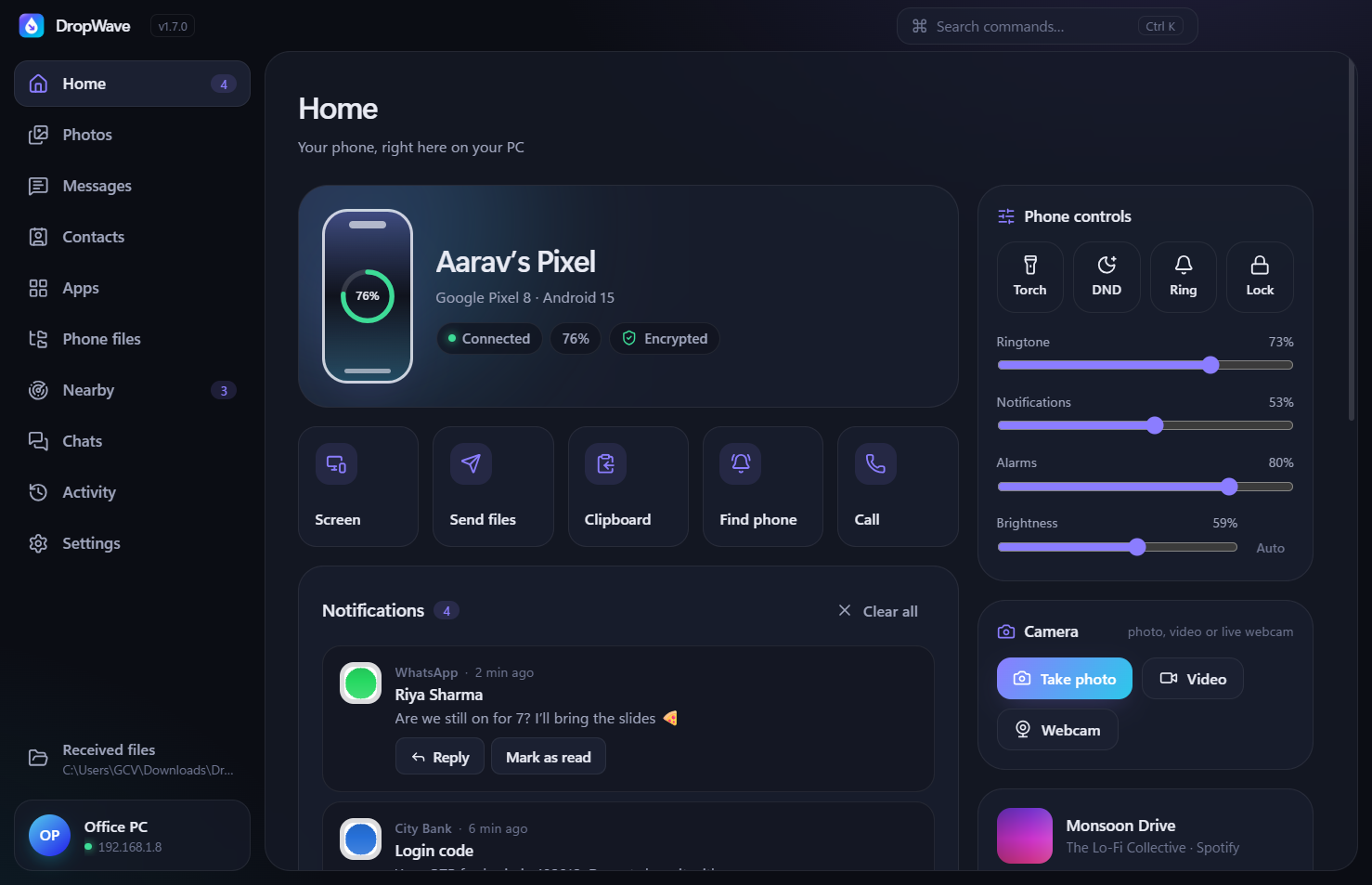
- Phone as webcam: the phone's camera live in a window: front / back, mirror, rotate, torch, snapshot, keep on top and a clean view with no buttons (H).
- DropWave Camera (Windows 11): turn it on in the webcam window and pick DropWave Camera in Zoom, Meet, Teams or the Camera app. The installer adds it for you.
- Camera for the PC: Take photo opens the phone's camera; the photo lands on the PC and in the clipboard, ready for Ctrl+V. Video too.
- Contacts: search, call (rings out from the phone), message or copy a number.
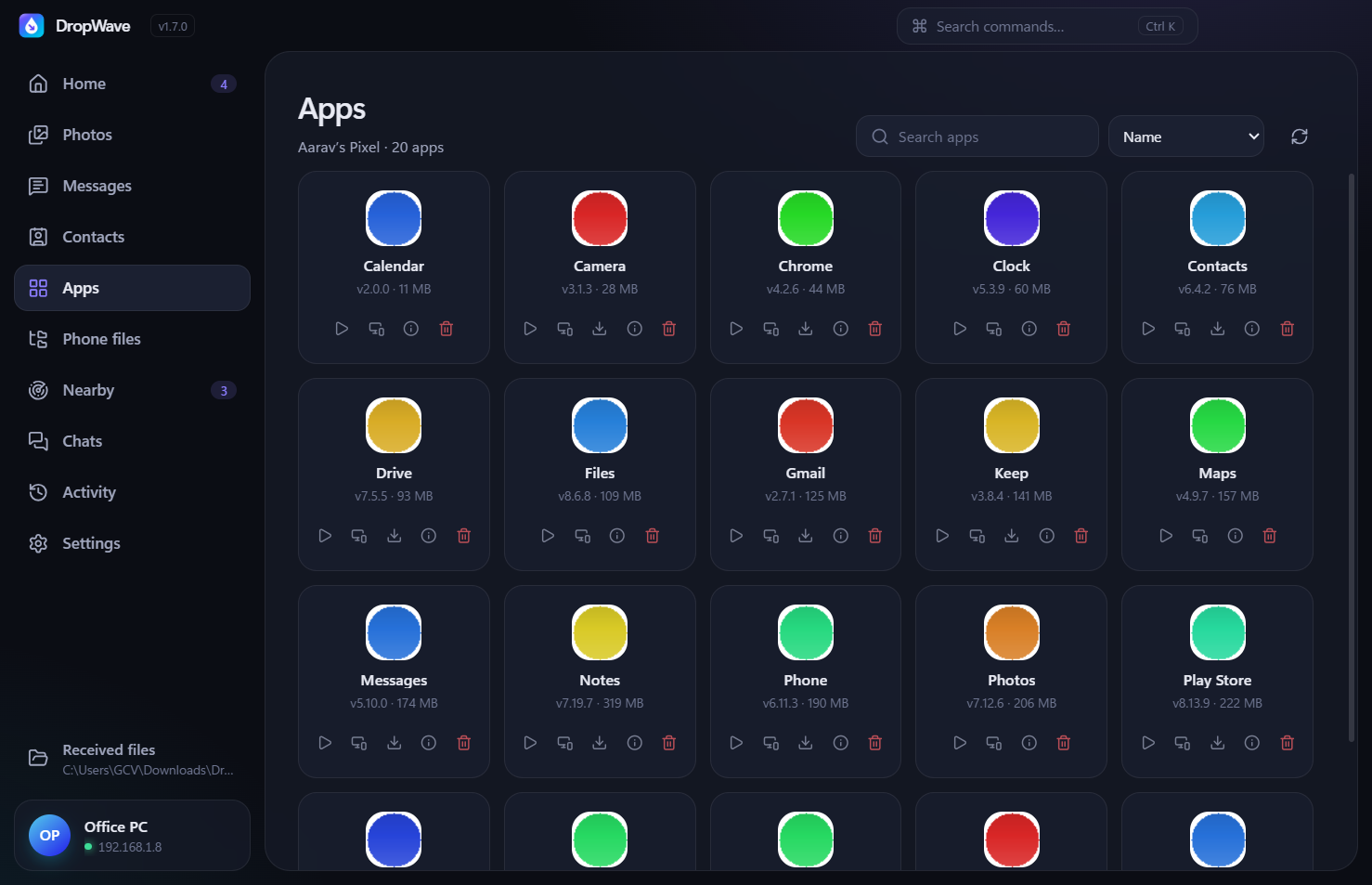
- Apps: all the phone's apps with icons: open on the phone or in a window on the PC, app info, uninstall (the phone asks first), copy the APK.
- Phone controls: torch, Do Not Disturb, ring / vibrate, ringtone, notification and alarm volumes, brightness, lock.
- Styles: Aurora, Frost (see-through over the Windows 11 backdrop), Petal, Ink and Dots, each in light and dark. Settings › Appearance › Style, or Ctrl+K.
- Photo auto-backup to Downloads › DropWave › Phone Backup by year and month, and the phone's sound while showing its screen.
New on the phone
- Works while locked: DropWave keeps answering the PC when the screen is off or another app is open. Tap Allow on Keep working when the phone is locked once (on Realme / Oppo / Vivo / Xiaomi also allow background activity in App info › Battery).
- Privacy tab: a Share with PC switch for every feature, one Pause sharing switch, and Android's own access for each with Allow / Turn off.
- Control from PC switches itself off when a banking or UPI app opens (on by default), or when screen sharing ends (optional).
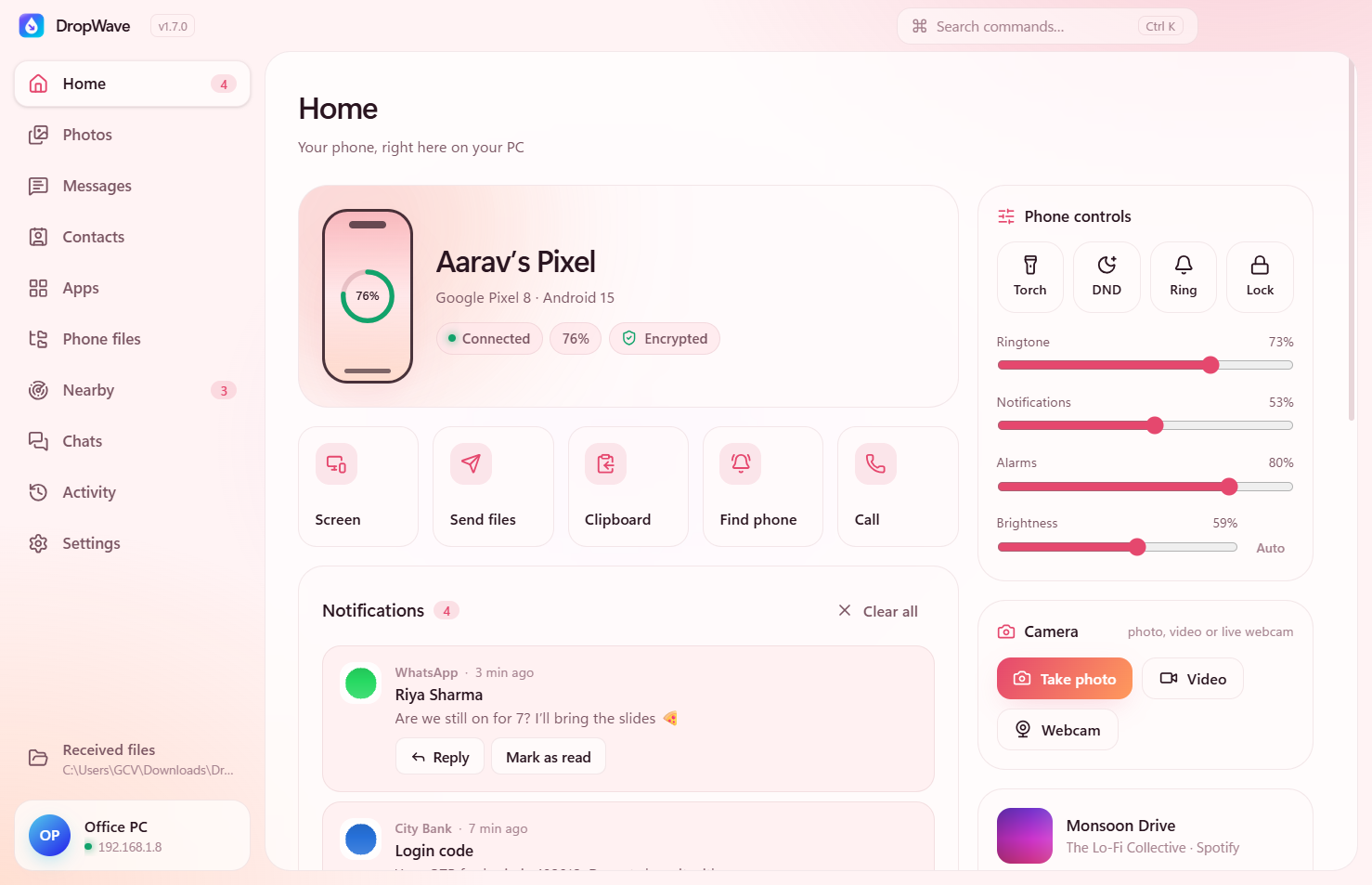
(Screenshots use a demo phone with made-up names and numbers.)
Install
- PC:
DropWave-Setup-1.8.0.exe(Windows 10/11; DropWave Camera needs Windows 11). Already installed? It updates itself; look for Restart to update. - Android:
DropWave-Android-1.8.0.apk(Android 10+), install over the old one. Then open Privacy to see what you share.
DropWave 1.7.0: your phone, on your PC
📱 Your phone, on your PC
Connect the DropWave Android app and your phone is right there on the PC. Everything goes over your own Wi-Fi: no cloud, no account.
New on the PC
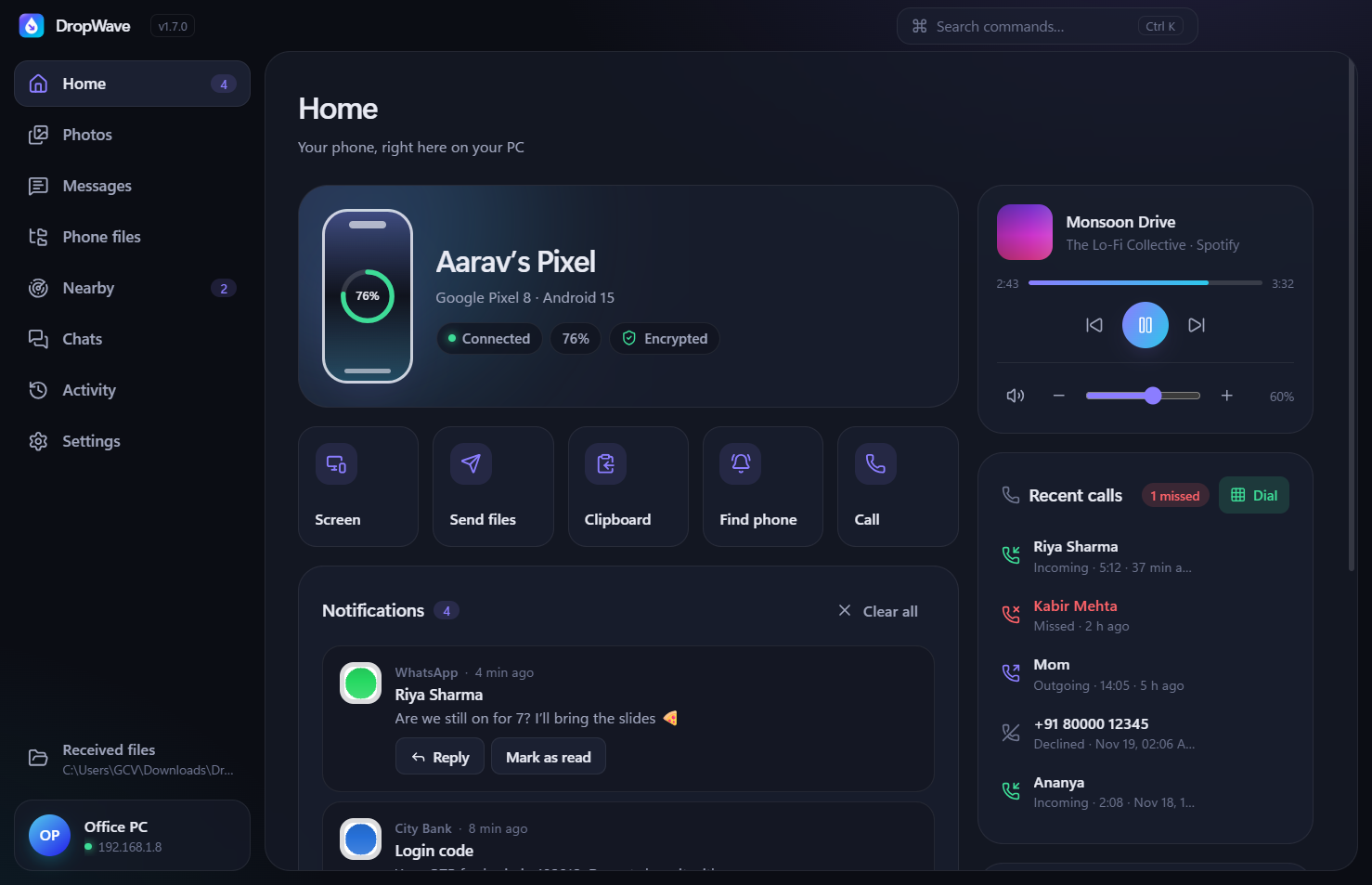
- Home: the phone's battery, what's playing (play / pause / next / seek and the phone's volume), and Find my phone (rings even on silent).
- Notifications: reply, use the app's own buttons, dismiss or clear all. One-time codes get Copy code. New ones pop up on Windows too.
- Calls: see who's calling and Answer / Decline / Hang up from the PC, also for WhatsApp, Telegram and Signal calls. Dial pad, call back and recent calls. (The call itself is on the phone.)
- Messages: your SMS on the PC: read, reply and start new messages, sent by the phone with its SIM.
- Photos: the camera roll by day (photos, videos, screenshots). Pick some and Download to PC, originals with their own dates.
- Phone files: browse the phone's storage and copy files to the PC.
- Phone screen: see the phone in a window and use it with your mouse and keyboard (click, drag, scroll, type, Back / Home / Recents, screenshots).
- Clipboard sync: copy on one, paste on the other. Passwords from password managers are never sent.
- Command palette (Ctrl+K), a timeline of what moved between devices, and five colour themes in light and dark.
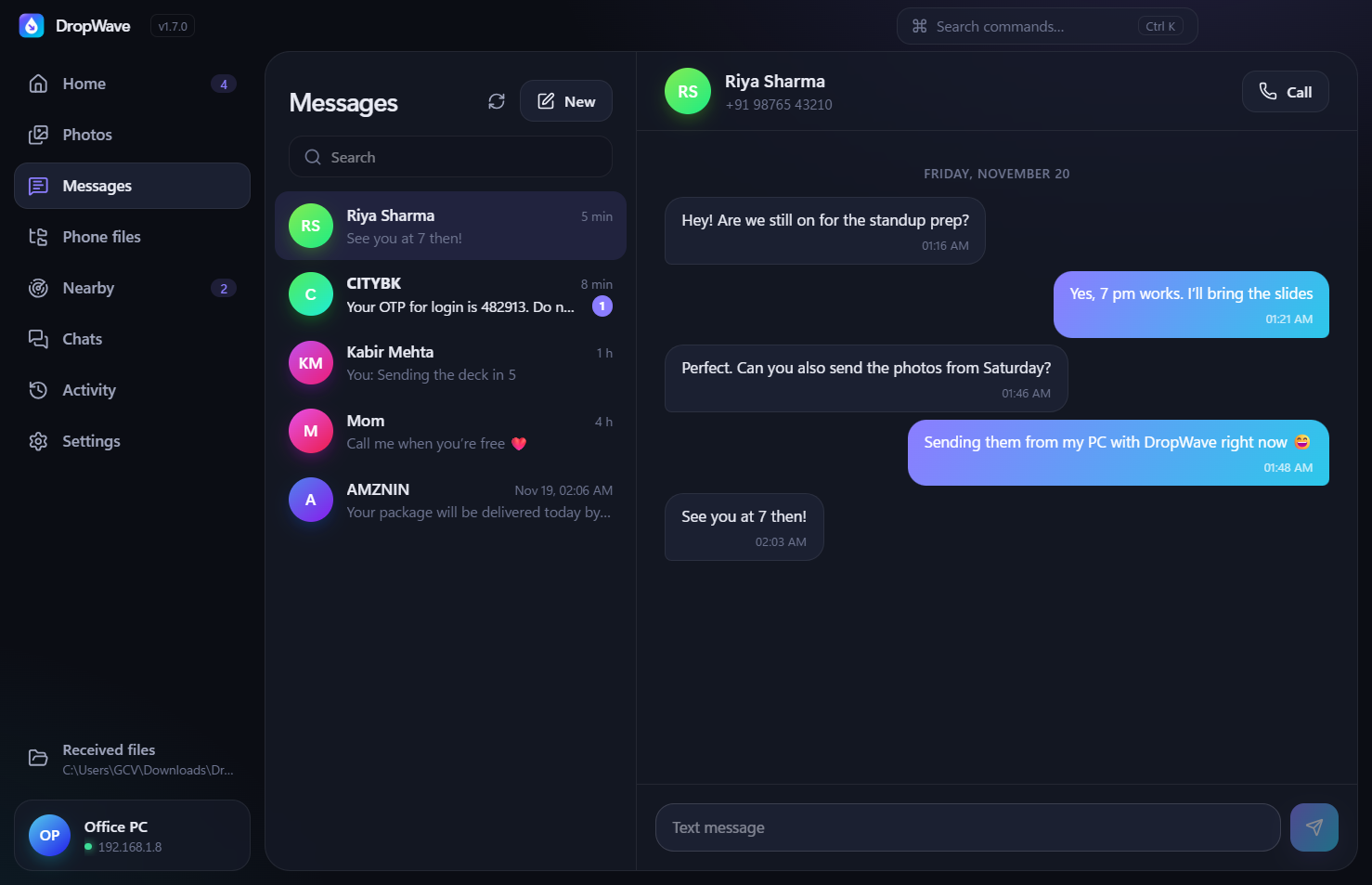
New on the phone
- New look: connection card with ping, grouped controls and bottom tabs (Home · Chat · Activity).
- Control PC: the phone becomes a touchpad and keyboard, plus a Deck of shortcuts (media, volume, switch app, screenshot, slides, Lock, Sleep). The PC asks first and shows "… is using your mouse · Stop".
- Rebuilt in Kotlin.
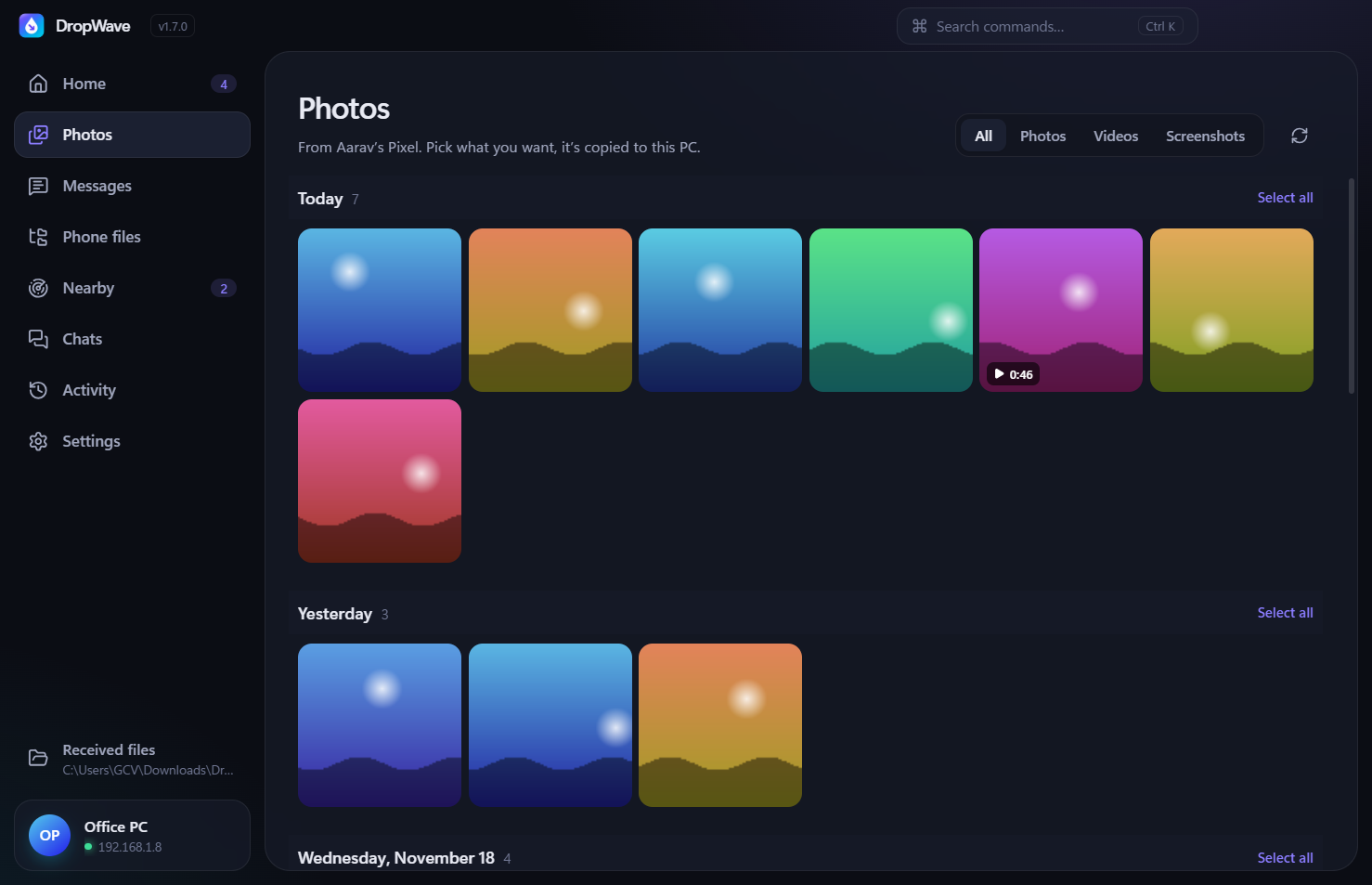
(Screenshots use a demo phone with made-up names and messages.)
Permissions, only for what you use
Each feature has its own card on the phone's Home and Android asks once: notification access, photos, calls, SMS, all-files access, Accessibility (for controlling the phone from the PC). If Android says "Restricted setting", open DropWave's App info › ⋮ › Allow restricted settings first.
Nothing is stored on the PC unless you download it. Requests from the phone are only accepted from a device that is connected right now; photos, files and the screen stream need a one-time token the PC created for that request.
Install
- PC:
DropWave-Setup-1.7.0.exe(Windows 10/11). Already installed? It updates itself; look for Restart to update. - Phone:
DropWave-Android-1.7.0.apk(Android 10+). Install over the old version; paired PCs are kept.
Tested on a real Android 14 phone: notifications and OTP, clipboard, music and volume, calls (SIM and WhatsApp), dial, SMS, photos, files, screen mirroring and control.
SHA-256
- Windows:
8679501A7E8EF71031D5F7924C26A832699D5B3757409B39D4FDE1D2A3805F6A - APK:
61A9EDA2ED4C09076250DEB964B3CB9E48BBE73678D97B325D7665BB481A9F90
DropWave 1.6.0: calls, screen sharing and remote control
📞 Calls, screen sharing and remote control
Everything goes device to device on your Wi-Fi (WebRTC). Nothing passes through a server.
Calls
- Voice and video calls between PCs and phones: PC ↔ PC, PC ↔ phone, phone ↔ phone.
- Incoming calls ring with Accept / Decline. Mute and camera on/off during the call.
Screen sharing
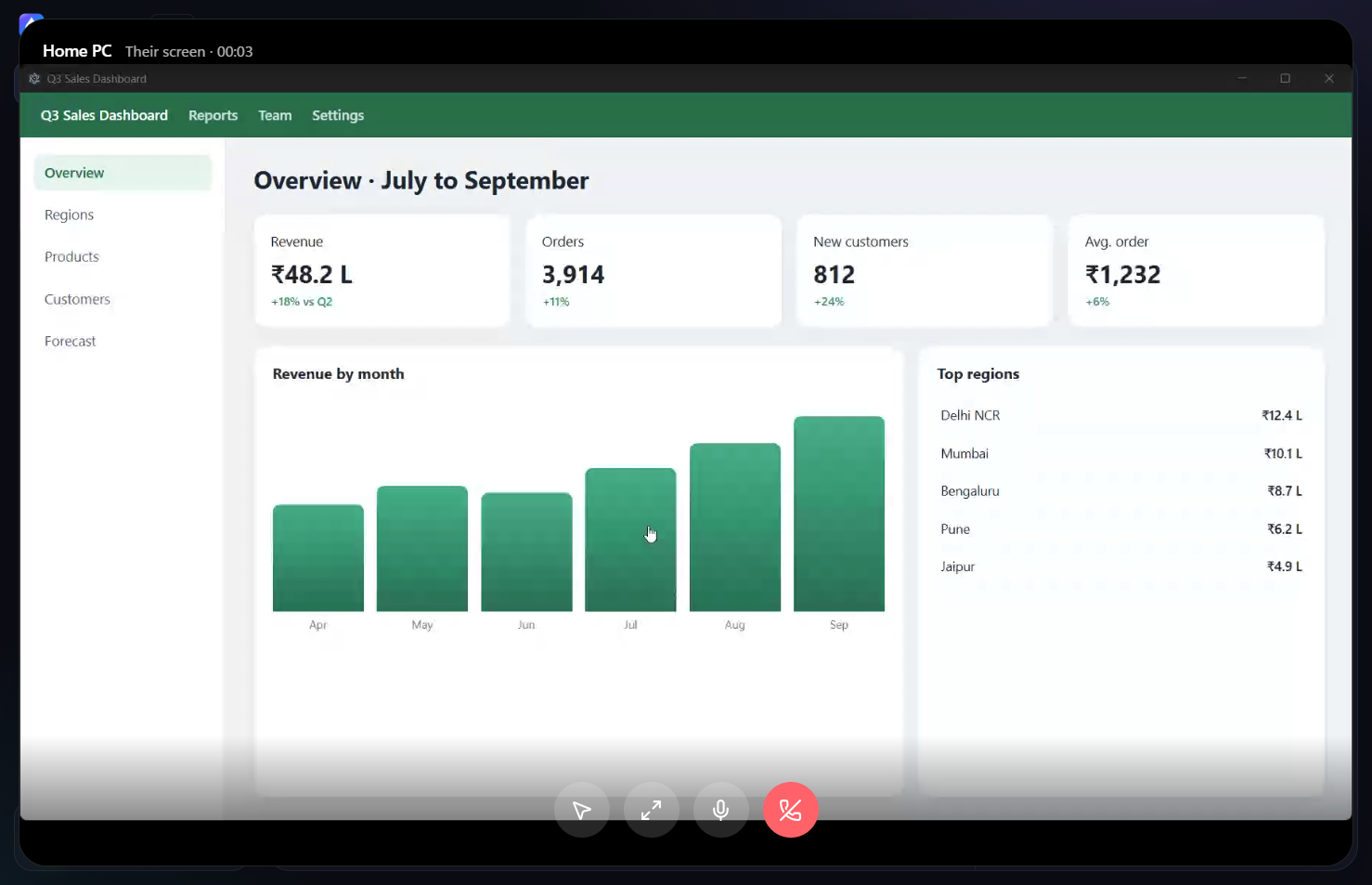
- Share your screen with another PC or a phone, or View another PC's screen (they must accept).
- Talk while you work: both sides' microphones are on during a screen share. The sharing PC sends its sound and its microphone together; Mute silences only the microphone.
Remote control (Windows)
- While viewing a PC's screen, press Control. The other PC asks "… wants to control your mouse & keyboard" (Allow / Deny).
- From a PC: mouse, clicks, scroll, typing and shortcuts (Enter, arrows, F-keys, Ctrl+C…).
- From a phone: goes full screen in landscape. Tap = click, hold = right-click, drag = drag, two fingers = scroll, plus a keyboard with Esc / Tab / arrows / Ctrl+C / V / Z.
- The person sharing always sees an orange "… is in control · Stop" button. Ending the share ends control too.
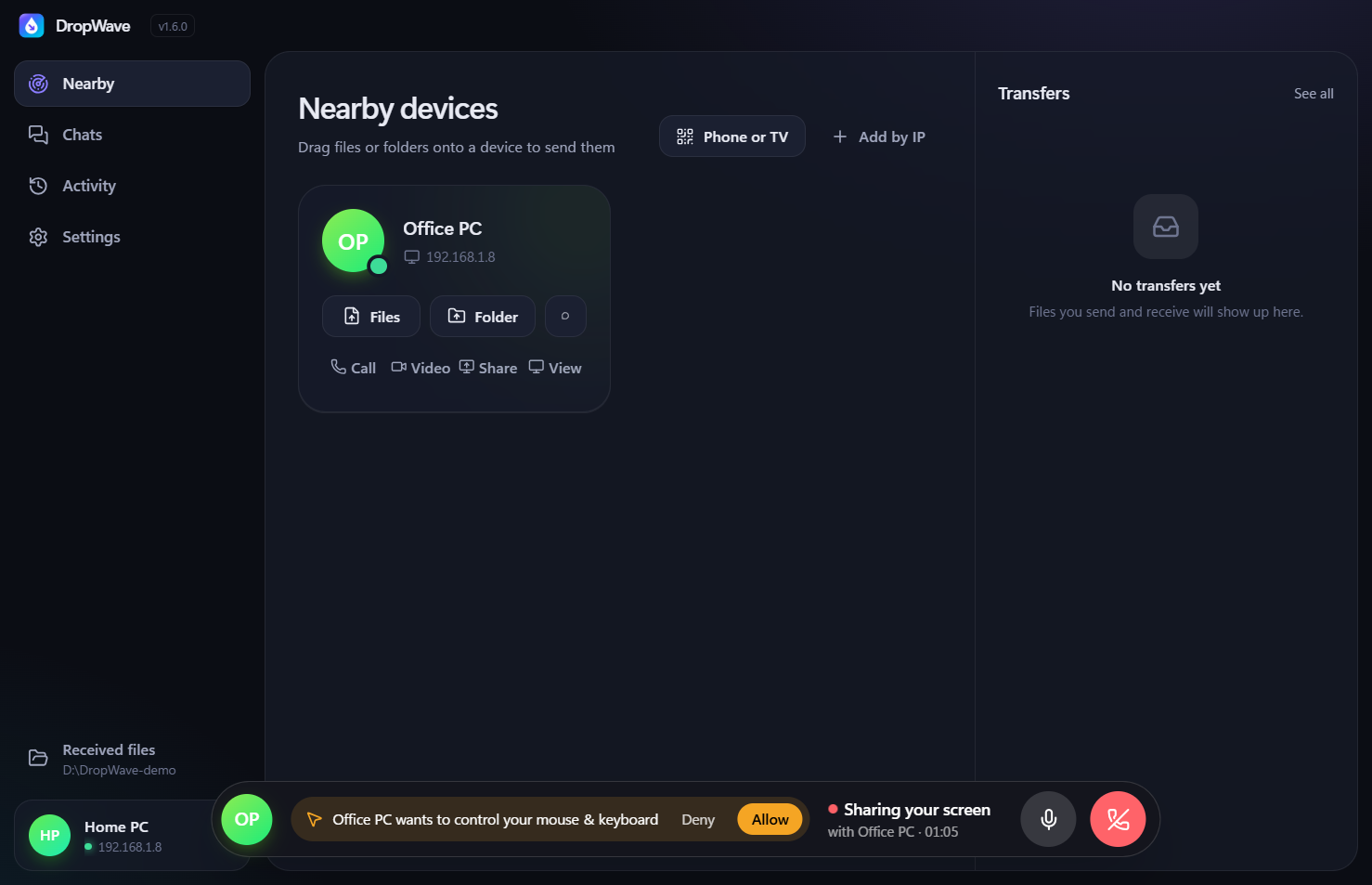
(Screenshots use two demo PCs sharing a demo dashboard window.)
Fixes
- Android app: if the PC it was connected to is off, it goes back to the list of PCs instead of a blank page.
Install
- PC:
DropWave-Setup-1.6.0.exe(Windows 10/11). Already installed? It updates itself; look for Restart to update. - Phone:
DropWave-Android-1.6.0.apk(Android 10+). Install over the old version; paired PCs are kept. Android asks for the microphone / camera only when a call needs them.
Calls between two PCs need both on 1.6.0. On a TV or in a plain browser you can watch a shared screen; calls need the app.
Tested on a real Android 14 phone and with two PCs: screen sharing (1920×1080), voice and video both ways, remote control from a phone and from a PC.
SHA-256
- APK:
E525508B38C60F3D031807AAFCA1C69F3D49A0C80C8E433587AE944144CC365F
DropWave 1.5.0: encrypted phone connection + Android notifications
🔒 Encrypted phone connection
The Android app now talks to your PC over HTTPS (TLS 1.3). Your PIN, files, messages and video streams are encrypted on the Wi-Fi.
- Each PC makes its own certificate. The app remembers (pins) it the first time you pair, then refuses any other certificate and never falls back to plain HTTP for that PC.
- If a PC's certificate changes (for example after reinstalling DropWave), the app warns you and asks for the PIN again.
- Already paired? Nothing to do: update both apps and the connection upgrades itself. You'll see a 🔒 next to "Connected".
- The no-install browser page (TVs, iPhones) still uses plain HTTP; use it on networks you trust.
🔔 Notifications on Android
- Files from your PC show a notification with Download and Decline buttons. Download saves to
Download/DropWavewithout opening the app. - Messages show a notification with the sender and the text.
- DropWave stays connected in the background (a quiet "Connected to …" notification). Swipe it away from Recents to stop.
- Android asks once for permission to show notifications.
Install
- PC:
DropWave-Setup-1.5.0.exe(Windows 10/11). Already installed? It updates itself; look for Restart to update. - Phone:
DropWave-Android-1.5.0.apk(Android 10+). Install over the old version; your paired PCs are kept.
Encryption needs both updated. The new app still works with older PCs (without encryption) until you update them.
Tested on a real Android 14 phone: pairing, PIN login, chat both ways, notifications, thumbnails, viewer, downloads and uploads over TLS (SHA-256 verified).
SHA-256
- APK:
7A2521B4250A658B2141178359DF4D3E1C8FF34AB2FB706F5B474BA7C2AE1475
DropWave 1.4.1: drag & drop fixed
🛠️ Drag & drop fixed
- Dropped files now actually send. In 1.4.0 dropping files or folders on a device did nothing (the files were lost on the way into the app). Fixed.
- No more stuck overlay. The "No devices to send to yet" overlay could stay on screen after a drag. It now goes away as soon as you drop, cancel or drag out of the window.
- Drop anywhere. Drop files anywhere in the window (not just on a device) and DropWave asks which device to send them to. No devices yet? The picker waits and lets you connect a phone or TV.
Download: DropWave-Setup-1.4.1.exe (Windows 10/11). Already installed? It updates itself; look for Restart to update.
The Android app is unchanged: keep using DropWave-Android-1.4.0.apk from the 1.4.0 release.
DropWave 1.4.0: Android app
📱 New: DropWave for Android
A real Android app (Android 10+), on top of the no-install browser option.
- Finds your PCs by itself. It scans your Wi-Fi; enter the PC's PIN once and it's remembered.
- Share → DropWave from Gallery, Files, WhatsApp, Chrome… sends photos, videos, files and links straight to your PC.
- Received files go to Download/DropWave, with Android's download notification.
- Back never disconnects. DropWave keeps running in the background.
- Chat, Play now (stream videos without downloading), phone ↔ phone and TV, same as before.
Tested on a real phone (Android 14): Wi-Fi scan, PIN, chat both ways, Gallery → Share → DropWave, downloads, video streaming, Back button, opening from a share while the app was closed.
Install
- Update DropWave on your PC to 1.4.0 (it updates itself, or use the installer below). The app needs 1.4.0 on the PC.
- On the phone, download
DropWave-Android-1.4.0.apkbelow and open it. Android asks to allow installs from this source the first time.
🖥️ Windows 1.4.0
- Lets the Android app connect (PIN-based app key, locked down to the app).
Download: DropWave-Setup-1.4.0.exe (Windows 10/11). Already installed? It updates itself; look for Restart to update.
SHA-256
- APK:
3BAD5D8931039E8109B159ABFDE9396648241949C4358AC238967643109D794D