Repository navigation
How it works and development
            ┌──────────────┐   events   ┌──────────────────────┐
  task ───▶ │    agent     │ ─────────▶ │  TUI / plain output  │ ──▶ you
            │ (loop + AI)  │ ◀───────── │ (approvals, cards)   │
            └──────┬───────┘  decisions └──────────────────────┘
                   │ tools
   ┌───────────────┼───────────────────────────────────────────────┐
   │ system_info  list_steps  run_step  run_command  disk_usage   │
   │ read_file  write_file  remember  propose_actions             │
   │ config_hints  web_search  fetch_url                          │
   │ mac_inventory  mac_change  mac_policy                        │
   └───────────────┬───────────────────────────────────────────────┘
                   │ risk classifier (safety)
                   ▼
           runner: zsh -lc, stdin closed, timeout, live output
- omega sends the model a system prompt (role, workflow, rules, disabled steps and notes from previous runs) and the task.
- The model answers with text and/or tool calls.
- Each call goes through the approval policy: it runs, you are asked, or it is rejected. Read-only calls from the same answer run together; a change, or a question, keeps the batch in order. Results go back to the model trimmed to the first 2 KB and the last 8 KB, including when a single line is huge.
- When a catalogue step fails and the model is on the fast tier, omega switches to the smart tier for the rest of the session.
- The loop continues until the model stops asking for tools. In interactive mode you can keep the conversation going.
Code layout:
cmd/omega/          entry point
cmd/omega-gui/      desktop app (Wails, build tag gui) and its frontend
internal/cli/       commands (setup, model, docker, mac, auth, config, steps, notes, logs, doctor), key checks
internal/agent/     agent loop, tools, config hints, web tools, prompt, events, run log
internal/llm/       providers (Anthropic SDK, OpenAI-compatible, OpenCode), tiers, prices
internal/safety/    command risk classifier
internal/runner/    command execution in its own session with live output
internal/sudo/      sudo bridge: wrapper, askpass helper and password checks
internal/steps/     step catalogue
internal/macos/     login and background items, menu bar, Dock, keyboard shortcuts, defaults, undo journal
internal/ui/        TUI (Bubble Tea, glamour), selection cards, plain output
internal/skills/    skills of the AI coding agents: inventory, audit, install, share, update, remove
internal/gui/       bridge between the agent's events and the desktop app's window
internal/i18n/      translations (en, es, fr, de, pt)
internal/demo/      scripted session for screenshots
internal/site/      builds the website: one page per language in internal/i18n
internal/config/    configuration and paths
internal/secrets/   API keys: macOS Keychain, Windows Credential Manager, Linux Secret Service or a 0600 file
site/               the website's templates and its strings in each language
docs/               website as GitHub Pages serves it (built from site/) and README assets
docs/manual/        this manual
Formula/omega.rb    template of the Homebrew formula (not an install path)
Casks/omega-app.rb  the desktop app's cask, copied to the tap by a release
make build     # builds ./bin/omega
make test      # risk classifier, agent loop, model plan, cards, translations, omega mac
make lint      # gofmt + go vet
make cross     # linux, macOS and windows binaries under ./bin
./bin/omega --demo                 # scripted session, no API calls, no real commands
scripts/capture.sh # re-record README and Pages captures from that binaryThe website is in the languages the app speaks. site/ holds the pages as
templates (index.html, privacy.html, 404.html) and one table of strings
per language (site/i18n/en.json, es.json, fr.json, de.json,
pt.json). make site writes docs/: English at the root and each other
language in its folder (docs/es/, docs/fr/, ...). GitHub Pages serves
docs/ as it is, so the built pages are committed.
make site # writes docs/*.html and docs/<lang>/*.html from site/To change a text, edit it in site/i18n/en.json and in the other four
tables, then run make site. To change the layout, edit the template. Do not
edit docs/*.html by hand: go test ./internal/site fails when docs/ is
not what site/ builds, when a language the app has is missing or lacks a
string, and when a translation changes a command, a key or the markup.
The styles, the script and the captures (docs/styles.css, docs/main.js,
docs/assets/) are shared by every language and edited in place.
Two parts of the page come from the program itself, not from the tables.
The step catalogue (docs/catalog.json and one per language) is
internal/steps written out, with each step's command and risk, so it
changes when the catalogue does. The risk examples are classified by
internal/safety when the page is built, and the box where a visitor types
a command runs that same package in the browser: make site compiles
internal/site/wasm to docs/classify.wasm and copies Go's loader next to
it (docs/wasm_exec.js). Run make site after changing the catalogue or the
classifier; the test catches a stale catalogue, not a stale classify.wasm.
The page's captures are the ones under docs/assets/. The session at the top
moves a camera over two of them (confirm.png, summary.png): each step in
the template names a rectangle of the capture in its own pixels, so check
those rectangles after recording the captures again.
The GitHub wiki holds this manual,
page by page. It is a copy: edit docs/manual/, then write the wiki's pages
from it into a clone of omega.wiki.git and push that.
git clone https://github.com/lcajigasm/omega.wiki.git ../omega.wiki
scripts/sync_wiki.py docs/manual ../omega.wiki # every page but Home, Roadmap, sidebar and footercmd/omega-gui is the same agent in a window, for macOS, Linux and Windows:
a sidebar with seven views that stay one click away while a session runs.
Maintenance has the tasks and a field to ask in words; Session has the
steps with their live output and the cards for approvals, selections and the
sudo password; History reads the saved transcripts; Tools runs the
checks that need no model and no key (registry latency, listening ports, hosts
and proxies, SSH keys, secrets left in the shell history, the privacy review,
large and duplicate files, stale build folders, repositories, the schedule,
snapshots and the blueprint export), each one the omega command of the same
name with what it prints shown in the window; Skills lists the skills of
your AI coding agents and installs, shares, updates and removes them, as
omega skills does; Status runs the
checks of omega doctor, turns steps on and off and shows the notes; and
Settings has the provider and its key, the model, the language and the
rest of omega config set. The language changes at once, without restarting.
It is built with Wails on the system webview and shares
the agent, the safety policy, the configuration and the translations with the
command. What the views ask of omega is in internal/cli/guiapi.go, and the
tools in internal/cli/toolsapi.go: a list of commands the app may run, so a
tool is never anything the terminal does not have. The commands that delete
(omega git clean, omega uninstall, omega privacy --clean) ask on a
terminal and are not offered in the window. Removing a skill is: the button
asks for a second click, links are deleted and folders go to the trash.
A release publishes
omega-macos-universal.dmg (Omega.app, Apple Silicon and Intel),
omega-gui_<version>_linux_{amd64,arm64}.tar.gz and
omega-gui_<version>_windows_{amd64,arm64}.zip, and on macOS it installs with
brew install --cask lcajigasm/tap/omega-app. The app is ad-hoc signed and
not notarized, so macOS quarantines it: run
xattr -dr com.apple.quarantine /Applications/Omega.app after installing.
The Windows build is not signed either, and SmartScreen warns on first run.
The command stays its own formula; the two share configuration and keys.
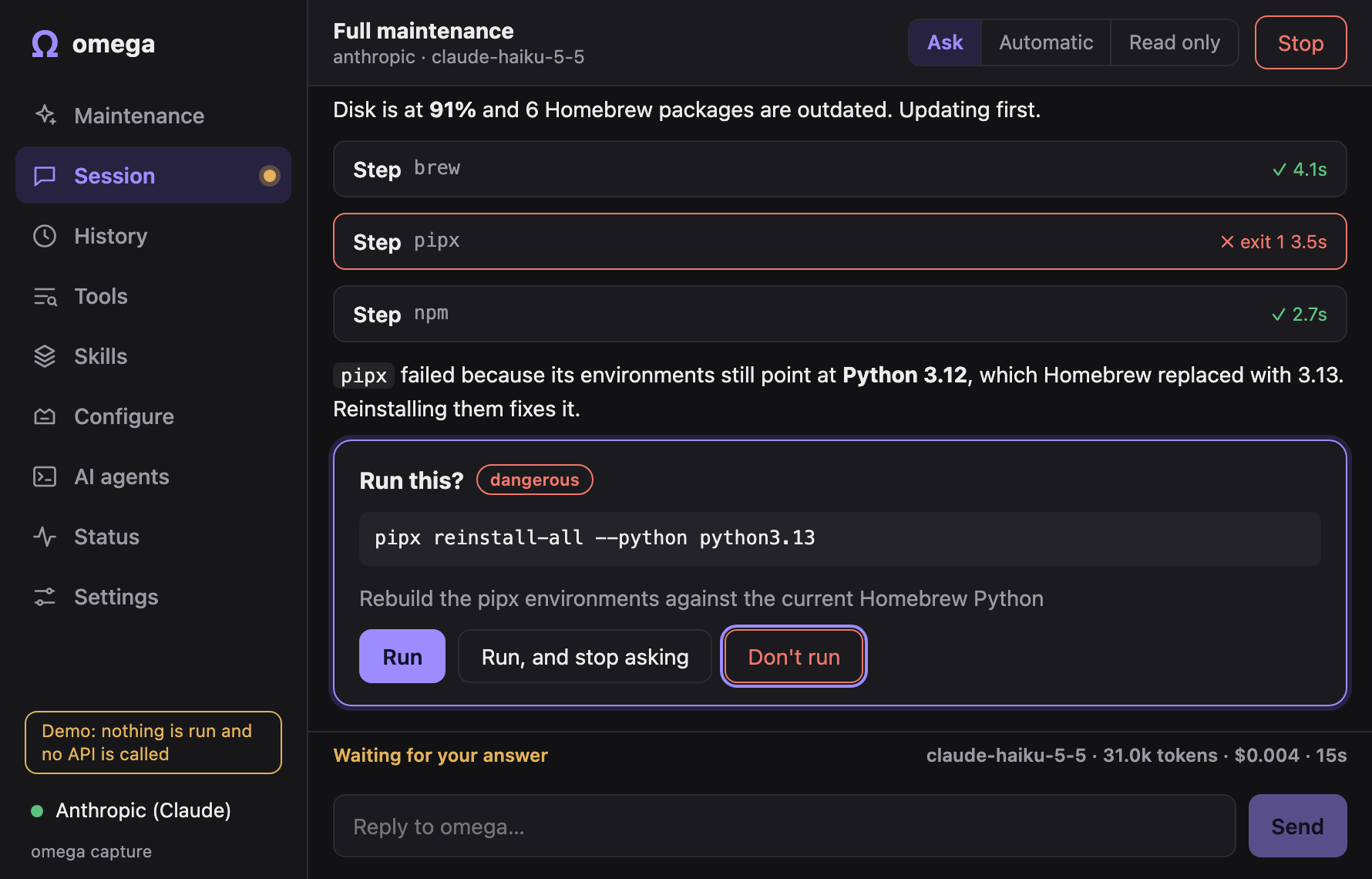
Recorded from the app by scripts/capture_gui.mjs, in its demo mode.
make gui                           # builds ./bin/omega-gui (cgo on macOS and Linux)
make gui-app                       # macOS: wraps it in ./bin/Omega.app, ad-hoc signed
make gui-dmg                       # macOS: universal app in ./bin/omega-macos-universal.dmg
./bin/omega-gui --demo             # scripted session, no API calls, no real commands
node scripts/capture_gui.mjs       # re-record the app's captures (docs/assets/gui-*.png)
On Linux it needs libgtk-4-dev and libwebkitgtk-6.0-dev to build and GTK 4
with WebKitGTK 6.0 to run. The agent's events reach the window through
internal/gui, which has no toolkit in it and is tested like the rest.
Terminal captures in the README are produced only by scripts/capture.sh
(see CONTRIBUTING.md).
To teach omega mac about an app, add its bundle id to a category in
internal/macos/policy.go, or its default global shortcut to knownAppHotkeys in
internal/macos/hotkeys.go. To add a step, edit internal/steps/steps.go (and add a step.<id>
translation). To add configuration hints, edit internal/agent/hints.go. To add a
provider, implement llm.Provider in internal/llm/ and register it in
llm.Providers and llm.New.
A release is one click. With CI green on main, start the release workflow
and say which part of the version goes up:
gh workflow run release.yml -f bump=minor     # 0.18.0 -> 0.19.0; patch and major work the same
gh workflow run release.yml -f version=1.0.0  # or name the version
The same form is in the Actions tab, under release → Run workflow.
The workflow works out the next version from the latest tag
(scripts/next_version.sh), runs the linter and the tests on main, creates
the tag on that commit and publishes everything below. It refuses to start
from a branch other than main or for a tag that exists. Pushing a tag
vX.Y.Z by hand still releases that tag the same way.
The workflow builds the archives, publishes them with SHA256SUMS on GitHub
Releases, and rewrites Formula/omega.rb in this repository (version and the
sha256 of each archive) on main. That commit goes on top of main as it is
when the builds end, which may be ahead of the tag. That file is a template,
not an install path. The workflow does not move the tag.
The same run builds the desktop app: the universal disk image on a macOS
runner (scripts/package_macos.sh), the Linux archives on amd64 and arm64
runners and the Windows archives by cross-compiling. SHA256SUMS lists them
too, and Casks/omega-app.rb here gets this version and the sha256 of the
disk image.
The same run pushes the container image to GitHub Packages
(ghcr.io/lcajigasm/omega, from the Dockerfile) for linux/amd64 and
linux/arm64, tagged with the version, its minor and latest, with a
provenance attestation and an SBOM. It uses the workflow's own token. CI
builds and runs the same image on every pull request. To build it here:
docker build --build-arg VERSION=$(git describe --tags --always) -t omega .brew install reads lcajigasm/homebrew-tap,
and the tap follows a release by itself: its update workflow reads this
repository's latest release four times an hour and rewrites
Formula/omega.rb (the command) and Casks/omega-app.rb (the desktop app)
with the version and the checksums from SHA256SUMS. There is no pull request
to merge. GitHub can deliver that schedule late, so when the
HOMEBREW_TAP_TOKEN secret exists here (a fine-grained token with Actions
read and write on the tap) the release starts the tap's update at once;
without it the release is just as complete and the tap catches up on its next
run.
verify-taps reads Formula/omega.rb and Casks/omega-app.rb from the tap
on the public GitHub API (no token) and compares their version with the tag.
It tries again every 5 minutes for up to 75 minutes, and the run fails if
either is still on another version. A release created by the workflow token
does not start other workflows, so the release job starts this one. Check a
tag by hand with:
gh workflow run verify-taps.yml --ref main -f tag=v0.10.0