Repository navigation
Your tools
omega tune            # guided: proposals on a card, applies what you pick
omega tune --auto     # automatic: applies low-risk improvements itself, offers the rest
omega does not ship a list of "best settings" that would go stale. Instead the agent gets three tools:
-
config_hints: for each tool installed on your Mac (topgrade, Mole, Homebrew, npm, pnpm, pip/pipx, uv, git, Docker Desktop, zsh, Oh My Zsh, mas, Rust, Go, Time Machine and Spotlight), where its configuration lives, read-only commands to inspect it, what is usually worth reviewing, and its official docs. -
fetch_url: reads a documentation page or raw file as text. -
web_search: searches the web when the official docs are not enough.
Every proposal comes with what changes, why, its impact and its source. Configuration edits always show a diff and keep a timestamped backup. Fetched pages are treated as untrusted data: the agent is told never to follow instructions found in them.
omega dev               # guided review with AI
omega dev status        # what is installed, by which manager, and what stands out (no AI)
omega dev install       # pick tools from the catalogue; or: omega dev install fzf mise
omega dev activate      # add the shell lines installed tools still need to ~/.zshrc (or ~/.bashrc)
omega's catalogue covers languages (Node.js, Python, Go, Rust, Ruby, Java, Deno, Bun, PHP, .NET, Zig, Elixir, Swift), version managers (mise, asdf, fnm, nvm, Volta, pyenv, uv, conda, rbenv, rustup, SDKMAN!), package managers and build tools, shell tools (Starship, fzf, zoxide, direnv, Atuin, eza, bat, ripgrep, fd, jq, tmux, Neovim…), git tools, container and cloud CLIs, and AI coding assistants (Claude Code, Codex, Gemini CLI, opencode, Ollama).
omega dev status prints each installed tool with its version and what
installed it (Homebrew, mise, nvm, cargo, an app bundle, macOS or the Linux
package manager), then the findings:
| Finding | Why it matters |
|---|---|
| one language installed by several version managers | it is unclear which version runs, and each one slows the shell |
a command found several times on PATH
|
the copy that runs may not be the one you update; Homebrew ahead of macOS's own copy is normal and not reported |
PATH entries that repeat or do not exist |
measured in a fresh login shell, not in omega's own environment |
| a tool installed but not activated | fzf, zoxide, direnv, Starship, mise and others do nothing until their line is in ~/.zshrc, or ~/.bashrc when your shell is bash (an Oh My Zsh plugin counts) |
| shell startup time | flagged above 500 ms |
| versions kept by each manager | how many and how much space, so old ones can go |
omega dev install runs the install command shown on the card. On a Mac that
is Homebrew for almost everything. On Linux omega picks, per tool: Homebrew when
it is installed and has the formula; otherwise the distribution's package
(sudo apt-get install, dnf, pacman or zypper, with each distribution's
package name); otherwise the tool's own installer where it has a well-known one
(rustup, mise, uv, Bun, Deno, Starship, fnm, pyenv, Atuin, Ollama, Claude Code…).
Tools with none of the three are detected but not offered. Commands that use
sudo ask for your password once. A tool installed by its own script
(curl … | sh) always asks for a typed yes first, from the command line and
from the agent, even with --yes, and is refused when there is no terminal to
ask at.
When a tool needs a line in the shell's startup file, omega offers to add it to
~/.zshrc (zsh) or ~/.bashrc (bash, with the bash form of the line), after
copying the file to <file>.omega-bak-<date>. For any other shell it prints the
lines for you to adapt.
With AI, omega dev goes further: it checks runtimes against their official
end-of-life pages, offers to remove versions no project needs with each
manager's own command, tunes configuration from the current docs, lists stale
build folders (node_modules, target, .venv, Pods… in projects untouched
for 60 days) and suggests at most five tools that fit what you already use.
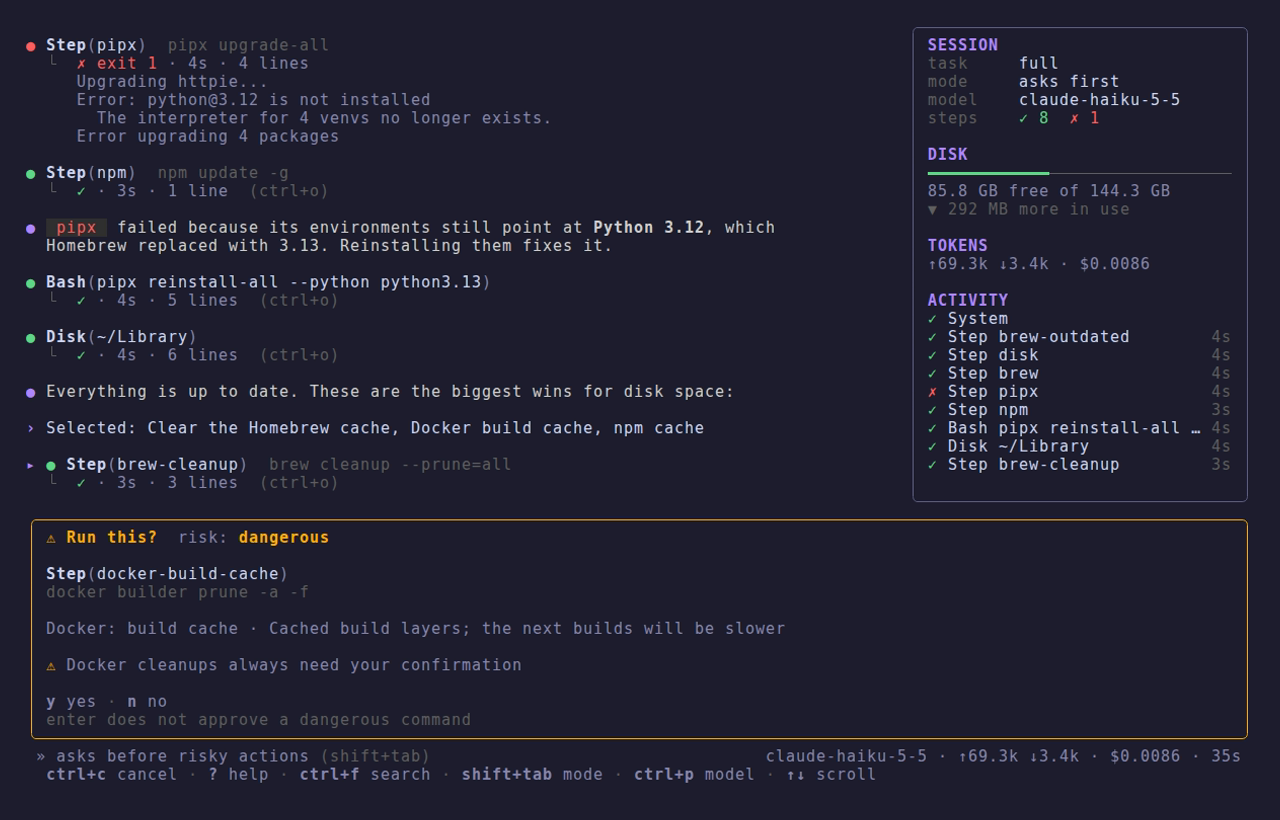
Docker tends to take tens of gigabytes. omega docker handles it without AI:
- starts Docker Desktop if you want (it asks first);
- shows images, containers, volumes and build cache with what is reclaimable, plus the size of Docker Desktop's disk image;
- lets you tick what to clean on a card: stopped containers, dangling images, all unused images, build cache, unused volumes (marked as deleting data);
- asks for a final confirmation and runs only what you ticked;
- shows how much Docker uses afterwards and how to give the space back to macOS.
The agent has the same Docker steps. Docker cleanups always need your
confirmation, even with --yes or after "yes to all", and the agent is told
never to prune volumes unless you picked that explicitly.
A skill is a folder with a SKILL.md that tells a coding agent how to do one
kind of task. Every agent reads its own folder of them and most also read the
shared one, so the same skill ends up copied by hand, linked, or missing where
you expected it. omega skills looks after them without AI and without a key:
omega skills                              # the agents on this machine and every skill
omega skills audit                        # only what is wrong
omega skills install anthropics/skills --skill pdf
omega skills sync                         # every installed agent sees every skill
omega skills update                       # bring the installed ones up to date
omega skills remove pdf
These are the personal folders omega reads, as each agent's documentation states them:
| Agent | Reads |
|---|---|
| Claude Code | ~/.claude/skills |
| Codex CLI | ~/.agents/skills |
| Gemini CLI |
~/.agents/skills, ~/.gemini/skills
|
| opencode |
~/.config/opencode/skills, ~/.claude/skills, ~/.agents/skills
|
| Cursor |
~/.agents/skills, ~/.cursor/skills, ~/.claude/skills
|
| GitHub Copilot CLI |
~/.agents/skills, ~/.copilot/skills
|
An agent counts as installed when its command is on PATH or its
configuration folder exists. Skills kept inside a project (.claude/skills,
.agents/skills) belong to that repository and are left alone.
-
List shows, for each skill, where it is (
sharedis~/.agents/skills), whether each place is a folder or a link, where omega installed it from, and what the audit found.omega skills --jsonprints the same as JSON. -
Audit reports links to folders that no longer exist, a
SKILL.mdwithout its---block, a missing or invalidname, a missing or too longdescription, copies of one skill whose content differs, and the installed agents that cannot see a skill. -
Install takes a folder, a git URL, a GitHub link to a folder
(
https://github.com/owner/repo/tree/main/skills/pdf) orowner/repo. It finds the skills at the top, one folder down and underskills/;--skillpicks some of them. The files are copied once, to the folder most agents read, and the agents that do not read it get a link to that copy (a copy with--copy, or where the system refuses links).--to claude,codexinstalls for those agents only. Links inside a repository and its.gitare never copied. A skill that is already installed is left alone unless--force. -
Sync links each skill into the folders of the agents that cannot see it,
with the fewest links that do it. It overwrites nothing: a skill whose copies
differ is reported and left for you to settle.
--dry-runonly says what it would do. -
Update goes back to where each skill came from: a new commit in the
repository, or changed files in the folder.
--checkonly looks. A skill you edited after installing it is left alone unless--force, and then the edited folder goes to the trash first. Skills omega did not install have no source and are reported as not tracked. -
Remove shows what goes and asks. Links are deleted; folders are moved to
the Trash on a Mac and to
~/.local/state/omega/removed-skillselsewhere.--from clauderemoves it from one place only, and--yesdoes not ask.
Agents read their skills when they start, so one that is already running sees a change after a restart. The desktop app has the same in its Skills view.