Balatro Editor - Mateo Fonseca



A minimalist and modern visual editor to modify your Balatro meta.jkr, profile.jkr and save.jkr files. Please note that the software is under development; there is no final version.
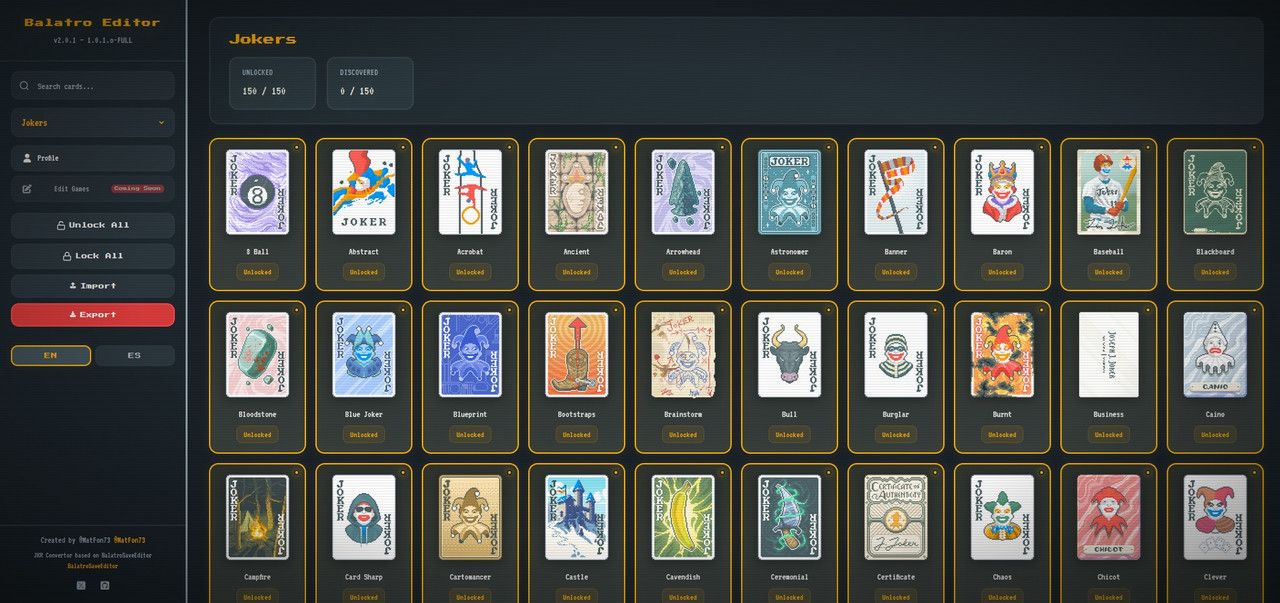
- Collection management — unlock, discover, or lock any card (Jokers, Tarots, Planets, Spectrals, Vouchers, Decks, Modifiers, Tags, Blinds)
- Profile editor — edit name, high scores, career stats, progress tracking, challenge progress, and deck statistics with win rates
- Save editor — full save.jkr editing with Game, Deck, Jokers, Consumables, Vouchers, and Planets tabs
- Bulk operations — unlock/lock all per category, bulk select and edit deck cards
- Smart search — real-time card filtering by name
- Import/Export .jkr — native Balatro format, 100% client-side, no server required
- Responsive design — desktop and mobile with adaptive layout and hamburger menu
- i18n — English and Spanish with instant toggle
This editor runs completely in your browser with no backend or server requirements.
Option A: Download ZIP
- Click the green "Code" button on GitHub
- Select "Download ZIP"
- Extract the ZIP file to any folder on your computer
Option B: Clone with Git
git clone https://github.com/MatFon73/BalatroEditor.git- Navigate to the extracted/cloned folder
- Double-click
index.html - The editor will open in your default browser
That's it! No server, no installation, no configuration needed.
A desktop version is available for macOS, Windows, and Linux with auto-loading of Balatro save files.
Download: Releases — download .dmg (macOS), .exe (Windows), or .AppImage (Linux)
Build from source:
npm install
npm start              # Run in development mode
npm run build:mac      # Package .dmg
npm run build:win      # Package .exe
npm run build:linux    # Package .AppImage
The desktop app automatically:
- Detects your Balatro save directory
- Loads meta.jkr, profile.jkr, and save.jkr on startup
- Saves edits directly to the game directory
- Watches for file changes and notifies you
BalatroEditor/
├── .github/
│   ├── CODE_OF_CONDUCT.md     ← Collaboration rules
│   ├── CONTRIBUTING.md        ← Contribution guide
│   ├── PULL_REQUEST_TEMPLATE.md
│   └── ISSUE_TEMPLATE/
│       ├── bug_report.md
│       ├── feature_request.md
│       └── config.yml
├── .vscode/
│   ├── extensions.json        ← Recommended extensions (Live Server)
│   └── settings.json          ← Workspace settings
├── electron/
│   ├── main.js                ← Electron main process
│   ├── preload.js             ← Secure IPC bridge
│   └── icon.png               ← App icon
├── data/
│   ├── meta.json              ← Default/demo save data
│   └── profile.json           ← Default/demo profile data
├── public/
│   ├── css/
│   │   ├── style.css          ← Full design system
│   │   ├── profile.css        ← Profile page styles
│   │   └── save-editor.css    ← Save editor specific styles
│   ├── img/
│   │   └── preview.jpg        ← Social preview image
│   └── js/
│       ├── jkr-converter.js   ← Lua ↔ JKR converter (deflate/inflate)
│       ├── utils.js           ← Shared utilities (notifications, format, export, debounce)
│       ├── translations.js    ← i18n system EN/ES with __() helper
│       ├── image-loader.js    ← Multi-source image loader with localStorage cache
│       ├── meta.js            ← Meta.jkr collection editor
│       ├── profile.js         ← Profile.jkr stats editor
│       └── save-editor.js     ← Save.jkr game editor
├── .editorconfig              ← Editor consistency
├── .gitattributes             ← Git file handling
├── .gitignore
├── AGENTS.md                  ← Dev conventions
├── favicon.ico
├── index.html
├── LICENSE
└── README.md
Windows: C:\Users\{User}\AppData\Roaming\Balatro\1\meta.jkr / save.jkr
macOS: ~/Library/Application Support/Balatro/1/meta.jkr / save.jkr
Linux / Steam Deck: ~/.local/share/Balatro/1/meta.jkr / save.jkr
Profile (all OS): Balatro\profile.jkr (same folder as 1/)
- Open
index.htmlin your browser - Import your
.jkrfile using the sidebar or tab buttons - Make your changes — click cards to toggle unlock state, edit fields in Profile/Save editor
- Click Export .jkr (or Save & Export in Profile) to save
- Close Balatro completely, backup your original file, then replace it with the exported one
Cards show green (unlocked), yellow (discovered), or red (locked) borders. Progress bars update automatically as you edit.
- Vanilla JS SPA — no framework, no build step, no bundler, no package.json
- CSS3 with custom properties, Flexbox & Grid, responsive media queries
- ES6+ JavaScript — DOM manipulation, Fetch API, client-side JKR processing
- CDN deps: Font Awesome 7.1, Inter font, Pako 2.1.0 (zlib compression)
- MatFon73 - Project creator and developer
- LocalThunk - Creator of Balatro
- TeddyHuang-00 - Creator of BalatroSaveEditor - JKR format reference
- Balatro Wiki - For card images and information
This project implements client-side JKR file processing inspired by the format documentation from BalatroSaveEditor by TeddyHuang-00.
MIT License — see LICENSE for details.