Repository navigation
Releases: leeleelee3264/spyhop
Release list
Spyhop v2.0.0

Spyhop 2.0 is a Mac app. The board opens in its own window and the menu bar icon is built in, so you no longer need a browser tab or SwiftBar.
This is the 2.0 that 1.0 promised: a release that changes how you use Spyhop. The browser version stays at 1.0.1 and gets no more updates.
What's new
- The board opens in the Spyhop window. Closing it keeps the orca in the menu bar.
- The menu bar count of sessions waiting for you is part of the app.
- Cards look and move the same as before, with smoother dragging between columns.
- Settings, topic columns and checked TODOs carry over.
New install
brew install leeleelee3264/tap/spyhop
open -a Spyhop
Coming from the browser version
Run brew update. Homebrew moves you to the app by itself, or prints these two commands:
brew trust --cask leeleelee3264/tap/spyhop
brew install --cask leeleelee3264/tap/spyhop
Open Spyhop once. It takes over the board and Start at login, removes the Spyhop icon from SwiftBar, and offers to remove the old browser version. SwiftBar itself is left alone.
What changed for you
- Open with
open -a Spyhopinstead ofspyhop. - Update with
brew upgrade --cask spyhop. - Doctor:
/usr/bin/python3 /Applications/Spyhop.app/Contents/Resources/spyhop/board.py --doctor.
Versioning from 2.0
Minor and patch releases (2.x.y) keep your settings, topic columns and how you open Spyhop working.
Feature tour: https://leeleelee3264.github.io/spyhop/
Spyhop v1.0.1
Fixed
- A board started by Start at login now switches to the new version by itself after
brew upgrade, like a board started withspyhop. Before, it kept running the old version until you ranspyhop.
Update
brew update
brew upgrade spyhop && spyhop
Run spyhop once this time: a board already running 1.0.0 from login still has the old check. From 1.0.1 on, brew upgrade alone is enough.
Spyhop v1.0.0
Spyhop 1.0.0 is the first stable release. The app is the same as 0.7.0; this release marks it ready for everyday use and starts the versioning promise below.
What Spyhop is
- All sessions in one place. Every Claude Code, Codex and OMP session you have open becomes a card on one board, with the ones waiting for you on top.
- Progress for each session. Spyhop reads the transcript and lays the work out as steps: what's done, what it's on now, what's next.
What's in 1.0
- Sessions in Orca, Terminal, iTerm2, Ghostty and WezTerm. Orca is optional.
- Steps on every card, a detail view with the last reply and TODOs, and Codex cross-checks shown under the card that started them.
- All / My turn / Working filters, Newest or Longest wait sorting, and grouping by location or by AI topic.
- Drag a card to another Orca workspace to move the session, conversation and all.
spyhop doctorto explain missing or wrong cards, and automatic switch-over afterbrew upgrade.- Menu bar count of sessions waiting for you, 9 themes, start at login.
Versioning from 1.0
Minor and patch releases (1.x.y) keep your settings, topic columns and commands working. Anything that would make you change how you use Spyhop waits for 2.0.
Install or update
brew update
brew upgrade spyhop && spyhop
For a first install, run brew install leeleelee3264/tap/spyhop and then spyhop. Feature tour: https://leeleelee3264.github.io/spyhop/
Spyhop v0.7.0
Includes OMP session support, persistent status filters, automatic upgrade detection, and reliability fixes from 0.6.x.
Working and My turn now show a themed empty-state card when no sessions match, with a status icon and a button to show all sessions.
Update:
brew update
brew upgrade spyhop && spyhop
Restart existing OMP sessions after upgrading from a version without OMP support.
Validation: 61 regression tests; both empty filters at desktop/mobile widths and light/dark themes; existing All-filter action verified.
Known integration limit: exact WezTerm window switching depends on macOS accessibility metadata; app-level switching is used when unavailable.
v0.6.1
Fixes the Homebrew upgrade transition introduced in 0.6.0.
A running board may have been started through Homebrew's stable opt/spyhop link. After Homebrew retargets that link, the old process still holds the same command-line argument but its PID record names the old Cellar directory. Version 0.6.0 could reject that valid watcher and keep the old board running.
0.6.1 accepts only the managed Spyhop opt path in this case. Python identity, --watch, and recorded process-birth checks remain in place; unrelated processes and arbitrary retargeted symlinks remain rejected.
Includes all 0.6.0 features: OMP sessions, persistent status filters, automatic upgrade detection, and the GA QA reliability fixes.
brew update
brew upgrade spyhop
spyhop
Run spyhop once after upgrading from 0.5.0 or earlier. Restart existing OMP sessions to load the status extension.
Verification: 61 regression tests; before/after opt-retargeting regression; actual installed 0.5.0 source booted through opt in an isolated runtime, switched to the patched board, and verified by HTTP with settings preserved.
Fix: #46.
Deployment verification
- Actual Homebrew upgrade and startup completed, replacing the old 0.5.0 watcher while preserving five existing interactive AI processes, settings, TODOs, and a live pinned assignment.
- All 61 tests passed again from the installed 0.6.1 keg;
brew testpassed. - 15 minutes of installed-board observation: no failed state/metrics requests, watcher restarts, failed-summary observations, or new watcher error log lines.
- The installed board detected and ended a real OMP session and rejected an attempt to end a QA-owned non-agent process. An installed iTerm2/Claude Go-and-End check also passed with other sessions preserved.
Known integration limit
Exact WezTerm window raising depends on macOS exposing accessibility window metadata. When that metadata is unavailable, Spyhop reports app-level switching; session detection and End remain available. This fallback was observed during installation QA.
v0.6.0
Upgrade compatibility: use v0.6.1. Version 0.6.0 may leave an older board running when that watcher was started through Homebrew’s stable opt link. 0.6.1 fixes the upgrade transition.
OMP support, persistent status filters and more reliable session controls.
New
- Read Oh My Pi sessions using the same cards, summaries, detail view and terminal controls as Claude Code and Codex. Tested with OMP 18.12.2.
- Filter by All / My turn / Working. Counts remain global, and filter and sort choices persist.
- Running boards started on 0.6.0 or later detect future Homebrew upgrades within a minute. The version badge links to release notes and records acknowledgment across tabs.
Reliability
- Preserve manual topic assignments during concurrent grouping and moves.
- Keep the last good summary when a provider returns malformed output.
- Select and raise the intended iTerm2 or WezTerm window, including multiple tabs in one window.
- Validate watcher identity before sending a termination signal, and retry failed update launches on subsequent checks.
- Use the same session detector in the menu bar, including registered OMP sessions.
- Ignore malformed update journals and keep the release-notes tooltip reachable.
Install or upgrade
brew update
brew upgrade spyhop
spyhop
For a first install, use brew install leeleelee3264/tap/spyhop.
Upgrading from 0.5.0 or earlier: run spyhop once after upgrading to switch the old board process. That older board cannot detect upgrades automatically.
OMP: after starting Spyhop, restart existing OMP sessions so they load its status extension. OMP sessions can be grouped by topic; moving them between Orca workspaces is not supported.
WezTerm window raising uses macOS Accessibility permission. If a window cannot be uniquely identified or permission is denied, Spyhop reports app-level switching instead of claiming an exact tab switch.
Verification
59 regression tests; 15 browser scenarios each in Chrome and Playwright WebKit; real Claude/Codex/OMP sessions across Terminal, iTerm2, Ghostty and WezTerm; real process termination and sibling-session preservation; same-window tab selection; isolated Homebrew-path upgrade, rollback and failure recovery.
Spyhop 0.5.0 (beta)
Spyhop 0.5.0 (beta). Moving cards works the same way in both views, plus fixes from the 0.3.0 / 0.4.0 QA pass.
New features
Move to an empty workspace from a slot (Location)
The drawer of empty workspaces on the left is gone. In Group by: Location, start dragging a card and a dashed + Other workspace slot appears at the end of the board, the same place and look as + New column in AI topics. Drop the card there and pick a workspace:
- The list shows the Orca workspaces that have no session right now, with their folder.
- Click or use ↑ / ↓ to choose, then Enter or Move. Esc, Cancel or a click outside puts the card back.
- The chosen workspace then shows up as a column, as before.
- The slot only appears when it can be used: there is at least one empty workspace, the session is waiting (a working session can't be moved in Location), and the session runs in Orca.
Moving onto a column that already has sessions works as before.
Bug fixes
- A column that scrolls inside itself no longer jumps back to the top on every refresh.
- The "Sorting new sessions by topic…" note now appears and clears as sessions are sorted, without reloading.
- On a phone-width window the Newest / Longest wait switch stays on one line.
- Memory no longer creeps up while the board stays open: what was cached for ended sessions is cleared once a day.
Install or update:
brew update
brew upgrade spyhop && spyhop
For a first install, run brew install leeleelee3264/tap/spyhop and then spyhop.
Spyhop 0.4.0 (beta)
Spyhop 0.4.0 (beta). A small follow-up to 0.3.0.
New features
New summarizer, fresh AI topics
When you pick a different summarizer in Settings, AI topics are sorted again from scratch with the new model.
- Cards you moved by hand, and the columns you named, stay exactly where they are.
- Every other session goes back to the N new · sorting pill and is placed again right away, without the usual one-minute wait.
- Picking the model that is already selected changes nothing.
Bug fixes
- Menu bar panel: with many sessions the list grew past the panel and pushed Open full board out of view. The header, the counts and the button now stay put, and only the session list scrolls.
Install or update:
brew update
brew upgrade spyhop && spyhop
For a first install, run brew install leeleelee3264/tap/spyhop and then spyhop.
Spyhop 0.3.0 (beta)
Spyhop 0.3.0 (beta). Topic columns you can trust, columns that follow the sort, and a board that fits a narrow window.
New features
Make your own topic column
In Group by: AI topics, start dragging a card and a dashed + New column slot appears at the end. Drop the card there and name the column. Three name ideas and the closest existing columns show up as chips; a chip only fills the box, you decide the name. Enter creates the column, Esc puts the card back.
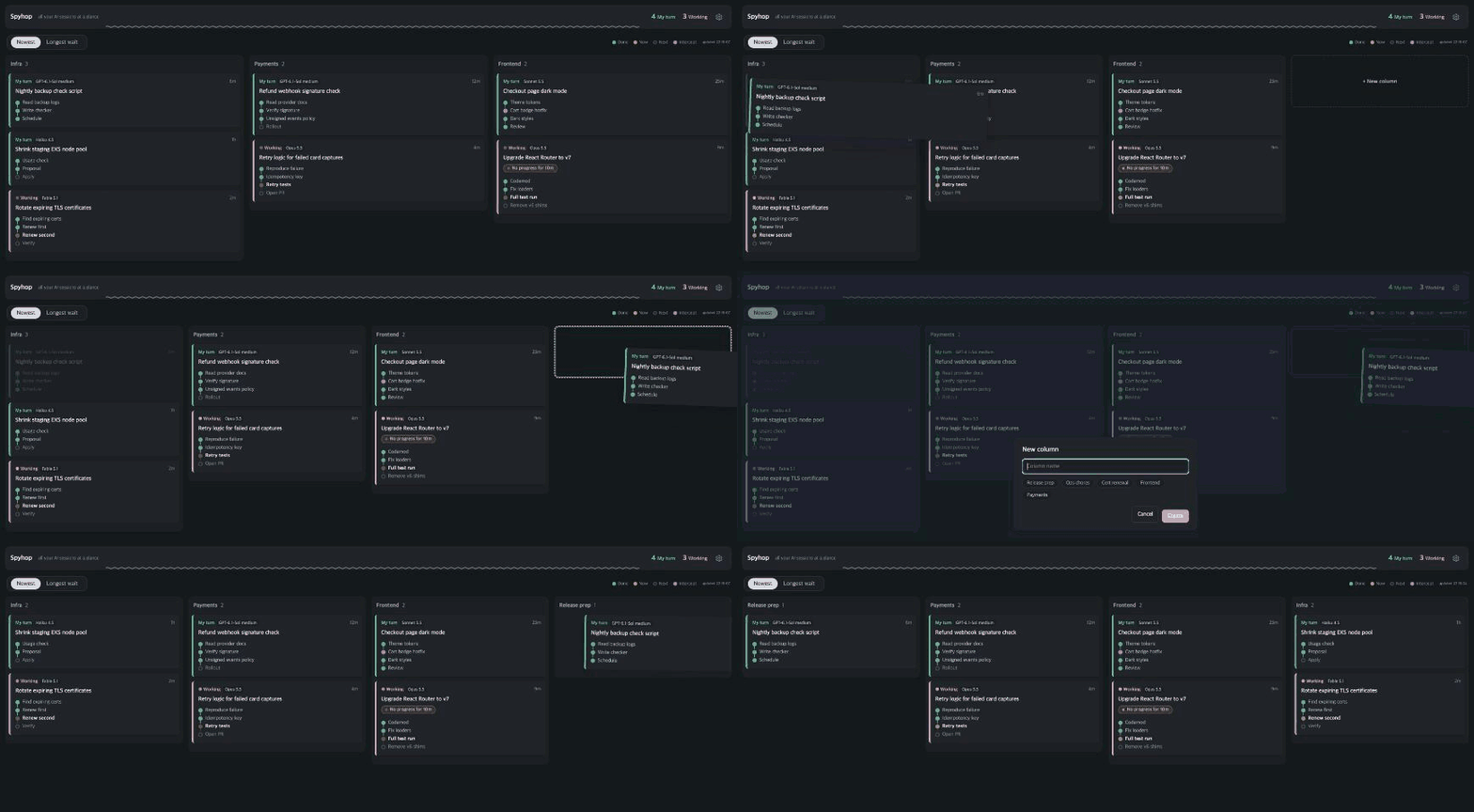
- A card you move by hand is pinned. When the AI sorts new sessions later, it only places the new ones and never moves a pinned card.
- Names are matched ignoring case and spaces, so "Release prep" and "releaseprep" stay one column. The AI uses the same check and reuses your column names for similar sessions.
- Dropping on an existing topic works the same way and pins the card there.
Columns follow the sort
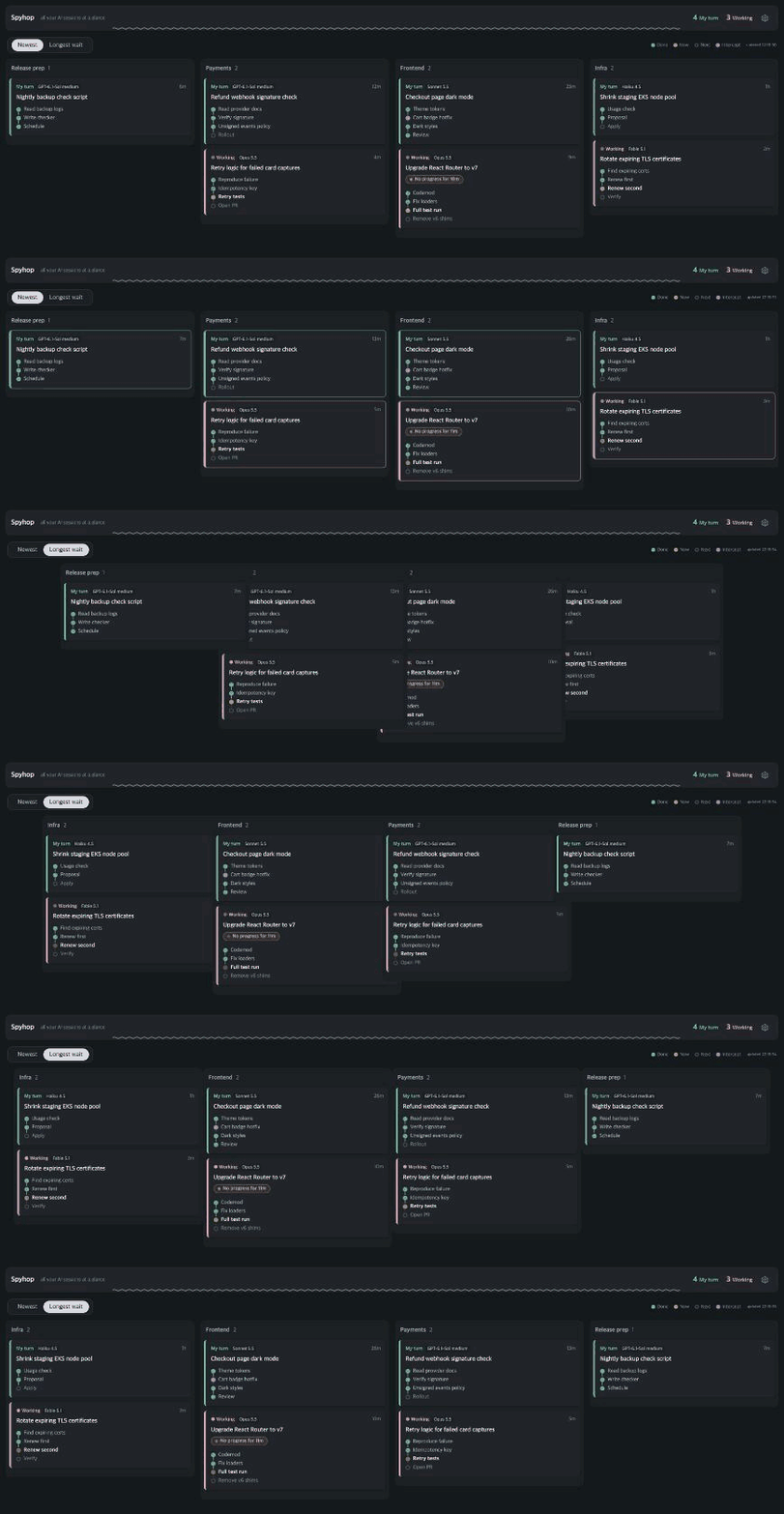
Newest and Longest wait now order the columns too: the column whose top card comes first is on the left. A column that changes place slides as one block, and the cards only move inside their column. While the pointer rests on a card, the board waits (up to 10 seconds) so the card you are about to click does not move.
Fits a narrow window
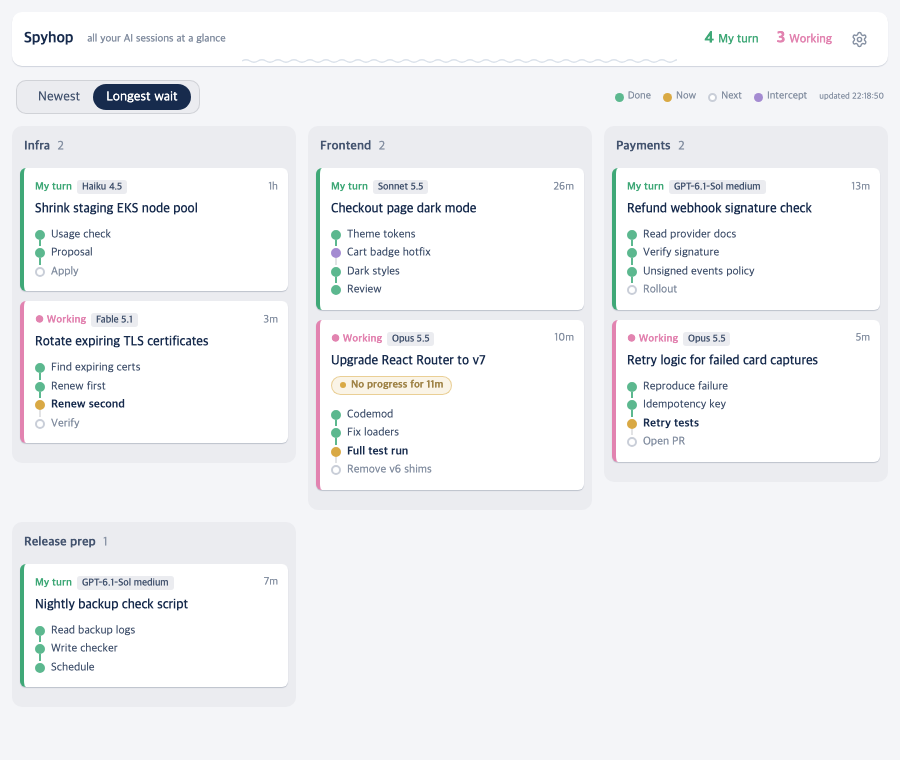
Columns wrap onto the next row instead of running off the screen: 3 across in a 900px window (for example half of a portrait monitor), up to 7 across on a wide screen, 1 on a phone. Cards shrink to progress bars when a column is taller than the screen, and a column that is still too long scrolls inside itself, so the rows below never get pushed out of view.
AI topics stay put
- Topics are decided once. A new session waits in a small N new · sorting pill next to the sort switch (hover for the names, click to open it) and then flies into its column. No more Unsorted column appearing and disappearing.
- Empty topic columns are not drawn, and topics with no running session are cleared when Spyhop starts and once a day.
Also new
- Card text (title, summary, steps, TODO, new topic names) follows your Mac's system language. Changing the language re-summarizes from scratch.
- End session on a card now asks in a centered popup (Esc or a click outside cancels).
- The left Group by option is now called Location. Old settings keep working.
Bug fixes
- Columns from sessions that ended days ago no longer pile up as empty columns in AI topics.
- The board no longer shakes sideways by a few pixels when a session ends (a scrollbar briefly appeared).
- The list under the "sorting" pill no longer closes when you move the pointer from the pill onto it.
- A summarizer answer like "Unsorted" or an empty name no longer creates a column that never goes away.
- When every session is still being sorted, the board now says so instead of looking empty.
- A card moved by hand before its conversation file existed lost its column once the file appeared. It now keeps it.
- In a wrapped layout, columns on the lower rows were always shrunk to bars. Each row now gets the full screen height.
Install or update:
brew update
brew upgrade spyhop && spyhop
For a first install, run brew install leeleelee3264/tap/spyhop and then spyhop.
Spyhop 0.2.6 (beta)
Spyhop 0.2.6 (beta).
New
-
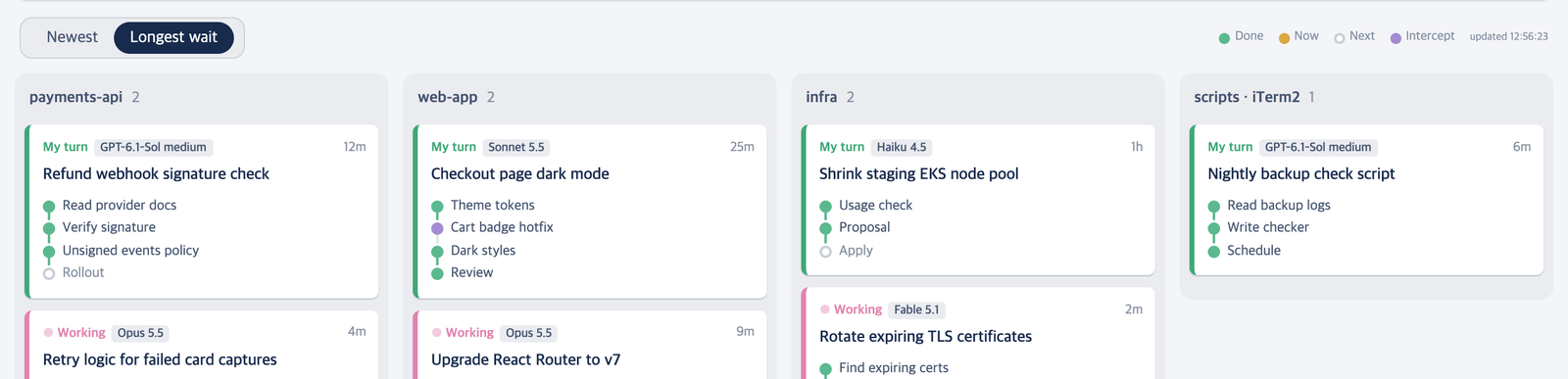
Sort the cards inside each column: Newest (the card that most recently became your turn first, the default) or Longest wait. Columns stay where they are.
-
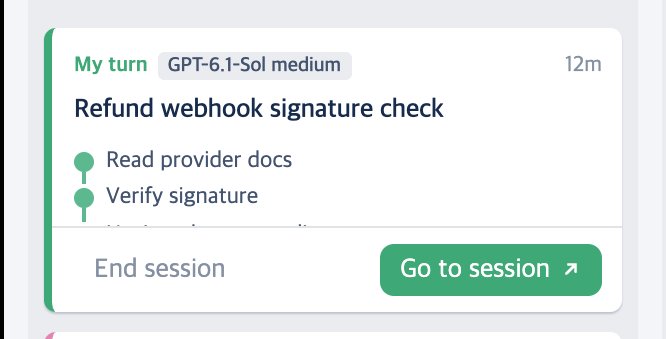
Rest the pointer on a card and a row appears at its bottom: Go to session ↗ jumps straight to the pane or tab, and End session asks "End this session?" before ending it.
Improved
- The model is always shown on a card, even when the card is narrow, and the time reads
12minstead of12m waiting. - While dragging a card over the drawer of empty workspaces, the card shrinks and moves aside, so the workspace names stay visible.
Fixed
- Moving a session into a workspace that already has panes now splits next to an existing pane instead of opening a new tab.
- A Claude card no longer stays Working after the turn has ended.
- A brief 503 from DeepSeek no longer shows "Summary failed"; the summary is retried twice first.
Install or update:
brew update
brew upgrade spyhop && spyhop
For a first install, run brew install leeleelee3264/tap/spyhop and then spyhop.