Troubleshooting
Main log:
/config/censorarr.log
Docker logs:
docker logs --tail 200 censorarrFollow live:
docker logs -f censorarrSymptoms:
ffprobe ... Permission denied
or:
SKIPPED media file because Censorarr does not have read permission
Check:
echo "PUID=$PUID PGID=$PGID"
gosu "$PUID:$PGID" id
Then test a real file:
gosu "$PUID:$PGID" head -c 1 "/media/Movie/Movie.mkv" >/dev/null && echo READ_OK || echo READ_FAILEDOn Synology, also test as root:
head -c 1 "/media/Movie/Movie.mkv" >/dev/null && echo ROOT_READ_OK || echo ROOT_READ_FAILEDIf PUID/GID fails but root succeeds, use:
CENSORARR_SYNOLOGY_COMPAT_MODE: "auto"Censorarr 1.6.5 checks nested ACLs and can fall back automatically.
Current protocol uses:
X-Censorarr-Token
Check that:
- main Censorarr and worker use the same literal token
- the worker is current and not an old pre-rename build expecting the legacy protocol
- no GUI-saved token is overriding the environment value
Test the worker directly:
curl -H 'X-Censorarr-Token: YOUR_TOKEN' http://GPU-IP:9000/healthCensorarr secret precedence is:
GUI-saved secret
then environment variable
then legacy config value
So a stale GUI token can override ASR_WORKER_TOKEN.
See Security & Secrets.
Check:
docker ps
docker logs --tail 100 censorarr-gpu-worker
Verify:
TCP 9000
correct worker IP
9000:9000 port mapping
firewall/routing
This is normally a Docker/NVIDIA passthrough issue.
Verify the host sees the GPU and that NVIDIA Container Toolkit is configured before troubleshooting Censorarr.
Check Docker logs first.
Censorarr 1.6.5 handles per-file ffprobe/read failures without terminating the whole daemon, so a restart loop usually points to a startup/configuration problem rather than one bad movie.
Make sure the project contains:
config/
work/
The public repository preserves them with .gitkeep.
Use relative mounts:
- ./config:/config
- ./work:/work
rather than hard-coded /volume1/docker/censorarr/... project-internal paths.
Inside the container:
ls -la /media
ls -la /tv
If empty, verify the left side of the compose volume mapping points to the correct host/NAS folder.
Check path mappings.
Example:
Radarr reports: /movies/...
Censorarr sees: /media/...
Mapping:
- from: /movies
to: /mediaCheck both movie and TV path mappings.
Check compose:
ports:
  - "8087:8787"
Then use:
http://SERVER-IP:8087
docker exec -it censorarr python /app/selftest.pyThis is useful after upgrades and before reporting a reproducible application bug.
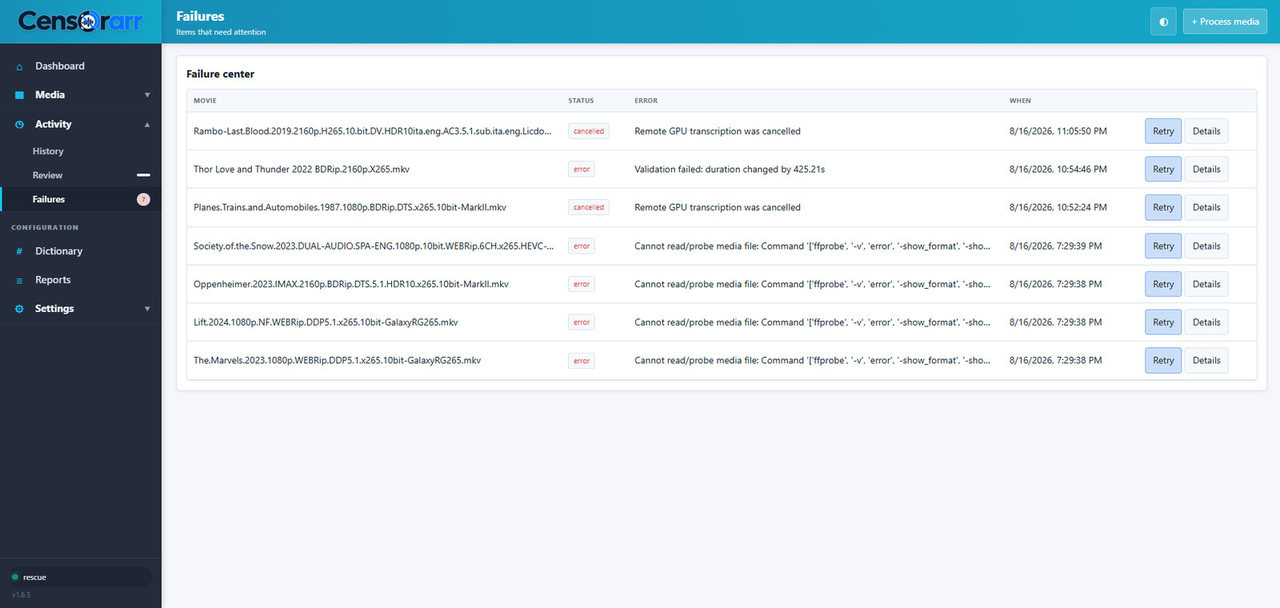
The Activity → Failures page collects items that need attention and provides Retry and Details actions.