Skip to content

[WiFi] Simplify credentials management#3473

Merged
TD-er merged 15 commits intoletscontrolit:megafrom
TD-er:cleanup/bitwise_log_debug
Feb 1, 2021
Merged

[WiFi] Simplify credentials management#3473
TD-er merged 15 commits intoletscontrolit:megafrom
TD-er:cleanup/bitwise_log_debug

Conversation

@TD-er
Copy link
Copy Markdown
Member

@TD-er TD-er commented Jan 21, 2021

Management of the credentials for WiFi networks had become way too complex.
This introduces a list of good candidates for connecting to, based on scan result and found RSSI values.

TD-er added 5 commits January 18, 2021 21:55
This may lead to lots of unneeded log spamming when processing rules.
N.B. the 'stage' build does NOT work with LAN.
…it#3463)

See also letscontrolit#3463

Still not finished as I discovered a logic error in the connection process when the initial scan may still be active when `prepareWiFi()` is called which changes WiFi mode.
Management of the credentials for WiFi networks had become way too complex.
This introduces a list of good candidates for connecting to, based on scan result and found RSSI values.
@TD-er
Copy link
Copy Markdown
Member Author

TD-er commented Jan 21, 2021

I made a quick test build:
Edit:
See below for more recent test build.

Please realize this is absolutely not finished yet, but I wonder if it already makes a difference with some notorious nodes like some Sonoff Basic units that experience perfect responsiveness on one build and dreadfully slow on other builds for no known reason.

@TD-er
Copy link
Copy Markdown
Member Author

TD-er commented Jan 22, 2021

Made a new test build (still not finished, but Setup will now be usable again :) )

@TD-er
Copy link
Copy Markdown
Member Author

TD-er commented Jan 24, 2021

Created a new build:

Main changes:

  • Reduced TX power to 17.5 dBm
  • Tweaked some timings
  • Start mDNS (when included) after WiFi is initialized.

N.B. most of the ESP32 builds failed, but that will be fixed in a next build.

@tonhuisman
Copy link
Copy Markdown
Contributor

tonhuisman commented Jan 24, 2021

Tried these:

ESP_Easy_mega_20210124_normal_ESP8266_4M1M_VCC.bin : Worked OK, WiFi is fine (-45 dBm)
ESP_Easy_mega_20210124_custom_ESP32_4M316k.bin : Worked OK, WiFi is fine (-45 dBm)
ESP_Easy_mega_20210124_test_ESP32_IRExt_4M316k.bin : At first: Can't find WiFi, goes into AP mode (same unit, same location as the other ESP32 I tried)
After ~15 seconds it did connect to WiFi, first tried an AP with #hidden# appended (Don't have an AP named like that, nor any hidden AP's), then connected to the closest AP, some log is available if you want to see that.
Now all is fine, WiFi is fine (-45 dBm)
Edit:
The unit does reconnect a couple of times, now is connected to another AP (a few meters further away) with -56dBm

@TD-er
Copy link
Copy Markdown
Member Author

TD-er commented Jan 24, 2021

I plan on making the "hidden" SSID connection optional or at least more dynamic.

A SSID of an access point can be set "hidden", which means it doesn't broadcast its SSID.
So it does not appear in a scan with a SSID (thus a good descriptive name to call it "hidden" :) )

We can connect to a hidden SSID by just giving the SSID and a password, but then you don't know which one it will connect as it connects to the first one that's successful.
What I want to achieve is that ESPEasy will connect to the strongest one first, but then you need to supply a BSSID and channel along with the credentials.
But for hidden SSIDs there's a problem. You don't know which BSSID to use for what SSID (if you set multiple credentials), so for hidden SSIDs I try all combinations.

If you have hidden SSIDs in the neighborhood, you may end up trying those too.

So I want to add a flag later to ignore hidden SSIDs if you know your AP isn't hidden.

What it does now:

  • Scan all AP's
  • Take the ones with known SSID (all of them)
  • Take hidden SSIDs
  • Add your current connection (if it is deemed stable) with an artificial RSSI of -1
  • Sort this list based on RSSI (thus the current one is first)
  • Try all elements in the list of AP candidates and remove the element you just attempt

As soon as this list is empty, a new scan will be performed and the loop repeats.

Things still to add:

  • When last scan is taken longer than N seconds ago (e.g. an hour) remove the AP candidates from the list and just keep the current one.
  • Add a checkbox to ignore hidden SSIDs
  • Make dealing with hidden SSIDs less preferred (e.g. only try to connect to hidden SSIDs if you are running a second scan without successful connection)

@tonhuisman
Copy link
Copy Markdown
Contributor

Things still to add:

Think you skipped one: (saw this: // FIXME TD-er: Must make this a setting.)

  • Setting for TX-power

@TD-er
Copy link
Copy Markdown
Member Author

TD-er commented Jan 24, 2021

Things still to add:

Think you skipped one: (saw this: // FIXME TD-er: Must make this a setting.)

  • Setting for TX-power

Ah glad someone is reading my changes too 👍

I even have more things on my todo list, but not sure if those will be included in this PR, or maybe for later as I don't want to stick on this one adding features.

Things on my mind:

  • Support for a separate file with credentials
  • Support for a factory default set of credentials not present in the settings (custom builds only, only for deployment)
  • Dynamic change B/G mode, proposed bandwidth and TX power based on link stability
  • Set country specific parameters
  • lots more.

Also force WiFi scan if reconnect to last used AP was unsuccessful.
Add checkbox to allow connecting to hidden SSID (also from setup page)
@TD-er
Copy link
Copy Markdown
Member Author

TD-er commented Jan 27, 2021

Added:

  • Checkbox to explicitly allow to connect to hidden SSIDs (also on setup page)
  • Force new wifi scan after "considered stable" wifi connection failed to reconnect.
  • Add max TX power + WiFi sensitivity margin in advanced settings

Still to do:

  • Make sure default max. TX power is not 0 dBm when updating settings
  • Set country specific parameters
  • Automatically try to connect to hidden ssid after N failed attempts.

Documentation on the new TX power settings:

WiFi TX Power

(Added: 2021-01-26)

The default TX power of an ESP unit is:

  • 802.11 b: +20 dBm
  • 802.11 g: +17 dBm
  • 802.11 n: +14 dBm

For some units it can help to reduce the TX power of the WiFi. As of now the exact reason why this may improve stability is a bit unclear. For example, the power supply may be slightly underdimensioned, or the antenna impedance isn’t perfect. (can be affected by a lot of factors)

The effect of a reduction in TX power is of course lower energy consumption, but also a reduction in WiFi range as the received signal strength on the access point will be lower. The unit for WiFi TX power is expressed in dBm, which makes it very easy to calculate the effect.

The relation between TX power in dBm and Watt:

  • 20 dBm = 0.1 Watt (= 30 mA @3.3V)
  • 10 dBm = 0.01 Watt
  • 0 dBm = 0.001 Watt

Every 10 dBm lower is a factor 10 less energy sent from the antenna. N.B. Since most ESP boards use a linear voltage regulator from 5V to 3.3V, the power reduction can be as high as 0.15 Watt.

See also “WiFi Sensitivity Margin”

For example the AP does receive the signal from your ESP node with an RSSI of -60 dBm. If we lower the TX power from 20 dBm to 10 dBm, the access point will receive our signal with an RSSI of -70 dBm.

Lowering the TX power can also be useful to make it more likely a node will connect to an access point close to the node in a setup with a number of access points using the same SSID. Most access points will disconnect a node if its signal drops below a certain RSSI value. (some brands of access points allow to set this threshold)

WiFi Sensitivity Margin

(Added: 2021-01-26)

See also WiFi TX Power.

The ESP boards have a RX sensitivity depending on the used WiFi connection protocol:

  • 802.11 b: –91 dbm (11 Mbps)
  • 802.11 g: –75 dbm (54 Mbps)
  • 802.11 n: –72 dbm (MCS7)

These are the numbers for an ESP8266.

N.B. The ESP32 is more sensitive for lower bit rates, but we use these more conservative ones.

Our dynamic WiFi TX power strategy is based on the following assumptions:

Without any changes in TX power on both the ESP as the access point (AP), we can assume the signal strength attenuates the same from the AP to the ESP as the return path from the ESP to the AP. Meaning if we see the signal from an AP has an RSSI value of -60 dBm, we can assume the AP receiving our signal has a similar signal strength with an RSSI of -60 dBm.

An access point usually has a better RX sensitivity than an ESP board.

With these assumptions in mind, we can lower our WiFi TX power.

Let’s assume the ESP is connected to an access point using 802.11N and we see an RSSI of -60 dBm. Without lowering TX power on the ESP, the access point will receive the ESP with an RSSI of -60 dBm.

When the TX power on this ESP is lowered from 14 dBm to 4 dBm, the access point will receive the ESP with an RSSI of -70 dBm. This is still within the stated -72 dBm RX sensitivity.

However for improved stability, it is wise to add some margin. For example a margin of 5 dBm. When applying this margin of +5 dBm, the ESP must try to match its output power to make sure the access point will receive the ESP with an RSSI of at least - 67 dBm. The set TX output power will then be (-60 dBm - -67 dBm =) +7 dBm, which is still a significant improvement in power consumption.

This margin can also be used to compensate for an access point which is set to a non default TX power. For example, it is good practice to lower the TX power of an access point to improve separation and take over in a network with multiple APs set to use the same SSID to provide roaming. Since these offsets are also expressed in dBm, they can be used without conversion for correcting this margin.

  • Negative margin: Used for access point with better RX sensitivity and/or lowered TX power
  • Positive margin: Used for access point with lower RX sensitivity and/or increased TX power

Note

It is almost always a bad idea to increase TX power of an access point. The signal from the access point may cover a longer range, but the RX sensitivity is not improved thus the client can not reply. It also affects other WiFi networks in the neighborhood, causing more interference.

Note

Changing the antenna of an access point for a “High Gain Antenna” does improve TX range as well as RX sensitivity and thus cancel each other out regarding this margin setting. A high gain antenna is more directional than traditional antennas.

@TD-er
Copy link
Copy Markdown
Member Author

TD-er commented Jan 27, 2021

Test build:

N.B. there is still no conversion for existing settings of the max. TX power.
So it will probably set it to 0 dBm, which is 1/100th of the default power.

Best to install this on a clean build or one that can be cleared if you now have an RSSI of less than 70 dBm on your node. (or move the node closer to the AP)

@tonhuisman
Copy link
Copy Markdown
Contributor

N.B. there is still no conversion for existing settings of the max. TX power.
So it will probably set it to 0 dBm, which is 1/100th of the default power.

Maybe you could add a command settxpower to configure this from the serial connection? (couldn't find that in the code, but maybe I missed it?)

I was wondering if the settings version should be increased as well, but that's probably waiting for that conversion.

Have a spare Wemos D1 mini Pro (clone, without a metal shield) laying around, I'll do some testing on that unit tonight. (though my WiFi coverage is quite good in and around the house, and the rest of that batch is working just fine)

@TD-er
Copy link
Copy Markdown
Member Author

TD-er commented Jan 27, 2021

I was wondering if the settings version should be increased as well, but that's probably waiting for that conversion.

The increment of the version is used to make those settings transitions.
So that's indeed something I have to do and will do.
But it was already around 2am, so I decided to call it a day :)

@TD-er
Copy link
Copy Markdown
Member Author

TD-er commented Jan 27, 2021

Have a spare Wemos D1 mini Pro (clone, without a metal shield) laying around, I'll do some testing on that unit tonight. (though my WiFi coverage is quite good in and around the house, and the rest of that batch is working just fine)

The nice thing about this PR is that the new settings also allow to 'stress test' bad WiFi coverage as you can set the WiFi Sensitivity Margin to a negative value.
Placing a finger on top of the antenna does lower the RSSI with roughly 10 dB, so you can play around with it.

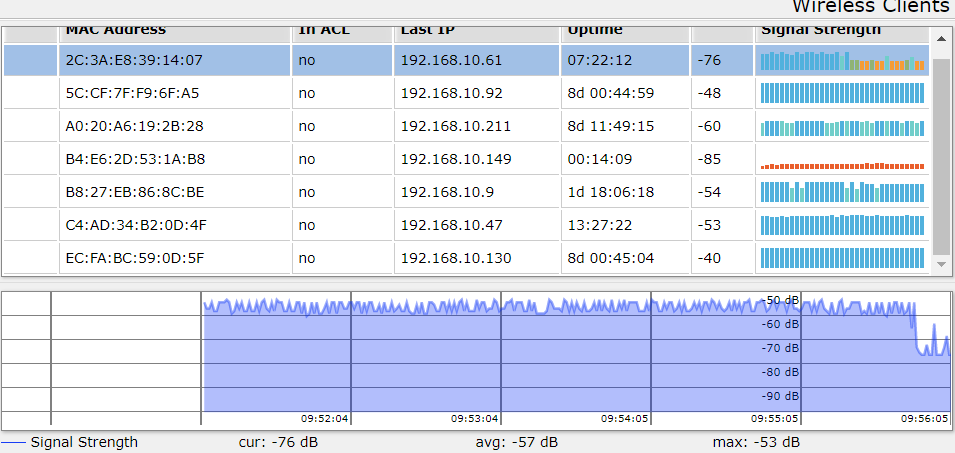
I am also using a MikroTik AP for these kind of tests as they are extremely versatile to tweak all settings (half of the settings I had to Google when I first started using them, even with decades of network experience) and are also extremely affordable.

image
For example, I just lowered the WiFi Sensitivity Margin from +30 to -10.
RSSI of the connection is -55 dB

Also added the current WiFi TX power to the sysinfo plugin.
@TD-er
Copy link
Copy Markdown
Member Author

TD-er commented Jan 27, 2021

New test build:

Implemented:

  • Added the needed transition for the newly added parameters.
  • The current TX power is now also available in the sysinfo plugin.
  • Dynamic change B/G mode, proposed bandwidth and TX power based on link stability

ToDo:

  • Make system variable for the current TX power.
  • Add averaging filter for TX power as you would otherwise always see the max TX power on a web page.
  • Make dealing with hidden SSIDs a fallback option even when set to not use them, maybe via a combo box instead of checkbox. (e.g. only try to connect to hidden SSIDs if you are running a second scan without successful connection)
  • Support for a separate file with credentials
  • Support for a factory default set of credentials not present in the settings (custom builds only, only for deployment)
  • Set country specific parameters (maybe...)

@tonhuisman
Copy link
Copy Markdown
Contributor

I've been testing for a short while now (fetched the PR just before you published the build above to have the settings conversion 😃), and I'm really impressed how quick it adapts to a changing WiFi signal while I'm walking from a very good connection (1 mtr from an AP) to a very poor connection (close to dead WiFi area in 1 corner of the house), and back 👍.

Does adding commands to set/get the tx power and sensitivity margin, etc., from rules/serial, make it onto the todo list? Or should that be auto-fine-tuning, and so not to be messed with externally?

@TD-er
Copy link
Copy Markdown
Member Author

TD-er commented Jan 27, 2021

The response on changed WiFi signal is at sub-second interval.
Every time the unit starts to send (from within ESPEasy), it will set the power to max. and as soon as that's done, it will switch back to the dynamic level.
Meaning all communication handled by the IP stack etc. will be done at the dynamic level.
This is by far the most traffic, so this strategy will make it a lot less noisy in the ether and also reduce the power consumption.

I will also add the commands for get/set the TX power and sensitivity margin.
I just waited with those to see if the 2 parameters I now have chosen are intuitive enough to be used and also can be set to some proper defaults which are fine for almost all use cases.
You have no idea what other ideas I've tried and thought of. One even more impossible to explain than the other.

@TD-er
Copy link
Copy Markdown
Member Author

TD-er commented Jan 28, 2021

New test build:

The main changes in this build are:

  • No longer changing the TX pwr to max when ESPEasy starts to send (doesn't make sense anymore now the power is dynamic)
  • Better match in received RSSI on AP between B/G/N networks. -> TX power on average will be slightly higher than previous test builds.
  • Added delay(1) between increasing TX power and sending to give power supply on ESP node some more rest.

@TD-er
Copy link
Copy Markdown
Member Author

TD-er commented Feb 1, 2021

New test build:

Only difference is the unit will not allow to connect to WiFi until uptime > 2000 msec.
N.B. it will try to perform a WiFi scan if there is no WiFi setting set, so please try on a unit with some configured WiFi settings.

@thomastech Can you also test it?

@thomastech
Copy link
Copy Markdown
Contributor

Tested:
ESP_Easy_mega_20210201_test_alt_wifi_ESP8266_4M1M_VCC
ESP_Easy_mega_20210201_test_ESP8266_4M1M_VCC

With 100K across xtal: Browser access normal. Good Web UI performance.
Without 100K: Bad. No browser access, page timeouts.

-Thomas

@TD-er
Copy link
Copy Markdown
Member Author

TD-er commented Feb 1, 2021

@thomastech What RF power do you use?

@jimmys01
Copy link
Copy Markdown
Contributor

jimmys01 commented Feb 1, 2021

Lower TX power means lower bandwidth (Generally) means more air time for the radio, means more CPU blocked waiting for transmission and receive. So far ditching N and using G mode for my nodes that are on the edge of coverage has worked fine for me.

I will test this PR and report back.

@TD-er
Copy link
Copy Markdown
Member Author

TD-er commented Feb 1, 2021

A new (ESP8266 only) test build:

Main changes are:

  • Set autoreconnect later (and only if it wasn't already set)
  • Set WiFi sleep mode every time we change the wifi mode (AP/STA/OFF)

@TD-er
Copy link
Copy Markdown
Member Author

TD-er commented Feb 1, 2021

Lower TX power means lower bandwidth (Generally) means more air time for the radio, means more CPU blocked waiting for transmission and receive. So far ditching N and using G mode for my nodes that are on the edge of coverage has worked fine for me.

I will test this PR and report back.

Yep, it is blocking longer, but still we hardly ever connect below 6 Mbps, so even serving the most elaborate web page (40kB) only takes roughly 60 msec to send. That's with an estimated effective band width of 50% of the WiFi connection speed.
If it lowers to 33%, you still hardly ever need over 100 msec for sending the largest web page we ever serve.

@Grovkillen
Copy link
Copy Markdown
Member

From my very un-scientific tests the WiFi is very adaptive to me moving around the node and also when covering it with my hand. I like it a lot!

@TD-er
Copy link
Copy Markdown
Member Author

TD-er commented Feb 1, 2021

Yep, WiFi TX power is updated very quickly.
On the AP side, you now don't see a lot of fluctuations in RSSI anymore, as long as you're not running into either limit of 0dBm or max dBm on the ESP.

However, the amount of energy reduction when sending at 0dBm is less than I would have expected it to be.

@thomastech
Copy link
Copy Markdown
Contributor

@thomastech What RF power do you use?

It was +7dBm during the test.

-Thomas

@TD-er TD-er merged commit 3c7e85f into letscontrolit:mega Feb 1, 2021
@TD-er TD-er deleted the cleanup/bitwise_log_debug branch February 1, 2021 21:51
Sign up for free to join this conversation on GitHub. Already have an account? Sign in to comment

Labels

None yet

Projects

None yet

Development

Successfully merging this pull request may close these issues.

5 participants