Repository navigation
Releases: lichdotdev/lich
Release list
v0.71.0

Added
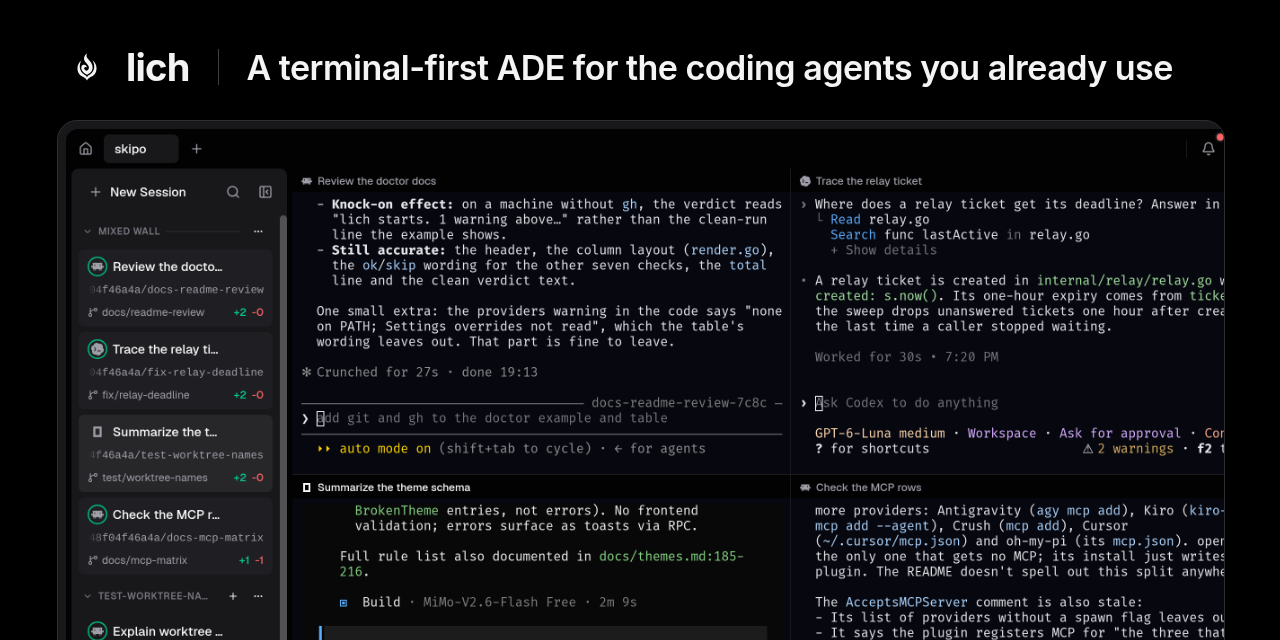
- Split layouts in the native window (experimental). Put sessions from
any open project side by side and split them however you like: Ctrl+Shift+G
splits the focused session to the right, Ctrl+Shift+I below, each asking
which session goes there, or drag a card from the sidebar onto a pane's
edge. Rearrange a layout by dragging a pane by its header onto another
pane's edge, or onto its middle to swap the two, and turn a pair between
side by side and stacked with Ctrl+Shift+R. Every layout is a tab after the
projects, with the status of its panes, renamed by double-clicking it; drag
the gap between two panes to resize them, zoom one with Ctrl+Shift+M, move
between them with Ctrl+Shift+F, and take one out with Ctrl+Shift+W; a
layout down to one pane closes. Rest a dragged session on another tab and
that tab comes up, as a browser does with a dragged file. The sidebar and
the footer follow the pane in focus. - Show a session's delegates beside it. In the native window, a session
that opened others, in any project, offers them in the footer: Show beside
lays it out with its delegates stacked at its right, as many as fit. In a
layout its pane header counts how many are there and adds the rest, asking
first before taking one out of another layout. A card in a layout names it. - Required checks are labelled. In the native window, a pull request's
Checks tab marks the checks that gate its merge with Required, as GitHub
does.
Changed
- lich lives at
lichdotdev/lich. The repository moved to the
lichdotdev organization and the site to
lichdotdev.github.io/lich. Old GitHub
links, clones and update checks redirect; bookmarks of the old site do not.
Fixed
- What's new follows a language you switch to. In the native window, the
release notes stayed in the language they were first read in after you
changed the interface language, under group names in the new one. - Diffs no longer stall on CJK text or pile up memory per file. In the
native window, a Review or a pull request's Files with Chinese, Japanese or
Korean text could freeze for seconds as each new character was looked up,
and every file's diff kept its own copy of the fonts, so a large pull
request held hundreds of megabytes.
v0.70.0
Added
- What's new speaks your language. The dialog that opens after an update
shows the release notes, and their group names, in the interface language
you picked, in both windows. A build whose notes have no translation yet
shows them in English. - Fork a session in the native window. Right-click a card and pick
Fork › Here to carry its conversation on in a new card right under it, in
the same checkout, or Fork › Worktree… to take it to a new worktree along
with your uncommitted changes. The copy is named after the original
("auth-refactor 2") and wears a fork mark. Claude Code, Codex and opencode
only: the other providers only resume. - The native window warns when two cards run one conversation. Resuming,
from inside an agent's own TUI, a conversation another card already has
open raises a warning in the bottom-right corner; Switch closes the card
that resumed and brings up the one that had it. - The native window shows images. A PNG, JPEG, GIF, WebP or BMP opens in
the Files tab's preview over a checkerboard, with its size and dimensions,
and a changed image in the Review shows before and after side by side. A
PDF, or any other file with no preview, offers Open in default app and Show
in folder instead of an error; in a pull request, a binary file links to
itself on GitHub. - The native window in your language. Every screen of the native window
reads in Portuguese, Spanish and Chinese, and Settings › General has the
interface language and the prompt language, as the web window has them
under Appearance. Before you pick one, the interface follows your
system's language. Choosing Chinese on a machine with no Chinese font
offers to download Noto Sans SC (about 25 MB) into lich's own folder. - Japanese. Both windows read in Japanese, and Japanese is a prompt
language, so lich talks to your agents in it. The native window draws
Japanese, Chinese and Korean each in its own region's font when one is
installed (Noto Sans CJK, Yu Gothic, Hiragino, Malgun Gothic and the like),
so kanji no longer take Chinese shapes, and offers to download Noto Sans JP
or KR when none is, as it does Noto Sans SC for Chinese. The README is in
Japanese too. - Korean. Both windows read in Korean, picked in Settings › Appearance
on the web and Settings › General in the native window, and Korean is a
prompt language: briefings, relayed messages and notices reach your agents
in Korean. - lich speaks Russian. Pick Русский as the interface language, in the web
window under Settings › Appearance or in the native window under
Settings › General, and as the prompt language, so the briefing, relay
notes and handoffs lich types into your agents read in Russian too. Counts
follow Russian's one, few and many forms (1 файл, 2 файла, 5 файлов). - opencode profiles on macOS and Windows, and Cursor CLI profiles on
Windows. Settings › Providers in the native window lists them as it
does on Linux. Cursor CLI on macOS and Kiro CLI on macOS and Windows still
have none: there they keep the login in the Keychain or in a folder no
setting can move, so every profile would share one account.
Changed
-
Every update opens the native window. The first launch of each release
switches lich to the native window, falling back to the web one where it
cannot start; switch back in Settings and lich stays on the web window until
the next release. The first time the native window opens, it says it is
experimental and links to a bug report. -
A lighter status ring in the native window. The ring around a
session card's icon is drawn thinner, to read at the weight the web
window gives it. -
Roomier shortcut keys in the native window. The key caps in the
command palette, the shortcuts overlay and Settings › Hotkeys have more
room around their text, which sits centred. -
Settings in the native window opens on Global. The gear in the top
bar always opens Settings on Global instead of the scope you last left it
in; a project's tab still opens its own settings from Project settings…. -
A calmer command palette in the native window. Each session, project
and message takes one line, with its path after the name; a worktree's
path shows its last three parts. Sessions waiting on you come first and
say so, and the filter tabs lose their pills for an underline. A closed
session in History shows its branch and age on the right, and a second
line only when a search matched its conversation, with the words marked.
Fixed
- A restarted session no longer reads as busy forever. A session whose
agent died mid-turn, or that was closed mid-turn, came back under the same
card still listed as busy to other sessions: a task sent to it waited for a
turn that would never end. It now starts with no state, like a new one. - Codex, Cursor CLI, Antigravity and Crush stop asking where you already
answered. A sandboxed session of any of them opens straight at its
prompt. Cursor CLI and Antigravity no longer ask again in a worktree of a
folder you trusted, nor Antigravity in its subfolders, and Crush no longer
asks to initialize each new worktree. A sandboxed oh-my-pi session no
longer opens on its setup wizard. - Claude Code stops asking "trust this folder?" where you already
answered. A folder you trusted in your main account is trusted in every
other Claude Code profile from its next session there, and a sandboxed
Claude Code session opens without the question at all. A session lich
opened for you no longer sits on that screen, where Enter exits. - A reopened native window knows where each session went. A session
that had moved withcd, or into tmux or ssh, came back showing its
checkout's path, branch and changes until its nextcd; the window now
reads where each one last was as it connects. - The native window writes agent prompts in your prompt language. The
pull request and issue handoffs and a batch of review comments were
always typed in English. - A theme change during a reconnect no longer crashes the native window.
Switching the theme, or the system switching light and dark, while the
window reattached to a restarted lich could paint terminals the reconnect
had just freed and take the window down. - Chinese, Japanese and Korean text no longer freezes the native window on
Linux. A session, a Review or a pull request full of CJK text could hang
the window for seconds, long enough for "not responding", and a zoom
brought the freeze back. - The native window holds less memory. Each session's terminal and the
Review loaded its own copy of the fonts it falls back on, tens of megabytes
apiece for a CJK or emoji font: six open sessions now take about half
the memory they did. It also starts quicker on a machine with CJK fonts
installed. - Reopening a session whose conversation is already open focuses that
card. A closed session from History, an undone close or an existing
worktree could come back as a second card on a conversation another card
was still running, and the two wrote into the same transcript. History
lists such a conversation once, by its latest close, and Forget removes
every copy of it.
v0.69.0
Added
- The native window on macOS, experimental. Lich.app ships it beside lich
on Apple Silicon and Intel, and Settings › Appearance › Window offers it as
on Linux and Windows. Option types characters in its terminal, as in
Terminal.app, so Option+letter shortcuts of an agent do not reach it. It
has only run on GitHub's macOS machines so far: notifications are plain
ones you cannot click, and there is no menu-bar item. - The file tree knows many more file types. Java, Gradle, C and C++, C#,
PHP, Ruby, Swift, SQL, Vue, Svelte, Terraform, Dockerfile, .gitignore and
about thirty more now show their own icon in the file tree and search
results, where they showed a plain file glyph.
Fixed
-
lich quitcloses the native window. It stayed open showing lich as
lost once the backend had gone; the tray's Quit and a stop signal close it
too, while a restart after an update still keeps it. -
The native window offers to remove a worktree when its last session closes. The
Closed toast gains Remove worktree beside Undo; a worktree lich did not create, or
one with uncommitted changes, is named in a dialog before it goes. -
The native window's terminal takes the cell under the pointer. A click,
a drag selection, a link and a program tracking the mouse all read the
pointer offset by the terminal's padding, so the cell they took sat below
and to the right of the one pointed at, by most of a cell on a scaled
display. -
The native window's terminal draws emoji. A color emoji font such as
Noto Color Emoji stores each emoji as a picture rather than an outline, and
the terminal only drew outlines, so every emoji showed as a blank gap; they
now draw in color, two cells wide. -
The native window's file tree shows each file's language icon. Every
file drew the same plain file glyph; each now carries the icon the browser
window gives it. -
A pull request an agent opens shows on its card when the turn ends. The
badge only looked again when the branch or its last commit moved, and opening
a pull request moves neither, so it waited for the window to lose and regain
focus. -
The native window opens on Windows. It looked fonts up through
fontconfig, which Windows does not ship, so it closed at launch and lich
fell back to the web window. On Windows it now finds the installed fonts
itself, Cascadia Mono or Consolas for the terminal by default, and the font
pickers in Settings list them. -
Switching between a light and a dark theme no longer freezes the native
window. A session that follows the terminal's color scheme, as Claude Code
does, was told of the change while the window still held its terminals, so
the window hung and closed.
v0.68.0
Important
Everyone on Linux and Windows: lich has a native window, experimental.
Choose it in Settings › Appearance › Window, and the tray keeps the web window
one click away; if it fails to start, lich opens the web window instead.
Added
- Choose the native window in Settings. Settings › Appearance (web) and
Settings › General (native) gain a Window choice, Web or Native
(experimental); lich opens the chosen one at launch, from the tray and from
lich focus, and the tray gains an item that opens the other one. Changing
it offers to switch now, closing this window and opening the other one with
every session still running. If the native window is missing or fails to
start, lich opens the web window and says why. The native window ships in
the Linux packages, the AUR package, the Windows installer and both
archives, beside lich; macOS has no build of it yet, so the choice is not
offered there. lich nativeopens the native window. It is built in Go on Gio, beside
the web window, and opens on the running lich (starting one when none runs)
after closing the web window, so your sessions stay where they are. It
survives lich restarting after an update, shows lich in the tray, and Show
lich brings it back after you close it.- The native window's terminal takes the mouse and the agent's keys.
Dragging selects from the clicked cell to the one under the pointer and
copies on release, a double click takes the word and a triple click the
line; a program that asks for the mouse, as Claude Code and vim do, gets
clicks, drags and the wheel instead, andShiftselects over it; in a
full-screen program that does not, such asless, the wheel moves through
it.Ctrl+Shift+V(Cmd+Von macOS) pastes the clipboard's text, or hands
the agent an image or file it holds;Ctrl+Vattaches a clipboard image
(Alt+Von Windows),Shift+Enterbreaks the line andCtrl+Backspace
erases a word, as in the web window. Resizing a zsh, bash or fish session
redraws its prompt instead of stacking copies of it: lich starts those
shells with prompt marks (OSC 133). - Pull requests in the native window. The pull request button in the top
bar,Ctrl+Shift+P, or a card's or the footer's#123opens the repository's
pull requests beside the one in view, filtered by text and by All, Ready,
Drafts or Failing, open, closed or merged. A pull request shows its checks,
mergeability and review, the files that conflict, its description and
conversation in Markdown, its commits, and its files as the Review tab draws
them beside a file tree, each file tickable as viewed and each review thread
under its line. Folding a file you had scrolled into keeps the next one
right under it, here and in the Review tab. A thread is answered or resolved
there or in the conversation, where the pull request is commented on too. A
selection of lines is commented for the session's batch or on the pull
request, into a pending review sent as a comment, an approval or a change
request. Open in Session reuses or creates the branch's worktree,
Resolve conflicts and Fix CI errors hand the problem to that
session's prompt, and Merge follows the base branch's rules, squashes or
merges with the commit message as you edit it when you ask to, then offers to
remove the merged worktree. - A new worktree in the native window starts from the newest of its base.
The Worktree item of the + menu (or its shortcut) opens a dialog that
takes a name, words or a#123issue, the branch to start from and whether to
bring the checkout's uncommitted changes. When that branch is behind its
upstream, asmainis after a few merges, lich fetches it first and starts the
worktree from the upstream instead, saying so under the branch; a branch with
commits not pushed, an unreachable remote or uncommitted changes brought along
keep the local branch. Your local branch itself is left as it is. A worktree
opened from the command line or by an agent (open_session) on a local base
starts from the newer of the two the same way. - Claude Code profiles: more than one account, each with its full login, in
the native window. Open Settings › Providers › Claude Code inlich native
and make a profile per account: New profile takes a name and the plugins
to bring from Personal, then logs it in with Claude Code's own
claude auth loginin a dialog (or from a terminal card), and plan usage,
plugins and every Claude Code feature work for it as they do for your own; the
setup tokens a wrapper binary used to hand over carried none of that. Your
settings,CLAUDE.md, agents, commands, skills and hooks stay shared across
profiles, the plugins you pick are installed into the new one under its
account's policy, and the lich plugin is installed there for you and follows
Personal's: installing or updating it there updates every profile, and the
ones logged in before they got it get it at lich's next start. A confined
session of a profile can write to its plugins as it does to the profile. A
project picks the profile its new sessions start in (Profile, in the
Global and project scopes), a session keeps the one it was born in and its
card names it, and Continue in on the card's menu moves a session's
conversation to another logged-in account, with its five-hour usage beside
it, and carries on in the same card. The web window does not show profiles. - Codex profiles: more than one login, in the native window. Open Settings ›
Providers › Codex inlich nativeand make a profile per account: New
profile takes a name and logs it in with Codex's owncodex login, which
opens the browser and waits for its page on a local port, so one login at a
time. A profile keeps its own login, its own conversations and its own
plugins: the dialog asks which of Personal's plugins to bring, Copy plugins
from… on a profile's menu brings more later, and the lich plugin is
installed there for you and follows Personal's updates. Personal's
config.tomlsettings (model, features, MCP servers),AGENTS.md, hooks,
skills and rules are the same in all of them; a setting changed inside a
profile goes back to Personal's at its next session, so change it in
Personal. A project picks the profile its new Codex sessions start in, a
session keeps the one it was born in and its card names it, and Continue
in on the card's menu moves a Codex conversation to another logged-in
account, with its five-hour usage beside it, and carries on in the same card.
Searching a conversation, resuming it from the History tab and the context
and cost readouts look in every profile. - oh-my-pi profiles: more than one login, in the native window. Open
Settings › Providers › oh-my-pi inlich nativeand make a profile per set
of accounts: New profile takes a name and opens oh-my-pi's own
omp loginin a terminal card, where you pick the provider to log in to,
since that login is an interactive picker. A profile keeps its own logins and
its own conversations;config.yml,models.yml, MCP servers,AGENTS.md,
skills, rules, commands, prompts and extensions are the same in all of them,
and the plugins you install withomp plugin installare not. The row names
the accounts logged in there. A project picks the profile its new oh-my-pi
sessions start in, a session keeps the one it was born in and its card names
it, and Continue in on the card's menu moves an oh-my-pi conversation,
images included, to another profile and carries on in the same card.
Searching a conversation, resuming it from the History tab and the context
and cost readouts look in every profile. - opencode, Cursor CLI and Kiro CLI profiles on Linux, in the native
window. Open Settings › Providers › opencode, Cursor CLI or Kiro CLI in
lich nativeand make a profile per account: New profile takes a name
and opens the CLI's own login (opencode auth login,cursor-agent login,
kiro-cli login) in a terminal card. None of the three has a setting of its
own that moves its login, so a profile's sessions run with their own
XDG_DATA_HOME(opencode, Kiro CLI) orXDG_CONFIG_HOME(Cursor CLI), a
directory of links to yours in which only the provider's own folder is the
profile's:gh,git,miseand every other tool in the session keep
finding their state where it always was, and what a tool creates there for
the first time during a session stays in that profile. An opencode profile
keeps its own login and conversation history, and its sessions cannot
continue in another profile, since opencode keeps both in one database. A
Cursor CLI profile keeps its own login, chats and CLI settings, and
Continue in moves a chat to another logged-in profile. A Kiro CLI
profile keeps its own login; conversations are every profile's, so
Continue in carries on in the other account at once. On macOS and
Windows these three keep their logins outside the XDG directories, so they
have no profiles there;docs/ceilings.mdhas what was measured for each
provider. - See which binary of each agent lich runs, and its version. When several
copies of a CLI sit on yourPATH(say a global npm install, a mise shim and
a distro package of Codex), the first one silently drives every session,
login and plugin install. In the native window, Settings › Providers shows
the version beside a provider whose row has no plan reading, and a
provider's Binary block names the file a session runs, its version, and every
other versionPATHholds, with a hint to pin one; the row in the list says
"other ver...
lich 0.68.0-pre.9 (native window preview)

A ninth preview of lich native, the native window (experimental), for Linux and Windows. Hand-made pre-release: it is not published to the AUR, Homebrew or the in-app updater, and macOS is not built yet.
New since pre.8
- Folding a file keeps your place in the diff. Ticking Viewed, or clicking the chevron of a file you had scrolled into, folds it at the top of the list with the next file right under it, instead of leaving you several files further down. Works in Pulls › Files and in the dock's Review tab.
Run it
- Extract the archive for your system. Keep
lichandlich-nativein the same folder. - Quit any lich that is already running.
- From that folder, run
./lich native(Linux) orlich.exe native(Windows).
It uses the same workspace, database and settings as an installed lich.
Requirements
- Linux: x86-64, glibc 2.36 or newer (Debian 12, Ubuntu 23.04, Fedora 37 and up), a Wayland or X11 desktop with EGL.
- Windows: Windows 10 or newer, x86-64.
SHA256SUMS lists the archives' checksums.
lich 0.68.0-pre.8 (native window preview)
An eighth preview of lich native, the native window (experimental), for Linux and Windows. Hand-made pre-release: it is not published to the AUR, Homebrew or the in-app updater, and macOS is not built yet.
New since pre.7
- Comment on a pull request's lines. In Pulls › Files, the menu over a selection offers Comment on the pull request, beside Comment for the session. The comment joins the pending review, shows under its lines, and reaches GitHub with Submit review.
- The window survives lich restarting. After an update's Restart, the window reconnects to the new lich and reattaches its sessions instead of stopping at "Another lich window took over", and the restarted lich no longer opens a web window in its place.
- Auto light/dark on Windows and macOS. The window now follows the OS light/dark scheme there too (macOS checks every 3 seconds).
- Update download as a progress bar, and Install with no project open runs in Home, as the web window does.
- Latin-1 files show their accents in the code view.
- An I-beam over a terminal, back to the arrow while its program takes the mouse (tmux, vim).
- The terminal font comes before its size in Settings › Appearance, as in Editor.
- Diagnostics: the window now logs to
lich-native.logbesidelich.log, reports an event loop stuck for over 3 seconds, and lich logs how a window it started ended. - Claude Code profiles honor
CLAUDE_CODE_PLUGIN_CACHE_DIRwhen seeding a new profile, and a sandboxed session gets that directory mounted.
Run it
- Extract the archive for your system. Keep
lichandlich-nativein the same folder. - Quit any lich that is already running.
- From that folder, run
./lich native(Linux) orlich.exe native(Windows).
It uses the same workspace, database and settings as an installed lich.
Requirements
- Linux: x86-64, glibc 2.36 or newer (Debian 12, Ubuntu 23.04, Fedora 37 and up), a Wayland or X11 desktop with EGL.
- Windows: Windows 10 or newer, x86-64.
SHA256SUMS lists the archives' checksums.
lich 0.68.0-pre.7 (native window preview)
A seventh preview of lich native, the native window (experimental), for Linux and Windows. Hand-made pre-release: it is not published to the AUR, Homebrew or the in-app updater, and macOS is not built yet.
New since pre.6
- Choose the interface font, and the code's font and size. Settings › Appearance has an Interface font. Settings › Editor has an Editor font and an Editor text size, which apply to the Code tab, the Review tab and pull requests; that code used to draw at a fixed 12 or 13px. Every font picker starts with System, now the default: the system's sans for the interface, and its monospace for the terminal and the code, which draws at 14px. File names, paths and counts follow the editor font. Onest, the interface's face until now, is one of the choices, and a terminal font you picked before stays.
- Selecting in a terminal takes what is under the pointer. A drag used to drop the cell it started on and the one under the pointer until the pointer crossed 60% of it. It now runs from the clicked cell to the cell under the pointer, both whole.
- A pull request's title and stats sit on the line of its buttons, with no gap above the title. A narrow panel moves the buttons to their own line.
- The theme pair switch is called Auto light/dark, so it no longer reads as the System theme.
Run it
- Extract the archive for your system. Keep
lichandlich-nativein the same folder. - Quit any lich that is already running.
- From that folder, run
./lich native(Linux) orlich.exe native(Windows).
It uses the same workspace, database and settings as an installed lich.
Requirements
- Linux: x86-64, glibc 2.36 or newer (Debian 12, Ubuntu 23.04, Fedora 37 and up), a Wayland or X11 desktop with EGL.
- Windows: Windows 10 or newer, x86-64.
SHA256SUMS lists the archives' checksums.
lich 0.68.0-pre.6 (native window preview)
A sixth preview of lich native, the native window (experimental), for Linux and Windows. Hand-made pre-release: it is not published to the AUR, Homebrew or the in-app updater, and macOS is not built yet.
New since pre.5
- A theme can follow your desktop from dark to light. A theme may name its variant for the other scheme (
pair), and with Follow system on (Settings › Appearance, beside the open theme list) the window draws that variant while the OS asks for its scheme, then goes back. The bundled Light and Dark pair each other, and the Everforest, Catppuccin, Lotus, Bluloco, Rosé Pine and Eldritch packs ship their pairs: update them from Settings › Appearance. Linux only for now; on Windows the window does not watch the OS scheme yet. lich theme listandlich theme switch <theme>. A script that changes your desktop's theme can bring lich along: the window repaints at once.- Java reads closer to an IDE. Enum constants, annotations, field declarations and import paths get their own highlighting, colored by your theme.
Run it
- Extract the archive for your system. Keep
lichandlich-nativein the same folder. - Quit any lich that is already running.
- From that folder, run
./lich native(Linux) orlich.exe native(Windows).
It uses the same workspace, database and settings as an installed lich.
Requirements
- Linux: x86-64, glibc 2.36 or newer (Debian 12, Ubuntu 23.04, Fedora 37 and up), a Wayland or X11 desktop with EGL.
- Windows: Windows 10 or newer, x86-64.
SHA256SUMS lists the archives' checksums.
lich 0.68.0-pre.5 (native window preview)
A fifth preview of lich native, the native window (experimental), for Linux and Windows. Hand-made pre-release: it is not published to the AUR, Homebrew or the in-app updater, and macOS is not built yet.
New since pre.4
- Code in the review and diff views is colored by your theme. Themes gain an optional
syntaxsection that styles code by highlighting tag (seedocs/themes.md). The bundled light and dark themes and the published theme packs already ship one; update them from Settings › Appearance. - Richer highlighting for the main languages. CSS, Go, HTML, Java, JavaScript, TypeScript, Python and Rust are parsed as CodeMirror parses them, so calls, declarations, types and variables are told apart, and HTML's scripts and styles are highlighted too. Kotlin and shell scripts are highlighted as CodeMirror's modes highlight them.
- Tabs shrink to their content when equal widths would overflow the bar.
- A touchpad scrolls the terminal smoothly, even by less than a row at a time.
- A project with a single worktree keeps its sidebar header.
- Text sizes outside the scale get the line height they have on the web, and growing fields no longer lose the leading of their first line.
- Creating several worktrees in a row reuses the base branch's fetch for 15 seconds instead of fetching it again.
Run it
- Extract the archive for your system. Keep
lichandlich-nativein the same folder. - Quit any lich that is already running.
- From that folder, run
./lich native(Linux) orlich.exe native(Windows).
It uses the same workspace, database and settings as an installed lich.
Requirements
- Linux: x86-64, glibc 2.36 or newer (Debian 12, Ubuntu 23.04, Fedora 37 and up), a Wayland or X11 desktop with EGL.
- Windows: Windows 10 or newer, x86-64.
SHA256SUMS lists the archives' checksums.
lich 0.68.0-pre.4 (native window preview)
A fourth preview of lich native, the native window (experimental), for Linux and Windows. Hand-made pre-release: it is not published to the AUR, Homebrew or the in-app updater, and macOS is not built yet.
New since pre.3
- A session whose process exits says so. The terminal prints
[process exited]and a band under it offers Restart, which starts the same kind of session again in the same card, and Close. - Text boxes resize. Comment, reply, review summary and merge message boxes have a grip in their bottom-right corner that drags their height. Until you drag, a box grows with its text; after, it keeps the height and scrolls. Their lines are spaced as in the web window.
- Worktrees from the CLI and agents start from the newer base.
lich open --worktree, a subagent's worktree and theopen_sessionMCP tool now start from the upstream when your local base branch is behind it and has no commits of its own, as the New worktree dialog does. - The project Run script is gone.
.lich/run-worktree.sh, the Run card and the Run entry of the "+" menu are removed. A Run card you already have opens as a plain terminal that keeps running its command. The setup script stays.
Run it
- Extract the archive for your system. Keep
lichandlich-nativein the same folder. - Quit any lich that is already running.
- From that folder, run
./lich native(Linux) orlich.exe native(Windows).
It uses the same workspace, database and settings as an installed lich.
Requirements
- Linux: x86-64, glibc 2.36 or newer (Debian 12, Ubuntu 23.04, Fedora 37 and up), a Wayland or X11 desktop with EGL.
- Windows: Windows 10 or newer, x86-64.
SHA256SUMS lists the archives' checksums.