Large feature expansion for Journey Add-On #1614


|
As someone who takes a lot of pictures i would like to improve the Journey Add-On, integrationg the external picture providers better, while also giving the user more design choices.
Any more ideas are more then welcome |
Replies: 7 comments 8 replies

|
Just as a remark. For large trips the limit is 500 pictures at the moment for a journey. Thats a hustle when you scroll... |
|
I do like the idea to make the journey add-on feature better. I would love to see a book printing export for example. Polarsteps is doing that pretty need, but their prices are unreasonable. |

|
This is also something i have in my mind, different formats. Right now i am focusing on making it easier to get pictures into a Journey and using them, after that i want to make a multitude of different options for how the Result should look and be formated. |

|
Journey entries currently do not expose time entry in the ui. While travelling, users could create an entry with photos or quick notes, the current date and time, and their current GPS location, then return later to add the full notes, mood, tags, and other details. Weather could also be filled automatically based on the captured location and time when available. |

|
I'd love to see a Google Photos integration as one of the external photo providers. I understand people use Immich or other solutions; however, I cannot give my friends + myself 100% confidence I wouldn't lose their data, would rather a commercial offering instead (i.e.: Google). |


|
I'd love to have the newest entries in the beginning for the public sharing. |

|
Trek will need to have a native app in the long to be functional as Findpenguin oder Polarsteps imo. |

|
Sure. Right now I would like to "just" have a improved or different view for people that I send the shared link. For now it suits if you finished a trip and then share it as something completed. But my use case would be to send the link at the beginning of the trip. Then people can check from time to time if there are new entries. So the most critical feature would be to have maybe a setting which reverses the order of the shown items. Newest at the top/left. |
|
I do a agree on the feature request to order it by new to old. But to see the actual track (and not just the place that you added) a native app would help massively. |

|
It would be good for users who are sharing a trip to be able to see shared photos of that trip, but not other users of the trek, ideally only photos shared, or related to that trip would be ideal too. |

|
Time for an update on this thread. Nearly everything raised here has been built, and one request in particular turned into the largest single feature TREK has had. TREK Studio (Beta)@elmocito asked for a book printing export, "Polarsteps is doing that pretty neat", and @SimMesg20's fourth point asked for more control over how the PDF ends up looking. Those two together are #1973, and it is not a set of options bolted onto the old export. It is a photo book designer inside Journey.
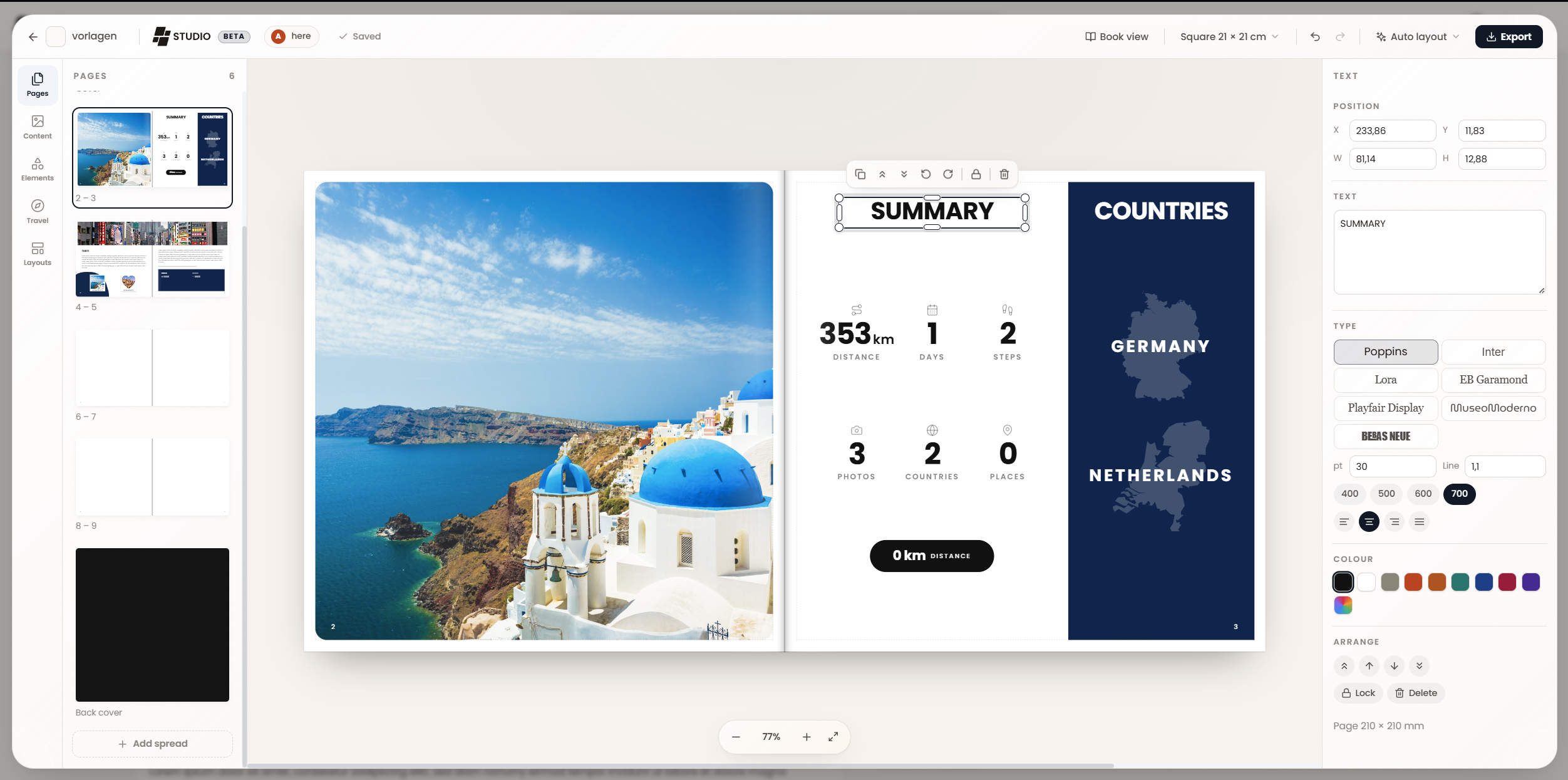
It lays the book out for you first. Open Studio on a journey and it is already a book: a cover, spreads for the entries, a back cover. Which arrangement an entry gets depends on what that entry actually has. A panorama gets the full width with the caption set over it. A day with six photographs gets a real arrangement rather than a grid of six equal squares. A day with no photographs gets a quiet text page instead of empty frames. The pages are built out of areas the way a printed travel book is, so you get coloured bands down the outer edge, panels carrying the country and the date, statistics pages. Then it gets out of the way. What the auto layout produces is an ordinary document. There is no locked "auto mode" and nothing re-runs behind your back. Every element is as editable as one you placed yourself: move, resize, rotate from any corner, layer, lock, duplicate. It snaps to the page edges, the page centres, the safe area and both sides of the gutter, and to the edges and centres of every other element, and it draws the guide so you can see why it stopped where it did. Undo treats a drag as one step rather than four hundred. Text is typed on the page itself, in its own typeface at its own size, because the point of editing there is watching the line endings while you write.
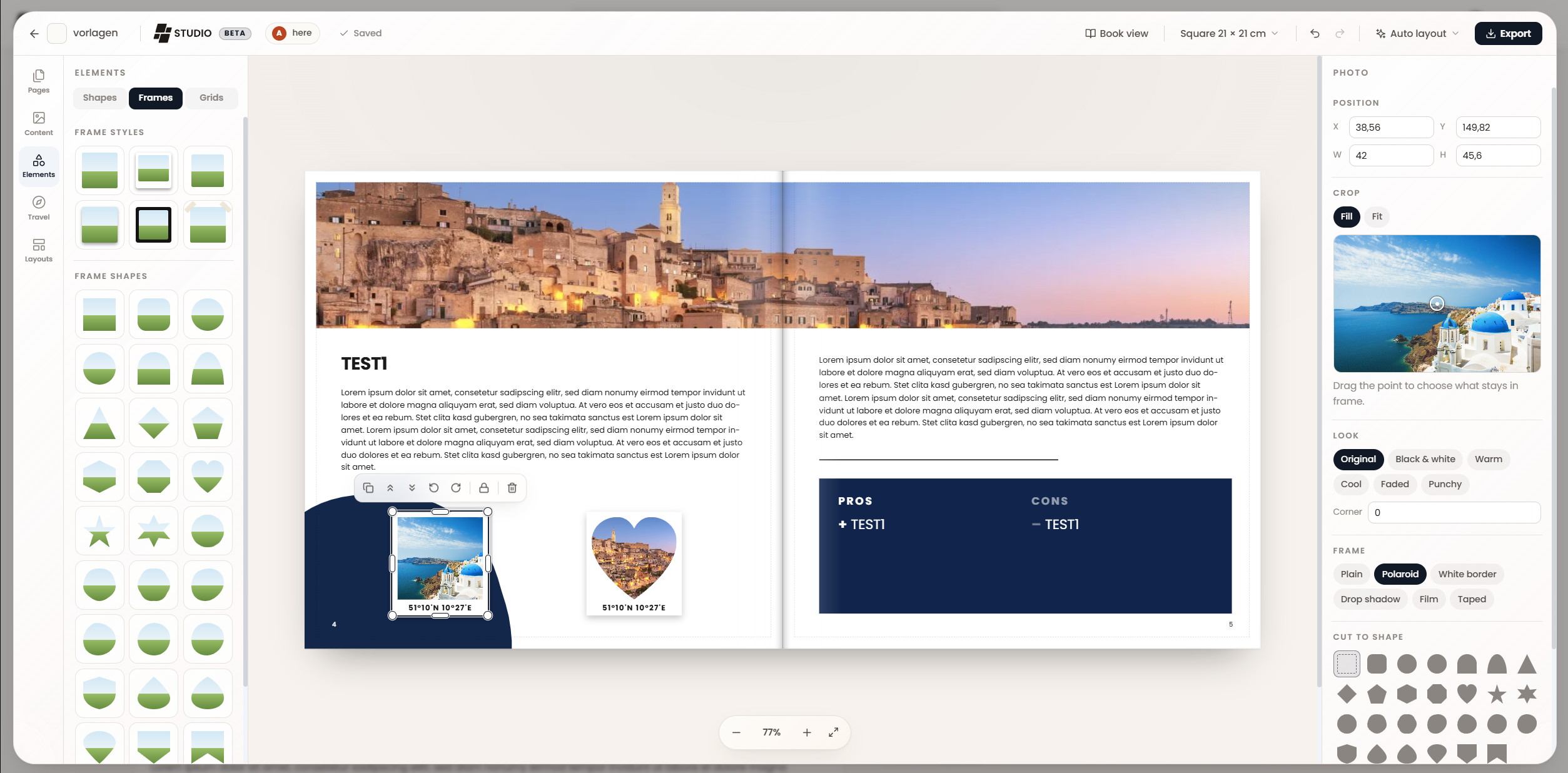
It knows it is a travel book. Alongside the ordinary shapes and frames there are elements made of your trip: country outlines drawn from real borders, flags, coordinate marks, day chips, distance and step counts, a route map drawn from the coordinates your entries already carry. Frames can be cut to a shape, given a Polaroid or film border, and cropped by dragging the point that decides what stays in frame. It saves itself, and more than one of you can be in it. The book autosaves. Everyone in a journey can open the same book at the same time and see each other's names and pointers moving across the page, so planning a book together works the way planning a trip together already does. The export is the thing you were looking at. The same renderer that draws the editor draws the PDF, so what comes out is what you saw. Single pages in reading order if you are sending it to a print shop, or spreads the way the book opens if it is for reading. Bleed and crop marks are a toggle. Trim size is yours, from square 21cm to A4 landscape to whatever your vendor binds. And you can pass a design on. Any spread can be downloaded as a file and imported into somebody else's book, which is how a good page can leave the journey it was made in. Measurements travel as fractions of the page, so a spread drawn on a square lays out correctly in a landscape book. Photographs deliberately stay behind: the file carries the design, not your pictures. Studio replaces the old Journey PDF button rather than sitting beside it. It is desktop only, and so is the PDF now: designing a book asks for room to work. Everything else about a journey is unchanged on a phone. The rest of the thread@SimMesg20, on your other points:
@SoonYu97, all three parts of yours landed:
@Peyos, both of yours are in #1972. A shared journey can be read newest first, set per share link, and the reader can flip it, so sending the link at the start of a trip works the way you described. It is off by default so an already-published link does not reorder itself under its readers. And the mobile numbering is fixed: the marker used to show the stop's position within its day while the heading showed the day number, same colour, different meaning, with the heading not rendered on mobile at all. Both count across the whole journey now, so every number appears once. @karldonteljames, yours turned out to be a security fix rather than a feature. Linking a trip to a journey copied every row of that trip's photos into the gallery, including ones a member had left unshared, and from there they were readable by every journey contributor and by anonymous visitors of an open share link. Closed in #1967 and the copying removed entirely in #1972. @elmocito, on the 500 picture limit: there is no such limit in the code, no query limit, no upload cap, no client slice. What you were feeling was the gallery putting every tile in the DOM at once. It renders in pages now and grows as you scroll. #1972 @nishi7409, Google Photos is the one I cannot promise. The tracker issue you linked is exactly the problem: the API they left us with does not let a third-party app read a user's library the way Immich or Synology do. If that changes, the provider layer is ready for it. Offline capture is the other deliberate gap. Journey is the only domain without an offline read path, so making it work is not a matter of queueing a write. An entry created offline would simply not appear, which reads as lost data. It needs the read path first, and that is its own piece of work. WhenAll of it, Studio included, ships in 4.0.0. #1967 and #1972 are merged; #1973 is in review, and Studio goes out marked Beta because the Auto Layout feature will still require a LOT of work. Once it is in your hands, this is the thread to tell me what the auto layout gets wrong. Keep the ideas coming. This thread has been worth more than any roadmap I could have written on my own. |
|
You are f*ckin' kidding me. Unbelievable awesome. I will drop some more ideas as soon as I am home. |

Thanks! Yeah, what can I say... who needs sleep anyway? :D |
|
This looks awesome, I guess it was a smart idea to wait for 4.0.0, most stuff I wanted to do would have been redundant, as for face recognition, I might look into it once 4.0.0 is out, if that's something you don't want to do yourself, as I don't think it's that big of a priority. Overall Trek is starting to become the one tool to beat them all and I am glad if I was able to help at all. Great work from everyone that was involved. I will test the Book system with a mocked Trip once it's out since i have a bunch of animal pictures. This way it's easy to share them with all of you for feedback. |


Time for an update on this thread. Nearly everything raised here has been built, and one request in particular turned into the largest single feature TREK has had.
TREK Studio (Beta)
@elmocito asked for a book printing export, "Polarsteps is doing that pretty neat", and @SimMesg20's fourth point asked for more control over how the PDF ends up looking. Those two together are #1973, and it is not a set of options bolted onto the old export. It is a photo book designer inside Journey.
It lays the book out for you first. Open Studio on a journey and it is already a book: a cover, spreads for the entries, a back cover. Which arrangement an entry gets depends on what that entry actually has. A…