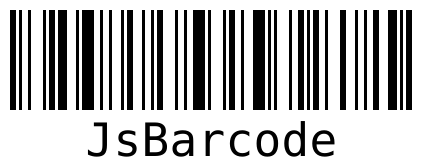



JsBarcode is a barcode generator written in JavaScript. It supports multiple barcode formats and works in browsers and with Node.js. It has no dependencies when it is used for the web but works with jQuery if you are into that.
- CODE128
- CODE128 (automatic mode switching)
- CODE128 A/B/C (force mode)
- EAN
- EAN-13
- EAN-8
- EAN-5
- EAN-2
- UPC (A)
- UPC (E)
- CODE39
- ITF
- ITF
- ITF-14
- MSI
- MSI10
- MSI11
- MSI1010
- MSI1110
- Pharmacode
- Codabar
- CODE93
<svg id="barcode"></svg>
<!-- or -->
<canvas id="barcode"></canvas>
<!-- or -->
<img id="barcode"/>JsBarcode("#barcode", "Hi!");
// or with jQuery
$("#barcode").JsBarcode("Hi!");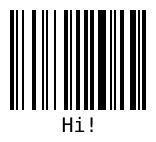
JsBarcode("#barcode", "1234", {
  format: "pharmacode",
  lineColor: "#0aa",
  width:4,
  height:40,
  displayValue: false
});
JsBarcode("#barcode")
  .options({font: "OCR-B"}) // Will affect all barcodes
  .EAN13("1234567890128", {fontSize: 18, textMargin: 0})
  .blank(20) // Create space between the barcodes
  .EAN5("12345", {height: 85, textPosition: "top", fontSize: 16, marginTop: 15})
.render();Use any jsbarcode-* or data-* as attributes where * is any option.
<svg class="barcode"
  jsbarcode-format="upc"
  jsbarcode-value="123456789012"
  jsbarcode-textmargin="0"
  jsbarcode-fontoptions="bold">
</svg>
And then initialize it with:
JsBarcode(".barcode").init();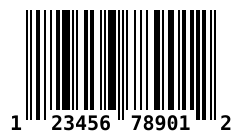
Pass in an object which will be filled with data.
const data = {};
JsBarcode(data, 'text', {...options});
data will be filled with a encodings property which has all the needed values.
See wiki for an example of what data looks like.
Download or get the CDN link to the script:
| Name | Supported barcodes | Size (gzip) | CDN / Download |
|---|---|---|---|
| All | All the barcodes! | 11.1 kB | JsBarcode.all.min.js |
| CODE128 | CODE128 (auto and force mode) | 6.3 kB | JsBarcode.code128.min.js |
| CODE39 | CODE39 | 5.1 kB | JsBarcode.code39.min.js |
| EAN / UPC | EAN-13, EAN-8, EAN-5, EAN-2, UPC (A) | 6.7 kB | JsBarcode.ean-upc.min.js |
| ITF | ITF, ITF-14 | 5.1 kB | JsBarcode.itf.min.js |
| MSI | MSI, MSI10, MSI11, MSI1010, MSI1110 | 5 kB | JsBarcode.msi.min.js |
| Pharmacode | Pharmacode | 4.8 kB | JsBarcode.pharmacode.min.js |
| Codabar | Codabar | 4.9 kB | JsBarcode.codabar.min.js |
| CODE93 | CODE93 | JsBarcode.code93.min.js |
Include the script in your code:
<script src="JsBarcode.all.min.js"></script>You are done! Go generate some barcodes 😄
You can also use Bower or npm to install and manage the library.
bower install jsbarcode --savenpm install jsbarcode --savevar JsBarcode = require('jsbarcode');
// Canvas v1
var Canvas = require("canvas");
// Canvas v2
var { createCanvas } = require("canvas");
// Canvas v1
var canvas = new Canvas();
// Canvas v2
var canvas = createCanvas();
JsBarcode(canvas, "Hello");
// Do what you want with the canvas
// See https://github.com/Automattic/node-canvas for more informationconst { DOMImplementation, XMLSerializer } = require('xmldom');
const xmlSerializer = new XMLSerializer();
const document = new DOMImplementation().createDocument('http://www.w3.org/1999/xhtml', 'html', null);
const svgNode = document.createElementNS('http://www.w3.org/2000/svg', 'svg');
JsBarcode(svgNode, 'test', {
xmlDocument: document,
});
const svgText = xmlSerializer.serializeToString(svgNode);For information about how to use the options, see the wiki page.
| Option | Default value | Type |
|---|---|---|
format |
"auto" (CODE128) |
String |
width |
2 |
Number |
height |
100 |
Number |
displayValue |
true |
Boolean |
text |
undefined |
String |
fontOptions |
"" |
String |
font |
"monospace" |
String |
textAlign |
"center" |
String |
textPosition |
"bottom" |
String |
textMargin |
2 |
Number |
fontSize |
20 |
Number |
background |
"#ffffff" |
String (CSS color) |
lineColor |
"#000000" |
String (CSS color) |
margin |
10 |
Number |
marginTop |
undefined |
Number |
marginBottom |
undefined |
Number |
marginLeft |
undefined |
Number |
marginRight |
undefined |
Number |
valid |
function(valid){} |
Function |
We ❤️ contributions and feedback.
If you want to contribute, please check out the CONTRIBUTING.md file.
If you have any question or suggestion create an issue or ask about it in the gitter chat.
Bug reports should always be done with a new issue.
JsBarcode is shared under the MIT license. This means you can modify and use it however you want, even for comercial use. But please give this the Github repo a ⭐ and write a small comment of how you are using JsBarcode in the gitter chat.