


A simple application to process YouTube (and YouTube Music) playlists and export them as audio or video files - or just grab the track list.
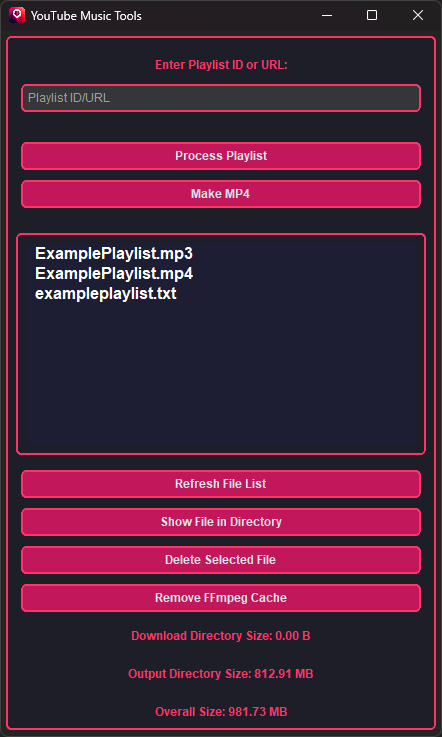
- Export playlist: Save a
.txtfile with the title, artist, and video ID for each track. - Audio compilation (optional): Downloads all tracks and merges them into a single MP3 using
ffmpeg. - Video compilation (optional): Creates an MP4 with static image or GIF background and audio.
- Flexible input: Accepts both full playlist URLs and plain playlist IDs.
- Encoder caching: Caches available
ffmpegencoders and presets for faster future runs. - Cache management: Includes a button to clear the encoder cache if needed.
On first launch, building the encoder cache may take a second.
- FFmpeg installed and available in your system
PATH.
Tip for Windows users:
The easiest (and safest) way to install FFmpeg on Windows is with winget, the official Windows Package Manager.
With winget, you get:
- Automatic download of the latest official FFmpeg release from trusted sources
- System-wide installation - no manual unzipping, copying, or adding to PATH
- Easy updates and uninstalls in the future
To install FFmpeg via winget, open PowerShell or Command Prompt and run:
winget install ffmpegThis is way easier and safer than manually downloading and extracting the binaries.
- Open the playlist in your browser (YouTube or YouTube Music).
- In the URL, locate the
list=parameter. For example, inhttps://www.youtube.com/playlist?list=PLxyz123456, the playlist ID isPLxyz123456.
Paste either the full URL or just the ID - both work.
Download the latest installer (YTMTools-Setup.exe) from Releases for a standard Windows installation.
Download the latest zip from Releases.
Note: All binaries are unsigned - if you prefer, build from source.
-
Clone the repo:
git clone https://github.com/Locko2901/YouTubeMusicTools.git cd YouTubeMusicTools -
Compile with Nuitka:
-
For a standalone build:
python -m nuitka --mingw64 --standalone --windows-console-mode=disable --include-data-files=assets/icons/img.ico=assets/icons/img.ico --include-data-files=assets/images/default.png=assets/images/default.png --enable-plugin=tk-inter --nofollow-import-to=yt_dlp.extractor.lazy_extractors --windows-icon-from-ico=assets/icons/img.ico --output-dir=ytmtools.dist --output-filename=ytmtools src/main.py
-
For a non-standalone build:
python -m nuitka --mingw64 --enable-plugin=tk-inter --follow-imports --nofollow-import-to=yt_dlp.extractor.lazy_extractors --windows-icon-from-ico=assets/icons/img.ico --output-filename=ytmtools src/main.py
Or just run directly: python src/main.py
Launch the tool and follow the labels. It’s mostly self-explanatory. If not, yell at your screen (or check the logs).
Note: Playlist has to be public or unlisted.
If something breaks:
- Try clearing the encoder cache
- Check the logs
- Open an issue
- Or hey, maybe fix it yourself
- Or don't. It's your time.
- Parallel download (maybe someday)
- Better threading, so GUI is less laggy (also maybe someday)
- yt-dlp - handles all the downloading
- Nuitka - compiles Python into binaries
- FFmpeg - the audio/video backend hero
This app is, aside from one core feature, essentially a GUI wrapper around yt-dlp - shoutout to the legends behind it.
This project is licensed under the MIT License - see the LICENSE file for details.