Linker view
This view appears in the info pane after selecting a linker from the linker list. It will look something like this:
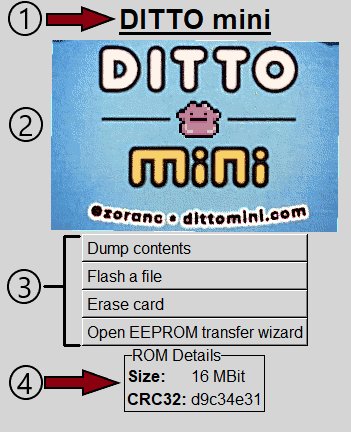
- Cartridge name
- Cartridge banner
- Actions which can be performed
- Details about the linker, cart, and contents
What you see on this screen will somewhat depend on the linker you're using and what's connected to it. Most linkers, such as the DITTO mini Flasher, will only be able to connect to its official flash cart whereas others, such as PokeUSB, will be able to accept both certain flash carts as well as the official cartridges.
When you first open this screen, you will see details about the linker, flash cartridge (if one is connected), and limited information about the contents of the cart. Once you click either Read contents or Dump contents , pm2hw will read the entire contents of the cart and be able to provide you with more information about its contents. All linkers and cartridges will have these actions available.
When you're connected to a flash cart, you will also be able to run flash and erase operations by clicking the respective buttons. Flashing will allow you to select a ROM file from anywhere on your system, but it would generally be more convenient to just add ROMs to your game library and flash from there. Generally, you will not need to erase the cart yourself, but the action is there in case you need it.
For flash carts with can be written to from within software running on the PM, the following buttons will also be available:
-
Open EEPROM transfer wizard
- This will open a wizard to step you through the process of either backing up or restoring save data on your PM.
-
Open BIOS transfer wizard
- This will open a wizard to step you through the process of dumping the BIOS of your PM for use with emulators.
- Remember: It is illegal to share your BIOS dump with others! Whether or not the backup is legal in your area is up to your country's copyright laws and international agreements your country has signed. Please consult these documents or a copyright lawyer in order to be familiar with your rights.
- Backing up your own BIOS and retaining a single copy of it for private use is legal in the USA.