Repository navigation
✌ v.1.0.0 - new Era of Coding

Code Editor — Modern, Real‑Time Collaboration
| Language | Link |
|---|---|
| English | This page |
| Русский | README_RU.md |





A lightweight, web‑based code editor with real‑time collaboration, project/file management, and a sleek, distraction‑free UI. Powered by Monaco (the editor behind VS Code), Fastify, and Socket.IO.
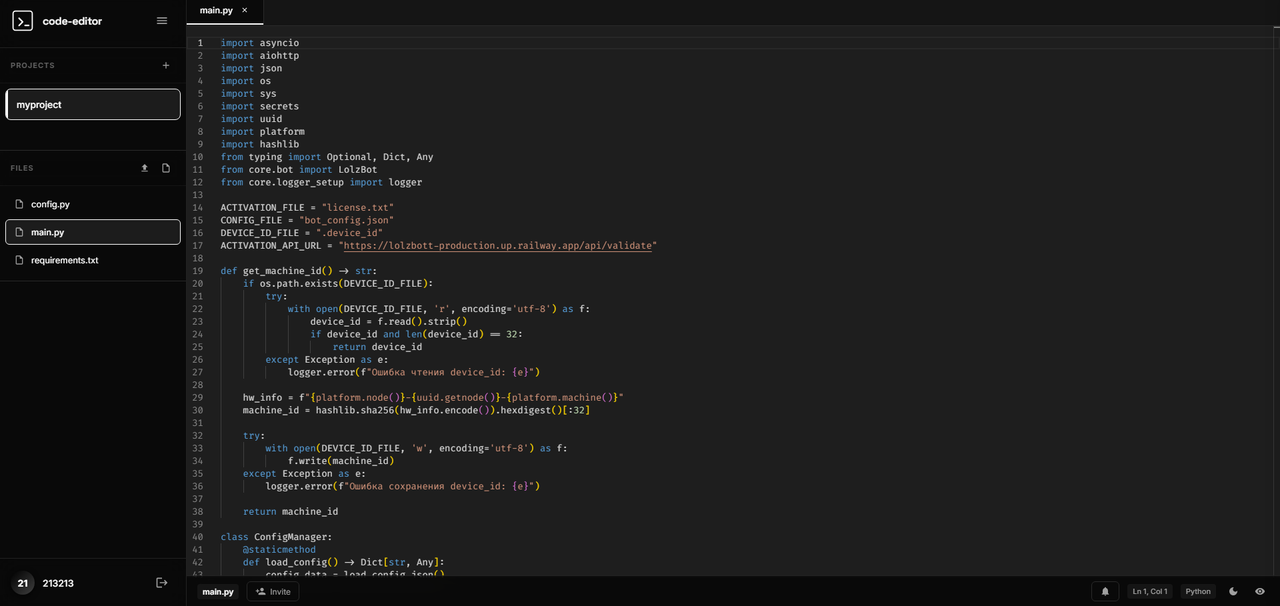
- Real‑time collaboration: live edits, remote cursor position, presence.
- Project & file management: create, upload, delete, and organize assets.
- Invitations: bring teammates into a project (default limit: up to 2 collaborators).
- Live preview: instant preview for HTML/CSS/JS, Markdown, SVG, images, audio, and video.
- Modern UX: dark/light themes, status bar, tabs, keyboard shortcuts.
- Security: sessions with httpOnly cookies, CSRF token checks, protective headers, rate limiting.
Quick Start
- Requirements: Node.js 18+
npm install
npm run start   # production mode
# or
npm run dev     # auto-reload during development
Open http://localhost:3000:
- Landing page at
/ - Auth flow at
/auth - Editor at
/editor(requires session)
How It Works
- Frontend: Monaco Editor with a split view and integrated preview panel. The preview securely renders content via an iframe and Blob URLs; HTML pages are auto‑stitched with in‑memory CSS/JS for instant feedback.
- Collaboration: Socket.IO rooms per project. Events include file changes, file create/delete, cursor updates, and collaborator presence.
- Backend: Fastify serves static assets and JSON APIs (
/api/auth,/api/projects,/api/files,/api/invitations,/api/warnings). Sessions and CSRF are enforced for mutating requests. - Storage:
better-sqlite3for a simple, fast embedded database. Scheduled cleanup tasks remove stale data.
Configuration
- The server runs on port
3000by default. SESSION_SECRET(optional): provide your own secret for session signing.- Defaults are sensible; no extra setup is required for local development.
Security & Responsible Disclosure
If you discover a security vulnerability, don’t stay silent — please report it!
- Open an issue in this repository with the “security” label, or
- Contact the maintainers privately if sensitive details are involved.
We appreciate responsible disclosure and will respond promptly.
— Happy coding!