Repository navigation

Codex Account Switcher 3.0
Version 3.0 is a ground-up redesign for macOS 27, with a much lighter app underneath.
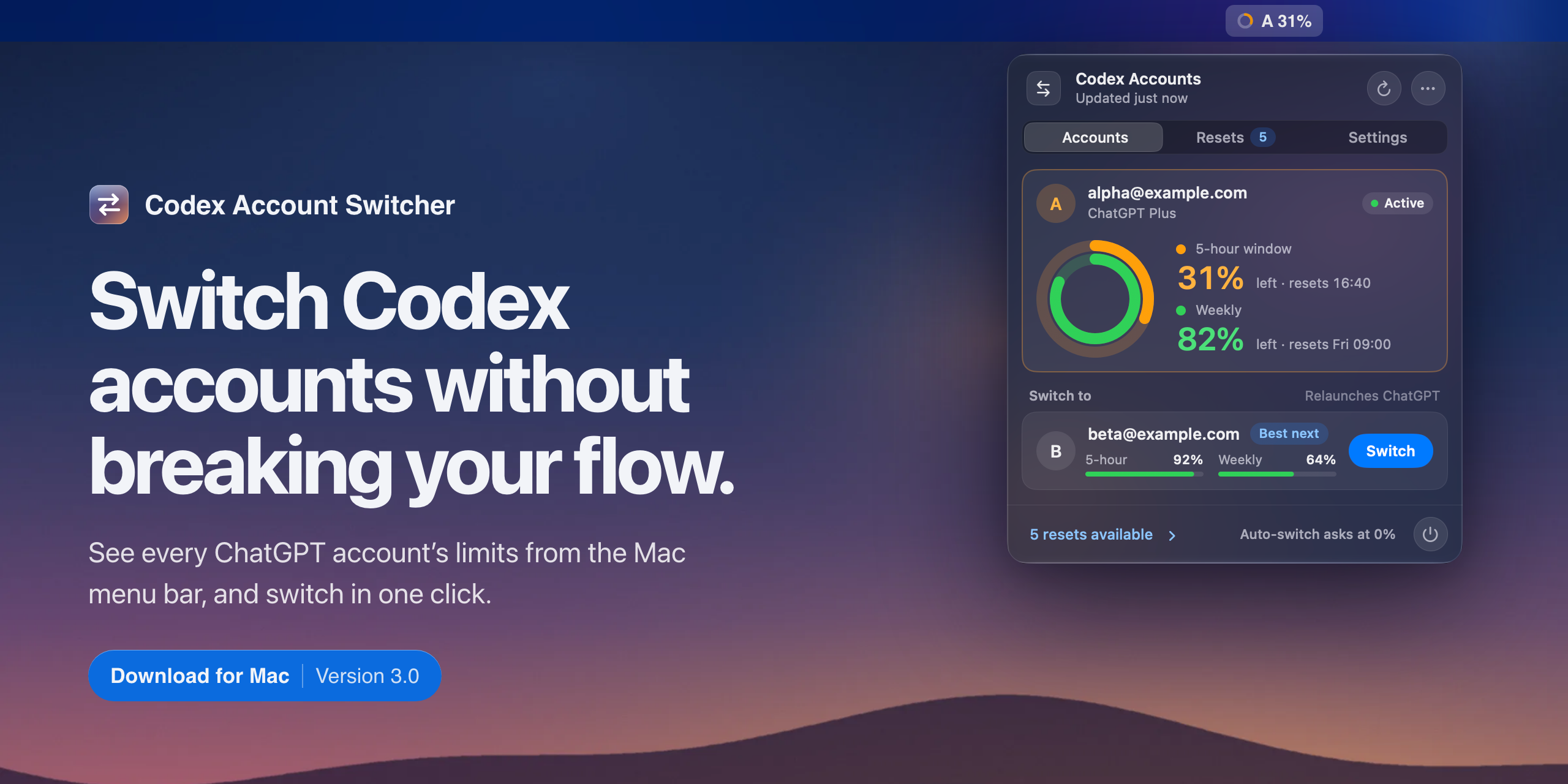
A new Liquid Glass design
- One glass panel. The panel is now a single Liquid Glass sheet with a standard toolbar. On macOS 26 and later it uses Apple’s native glass, so it follows your transparency setting.
- Tabs instead of back buttons. Move between Accounts, Resets and Settings with one tab control. The Resets tab shows how many credits you have.
- Limits you can read at a glance. The account you’re using shows two rings, one for the 5-hour window and one for the week. Other accounts show slim meters, and the one with the most room left is marked “Best next”.
- Calmer menu bar. The menu bar item is now a small usage ring next to the account letter. The text stays plain until you’re nearly out, then turns red. A spinner shows while you switch or use a reset.
- Clearer confirmations. With “Confirm before switching” on, the account row asks “Relaunch ChatGPT as B?” with Cancel and Confirm, right where you clicked. Accounts that need signing in again show a Sign In button.
- Settings that feel like macOS. Grouped lists with real switches and pop-up menus, a live preview of the menu bar item, Rename and Log Out for each account, and a compact health summary.
- A better Resets view. A summary of how many credits you have, when the next one expires and how many are urgent, then every credit by account with colour-coded days left.
- Light and dark. Every screen is designed for both.
Faster and lighter
- Switching finishes several seconds sooner. The app now watches for ChatGPT to quit and reopen instead of waiting a fixed time.
- The panel opens instantly. It no longer runs a
codex-authcheck on the main thread every time it draws, and no longer re-downloads every reset credit each time you open it. - The open panel only redraws when something it shows has changed, instead of every few seconds.
- Background work is lighter: no hidden menu rebuilt on every refresh, no 20 ms polling while commands run, saved sign-ins indexed once, and timer wake-ups that macOS can group together.
- Usage checks use their own cache-free connection, so figures are always current and responses containing sign-in tokens are never written to disk.
- About 2,400 lines of old code are gone, including the retired API mode.
Install
- Download
Codex-Account-Switcher-v3.0.zipbelow and move the app to Applications. - The app isn’t notarised yet, so the first time, right-click it and choose Open.
- If you’re new, install codex-auth and run
codex-auth loginonce for each account.
Upgrading from 1.8? Replace the old app. Your accounts, labels and settings carry over.
Needs macOS 14 or later. Designed for macOS 27.