Releases: lovach/Lunavect
Release list
Lunavect 0.2.4

Lunavect 0.2.4 improves session navigation, recovery after local read failures, and quota accuracy.
- Responsive navigation. Slow Terminal automation no longer blocks the app. Cancelled transitions stop cleanly, and permission or timeout failures keep their specific explanation.
- More reliable IDE companions. VS Code and JetBrains clean up their connections when they close. VS Code prevents cancelled requests from focusing a tab later, bounds slow connections and handles workspace/path boundaries consistently.
- Recovery and data integrity. Local metadata refreshes after temporary read failures or restored permissions. Bounded file reads and validation protect shared state and editor connection records. Corrupt background-work counts cannot overflow badges.
- Accurate limits. Reset times handle midnight, New Year and daylight-saving boundaries. Changing the selected Codex executable rejects replies from the previous one; notifications follow the same freshness rules as the displayed allowance.
- Timed Keep Awake. Moving the system clock backward cannot extend a timed lease.
- Privacy. No app telemetry, analytics identifiers or session uploads. Developer statistics come only from GitHub downloads and repository traffic.
Editor companion update: both bundled companions are now 0.1.1. In Settings → Connections → Sessions in editors, show the new installer and reinstall it in VS Code or JetBrains, then reload/restart the editor. Updating Lunavect alone does not replace an editor plugin.
Local checks passed: 736 Swift tests (59 conditional skips), 110 Python tests (one optional SDK skip), 16 Node tests, and the additional built-resource test. The optional SDK case passed separately. Actual row actions in installed build 191 verified exact terminal navigation in Apple Terminal, VS Code and IntelliJ IDEA 2026.2.3. Both providers and JetBrains Classic/Reworked terminals were exercised using inert fixtures. A public 0.2.3 → 0.2.4 Sparkle upgrade passed, preserving preferences; both existing widgets rendered LIVE afterward and through the ten-minute confirmation.
Supports macOS 14 or later, Apple silicon and Intel. The app is Developer ID signed and notarized by Apple. Provider-panel routes have contract coverage; authenticated end-to-end provider panels, remote workspaces, other JetBrains versions/products and the full hardware/OS matrix are not certified by this release.
Lunavect 0.2.3
Lunavect 0.2.3 adds local editor session navigation for Claude Code and Codex.
- Open the existing terminal tab in VS Code or JetBrains 2026.2, including the Classic and Reworked JetBrains terminals. Lunavect checks the live process identity and confirms focus of the correct project window and tab.
- Install the bundled editor companion from Settings → Connections → Sessions in editors → Show installer. Use Install from VSIX in VS Code or Install Plugin from Disk in JetBrains, then reopen the project and refresh the connection.
- IDE sessions no longer fall back to Apple Terminal or Codex Desktop. Missing companions, closed tabs and ambiguous windows show specific messages.
- Includes workspace-aware routes for the official Claude Code and Codex extensions in VS Code, with reuse of an existing Codex editor group.
- Adds installer integrity checks, protocol and navigation regressions, and translations in all six app languages.
Compatibility: local macOS VS Code/Insiders and JetBrains 2026.2 terminals. JetBrains AI Chat/ACP panels, other JetBrains versions and remote workspaces are not supported. The VS Code provider-panel routes have interface/contract tests; authenticated end-to-end behavior is not yet verified. Setup and compatibility.
Validation: 709 Swift tests passed, 59 conditional tests skipped; 102 Python tests and 8 companion tests passed. The universal app/widget/helper build, packaged resources and source provenance passed. Real local VS Code and IntelliJ IDEA 2026.2.3 terminal navigation was exercised using inert fixture processes, without model requests.
Lunavect 0.2.2
Lunavect 0.2.2 fixes navigation to running terminal sessions.
Fixed
- Recover the original terminal tab. Running Claude Code sessions can now recover their terminal location when a detached hook loses it. Sessions in the same project are matched by their individual processes.
- Focus the live Apple Terminal tab. Exited tabs that retain an old terminal device no longer intercept navigation. The correct minimized window is restored, and ambiguous project matches no longer open an arbitrary tab.
- Explain navigation errors. Automation permission denial now points to the macOS permission setting. Missing tabs, timeouts and other terminal errors have specific messages.
Documentation
- Updated the README and website introduction.
Install or update
Download Lunavect-0.2.2.dmg, or open Lunavect → Settings → Updates → Check for Updates. This is build 188, signed with Developer ID and notarized by Apple. macOS 14 or later; Apple Silicon and Intel binaries included. Existing settings and client connections are retained.
The original report came from another Mac. The fix was verified with detached native processes in a real Apple Terminal, including a minimized window and a reused terminal device; the reporter’s exact environment has not been retested.
Lunavect 0.2.1
Lunavect 0.2.1 (186) is a bug-fix release. Update if you use Claude Code background tasks or automatic hiding of finished sessions.
Fixed
- Sessions waiting on background work stay in the panel. A Claude session that replied and then waited for its background commands or subagents could vanish from the list a few seconds later, while its tasks were still running. It now stays visible as In background until the work finishes.
- Finished sessions respect your hiding interval. With automatic hiding turned on, a finished session could disappear within seconds instead of after the 5, 10 or 20 minutes you chose.
Both problems appeared when another status-bar script also recorded Claude sessions, or when Claude's session list refreshed right after a reply. See the changelog.
Sessions that were hidden this way come back with their next prompt, or at once from Hidden sessions at the bottom of the panel.
Install: download Lunavect-0.2.1.dmg, open it and drag Lunavect to Applications, or run brew upgrade --cask lovach/lunavect/lunavect. Existing installations can use Settings → Updates. The app is Developer ID signed and notarized by Apple; the updater ZIP and feed are signed.
macOS controls WidgetKit refresh scheduling. A complete Sparkle installation cycle and other macOS versions remain outside the reproduced checks. See verification for scope.
Lunavect 0.2.0
Lunavect 0.2.0 (184) shows what your agents are still doing after they reply, tells you why a turn failed, and warns you before a usage limit runs out.
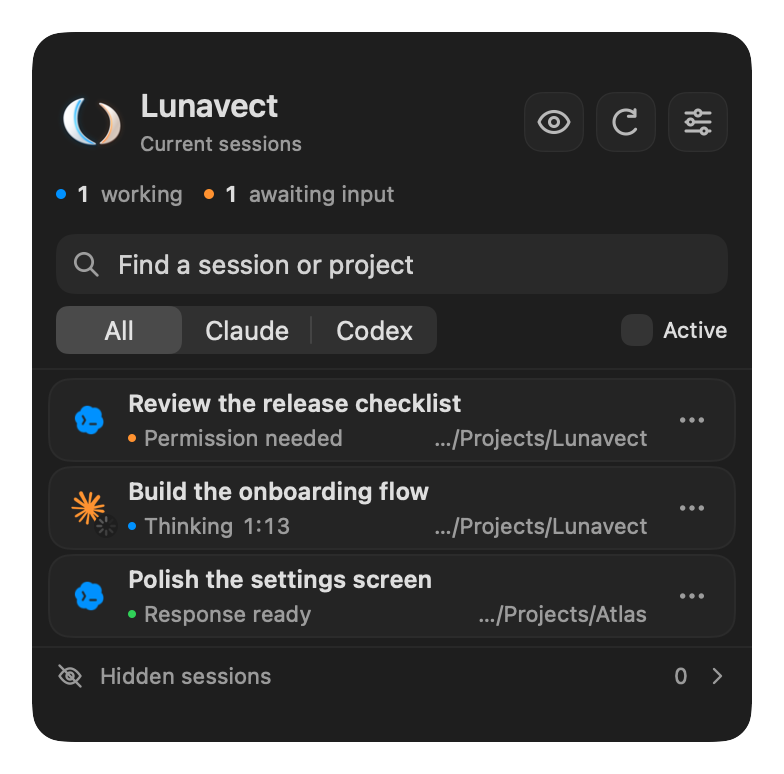
New
- Background tasks. A small count on a Claude session shows the background commands, subagents, monitors and workflows it is running, while Claude is still thinking and after it replies. A reply that leaves that work running stays In background instead of Response ready, and one notification arrives when the last task finishes. Dev servers and log followers do not hold it back.
- Why a turn failed. When a Claude Code turn ends with an API error, the session and a new Errors notification say why: limit reached (with the time it is available again), can't reach Claude, service error, sign in again or account issue.
- Limit alerts. A single warning when a five-hour or weekly allowance of Claude or Codex drops below your chosen level (10% by default), and a notice when it returns. Only fresh values count.
- No network. Working sessions say so when the Mac has been offline for more than 10 seconds.
Improved
- Times, weekdays and percentages follow your Mac's region and 12- or 24-hour clock in every language.
- Session panel: no double opens, instant opening from notifications, clearer tooltips, Command-Delete to hide a row, Control-click menus in the menu bar, steadier refresh buttons and better VoiceOver.
- Automatic Keep Awake shows Paused after a battery or heat stop and resumes by itself.
- Activity widgets no longer show the outdated badge during normal work; stronger contrast with Increase Contrast.
- Faster launch with long Codex histories, bounded local records, and a clean disconnect after reinstalling over edited client settings.
This release comes out of a full engineering and product review of the app. See the changelog for every change.
Install: download Lunavect-0.2.0.dmg, open it and drag Lunavect to Applications, or run brew upgrade --cask lovach/lunavect/lunavect. Existing installations can use Settings → Updates. The app is Developer ID signed and notarized by Apple; the updater ZIP and feed are signed. After the first launch Lunavect adds one more event handler to Claude Code (SubagentStop) through the existing connection.
macOS controls WidgetKit refresh scheduling. A complete Sparkle installation cycle and other macOS versions remain outside the reproduced checks. See verification for scope.
Lunavect 0.1.9
Lunavect 0.1.9 (181) keeps Codex's internal memory agent out of your sessions.
- Codex consolidates its memories with an internal agent that works in
~/.codex/memories. It reports events like a task, but it is not a thread you can open. Lunavect no longer shows it as a working session or counts it, and Settings → Connections no longer reports an incomplete Codex session catalog because of it.
This release also includes the recent widget, terminal and performance work from 0.1.8 and 0.1.7: desktop widgets that recover on their own after an update, sessions that open in their own Terminal or iTerm2 tab, and lower background CPU use.
Download Lunavect-0.1.9.dmg, open it and drag Lunavect to Applications. Existing installations can use Settings → Updates. The app is Developer ID signed and notarized by Apple; the updater ZIP and feed are signed.
macOS controls WidgetKit refresh scheduling. A complete Sparkle installation cycle for this release and other macOS versions remain outside the reproduced checks. See verification for scope.
Lunavect 0.1.8
Lunavect 0.1.8 (180) lets desktop widgets recover on their own after an update.
- While an installer or updater removes the replaced copy, macOS can lose track of the widget extension and show placeholders even though the widgets' data is fresh. Lunavect already re-confirmed its widget registration 5 and 30 seconds after launch; it now also does so after 2 and 10 minutes, once that cleanup has settled. The checks only re-register the installed app and its widget extension. They never restart the extension or change widget settings.
This release also includes everything from 0.1.7: terminal sessions open in their own Terminal or iTerm2 tab, background CPU use is lower, and Claude runs started by another agent no longer appear as separate sessions.
Download Lunavect-0.1.8.dmg, open it and drag Lunavect to Applications. Existing installations can use Settings → Updates. The app is Developer ID signed and notarized by Apple; the updater ZIP and feed are signed.
macOS controls WidgetKit refresh scheduling. A complete Sparkle installation cycle for this release and other macOS versions remain outside the reproduced checks. See verification for scope.
Lunavect 0.1.7
Lunavect 0.1.7 (179) keeps desktop widgets visible after updates, uses much less CPU in the background and brings terminal sessions to their own tab.
- Desktop widgets recover on their own when macOS loses track of the widget extension after an install, update or extension restart. Each launch re-confirms the widget registration after 5 and 30 seconds, without restarting the extension or changing widget settings. Relaunching Lunavect repairs widgets that show placeholders.
- Lower background CPU use. Session polls no longer re-read unchanged local files, reopen unchanged Codex journals or scan every process on each pass, and a closed Settings window stops recomputing statistics. On the test Mac, steady CPU use went from about 7.5% to 2.9% with an active session and the animated menu-bar character.
- Opening a Claude Code or Codex session that runs in Terminal or iTerm2 brings its own tab to the front and closes the session panel. macOS asks once for permission to control that terminal. A terminal that is not running is never launched for this, and Desktop sessions are never matched to a CLI in the same folder.
- A Claude CLI started by a command inside another Claude or Codex task no longer appears as a separate session, in counters, notifications or activity.
- A Codex CLI bundled inside a desktop app is recognized as a terminal client when it runs in a terminal.
Download Lunavect-0.1.7.dmg, open it and drag Lunavect to Applications. Existing installations can use Settings → Updates. The app is Developer ID signed and notarized by Apple; the updater ZIP and feed are signed.
macOS controls WidgetKit refresh scheduling. A complete Sparkle installation cycle for this release and other macOS versions remain outside the reproduced checks. See verification for scope.
Lunavect 0.1.6
Lunavect 0.1.6 improves session status delivery and scrolling, and includes the recent Codex activity and widget-registration fixes.
- Clear stale menu-bar waiting counts during system event tracking after work resumes.
- Reduce whole-panel updates while scrolling long session lists; keep swipe and drag hit testing current.
- Detect active Codex desktop tasks whose rollout filenames contain a segment UUID.
- Restore the installed widget host after temporary build registrations are removed.
Download Lunavect-0.1.6.dmg for manual installation. The ZIP and signed appcast serve the built-in updater. The app is universal, Developer ID signed and notarized by Apple. Existing settings, signing identity, bundle IDs and update keys are preserved.
The fixes cover reproduced regressions. They do not guarantee that every transient provider status has the same cause; a live FPS improvement and a complete automatic-upgrade cycle for this version remain unverified. Older releases remain available.
Lunavect 0.1.5
Lunavect 0.1.5 (162) improves widget recovery and session status reliability.
- After an app update, Lunavect refreshes its own installed widget extension registration and requests fresh timelines while preserving widget settings.
- Expired waiting statuses leave the menu-bar count even when local event reads fail or remain pending.
- Confirmed internal Codex agents stay out of user session lists, waiting counts, activity and notifications. Ordinary tasks and independent chats remain visible; provider history is preserved.
Download Lunavect-0.1.5.dmg, open it and drag Lunavect to Applications. Existing installations can use Settings → Updates. The app is Developer ID signed and notarized by Apple; the updater ZIP and feed are signed.
macOS controls WidgetKit refresh scheduling. The separate report of an empty waiting indication and a complete Sparkle installation cycle for this release remain outside the reproduced checks. See verification for scope.