Repository navigation
Home
Welcome to the buildFPV visual learning path. Start with the aircraft overview, understand how it flies, then identify each part one by one before moving into radio setup, simulation, configuration and safety. These Wiki-ready pages are maintained in the main repository under docs/wiki-source/; reusable diagrams live in docs/assets/.
Important
Mandatory beginner video course before your first real flight: complete the Learn to fly an FPV drone (for total beginners) playlist in sequence while practising in Liftoff. This is a buildFPV learning requirement, not an official licence or certification; continue to check safety requirements and current local rules.
- Drone Systems and Controls — supplied playlist and video to complement the control-loop diagrams.
- RadioMaster Pocket setup video — setup and binding overview.
- India outdoor flying rules — supplemental video resources plus official rules and airspace links.
- Drone Coding and Machine Learning — optional advanced track.
- FPV System Basics — understand the control, flight-control, power and video paths.
- How FPV Drones Work — learn lift, flight axes, motor rotation and feedback control.
- FPV Drone Parts — One by One — a visual lineup and detailed explanation of the frame, battery, motors, propellers, ESC, flight controller, receiver, camera, video system, antennas and optional GPS/accessories.
- Hardware Gallery — compare real build photos, boards, antennas and GPS modules.
- RadioMaster Pocket Button Guide — identify controls and calibrate the radio.
- Pocket ELRS and Liftoff — connect the Pocket by USB for the original Liftoff FPV Drone Racing game.
- Pocket ELRS and Liftoff: Micro Drones — connect and calibrate the controller separately for the micro-drone simulator.
- Simulator Training — build control skills before a real flight.
- Betaflight Basics, ExpressLRS Basics, Video Systems and Goggles, Video Antennas, and GPS and Flight Controllers.
- Bench Safety and Flight Readiness, Buying Parts in India and Troubleshooting.
- Drone systems and controls video/playlist
- RadioMaster Pocket setup and binding walkthrough
- DGCA / drone-awareness video resources
- Optional drone coding and machine learning track
Start with the Drone Categories and Size Guide. Dedicated class guides: Tinywhoops and micro, 2.5-inch FPV, 3.5-inch cinewhoop, 5-inch racing vs freestyle, and 7-inch long-range.
Frame geometry and assembly: Balanced X vs deadcat, balanced X assembly, deadcat assembly, 2.5-inch frame assembly, 3.5-inch cinewhoop assembly, 5-inch assembly, and 7-inch assembly. Use the Assembly Tools and Workshop Guide before starting a DIY build.
Components and buying: Motors, propellers and battery compatibility, Battery flight-time and cycle-life planning, LiPo/Li-ion charger and safety, BNF/PNP/RTF/ARF/DIY formats, and the FPV Build Budget and Buying Guide.
Start with the model-level FPV Cameras, VTX, VRX and Goggles Compatibility Comparison, then use the FPV Camera Selection Guide and Analog vs Digital FPV Camera/Video Guide. For setup instructions, see Analog Goggles/VRX, DJI O3/O4, Walksnail Avatar, HDZero, and general goggles/VRX integration.
The radio-control receiver and video receiver are different systems. Digital goggles and air units must match by explicitly supported model/generation and firmware.

These short concept animations explain thrust direction and the way front-motor spread can affect propeller visibility. They are explanatory illustrations, not motor maps, actual flight simulations, wiring diagrams or manufacturing drawings.

For a full visual map of the component order, see the FPV parts lineup.

A scalable vector overview of the hardware and system paths. It is conceptual, not a wiring schematic; verify every detail against the exact build and manufacturer manual.

Throttle changes the overall thrust request. Roll, pitch and yaw describe rotation around the drone's three axes; the flight controller mixes these requests into motor outputs.
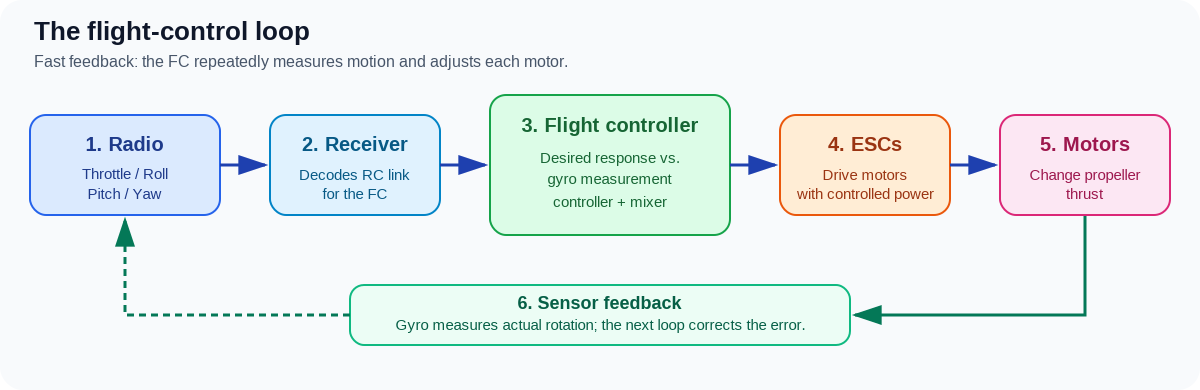
Your radio sends commands, the flight controller reads sensor feedback and computes corrections, and the ESCs adjust motor power. The gyro is central to fast stabilisation; GPS provides slower navigation data when fitted and configured.
Open FPV Drone Parts — One by One next. It now has a dedicated lineup illustration and custom component diagrams for the frame, battery/power, motors/propellers, FC/ESC and AIO, sensor feedback, ELRS receiver, FPV video, antennas and optional GPS/accessories.
- Remove every propeller during setup, USB configuration, firmware work, receiver checks and motor testing.
- Disconnect the LiPo before soldering or changing wiring.
- Do not assume a radio bind verifies failsafe, motor direction, video or power wiring.
- Check official documentation and current local airspace/radio rules before outdoor use.
This is the live-Wiki learning path. Source Markdown and assets are maintained in the buildFPV source repository; changes become visible here after the Wiki publishing workflow completes.