Repository navigation
FPV System Basics

High-resolution vector recreation of the overview graphic. The diagram is scalable and designed to stay sharp when enlarged. It is a conceptual learning map, not a wiring diagram or exact build layout.
Use this page as the map, then open the chapter that explains the part you want to understand. Each chapter follows the signal or energy path through the aircraft and ends with checks and questions. These are learning explanations, not wiring instructions.
- How FPV Drones Work — from sticks to flight explains pitch, roll, yaw, thrust and the control loop.
- Drone Parts — One by One identifies the hardware and its purpose.
- FPV Power System Explained follows battery energy through distribution and regulated supplies.
- FPV Propulsion System Explained follows the ESC, motors and propellers from electrical command to thrust.
- Flight Controller and Stabilization Explained explains sensor feedback, setpoints, PID concepts and flight modes.
| System path | What travels through it | Read next |
|---|---|---|
| Radio control | Stick/channel values from the transmitter, over the RF link and receiver, into the FC | Radio-Control Path Explained · ExpressLRS Basics |
| Live video | Camera picture through the analog VTX or digital air unit, over the video link to a compatible receiver/goggles | Video Path Explained · Analog vs Digital Video |
| Power and propulsion | Stored battery energy converted into controlled motor torque and thrust | Power System Explained · Propulsion System Explained |
| Sensors and stabilization | Gyro/other sensor measurements feed the FC's control loop; motor output changes the aircraft's motion | Flight Controller and Stabilization · Betaflight Basics |
| GPS, telemetry and recovery | Position/status data feeds supported FC features and selected displays; telemetry can send data back | GPS, Telemetry and Recovery Explained · GPS and Flight Controllers |
Follow the chapter order above if you are starting from zero. Then read ExpressLRS Basics and Betaflight Basics for hands-on configuration, Motors, Propellers and Battery Compatibility for selection trade-offs, and FPV Chargers, LiPo and Li-ion Battery Safety before charging or handling packs.
Important: a radio bind, a working video picture or a correctly detected GPS is only proof about that part of the system. It does not establish flight readiness. Use the exact hardware documentation, keep props removed during configuration and motor checks, and follow current local rules.
The original supplied raster artwork is still available: FPV drone basics infographic · beginner FPV guide.
Use the visual map for orientation, then follow the text and model-specific manuals for setup, wiring, motor direction and compatibility.

Major aircraft parts at a glance.
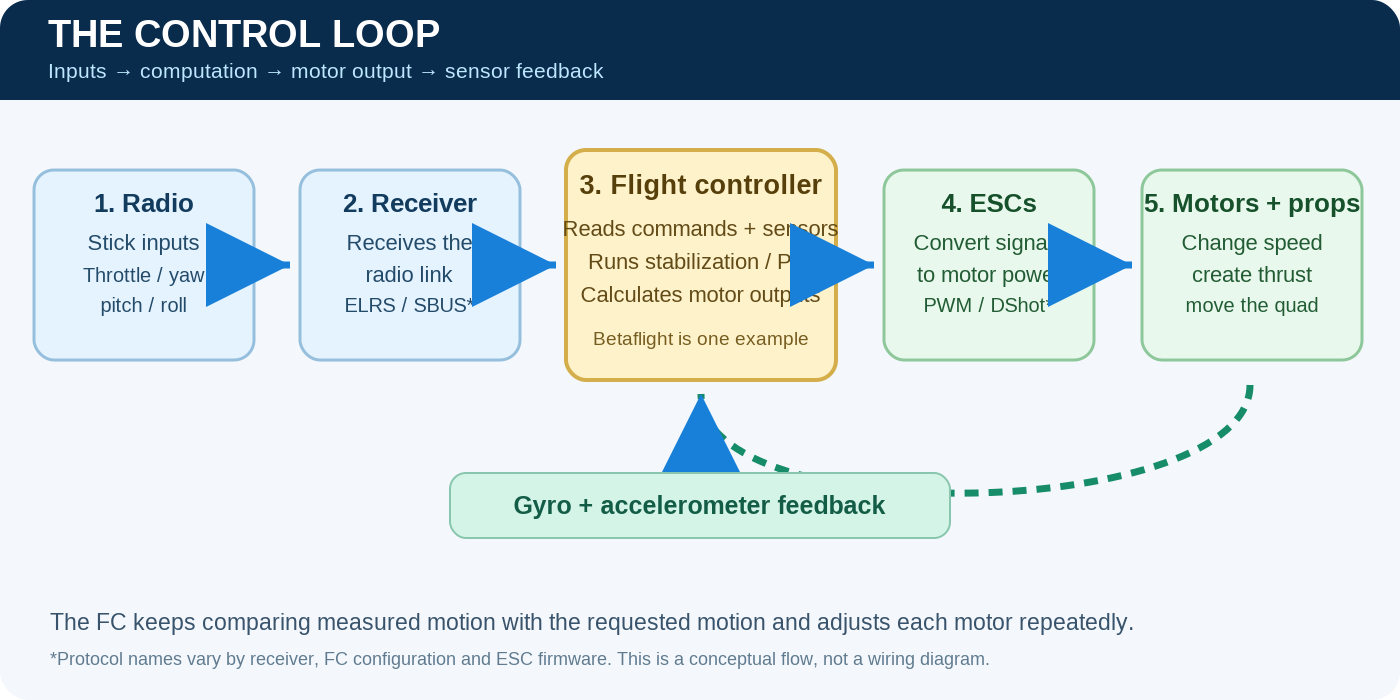
Control and stabilization path; not a wiring diagram.

Camera video and radio control are distinct links.

Confirm antenna band, connector, polarization and orientation.
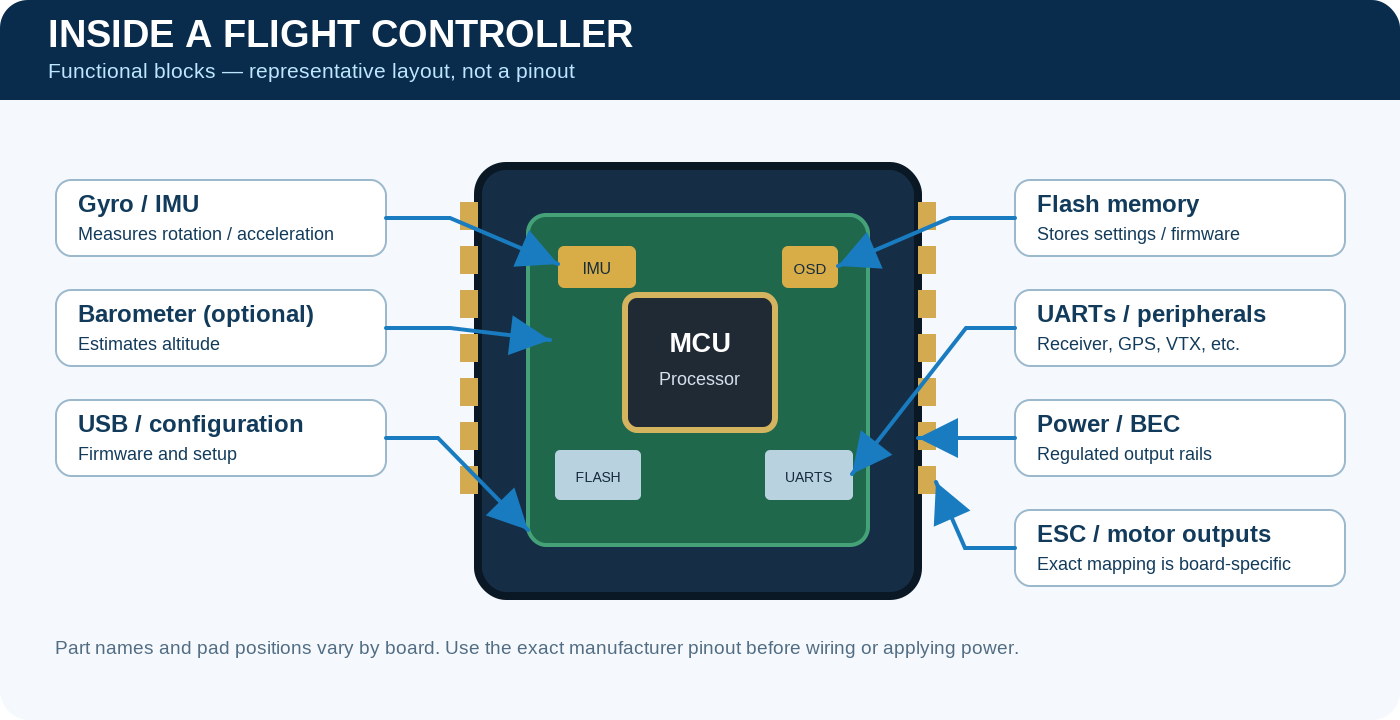
Board-specific pinout documentation remains authoritative.

Match radio protocol, receiver firmware and wiring.

GPS-enabled features depend on hardware, firmware and configuration.
For choosing an aircraft style, see Drone Categories and Size Guide. For hardware/video trade-offs, see Analog vs Digital FPV Video and Goggles/VRX Integration.

Real-build photo: FPV Quadrocopter on Wikimedia Commons. This is an overview photo, not a wiring diagram.
FPV means first-person view: an onboard camera transmits live video to compatible goggles or a display. A quad combines several systems that must be compatible but are not the same thing.


Use these as guided explanations alongside the diagrams and official manuals. I could not reliably confirm the playlist/video titles from public page metadata, so the links are grouped by the topic supplied with them rather than making claims about their exact syllabus.
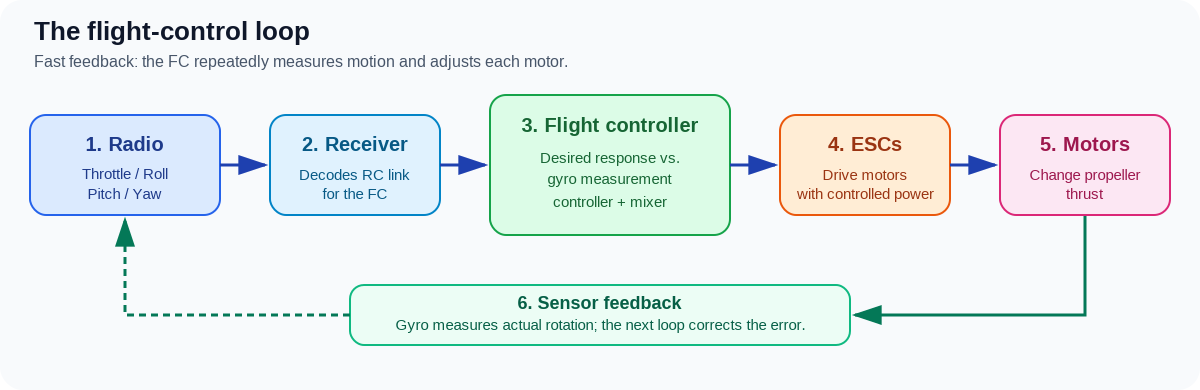
The control loop describes what happens after your command reaches the flight controller. It is a conceptual diagram, not a pinout or wiring schematic.
Pilot's sticks → RadioMaster Pocket ELRS → 2.4 GHz ExpressLRS link → aircraft receiver → flight controller → ESC → motors → propellers
The radio sends control commands. The receiver delivers channel data to the flight controller. The flight controller combines pilot input with gyro/sensor readings; it then sends motor commands to the ESC.
This concept image is for orientation only. The signal path below shows the logical flow; always check hardware-specific manuals for wiring.
Camera → analog VTX or digital air unit → video link → compatible goggles/display → pilot
Keep this separate from the control path: the radio link carries stick commands, while the video system carries the camera feed. A compatible ELRS radio and receiver do not automatically make a video transmitter compatible with your goggles.
The selected video system determines which goggles/receiver and antennas are compatible. A 2.4 GHz ELRS control link does not determine which FPV video system to use.
Battery → power distribution/regulators → FC, ESC, receiver, camera/video hardware, motors
Actual wiring and supported input voltages depend on each product. Check the board manuals rather than relying on this conceptual diagram.
DVR can record what the goggles/display receives. An onboard camera may record higher-quality footage separately. Gyroflow can stabilize compatible recorded footage when the necessary camera/motion-data workflow is supported; it is not required for flying.
- EdgeTX: radio operating system/model configuration on the Pocket.
- ExpressLRS: the RC control link on the transmitter module and receiver.
- Betaflight or another supported flight-controller firmware: flight behavior, receiver mapping, motor outputs and failsafe-related configuration.
- VTX/air-unit firmware: specific video hardware.
- Gyroflow: desktop post-processing/stabilization workflow.
Do not update all systems at once. Confirm the exact target and recovery procedure for each one.
- Trace a control command from radio sticks to motor output.
- Explain why the video link is separate from the ELRS control link.
- Explain why a concept diagram cannot replace a board-specific wiring diagram.
- LiPo cell count (S): number of cells in series; this affects voltage.
- Rates: relation between stick input and commanded rotation.
- Arming switch: deliberate control used to enable motors.
- Failsafe: defined action on signal loss; verify real behavior rather than assuming.
- Blackbox: flight-controller logging useful for diagnosis.
- Explain how a roll-stick movement becomes a motor command.
- Explain why successful ELRS binding does not verify video, motor direction, failsafe, or battery wiring.
- Explain the difference between ELRS and a video transmitter.