Releases: m-sanchez/ocelin
Release list
Ocelin 0.6.8 preview: Windows shortcut identity repair

Ocelin 0.6.8 fixes a Windows shortcut conflict that could keep showing Electron's taskbar icon after earlier icon updates.
- Development and test builds have separate Windows app IDs from installed Ocelin.
- The installed app backs up the old
Electron.lnkonly when its identity and target verify that it belongs to Ocelin development. - Backups remain in
%LOCALAPPDATA%\Ocelin\shortcut-backups. Other apps and taskbar pins are preserved. - Regression checks cover actual Windows shortcuts, backup preservation and window icons.
Install Ocelin-0.6.8-x64-setup.exe to update. Preferences and session history are preserved. The taskbar widget stays at 0.6.5 and needs no new approval.
This remains an unsigned Windows preview.
Ocelin 0.6.7 preview: workspace taskbar icons
Ocelin 0.6.7 updates the Windows workspace taskbar icon handling.
- Windows receives a dedicated pet icon file, separate from the executable and app archive.
- Dashboard and workspace windows reapply their Ocelin icon and identity when shown or restored.
- Packaged checks read the actual small and large Windows window icons and verify recovery after an incorrect icon is applied.
Install Ocelin-0.6.7-x64-setup.exe to update. Preferences and session history are preserved. The taskbar widget stays at 0.6.5 and needs no new approval.
This remains an unsigned Windows preview.
Ocelin 0.6.6 preview: Windows branding
Ocelin 0.6.6 cleans up the Windows app's identity and menus.
- Ocelin menu with dashboard and session-panel shortcuts, Ocelin Help and a branded About dialog.
- Explicit Ocelin taskbar identity, icon and relaunch behavior for both dashboard and full project windows.
- Pet icons at nine sizes, from 16 to 256 pixels, in the application, installer and uninstaller.
- Build checks verify executable names and embedded icons, and packaged smoke checks reject default framework menu entries.
Install Ocelin-0.6.6-x64-setup.exe to update. Preferences and session history are preserved. The taskbar widget remains 0.6.5; no widget reinstallation or permission review is needed.
The Windows preview remains unsigned. Its underlying runtime and third-party license notices remain included.
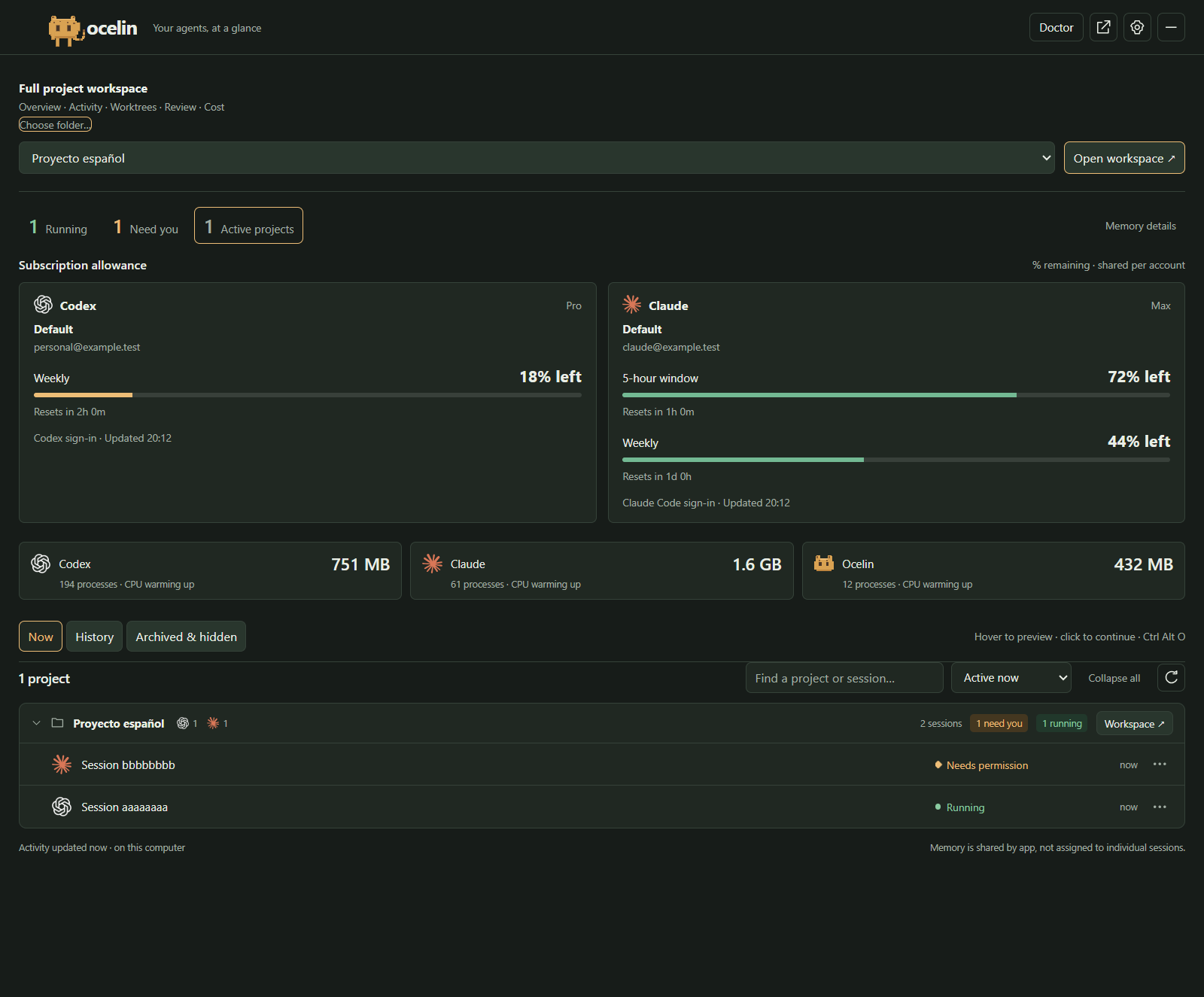
Validated with the package self-test, 714 unit tests, packaged Windows interactions and executable-resource checks. The 0.6.5 screenshot gallery shows the session, allowance and Doctor features retained in this update.
Ocelin 0.6.5 preview: taskbar allowances and Doctor
Ocelin 0.6.5 puts running sessions and subscription allowance in the taskbar and adds Doctor to the sliding panel.
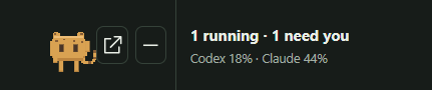
- Taskbar: the animated pet shows running/attention counts plus separate Codex and Claude percentages left. Settings offers lowest remaining limit, weekly or five-hour allowance, and can switch the second line to per-app sessions or RAM.
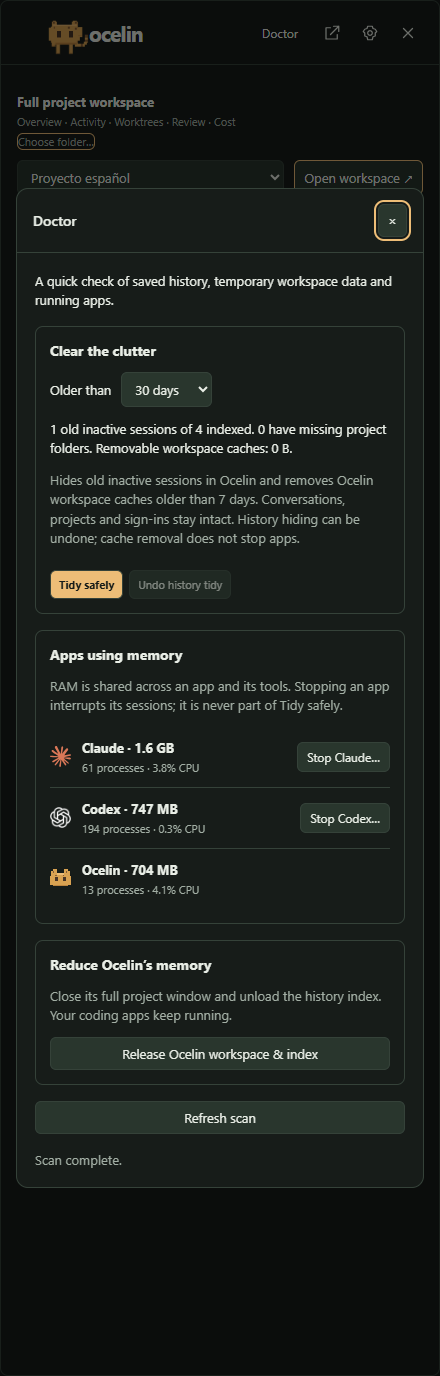
- Doctor → Tidy safely: hide inactive sessions older than 30, 90 or 180 days, with Undo. Remove only old Ocelin workspace caches. Original conversations, project files, native sidebars and sign-ins stay intact.
- Doctor → Stop Codex / Claude: review process count and running sessions, then explicitly stop that app and its observed tools. This can interrupt all accounts in the app. Changed or inaccessible processes are skipped.
- Release Ocelin workspace & index: close the full project window and unload history while keeping your coding apps and session monitor running.
Install Ocelin-0.6.5-x64-setup.exe. For the new taskbar text, use Settings → Connect taskbar strip and approve adapter 0.6.5 with Enable after installation checked. Ocelin.twidget is also attached for manual import. Existing patched hosts need no replacement. First-time users can get the optional host from 0.6.2.
Multiple account profiles show the lowest valid value per provider, never a sum. An asterisk indicates incomplete readings; open the panel for each account and reset time. Missing, stale or reset-expired readings are not treated as full allowance. The Windows preview is unsigned; optional taskbar integration uses private Windows APIs.
Validated with 714 tests, package self-test, packaged desktop interactions, Windows/Linux CI and Windows packaging. Process stopping was exercised only against an isolated disposable test process.
Screenshots
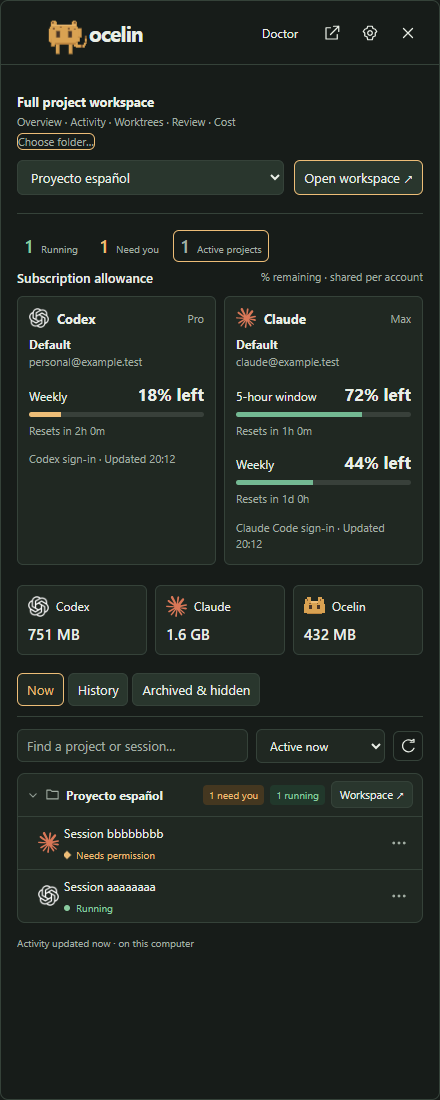
Ocelin 0.6.5 with sample conversations, accounts and allowance readings. Memory figures come from the capture machine.
| Sliding session panel | Doctor: cleanup and memory |
|---|---|
 |
 |
The optional movable floating tile can also show running counts and remaining allowance:
Ocelin 0.6.4 preview: account profiles and full workspace
Open the full project workspace directly from the taskbar panel, and monitor additional signed-in account profiles.
- Open workspace opens the original Overview, Activity, Worktrees, Review and Cost interface. Choose a recent project or use Choose folder…. Each project heading also has a Workspace button.
- Settings → Account profiles connects up to eight additional existing local Codex or Claude Code profiles. Each gets an allowance card, profile name and reported account email.
- Rename or disconnect a profile without deleting provider files or changing its sign-in.
- Session rows and history previews identify their source profile. The account that originally ran a historical conversation remains unverified.
- 5-hour window now clearly describes the allowance shared across conversations. Profiles using the same account share limits; percentages are never added together.
Install Ocelin-0.6.4-x64-setup.exe. Existing taskbar widget installations need no update. New taskbar installations use adapter 0.6.4 and the patched host from the 0.6.2 preview.
Profiles must already be signed in through the provider's own tools. App-only credentials, temporary terminal tokens, WSL and remote profiles are not automatically connected. Claude's OAuth usage and identity endpoints are not public stable APIs. The Windows preview remains unsigned; optional taskbar integration remains experimental.
Validated with 709 tests, package self-test, desktop interaction smoke and live identity/allowance readings from both providers.
Ocelin 0.6.3: subscription allowance
Ocelin 0.6.3 shows how much of your Codex and Claude subscriptions is left.
- Percentage remaining for every reported session and weekly limit, with reset countdowns and exact local reset times on hover.
- Separate model allowances, including Codex Spark, under “Other model allowances.”
- Matching cards in the dashboard, taskbar session panel and original project Cost page.
- Refreshes every two minutes. Missing, stale or reset readings stay unavailable until refreshed.
Install Ocelin-0.6.3-x64-setup.exe. Existing taskbar widget installations need no update. New taskbar installations still use adapter 0.6.4 and the patched host from the 0.6.2 preview.
Codex reads the signed-in CLI account API; Claude reads its existing Claude Code subscription sign-in. These can differ from accounts signed into other apps. Credentials stay in the background process. Claude refresh remains owned by Claude Code, and its OAuth usage endpoint is not a public stable API. The original browser Cost page reads the desktop's sanitized local snapshot.
Validation: 703 tests, package self-test, desktop layout and interaction smoke, and live usage readings from both providers. The Windows preview remains unsigned; optional taskbar integration remains experimental.
Ocelin 0.6.2 Windows preview
Ocelin 0.6.2 brings the pixel pet and live session counts into the optional Windows taskbar strip. Clicking anywhere on the widget opens a compact session panel at the right edge of that monitor.
- See running work, attention signals and app RAM. Hover deliberately over a title to preview recent activity; click to continue in the exact Codex or Claude conversation.
- Close the panel with Escape, its close button or an outside click. Reduced-motion settings disable the slide.
- Choose the dashboard, tray panel and movable, hideable floating tile independently.
- Widget updates release their launch folder correctly, resolve redirected pet images and preserve the installed protocol handler during tests.
- The optional host includes English permission review, correct widget selection and a whole-widget action with a hand cursor.
Download Ocelin-0.6.2-x64-setup.exe for the Windows companion. Ocelin.twidget is adapter 0.6.4. Whole-widget activation requires the Ocelin-patched TaskbarWidgets-0.5.36-English-review.zip, including its MIT license and third-party notices. Widget installation and update permissions remain under your control.
The separate Ocelin.AppTasks.Local.msix is development bridge 0.6.0.2 and requires administrator installation. It publishes experimental native Windows tasks; task storage is confirmed, but native hover-card rendering remains unverified. The installers are unsigned.
The taskbar host uses private Windows APIs. Unload it before replacing its executable and start a fresh Windows shell before loading the replacement. An earlier hot replacement caused one Explorer crash; a controlled shell restart succeeded afterward. This remains an experimental integration.
Validation: 694 core tests, package self-test, packaged Windows smoke, animation-frame measurements, deliberate-hover checks, native URI dispatch, launch-folder rename and protocol-handler preservation, Windows/Linux Node 20/22 CI, 14 host setup scenarios and actual widget validation. The user confirmed the pet, whole-widget panel opening and visible slide on Windows 11 build 26200.9457. The cursor host passed CI run 35219044416 and is installed. A real hover produced the native diagnostic hand cursor: active=1, confirming Windows selected the hand cursor; visual feedback from the user remains pending.
Ocelin 0.6 · Conversation history and Windows integration preview
Ocelin 0.6 adds conversation previews and history management to the Windows companion for Codex and Claude.
- Hover or keyboard-focus a task to preview recent messages; click to open that conversation in its provider.
- Search and filter saved conversations, including archived tasks and missing project folders. Review a selection before hiding it locally or archiving/restoring through Codex.
- Use the tray, compact floating tile or dashboard. Optional native Windows App Tasks and Taskbar Widgets integrations are selectable.
- Notification clicks return to the exact task. Ctrl Alt O opens the quick panel. Hidden windows release their renderers, and project workers stop with their windows.
Download Ocelin-0.6.0-x64-setup.exe for Windows x64. The preview installer is unsigned; settings survive an update. The browser core remains dependency-free.
The separate Ocelin.AppTasks.Local.msix is an unsigned development bridge (0.6.0.1), requiring administrator installation and an enabled experimental Windows rollout. The helper API status does not prove that Windows displays cards. Native hover cards have not been visually verified on the test machine. The optional Ocelin.twidget requires Taskbar Widgets and its permission review; Explorer rendering is not yet verified. These are preview integrations, not a claim of universal Windows support.
Validated with 691 tests, the package self-test, packaged desktop smoke, real Codex archive/restore on isolated fixtures, and live paginated history reads. Claude native archive, permanent deletion, WSL/remote sources and in-panel agent approvals are not included. Memory is measured per app, not divided among sessions.
Ocelin 0.5.0 · Compact projects and live memory
Ocelin now opens on active work, grouped by project, with live app memory above the list.
- Compact, collapsible project groups and official Codex/Claude icons.
- Live Windows RAM and CPU details for each app and its recognized child tools.
- Reversible cleanup hides older finished and stale entries without deleting provider conversations.
- Choose session chips or a compact status tile, floating freely or above the taskbar.
- Optional Taskbar Widgets adapter for an inside-taskbar summary. Requires the external host and permission review; Explorer rendering is not verified.
Validated with 676 unit tests, the package self-test, development and packaged Windows checks, installed operation without system Node, and narrow/light layouts. The adapter passes upstream schemas, archive integrity and JSON-lines protocol tests.
Download the x64 installer for Windows. It remains unsigned. The browser archive retains the ocelin and clawdeck commands and needs Node 20+. No provider API key is needed for monitoring.
Ocelin 0.4.0 · Windows preview
Ocelin is the new name and pixel ocelot identity for Clawdeck. This preview brings local Codex and Claude sessions together across projects.
- Choose any combination of Windows tray panel, floating session bar and full dashboard.
- Track session activity, attention and observed turn endings, with stale states labelled as unknown.
- Customize theme, motion, notifications, project/provider muting and optional sign-in startup.
- Preview optional lifecycle hooks before installing them; existing provider settings are preserved.
- Open a selected session in the project dashboard using the app's bundled Node runtime.
Downloads
Ocelin-0.4.0-x64-setup.exe: per-user Windows x64 installer, with Chromium and Node included.clawdeck-panel-0.4.0.tgz: the browser dashboard package, requiring Node 20 or newer. Install withnpm install --global https://github.com/m-sanchez/clawdeck/releases/download/v0.4.0/clawdeck-panel-0.4.0.tgz, then runocelin run --checkout <project>. Theclawdeckalias remains supported.SHA256SUMS.txt: SHA-256 checksums for both downloads.
The browser core still has zero runtime dependencies. Existing repository URLs, commands and configuration remain compatible. The npm registry carries the earlier release; use the archive attached here for version 0.4.0.
Validation
669 unit tests and the core self-test passed. GitHub checks cover Node 20/22 on Windows and Linux. Windows checks cover all three surfaces, renderer isolation, concurrent provider sessions, a bundled project backend, hook capture/removal, startup preferences and background visibility. Installation without system Node and uninstall preservation were verified locally.
Preview limits
The installer is unsigned and updates are manual. WSL, remote/cloud-only sources, Explorer embedding, direct agent approvals and exact native task deep links are not included. The full physical multi-monitor, sleep/lock and DPI matrix still needs hardware coverage. Hooks remain optional and Codex must trust them before they run.