Repository navigation
Releases: madmorett/bullpane
Release list
0.7.1 — Flow map arrowheads

Fixed
- Arrowheads on flow maps. Arrows now show which way the work goes. They were missing in 0.7.0.
- FlowProducer flows read left to right. The parent queue sits on the left and fans out to the child queues it waits for, on flow maps and on "All queues". On the flow maps API a detected edge's
fromis now the parent;GET /connections/:id/flowskeeps Redis' child → parent.
docker pull bullpane/bullpane:0.7.1 · npx bullpane@0.7.1
0.7.0 — Flow maps
Flow maps (Pro)
Draw how work moves through your queues, and see live counts on every one.
- Named maps, optionally nested. Draw a process, for example checkout → payment-capture → email-send and pick-pack, and nest maps like folders if you want. The layout the team arranges is saved for everyone.
- Across connections. A map can go from one Redis to another, or from Redis to Postgres. Each connection gets its own colour.
- Detected maps. Queues linked by BullMQ's FlowProducer show up as maps on their own. Copy one to edit it.
- Built from your AI client. Ten new MCP tools (
create_flow_map,add_flow_edge,copy_flow_map, …) let Claude or any MCP client draw a flow while the page updates live.
Upgrading
One migration runs at boot and adds three tables, on SQLite and on MySQL.
docker pull bullpane/bullpane:0.7.0 · npx bullpane@0.7.0
0.6.3 — Run a whole group, or a whole campaign, now
Added
- Promote every delayed job of a group, or of a search. "Promote all
delayed" on a group, and "Promote all matches" on a search in the delayed
tab, promote every matching job, not only the 500 that fit a selection.
Each server call is bounded (2000 promotions, a capped number of scan
slices) and returns a cursor; the dialog loops, counts and can stop between
calls. On a BullMQ Pro queue the jobs go back into their group. API:
POST …/jobs/promote-matching; MCP:promote_matching. - Group actions on the queue page. With a group filter on, a toolbar
pauses, resumes, promotes all delayed of, or drains that group, and links to
its page. That includes groups Pro has not indexed because all their jobs
are delayed, which the groups page cannot list: pausing one works and its
jobs join it paused.
Fixed
- The waiting count of a BullMQ Pro queue counts the jobs waiting in groups.
Pro keeps a group's waiting jobs in the group's own list, not in the queue's
wait list, so a queue with thousands of grouped jobs showed "waiting 0". The
waiting tab now adds them, with a tooltip that splits the two and a "+" when
the sum stopped at 1000 groups. With a group filter it shows that group's
total. An empty wait list on a Pro queue says where the jobs are. The sum
costs two O(1) commands per group in the existing stats script, on the queue
page only. - The group filter offers groups whose jobs are all delayed. Pro only
indexes groups with jobs waiting, running, limited or paused, so the picker
never listed them, and it showed "N waiting" on every tab. Outside the waiting
tab it now lists the groups of the jobs on screen first ("on this page") and
hides the waiting counts.
Thanks to @Carvalho-the-Dev (#14).
Upgrading
bullpane/bullpane:0.6.3, ghcr.io/madmorett/bullpane:0.6.3 or npx bullpane@0.6.3. No migration. On BullMQ Pro queues, promoting grouped jobs needs BullMQ Pro's package next to Bullpane (see 0.6.2).
Contributors

Assets 2
0.6.2 — BullMQ Pro groups: pause, resume, drain
Added
- Pause, resume and drain a BullMQ Pro group from the group page, and from MCP:
pause_groupandresume_groupare tools; draining a group stays a link to the confirmation dialog. Drain is admin-only. (#10)
Fixed
-
Job actions no longer take a job out of its BullMQ Pro group. Core bullmq's promote and retry put a grouped job in the queue-wide wait list, where a Pro worker runs it with no group concurrency or rate limit, even while its group is paused; its remove left a waiting job's id in the group's list. With BullMQ Pro's package installed next to Bullpane, every write on a Pro queue now runs Pro's own scripts. Without it, these writes are refused with
409 bullmq_pro_api_required:- promote or retry of a grouped job;
- remove of a waiting grouped job;
- add with
opts.group; - retry all, drain or obliterate on a Pro queue.
Everything else keeps working, including removing delayed, completed or failed grouped jobs. (#12 — thanks @Carvalho-the-Dev, and @chagasjoao for the report)
Verified against real @taskforcesh/bullmq-pro 7.38.5 and 7.48.0: promote (single and bulk) and retry land in the job's group, remove takes a waiting job out of its group, pause/resume update the paused groups, drain empties the group and keeps its delayed jobs, other groups are untouched, and plain bullmq queues behave as before.
Upgrading
On BullMQ Pro queues, install BullMQ Pro's package next to Bullpane before upgrading, or the writes above are refused. Bullpane cannot ship it: it is commercial and served from Taskforce's registry with your token. docs/BULLMQ-PRO.md has the Docker build (token as a build secret), source and npx recipes; the boot banner says bullmq-pro: <version> once it is found. Queues without groups and Postgres queues are unaffected.
bullpane/bullpane:0.6.2, ghcr.io/madmorett/bullpane:0.6.2 or npx bullpane@0.6.2. No migration.
Contributors

Assets 2
0.6.1 — A BullMQ Pro group's delayed jobs, found
Fixed
- A BullMQ Pro group's delayed jobs can be found. Pro keeps only waiting jobs under their group; delayed, failed and completed ones sit in the queue's own states, so the group filter showed nothing on those tabs and a group with only delayed jobs was not listed. The group filter now works on every tab, through a bounded scan that never reads other groups' payloads. The group page links to its delayed, failed and completed jobs, and the MCP
search_jobstool takesgroup_id. (#9, #11 — thanks @chagasjoao for the report and @Carvalho-the-Dev for the fix)
Known issue
Promoting or retrying a grouped job still goes through core bullmq, which moves it out of its group. 0.6.2 fixes this; upgrade before promoting a group's jobs.
Upgrading
bullpane/bullpane:0.6.1, ghcr.io/madmorett/bullpane:0.6.1 or npx bullpane@0.6.1. No migration.
Contributors
Assets 2
0.6.0 — BullMQ on Postgres
Added
- BullMQ on Postgres. BullMQ 6 can keep its queues in PostgreSQL, and
Bullpane now reads and operates them: add a connection of kind Postgres
with the database URL and the schema BullMQ created (defaultbullmq), or
npx bullpane --postgres postgres://user:pass@host:5432/db, or
"kind": "postgres"inBULLPANE_CONNECTIONS. Queues, counts, job lists,
search, job detail, logs, schedulers, flow trees, metrics, alerts and every
action work as on Redis. Reads are SQL on BullMQ's own tables (one statement
each, on BullMQ's partial indexes, single-core, payloads truncated in SQL);
writes go through the official bullmq API. Requires a schema written by
BullMQ ≥ 6.0.3; Bullpane never runs migrations on your database.
Seedocs/POSTGRES.md. - Works where Postgres actually runs: behind PgBouncer and other
transaction poolers, over TLS with the URL your provider gives you
(sslmode=requiremeans what it means in psql), and with a read-only role
(browsing works; actions answer403 database_permission_denied). - Postgres health card: connections against
max_connections,
transactions/sec, database and table sizes, and a warning when BullMQ's
eventtable, which BullMQ 6 never trims, passes 1 GiB. - Counts on Postgres are exact. Big states (100k+ jobs) are recounted less
often, up to once a minute from 3M jobs, so a large install does not keep a
core of its database busy.
Changed
- The health monitor is now "Server health": its wording no longer assumes Redis.
Tested
- Every feature end to end on Postgres (
pnpm smoke:postgres): real workers,
a real browser, PgBouncer, TLS, a read-only role, MySQL as the app
database, and a load test showing the dashboard's reads take no locks a
worker can wait on and leave worker throughput within noise with 10 tabs open.
Upgrading
bullpane/bullpane:0.6.0 or ghcr.io/madmorett/bullpane:0.6.0, and npx bullpane@0.6.0. Redis installs are unaffected. Postgres connections need a schema written by BullMQ ≥ 6.0.3; Bullpane never runs migrations on your database.
0.5.2 — Docker Hub, npx bullpane, no blank page after an upgrade
Added
-
Docker Hub. The image is also published as
bullpane/bullpane, same tags and platforms asghcr.io/madmorett/bullpane:docker run -d -p 3000:3000 -v bullpane-data:/data bullpane/bullpane
-
npx bullpane. The same dashboard without Docker, for a quick look. Listens on 127.0.0.1 and keeps its SQLite in~/.bullpane:npx bullpane --redis redis://localhost:6379
Fixed
- A blank page after upgrading. The UI's
index.htmlwas served with a one-hour cache, so a browser that had loaded the previous version kept asking for bundles the upgrade had removed. It is now always revalidated; the hashed bundles keep their cache. npx bullpaneno longer prints a deprecation warning forglobon first run (@fastify/static8 → 10).
Upgrading
bullpane/bullpane:0.5.2 or ghcr.io/madmorett/bullpane:0.5.2. No migration. The npm package is published with provenance from this release's workflow run.
0.5.1 — No database to set up
Added
-
No database to set up. Without
DATABASE_URL, Bullpane keeps its own data (connections, settings, and on Pro users, alerts, folders, the audit log and MCP clients) in a SQLite file in/data. This is the whole install:docker run -d -p 3000:3000 -v bullpane-data:/data ghcr.io/madmorett/bullpane
Mount a volume on
/data, or the data dies with the container. -
MySQL is unchanged and still supported. An install that sets
DATABASE_URL=mysql://…keeps using MySQL with the same schema. Use MySQL when you run more than one replica, or on ECS Fargate. Do not put the SQLite file on NFS/EFS.
Changed
- With
DATABASE_URLunset, the default used to bemysql://bullpane:bullpane@localhost:3306/bullpane. It is now SQLite. If you relied on that default, setDATABASE_URLto keep your MySQL data. The boot banner says which database is in use. - The repository's
docker-compose.ymlstarts MySQL only withCOMPOSE_PROFILES=mysqlplusDATABASE_URL=mysql://bullpane:bullpane@mysql:3306/bullpanein.env. If you ran it with its bundled MySQL, add those two lines before updating. The volume is the same, so your data is where you left it. - A
DATABASE_URLthat is neithermysql://norfile:now stops the boot with an error.
Fixed
- A database blip during an alerts tick no longer crashes the server (Pro). With a rule covering every queue (the default rule is one), a failed read left an unhandled promise rejection, which stops a Node 22 process. The tick now fails, logs, and the next one runs.
Upgrading
ghcr.io/madmorett/bullpane:0.5.1. On MySQL nothing runs at boot: the migrations moved to migrations/mysql/ under the same names. Compose, EC2 and ECS setups from this repository all set DATABASE_URL and keep MySQL.
0.5.0 — MCP server: your queues, inside your AI
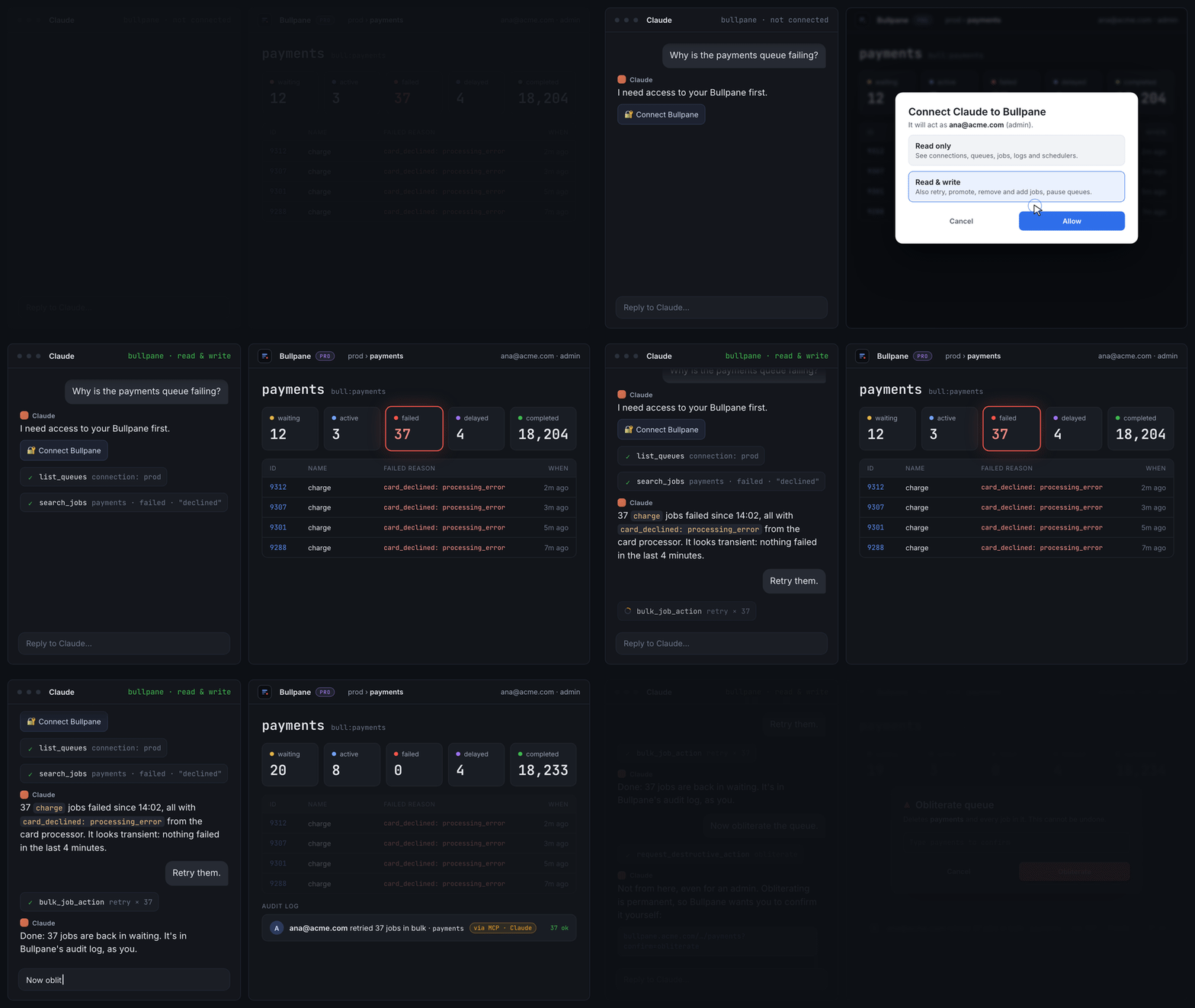
Added
- MCP server (Pro). Paste
<PUBLIC_URL>/mcpinto Claude (claude.ai, Claude Desktop, Claude Code) or any MCP client that supports OAuth, sign in with your Bullpane login or SSO, and pick read or read & write on the consent screen. - It acts as you. Every tool is the same
/apicall the dashboard makes, so what you cannot do in the dashboard it cannot do either. - Access is re-checked on every call. It is the lowest of the admin's ceiling (
Settings → MCP: off / read / read & write, default off), what you approved and your role. A viewer never writes. - Writes are audited with
via: mcp. - Drain, clean and obliterate are never run from MCP. The client gets a link that opens the confirmation dialog in the dashboard.
- OAuth 2.1: PKCE, dynamic client registration, rotating refresh tokens. Connected clients can be disconnected in Settings.
- Cloud-hosted clients (claude.ai, Claude Desktop) need
PUBLIC_URLto be public HTTPS.
Fixed
- Promoting a job scheduler's delayed job no longer skips the next run (#3, thanks @Carvalho-the-Dev). Promoting one now asks: run a copy now and keep the next run, or promote and skip the next run. The API and bulk promote default to the copy.
Upgrading
ghcr.io/madmorett/bullpane:0.5.0. One migration (0009_mcp.sql, three new tables) runs at boot; back up MySQL first as usual. MCP stays off until an admin enables it in Settings → MCP.
Contributors
Assets 2
0.2.0 — SSO auto-provisioning
Added
- SSO auto-provisioning (Pro), opt-in.
Settings → SSO → Let anyone from your domains sign in. When somebody your identity provider authenticates has no
Bullpane account and their email is in one of the listed domains, their first
sign-in creates a password-less viewer account instead of being refused.
Off by default; the pre-provisioned model is unchanged until an admin turns it on.- The domain list is mandatory: a Google OIDC client accepts every Google
account, so the toggle cannot be switched on without at least one domain.
Matching is exact (example.comdoes not admitsub.example.com). - OIDC tokens with
email_verified: falseare never provisioned. - Disabled accounts stay disabled; the role is always viewer, promote by hand.
- New audit action
auth.sso_provisioned, marked high risk, so the trail
shows every account that arrived without an invite.
- The domain list is mandatory: a Google OIDC client accepts every Google
GET/PUT /api/sso/settingsnow carriesautoProvisionand
autoProvisionDomains;PUTaccepts any subset of fields.
Docker: ghcr.io/madmorett/bullpane:0.2.0. No database migration in this release.