truffle unbox tutorialtoken
- download OpenZeppelin :
npm install openzeppelin-solidity - as OpenZeppelin requires solidity 0.6.0, change compiler options to match OpenZeppelin Requirements by adding following lines in file
truffle.js
  ...
  ,
  compilers: {
    solc: {
      version: "0.6.0"
    }
}- also change the line
pragma solidity ^0.4.24;topragma solidity ^0.6.0;incontracts/Migrations.sol - create the file
contract/SdvToken.soland add the following lines :
pragma solidity ^0.6.0;

import "openzeppelin-solidity/contracts/token/ERC20/ERC20.sol";

contract SdvToken is ERC20 {
  uint public INITIAL_SUPPLY = 12000;

  constructor() ERC20("SdvToken", "SDV") public
  {
    _setupDecimals(2);
    _mint(msg.sender, INITIAL_SUPPLY);
  }
}- compile project:
$ truffle compile

Compiling your contracts...
===========================
> Compiling ./contracts/Migrations.sol
> Compiling ./contracts/SdvToken.sol
> Compiling openzeppelin-solidity/contracts/GSN/Context.sol
> Compiling openzeppelin-solidity/contracts/math/SafeMath.sol
> Compiling openzeppelin-solidity/contracts/token/ERC20/ERC20.sol
> Compiling openzeppelin-solidity/contracts/token/ERC20/IERC20.sol
> Artifacts written to /Users/matthieu/workspace/blockchain/sdvtoken/build/contracts
> Compiled successfully using:
- solc: 0.6.0+commit.26b70077.Emscripten.clang- create file
migrations/2_deploy_contracts.jsand add the following lines :
var SdvToken = artifacts.require("SdvToken");

module.exports = function(deployer) {
  deployer.deploy(SdvToken);
};- launch ganach app and click on "NEW WORKSPACE" (make sure ETHEREUM is selected)
- enter a workspace name (i.e: sdv-workspace)
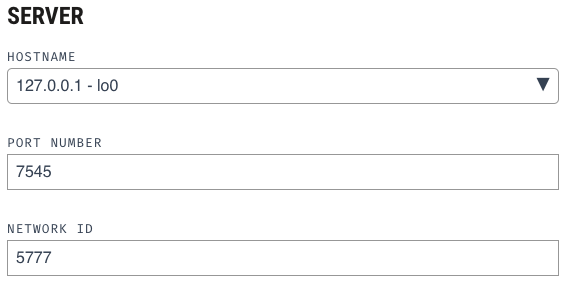
- select tab "SERVER", copy the configuration below and then click on [save workspace]