Repository navigation
Releases: mbsintegrations/LG-TV-HA-Home-Launcher
Release list
LG TV - HA Home Launcher v0.3.0 - Backgrounds, customizer and energy flow

LG TV – HA Home Launcher v0.3.0
Make the launcher yours with personal backgrounds, an optional theme customizer and an animated house energy view. No root required, no ads in the launcher, and no always-on setup computer.

Backgrounds
- Upload 1–5 JPG, PNG or static WebP images directly in Your space, below Layout theme. You do not need to use the customizer.
- Recommended 1920 × 1080 / 16:9. Inputs are limited to 4 MB and 16 megapixels each; the browser crops, strips metadata and compresses each to 450 KB or less.
- Keep one image static or rotate several every 30 seconds, 1, 2 or 5 minutes. Rotation pauses when Home is hidden.
- Separate image opacity and darken background controls. Three lightweight generated samples are included.
- Images stay in local setup, exported profiles and your built package. Personal photos remain private unless you share those files.
Optional theme customizer
- Solid, Translucent, Outlined and Glass card finishes, adjustable opacity, four corner shapes, colour accents and independent card colours.
- Glass uses one small blurred wallpaper shared across surfaces, so it does not require modern webOS backdrop-filter support.
- Drag app tiles and controls into order, or use Earlier / Later. LG Home remains last.
- Choose Custom arrangement to reorder the clock/weather, app, control and status-card rows. Status-card ordering is also available outside Sidebar. Placement snaps into fixed rows; arbitrary overlapping/resizing is not included.
- Existing layout themes and colour palettes remain independent. The customizer is entirely optional.
Animated energy flow
- Choose Energy flow · animated house in Home cards → Energy & power → Power layout. The classic diagram and simple readings remain available.
- Generic, editable labels; no SigenStor branding or vendor-specific integration requirement.
- Solar, home, battery, grid and up to two charger readings surround the house. Unconfigured devices and entities absent from the connected HA snapshot are hidden, including their corresponding artwork.
- Idle devices remain visible. Unavailable readings and disconnects stop active flow; animations pause when the launcher is hidden.
- W/kW conversion and sign inversion use your existing mappings. The lines show each sensor's direction, not an estimated allocation of solar between consumers.
Fixes and guides
- Glass cards preserve Sidebar's fixed card positions.
- Corner settings apply to app/control/status/weather surfaces and inner energy boxes.
- Clearer preview-save errors and recovery after a configurator restart, without replaying discovery or build requests.
- New main image, customization/energy screenshots and refreshed setup walkthrough.
- Expanded upload, styling, energy, upgrade and recovery documentation. LG 43UN73906LE is listed as user-verified for all features; firmware/SDK/webOS versions were not reported.
Updating
- Keep your working private IPK and exported profile.
- Extract LG-TV-HA-Home-Launcher-0.3.0-source.zip, run
npm ci --ignore-scripts, thennpm start. Usenpm.cmdon PowerShell if needed. - Import your profile. Schema remains version 1; missing customizer settings use no photos and solid cards, preserving your layout, palette, apps and entities. Choose the house energy view if wanted.
- Export the updated profile, reconnect HA, build privately and install your own IPK with webOS Dev Manager. The public sample has no token and does not preserve your configured app's credentials.
- Existing helper users: follow the manual helper-enabled build/update procedure and preserve your per-TV options. Pause/release before replacing a service-bearing package, then resume and check Home. The native helper remains 0.1.0.
Older releases do not understand the new customizer fields; use your earlier saved profile and IPK for rollback.
Validation and performance
The house energy view is installed on both reference TVs, with exact installed-file verification and active helpers. The Living Room appearance was accepted by the owner. Backgrounds, rotation, customizer and Glass have automated/browser coverage; physical TV performance testing for those options remains outstanding. One static background is the lightest option for older TVs.
Validation details · Customizer guide · Upgrade guide
Downloads
- LG-TV-HA-Home-Launcher-0.3.0-source.zip — configurator, TV source, documentation, screenshots and manual helper tools. Start here.
- com.mbs.communityhome_0.3.0_SAMPLE_all.ipk — credential-free sample; shows Setup required on a TV. Build privately for live HA.
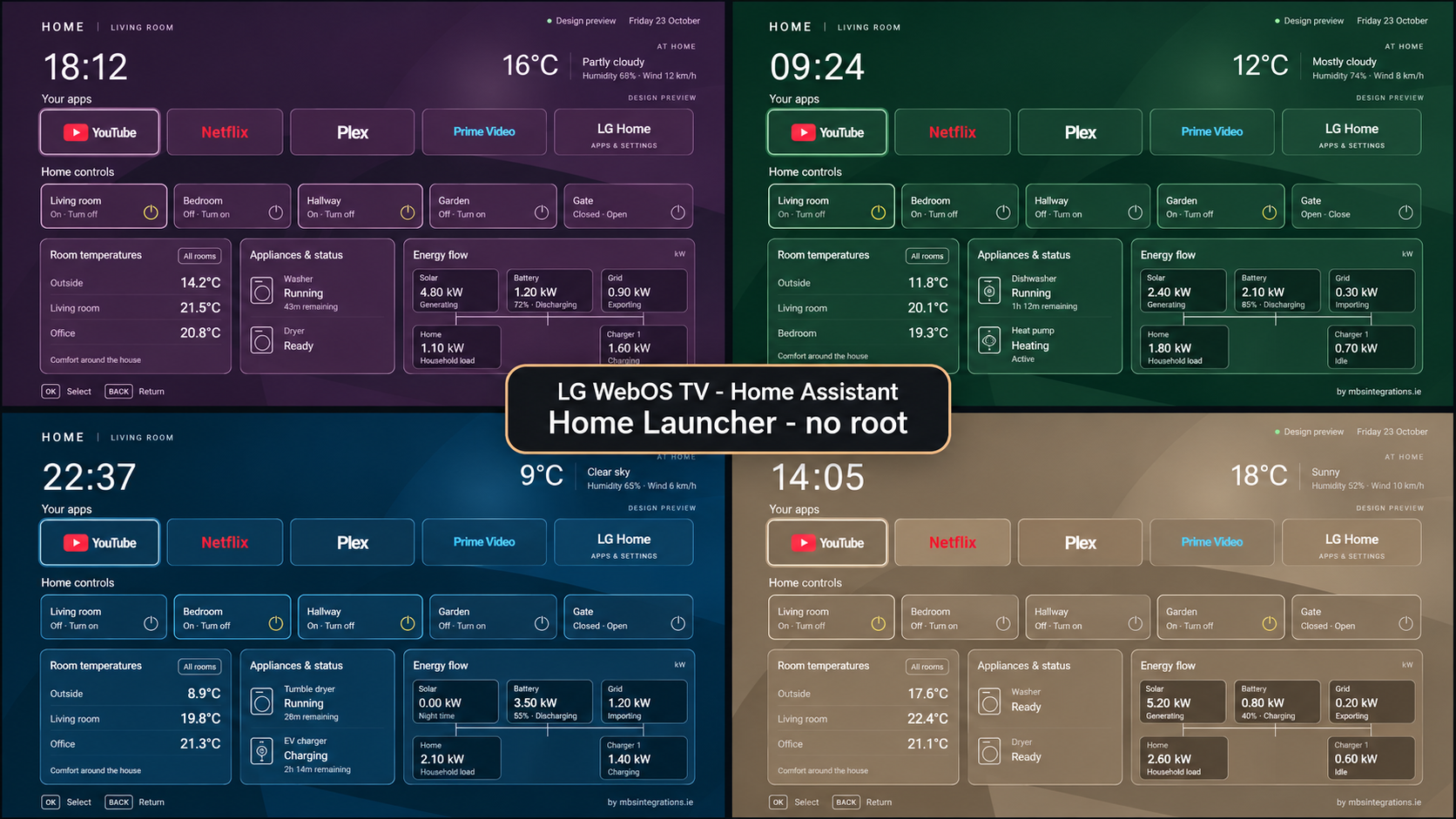
- LG-TV-HA-Home-Launcher-update-0.3-grid.jpg — refreshed 2×2 community image with four layouts and scenic backgrounds.
- LG-TV-HA-Home-Launcher-designs.png and LG-TV-HA-Home-Launcher-themes.jpg — palette and layout overviews.
- SHA256SUMS.txt — checksums for the release files, including both community image versions.
Configured TV packages contain your HA token and must stay private. The optional helper remains a manual, model-dependent installation; no universal helper IPK is provided.
Start here · webOS Dev Manager · Developer Mode and renewal
Independent GPL-3.0 project by MBS Integrations. Not affiliated with LG or Home Assistant.


LG TV - HA Home Launcher v0.2.0 - Themes, weather and app tiles
LG TV – HA Home Launcher v0.2.0
Four new home-screen layouts, richer weather and more flexible app tiles for your LG webOS TV. The launcher connects directly to Home Assistant; no root or always-on setup computer is required.
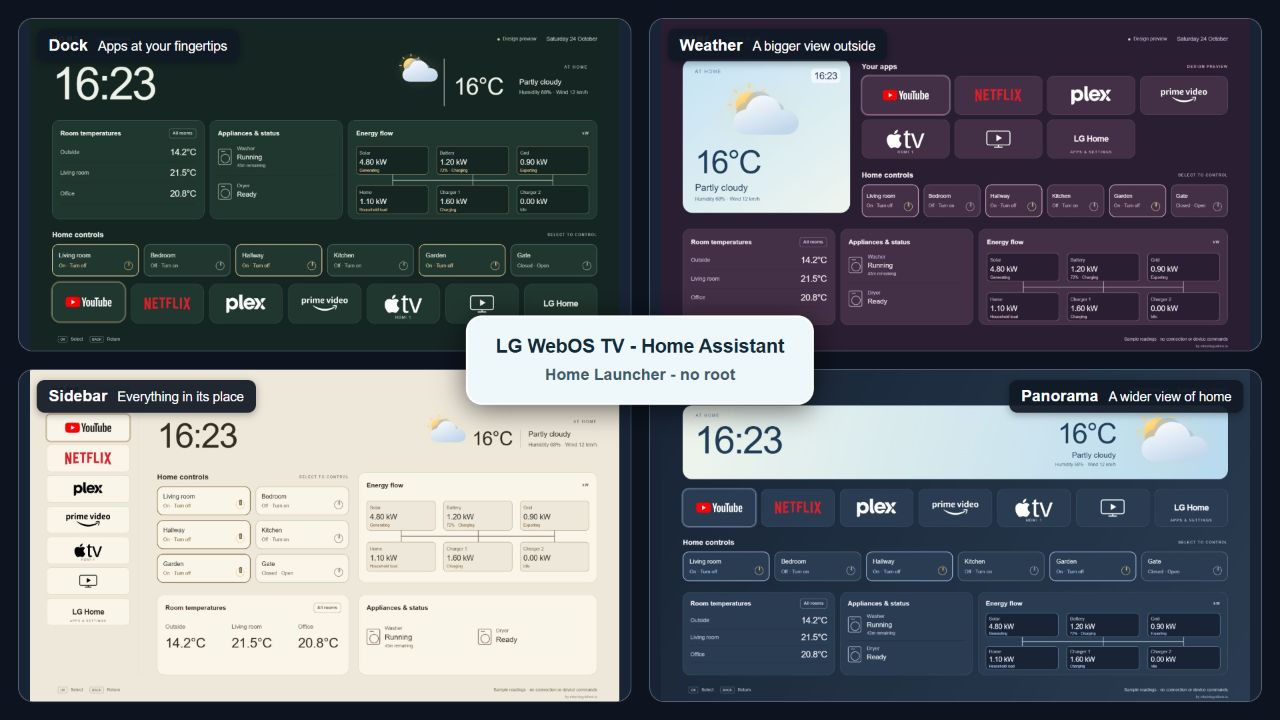
New layouts and weather
- Dock: apps along the bottom, with home information above.
- Weather: a large weather panel beside apps and controls.
- Sidebar: a vertical app rail with grouped home controls and cards.
- Panorama: a wide weather scene above apps, controls and cards.
- Classic remains available and is the default when importing an older profile.
- Layout and Color Palette are separate choices. Use Forest, Slate, Ocean, Dusk/plum, Sand, Monochrome or custom colours with any layout.
- Local weather graphics change with the HA condition. An optional Sun entity supplies day/night information for cloudy and rainy conditions too.
- Every layout supports up to eight app/input tiles and six home controls. Card titles, generic status entries and optional energy remain configurable.
See every layout and palette combination and the theme guide.
App tiles and TV features
- Five choices per tile: Text Only, Logo, Logo and Text, App Logo, App Logo and Text. Bundled artwork loads locally with text fallback; compact icons have no extra inner outline.
- Common-app dropdown: YouTube, YouTube Kids, Netflix, Disney+, Prime Video, IPTV Smarters, Hulu, Max/HBO Max, Paramount+, Plex, Jellyfin and Apple TV (app).
- Custom app lets you enter a name and installed app ID. IDs remain editable for model/region differences.
- Apple TV app and HDMI-connected Apple TV are separate targets. HDMI 1–4 presets remain available.
- Live TV opens the tuner. TV Guide can use an app ID or the selected LG TV's Guide button through Home Assistant, including the tested B9 overlay route.
- LG Home stays last as the route back to LG's interface. Existing profiles retain their text tiles until you choose another appearance.
App IDs, logo choices and Guide setup
Fixes and documentation
- Fixed the footer overlap between Home-helper status and remote hints, including the Resume button when paused.
- Put Layout theme on a full-width configurator row below Clock and Color Palette.
- Added 35 layout screenshots, a four-theme overview and screenshots of all five configurator steps.
- Expanded layout/palette, weather location/day-night, app preset, upgrade and recovery instructions.
- Included the Developer Mode renewal guide and HA package added since 0.1.1, alongside webOS Dev Manager and manual helper documentation.
Updating from 0.1.1
- Keep your working private IPK and exported profile.
- Extract the new source ZIP into a separate folder, run npm ci --ignore-scripts, then npm start. On PowerShell use npm.cmd if needed.
- Import your profile. Schema version 1 is unchanged: existing app IDs, entities and controls are preserved. Missing layout becomes Classic; missing appearance becomes Text Only.
- Choose a theme/palette and any app changes, reconnect HA and export the revised profile.
- Build your own private package and install it over Home using webOS Dev Manager. The public sample contains no token and does not retain your configuration.
For an existing manual helper installation, use the helper-aware update procedure. Preserve your per-TV options and service ownership, pause/release before updating, then resume and check Home. The native helper remains 0.1.0; themes and logos do not require a new native binary. A new app tile does not automatically change its watched-app exit list.
Downloads
- LG-TV-HA-Home-Launcher-0.2.0-source.zip — configurator, TV source, all guides/screenshots, HA templates and manual helper tools. Start here for installation.
- com.mbs.communityhome_0.2.0_SAMPLE_all.ipk — credential-free package sample; displays Setup required on a TV. Build privately for live HA.
- LG-TV-HA-Home-Launcher-designs.png — original palette overview.
- LG-TV-HA-Home-Launcher-themes.jpg — new four-theme overview.
- SHA256SUMS.txt — checksums for the four files above.
Your configured IPK contains your HA token and must stay private. The optional Home-button helper is supplied as source and manual per-TV build instructions, not a universal helper IPK.
Compatibility
Both reference TVs now have 0.2.0 installed: OLED65B9PLA with Panorama/Slate and 65NANO766QA with Weather/Dusk. Installed files match the builds and both helpers report active. B9 testing confirmed Live TV, Guide through HA and Home return from YouTube, and the Panorama appearance was accepted on TV. See the validation details.
App availability and IDs vary by region and TV. YouTube Kids may require the Kids experience inside YouTube. IPTV Smarters uses its vendor app artwork and supplies no channels. Background uploads, slideshows and free-form card placement are not included.
Start here · Configurator walkthrough · Developer Mode · webOS Dev Manager · Security
Independent GPL-3.0 project by MBS Integrations, with preserved upstream notices. Not affiliated with LG or Home Assistant.
LG TV - HA Home Launcher v0.1.1

Create your own LG webOS home screen with streaming apps, HDMI inputs and Home Assistant cards. Configure it in the local MBS Integrations wizard, then install a private package on your TV. No always-on PC or relay is needed for normal launcher use.
Start here
Read Start here, Developer Mode and webOS Dev Manager.
- LG-TV-HA-Home-Launcher-0.1.1-source.zip — complete public source, configurator, guides, blueprint and manual helper tools. Extract it and run the setup steps.
- com.mbs.communityhome_0.1.1_SAMPLE_all.ipk — credential-free packaging sample. On a TV it says Setup required; use the configurator to build your own live package.
- LG-TV-HA-Home-Launcher-designs.png — four-design promotional image.
- SHA256SUMS.txt — checksums for the source, sample package and image.
A configured private IPK contains your HA token. Never upload or share it. The optional Home-button helper is provided as source/manual tools only; no universal helper binary is released.
Changes in 0.1.1
- App name is now Home.
- The discreet TV credit is shortened to “by mbsintegrations.ie”.
- Resume Home button stays enabled until paused; the manual CLI trial remains limited to two minutes.
- Updated compatibility notes following installation on both reference TVs.
Included
Six palettes and custom colours; five default app tiles, up to eight; editable card titles; temperatures, lights and selected controls; four generic status entries; optional energy flow or readings; profile import/export; original LG Home access. The docs include installation, updates, Developer Mode maintenance, recovery, HA tokens and manual helper adaptation.
Compatibility
The configurable launcher is installed on an LG OLED65B9PLA and a 65NANO766QA with the Dusk (plum) palette and Home-button helper. Live Home Assistant data and Home-button return from YouTube are confirmed on both TVs. Both TVs passed native input and remote-release checks. See validation for the tested features and security for credential handling and dependencies.
Known dependency advisories remain in the desktop CLI tree and optional legacy helper; they are recorded in the security guide. This is not a security-audited production release.
Independent GPL-3.0 project by MBS Integrations, with preserved upstream helper notices. Not affiliated with LG or Home Assistant.
LG Home Launcher v0.1.0 — Community Preview

Create your own LG webOS home screen with streaming apps, HDMI inputs and Home Assistant cards. Configure it in the local MBS Integrations wizard, then install a private package on your TV. No always-on PC or relay is needed for normal launcher use.
Start here
Read Start here, Developer Mode and webOS Dev Manager.
- LG-Home-Launcher-0.1.0-preview-source.zip — complete public source, configurator, guides, blueprint and manual helper tools. Extract it and run the setup steps.
- com.mbs.communityhome_0.1.0_SAMPLE_all.ipk — credential-free packaging sample. On a TV it says Setup required; use the configurator to build your own live package.
- SHA256SUMS.txt — checksums for those two files.
A configured private IPK contains your HA token. Never upload or share it. The optional Home-button helper is provided as source/manual tools only; no universal helper binary is released.
Included
Six palettes and custom colours; five default app tiles, up to eight; editable card titles; temperatures, lights and selected controls; four generic status entries; optional energy flow or readings; profile import/export; original LG Home access. The docs include installation, updates, Developer Mode maintenance, recovery, HA tokens and manual helper adaptation.
Compatibility
The configurable launcher is installed on an LG OLED65B9PLA and a 65NANO766QA with the Dusk (plum) palette and Home-button helper. Live Home Assistant data and Home-button return from YouTube are confirmed on the B9. Both TVs passed native input and remote-release checks. See validation for the tested features and security for credential handling and dependencies.
Known dependency advisories remain in the desktop CLI tree and optional legacy helper; they are recorded in the security guide. This is not a security-audited production release.
Independent GPL-3.0 project by MBS Integrations, with preserved upstream helper notices. Not affiliated with LG or Home Assistant.