Releases: mediago-dev/mediago
3.5.0

🎉 MediaGo v3.5.0
This release brings support for more sites, a brand-new browser extension, and deep integration with AI assistants. Overall, it runs faster and uses fewer resources.
🌐 Browser Extension (Chrome / Edge)
See a video you like while browsing? Send it to MediaGo with one click.
- Automatically detects downloadable videos on web pages — the toolbar icon shows the count detected on the current page
- Works with most major video sites, including Bilibili, YouTube, and more
- Bilingual interface (English / Chinese) that follows your browser language by default
- No need to install from the store — after installing MediaGo, find the extension files under Settings → More Settings → Browser Extension Directory
🎬 YouTube and 1000+ Sites Supported
Added support for YouTube, Twitter/X, Instagram, Reddit, and over a thousand other video sites. Previously supported formats are now more stable too, especially for overseas sites.
🦞 Download with a Single Sentence via AI Assistants (OpenClaw Skill)
If you use AI coding tools like Claude Code or Cursor, you can now just tell your AI:
"Download this video for me: https://..."
The AI will automatically call MediaGo to handle the download. To install:
npx clawhub@latest install mediago
Both English and Chinese commands are recognized.
🔌 Let Other Tools Integrate with MediaGo
A full set of APIs is now open, letting scripts, automation tools, and even other apps call MediaGo — you're no longer confined to the desktop window. The browser extension itself communicates with the desktop app through these APIs, and power users can build them into their own workflows.
🎞️ Convert Formats Right After Downloading
Once a video finishes downloading, you can convert its format and choose quality settings directly inside MediaGo — no need to open another tool.
🐳 Easier Docker Deployment
Deploy with a single command. Works on both Intel and ARM chips:
docker run -d --name mediago -p 8899:8899 -v /path/to/mediago:/app/mediago ghcr.io/caorushizi/mediago:3.5.0
If you're using the desktop version, phones and tablets on the same home network can also open MediaGo's web interface — no extra configuration needed.
⚡ Performance and Experience
- Faster startup and lower memory footprint
- Built-in video player — no need to launch a separate app
- Some long-standing issues are fixed: download logs can now be copied, the download task list auto-refreshes when tasks are imported externally, and special characters in filenames are handled automatically — no more "can't find the file after it finishes downloading"
Notes for macOS Users
[Intel chips] Install the x64 version from the release page. After installation, you'll need to allow apps from unidentified developers in your Mac's security settings.
[Apple Silicon] Install the arm64 version from the release page. After installation, run the following command in Terminal:
sudo xattr -dr com.apple.quarantine /Applications/mediago-community.app
🎉 MediaGo v3.5.0
新版本带来更多站点支持、全新浏览器扩展、以及和 AI 助手的深度整合。整体运行更快、资源占用更少。
🌐 浏览器扩展(Chrome / Edge)
浏览网页时看到感兴趣的视频,一键发到 MediaGo 下载。
自动识别网页上的可下载视频,工具栏图标会显示当前页检测到的数量
支持大多数主流视频站点 —— 包括 B站、YouTube 等
中英双语界面,默认跟随浏览器语言
不用去商店下载,装完 MediaGo 后在设置 → 更多设置 → 浏览器扩展目录就能找到安装文件
🎬 支持 YouTube 和 1000+ 站点
新增对 YouTube、Twitter/X、Instagram、Reddit 等一千多个视频站点的支持。之前只能下的格式也更稳定了,特别是一些海外网站。
🦞 AI 助手一句话下载(OpenClaw Skill)
如果你在用 Claude Code、Cursor 等 AI 编程工具,现在可以直接跟 AI 说:
"帮我下载这个视频:https://..."
AI 会自动调用 MediaGo 帮你下载。安装方式:
npx clawhub@latest install mediago
中文英文指令都能识别。
🔌 让其他工具和 MediaGo 联动
开放了一整套接口,让脚本、自动化工具、甚至其他 App 都能调用 MediaGo —— 你不再被限制在桌面窗口里。浏览器扩展就是通过这套接口和桌面端对话的,喜欢折腾的用户也可以基于它接入自己的工作流。
🎞️ 下载完直接转格式
视频下载好之后,在 MediaGo 里直接就能转格式、选画质,不用再打开别的软件。
🐳 Docker 部署更简单
一条命令就能部署,支持 Intel 和 ARM 两种芯片:
docker run -d --name mediago -p 8899:8899 \
  -v /path/to/mediago:/app/mediago \
  ghcr.io/caorushizi/mediago:3.5.0
如果你用的是桌面版,同一个家庭网络里的手机、平板也能打开 MediaGo 的 Web 界面,不用再额外配置。
⚡ 速度与体验
启动更快、占用更少内存
视频播放器内置了,不再需要单独启动
一些老顽疾修掉了:下载日志现在可以复制、下载任务列表在外部导入时会自动刷新、文件名里的特殊字符会自动处理,不会再出现"下完找不到文件"的问题
MacOS 使用
【Intel 芯片】需要安装 release 中的 x64 版本。安装完成后需要在 Mac 的安全设置中打开来自身份不明开发者的 Mac App
【Apple 芯片】需要安装 release 中的 arm64 芯片。安装完成后需要在控制台执行sudo xattr -dr com.apple.quarantine /Applications/mediago-community.app命令
3.5.0-beta.1
New
Added YouTube downloads via yt-dlp, supporting 1000+ sites
Improved
Consolidated binary path args into a single --deps-dir flag
Redesigned download dialog and resource extraction page
Cleaned up unused browser extension dependencies
Fixed
Download failure logs showing [object Object] instead of actual output
Electron deprecation warnings and update check crash
Missing translation for password confirmation on sign-in page
Hardcoded Chinese strings in Skills setup commands
3.5.0-beta.0

MediaGo Community v3.5.0-beta.0
🦞 OpenClaw Skill
支持在 AI 编程助手中通过自然语言下载视频。安装 Skill 后,直接对 AI 说「帮我下载这个视频」即可。
安装方式:
npx clawhub@latest install mediago支持 Claude Code、Cursor 等主流 AI 编程助手,中英文指令均可使用。
🔌 开放 HTTP API
新增完整的 HTTP REST API,支持通过接口创建下载任务、查询进度、管理下载列表。可以方便地与脚本、自动化工具或其他应用集成,不再局限于桌面端操作。
🎬 视频格式转换
新增视频格式转换功能,下载完成后可直接在应用内转换为其他格式,支持选择输出格式和画质。
🐳 Docker 部署优化
Docker 镜像迁移到 GitHub Container Registry,支持 x86 和 ARM 双架构。部署方式简化为挂载一个目录:
docker run -d --name mediago -p 8899:8899 \
  -v /path/to/mediago:/app/mediago \
  ghcr.io/caorushizi/mediago:3.5.0-beta.0
⚡ 性能提升
后端全面重写,启动更快,占用资源更少。视频播放器合并到主服务中,不再需要单独启动,使用体验更流畅。
3.1.0-beta.1
What's Changed
- fix: download progress by @caorushizi in #582
- fix: 构建 dev 版本的 docker by @caorushizi in #583
- fix: 代理支持socks5 by @y2hlbg in #585
- feat: 添加 sentry by @caorushizi in #588
- fix: null window error by @caorushizi in #589
- feat: 优化 schema 调起的逻辑 by @caorushizi in #590
- fix: 增加归一化逻辑,解决进度条倒退问题 by @y2hlbg in #586
- fix: 嗅探自动更新,如果页面title变化,更新页面信息,展示到右侧嗅探列表 by @y2hlbg in #587
- feat: true portable by @caorushizi in #591
Full Changelog: v3.1.0-beta.0...v3.1.0-beta.1
Contributors


Assets 13
3.1.0-beta.0
What's Changed
- fix: 🐛 change the name of the detected video by @caorushizi in #412
- build(deps-dev): bump vite from 5.2.11 to 6.1.0 by @dependabot[bot] in #411
- build(deps-dev): bump eslint-plugin-react-hooks from 4.6.2 to 5.1.0 by @dependabot[bot] in #385
- build(deps-dev): bump stylelint-config-standard from 36.0.0 to 37.0.0 by @dependabot[bot] in #400
- build(deps): bump react-dom and @types/react-dom by @dependabot[bot] in #382
- build(deps): bump socket.io-client from 4.8.0 to 4.8.1 by @dependabot[bot] in #384
- build(deps): bump i18next-browser-languagedetector from 8.0.0 to 8.0.2 by @dependabot[bot] in #381
- feat: ✨ straight link download by @caorushizi in #413
- Revert "build(deps): bump react-dom and @types/react-dom" by @IOLOII in #418
- fix: 🐛 url encode by @caorushizi in #419
- fix: scheme open app in macOs by @y2hlbg in #420
- fix: bilibili ele bug fix by @y2hlbg in #421
- fix: ts fix by @y2hlbg in #426
- fix: bilibili video name by @y2hlbg in #427
- feat: ✨ support for pushing download links to docker by @caorushizi in #432
- feat: 增加小屏页面自适应 by @zhou-xh in #467
- refactor: 📦️ reconstruct the video download service by @caorushizi in #482
- refactor: 📦️ optimize socket.io by @caorushizi in #483
- Refactor project by @caorushizi in #505
- refactor: use DESC sorting of created date in the download list and download complete list page by @woniuxingdong in #508
- refactor: add item to ignore the '.store' directory by @woniuxingdong in #513
- refactor: share app store defaults by @caorushizi in #514
- refactor: centralize controller handler registration by @caorushizi in #515
- Refactor app store handler mapping by @caorushizi in #516
- refactor: extract download state aggregator by @caorushizi in #517
- docs: 📸 migrate to local images and update architecture documentation by @caorushizi in #518
- refactor(frontend): rename files to kebab case by @caorushizi in #522
- feat: add win arm support by @caorushizi in #530
- refactor: reponame by @caorushizi in #531
- feat: add copilot instructions by @caorushizi in #532
- feat: edit actions sctipts by @caorushizi in #533
- build(deps): bump axios from 1.11.0 to 1.12.2 by @dependabot[bot] in #527
- Fix something by @caorushizi in #535
- Remove title from form by @caorushizi in #540
- feat: use video and downloader server by @caorushizi in #546
- Update UI by @caorushizi in #548
- refactor: rename remaining download item reference by @caorushizi in #549
- Fix all bugs by @caorushizi in #556
- feat: update @mediago/core v0.0.10 by @caorushizi in #560
- feat(download-log): fetch logs lazily in dialog by @caorushizi in #561
- feat: update deps by @caorushizi in #562
- fix: mac tray icon by @caorushizi in #563
- feat: 添加登录页面 by @caorushizi in #564
New Contributors
Full Changelog: v3.0.1...v3.1.0-beta.0
Contributors


Assets 13
3.0.1
What's Changed
- docs: 📝 remove docs by @caorushizi in #365
- fix: defaultly to play audio by @woniuxingdong in #368
- docs: update README.md by @caorushizi in #369
- feat: display created date for items in download list by @woniuxingdong in #370
- feat: ✨ docker platform by @caorushizi in #371
- Dev/docs by @caorushizi in #376
- feat: ✨ update readme by @caorushizi in #377
- feat: ✨ update readme by @caorushizi in #378
- Fix some bug by @caorushizi in #387
- feat: ✨ update adblocker by @caorushizi in #389
- fix: 🐛 pass the request header when downloading by @caorushizi in #391
- feat: ✨ use the silent parameter for immediate download by @caorushizi in #392
- fix: 🐛 urlschema add headers params by @caorushizi in #393
- fix: 🐛 modify home page copy by @caorushizi in #394
- docs: 📝 simplify download buttons and supplement documentation by @caorushizi in #395
- Dev/perfermance by @caorushizi in #396
- feat: ✨ v3.0.1 by @caorushizi in #401
New Contributors
- @woniuxingdong made their first contribution in #368
Full Changelog: v3.0.0...v3.0.1
Contributors
Assets 13
3.0.0
What's Changed
changhelog 3.0.0
软件截图
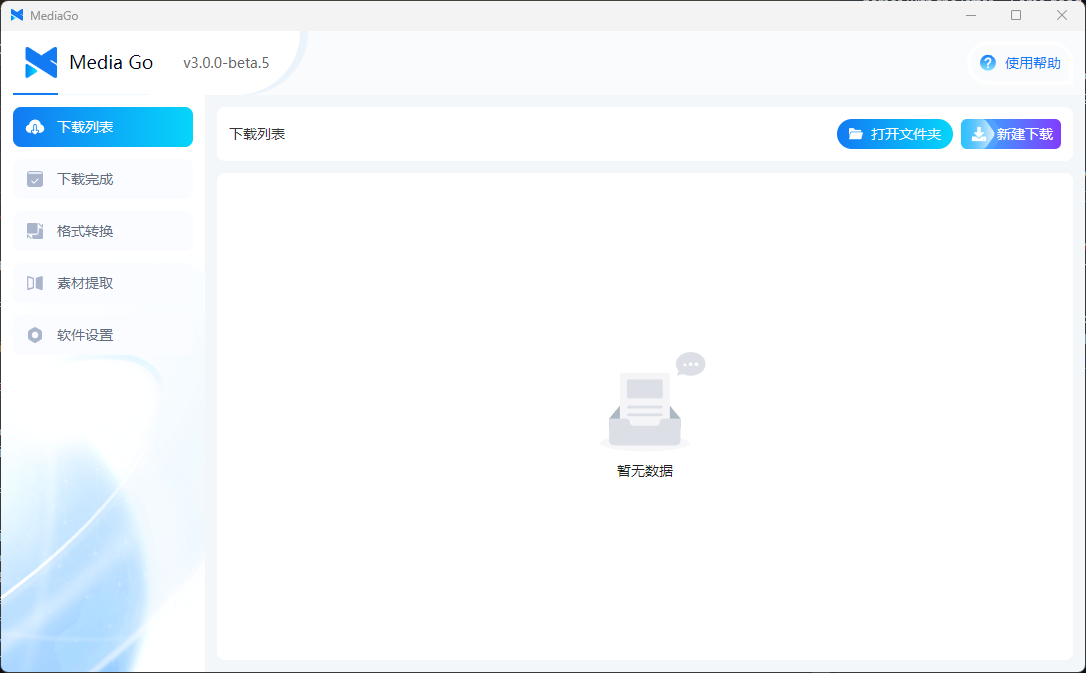
重要更新
- 支持 docker 部署 web 端
- 更新桌面端 UI
更新日志
- 更新桌面端 UI
- 支持 docker 部署 web 端
- 新增视频播放,支持桌面端和移动端播放
- 修复 mac 打开无法展示界面的问题
- 优化了批量下载的交互
- 添加了 windows 的便携版(免安装哦)
- 优化了下载列表,支持页面中多个视频的嗅探
- 支持收藏列表手动导入导出
- 支持首页下载列表导出
- 优化了【新建下载】表单的交互逻辑
- 支持 UrlScheme 打开应用,并添加下载任务
- 修复了一些 bug 并提升用户体验
Commits
- UI by @caorushizi in #217
- feat: ✨ v3.0.0 by @caorushizi in #234
- V3.0.0 by @caorushizi in #235
- docs: 创建 axios 实例 by @hanzc0106 in #242
- docs: update icon button by @wfl36 in #243
- docs: add update info by @ruixingshi in #248
- docs: change text by @ruixingshi in #249
- Dev UI by @caorushizi in #250
- feat: ✨ new ui by @caorushizi in #252
- feat: ✨ add mobile player by @caorushizi in #253
- feat: ✨ local ip by @caorushizi in #254
- feat: ✨ add backend by @caorushizi in #255
- Dev backend by @caorushizi in #261
- feat: ✨ add bin by @caorushizi in #262
- feat: ✨ fix macos by @caorushizi in #263
- fix: 🐛 tag ui scaling bug by @y2hlbg in #264
- feat: ✨ release 3.0.0-beta.0 by @caorushizi in #265
- feat(download): ✨ 新建下载时默认带入上次表单信息 by @caorushizi in #276
- fix: 🐛 便携版上传 by @caorushizi in #278
- feat: ✨ v3.0.0-beta.1 by @caorushizi in #279
- fix: 🐛 批量下载功能优化 by @caorushizi in #281
- Feature by @caorushizi in #282
- feat: ✨ 添加关闭窗口选项 by @caorushizi in #283
- feat: ✨ new icon by @caorushizi in #284
- Feature by @caorushizi in #285
- Feature by @caorushizi in #286
- feat: ✨ video sniffing logic optimization by @caorushizi in #287
- feat: ✨ added video link export & new download style optimization by @caorushizi in #288
- feat: ✨ v3.0.0-beta.2 by @caorushizi in #289
- feat: ✨ optimized app ICONS by @caorushizi in #290
- fix: 🐛 optimize some styles by @caorushizi in #291
- fix: 🐛 error message style in dark mode by @caorushizi in #292
- fix: 🐛 fix list style by @caorushizi in #293
- feat: ✨ web by @caorushizi in #294
- feat: ✨ dev web by @caorushizi in #300
- Fix charset by @caorushizi in #301
- feat: ✨ support docker by @caorushizi in #302
- fix: 🐛 lock version by @caorushizi in #303
- fix: 🐛 compressed image volume by @caorushizi in #304
- Update README.md by @david88558855 in #305
- feat: ✨ optimize web Some interaction & optimize engineering logic by @caorushizi in #306
- Dev gulp by @caorushizi in #307
- fix: 🐛 merge video by @caorushizi in #310
- feat: ✨ v3.0.0-beta.3 by @caorushizi in #311
- feat: ✨ v3.0.0-beta.3 by @caorushizi in #312
- feat: ✨ v3.0.0-beta.5 by @caorushizi in #313
- Fix mac build by @caorushizi in #314
- Fix mac build by @caorushizi in #319
- fix: 🐛 fix macos permission by @caorushizi in #320
- feat: ✨ release scripts by @caorushizi in #322
- v3.0.0 by @caorushizi in #323
New Contributors
- @hanzc0106 made their first contribution in #242
- @wfl36 made their first contribution in #243
- @ruixingshi made their first contribution in #248
- @y2hlbg made their first contribution in #264
- @david88558855 made their first contribution in #305
Full Changelog: v2.2.3...v3.0.0
Contributors


Assets 13
3.0.0-beta.5
What's Changed
- fix: 🐛 fix list style by @caorushizi in #293
- feat: ✨ web by @caorushizi in #294
- feat: ✨ dev web by @caorushizi in #300
- Fix charset by @caorushizi in #301
- feat: ✨ support docker by @caorushizi in #302
- fix: 🐛 lock version by @caorushizi in #303
- fix: 🐛 compressed image volume by @caorushizi in #304
- Update README.md by @david88558855 in #305
- feat: ✨ optimize web Some interaction & optimize engineering logic by @caorushizi in #306
- Dev gulp by @caorushizi in #307
- fix: 🐛 merge video by @caorushizi in #310
New Contributors
- @david88558855 made their first contribution in #305
Full Changelog: v3.0.0-beta.2...v3.0.0-beta.5
Contributors
Assets 17
3.0.0-beta.2
Full Changelog: v3.0.0-beta.1...v3.0.0-beta.2
What's Changed
- fix: 🐛 批量下载功能优化 by @caorushizi in #281
- Feature by @caorushizi in #282
- feat: ✨ 添加关闭窗口选项 by @caorushizi in #283
- feat: ✨ new icon by @caorushizi in #284
- Feature by @caorushizi in #285
- Feature by @caorushizi in #286
- feat: ✨ video sniffing logic optimization by @caorushizi in #287
- feat: ✨ added video link export & new download style optimization by @caorushizi in #288
- feat: ✨ v3.0.0-beta.2 by @caorushizi in #289
- feat: ✨ optimized app ICONS by @caorushizi in #290
- fix: 🐛 optimize some styles by @caorushizi in #291
- fix: 🐛 error message style in dark mode by @caorushizi in #292
Full Changelog: v3.0.0-beta.1...v3.0.0-beta.2
Contributors
Assets 17
3.0.0-beta.1
What's Changed
- feat(download): ✨ 新建下载时默认带入上次表单信息 by @caorushizi in #276
- feat: ✨ 将首页的【打开浏览器】按钮换成【素材提取】
- fix: 🐛 收藏列表样式优化
- feat: ✨ 增加导入导出网址
- fix: 🐛 修复收藏页面中无法通过右键删除的问题
- fix: 🐛 新建收藏之后没有关闭弹窗
- fix: 🐛 解决列表页面在操作时跳动的问题
- fix: 🐛 pC 端的视频无法播放
- fix: 🐛 修复批量下载 & icon 样式
- fix: 🐛 优化视频识别逻辑 & 添加完成列表的右键菜单
- fix: 🐛 阻止 deeplink 打开
- feat: ✨ 新增便携版
- fix: 🐛 便携版上传 by @caorushizi in #278
- feat: ✨ v3.0.0-beta.1 by @caorushizi in #279
Full Changelog: v3.0.0-beta.0...v3.0.0-beta.1