This is it, "The Big One", 42sh is a milestone project at Hive, Helsinki. The aim is to build the most complete and stable Unix Shell possible. This project was built by a 2 person team, Alex (that's me, hello!) and Juha
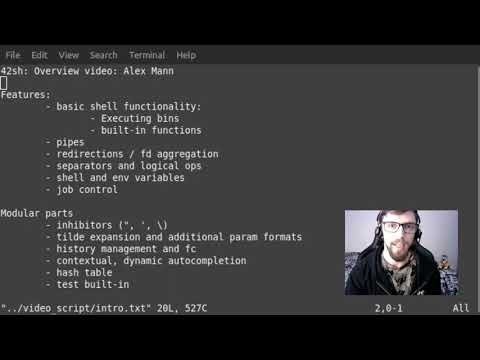
This shell does a lot, like A LOT. Here's an overview video if you'd like a 'guided tour' of the basic features and few more nifty things:
Utilising the skills we learned while completing 21sh, this is a more enhanced and "semi-POSIX-compliant" implementation of a Unix Shell.
This shell is effectively 'built on top of' 21sh, although to create some of the features needed for 42sh, some parts of the program had to be completely overhauled. As such, please see the 21sh readme, everything that shell can do, this shell can do better! Only the features unique to 42sh are covered here.
My project partner and I used Bash as a reference, and frequently referred to the POSIX standard, while working on this project.
This shell boasts the following features:
  - Execution of simple commands
  - Pipes "|"
  - The following redirection operations: ">", "<", ">>" and "<<"
  - File descriptor aggregation ">&"
  - Command line separators ";" and logical-operators "&&" and "||"
  - Both environment and internal shell variables (export, set, unset)
  - Job control monitoring (jobs, fg, bg, and the '&' operator)
  - Correct monitoring of all signals
  - Inhibitors (" ", ' ', \)
  - Tilde expansion and additional parameter expansion formats (e.g. '${parameter:+word}')
  - Complete history management, including expansions such as '!!' or '!word' and the fc built-in
  - Contextual dynamic autocompletion of commands, built-ins, filepaths and variables
  - A hash table
...and the following built-in functions. All POSIX compliant except for set and unset:
  - cd
  - echo
  - exit
  - export
  - fc
  - unset
  - hash
  - jobs
  - fg
  - bg
  - test
  - true
  - false
  - type
  - set
To compile and run this program you will need:
- A Unix or Unix-like operating system (preferrably MacOs or Linux)
- GNU Make 3.81
Clone this repository and in the root directory run the following command to enter the shell: make; ./42sh
In no way should this shell ever crash (e.g. segmentation fault or bus error), leak memory, freeze or get stuck in a loop. Please report any such issues to us if you find them!
- Inhibitors
42sh includes full handling of single quotes, double quotes and backslashes. Text input can be edited across multiple lines and single quotes and backslashes can be used to inhibit the expasion of variables. Double quotes will only inhibit tilde expansion.
- Additional parameter expansion formats
The following formats are fully handled in this shell, and will even autocomplete [this is something even bash can't do ;) ]. I also added a basic implementation of globbing with '*', to demonstrate the pattern matching functionalities of the last 4 formats listed below:
  - ${parameter:-word}
  - ${parameter:=word}
  - ${parameter:?word}
  - ${parameter:+word}
  - ${#parameter}
  - ${parameter%}
  - ${parameter%%}
  - ${parameter#}
  - ${parameter##}
- Complete history management
In this project, we went far beyond the simple up and down navigation required in 21sh. The following features are fully functional:
  - Expansions: !! * !word * !number * !-number
  - History is saved to a file so it can be accessed over several sessions
  - The built-in fc (including all POSIX options)
  - Incremental history search using ctrl-r
- Contextual, dynamic autocompletion
Commands, built-ins, files, filepaths, internal and environment variables can all be autocompleted using the tab key. The behaviour implemented is much the same way as bash, including the column display if there is more than one potential option and tab is pressed twice. If more than 100 potential options are about to be displayed, the user is given the option to abort the process.
When autocompleting variables, the completion is format-sensitive, so $HO completes to $HOME and ${HO to ${HOME}, for example.
When autocompleting filepaths, a slash '/' character will be printed after the word instead of a space, if the completed word is a directory.
Autocompletion is "contextual", it will only suggest commands and built-ins while the cursor is in the first word, in all other cases, it will suggest files, except in cases where the word starts with a '$'.
- Hash table
Hashing allows for more optimal searches for commands. Rather than searching the whole $PATH variable every time a command runs, it can be added to the hash table with the built-in 'hash'. As a secondary feature, the hash table also allows the user to track the number of times each hash command has been executed. We used the FNV-1 hashing algorithm to implement this feature.
- The built-in 'test'
This built-in allows the user to check file types and compare values. The following operators are included:
  -b (file is block special) * -c (file is character special) * -d (file is a directory)
  -e (file exists) * -f (file is a regular file) * -g (file is set-group-id)
  -L (file is a symbolic link) * -p (file is a named pipe) * -r (user has read access)
  -S  (file is a socket) * -s (file size > 0) * -u (file's set-user-id bit is set)'
  -w (user has write access) * -x (user has search and execute access) * -z STRING (STRING has length of zero)
  = (srting equals) * -eq (integer equals) * -ne (not equals) * -ge (greater than or equal to)
  -lt (less than) * -le (less than or equal to) * ! EXPRESSION (EXPRESSION is false)
- The Bash Hackers Wiki
- The Open Group's documentation, specifically, this page on Shell Command Language
- The Art Of Unix Programming