Recently I discovered than this deploy instruction doesn't work any more.
My target is:
- Visual Studio 2019 builder
v16.7.3
x64 platform- official release
- no
dxilconv
- SPIR-V support
- commit bf5d585
I'm working with DXC about 6 month and did not have any problems with building the product until today.
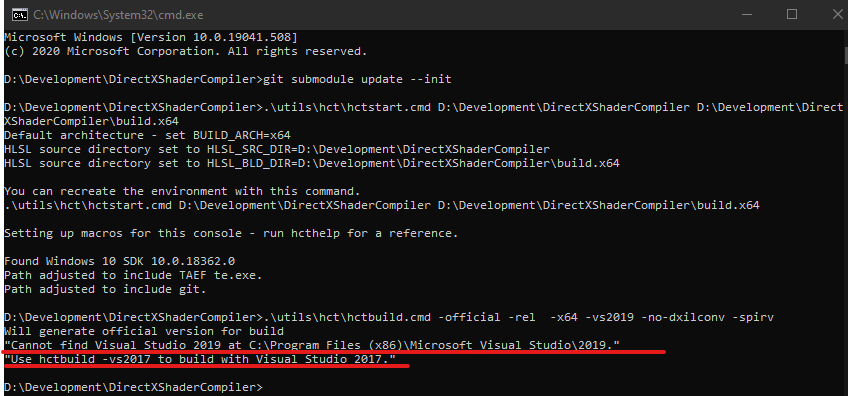
I quickly discovered that bf5d585 commit slightly changed .\utils\hct\hctbuild.cmd script to force the user to install Visual Studio 2019 to the default location only (C:\Program Files (x86)\Microsoft Visual Studio\2019).
My instance of Visual Studio 2019 is installed here D:\Programs\Microsoft Visual Studio\2019.
Point is that before bf5d585 commit the DXC build system worked fine for my environment.
Would you kindly fix the issue?
Full command which I triggered
git submodule update --init

.\utils\hct\hctstart.cmd D:\Development\DirectXShaderCompiler D:\Development\DirectXShaderCompiler\build.x64

.\utils\hct\hctbuild.cmd -official -rel -x64 -vs2019 -no-dxilconv -spirv
Full console output


Recently I discovered than this deploy instruction doesn't work any more.
My target is:
v16.7.3x64platformdxilconvI'm working with DXC about 6 month and did not have any problems with building the product until today.
I quickly discovered that bf5d585 commit slightly changed
.\utils\hct\hctbuild.cmdscript to force the user to install Visual Studio 2019 to the default location only (C:\Program Files (x86)\Microsoft Visual Studio\2019).My instance of Visual Studio 2019 is installed here
D:\Programs\Microsoft Visual Studio\2019.Point is that before bf5d585 commit the DXC build system worked fine for my environment.
Would you kindly fix the issue?
Full command which I triggered
Full console output