Does this issue occur when all extensions are disabled?: Yes
-
VS Code Version:
Version: 1.66.0 (user setup)
Commit: e18005f
Date: 2022-03-30T05:50:14.623Z
Electron: 17.2.0
Chromium: 98.0.4758.109
Node.js: 16.13.0
V8: 9.8.177.11-electron.0
OS: Windows_NT x64 10.0.19044
-
OS Version:
Windows 10 Home
-
Steps to Reproduce:
-
I have an automatic compiling task:
{ "label": "compile ts app ; ~ compile ts WATCH @server", "type": "shell", "command": "node", "args": [ "app-dev-utils/bin/app-dev-utils/src/vsc-task-run/VscTaskRun.js", "~ compile ts WATCH @server", "tsc-watch --noClear -p app-src/.compilets/tsconfig-server-app.json", ], "problemMatcher": ["$tsc-watch"], "isBackground": true, "runOptions": { "runOn": "folderOpen", } },
-
Since a rencent update of vscode, the text that was previously showing in white, now shows in black, thus making it almost invisible. I haven't changed any setting since the update causing this. I am not using themes or any color customization. I am using a MS-DOS terminal and these are my terminal settings:
"terminal.integrated.automationProfile.windows": { "path": "C:/Windows/system32/cmd.exe" }, "terminal.integrated.defaultProfile.windows": "Command Prompt", "terminal.integrated.gpuAcceleration": "canvas",
I have tried to change gpuAcceleration to all the possible values and it doesn't change anything about the color. I have this setting because it's a workaround for another vs code bug mentionned in another unrelated issue.
-
This is a screenshot of the bug:
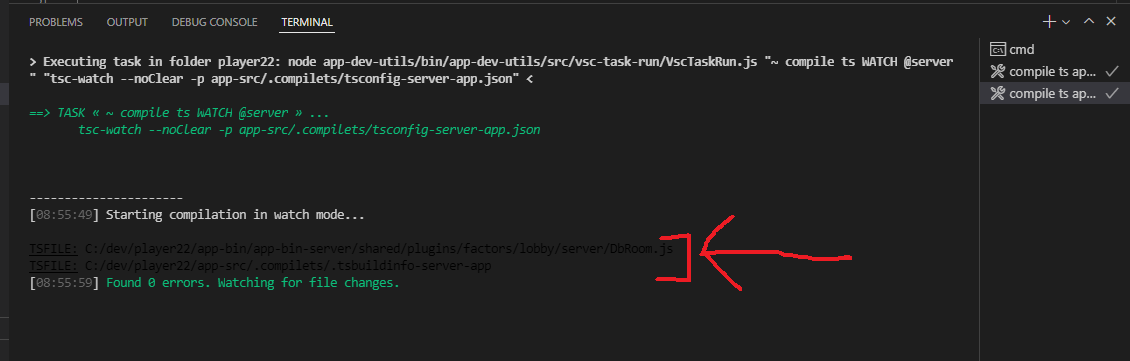
I outlined the black text, barely visible, because it's black on a black background. Again I left all the themes options by default.


Does this issue occur when all extensions are disabled?: Yes
VS Code Version:
Version: 1.66.0 (user setup)
Commit: e18005f
Date: 2022-03-30T05:50:14.623Z
Electron: 17.2.0
Chromium: 98.0.4758.109
Node.js: 16.13.0
V8: 9.8.177.11-electron.0
OS: Windows_NT x64 10.0.19044
OS Version:
Windows 10 Home
Steps to Reproduce:
I have an automatic compiling task:
{ "label": "compile ts app ; ~ compile ts WATCH @server", "type": "shell", "command": "node", "args": [ "app-dev-utils/bin/app-dev-utils/src/vsc-task-run/VscTaskRun.js", "~ compile ts WATCH @server", "tsc-watch --noClear -p app-src/.compilets/tsconfig-server-app.json", ], "problemMatcher": ["$tsc-watch"], "isBackground": true, "runOptions": { "runOn": "folderOpen", } },Since a rencent update of vscode, the text that was previously showing in white, now shows in black, thus making it almost invisible. I haven't changed any setting since the update causing this. I am not using themes or any color customization. I am using a MS-DOS terminal and these are my terminal settings:
"terminal.integrated.automationProfile.windows": { "path": "C:/Windows/system32/cmd.exe" }, "terminal.integrated.defaultProfile.windows": "Command Prompt", "terminal.integrated.gpuAcceleration": "canvas",I have tried to change gpuAcceleration to all the possible values and it doesn't change anything about the color. I have this setting because it's a workaround for another vs code bug mentionned in another unrelated issue.
This is a screenshot of the bug:

I outlined the black text, barely visible, because it's black on a black background. Again I left all the themes options by default.