Repository navigation

IconFlow 0.8.2 — Find it. Apply it. Undo it.
A compact native Windows icon workflow, built around local processing and safe recovery.
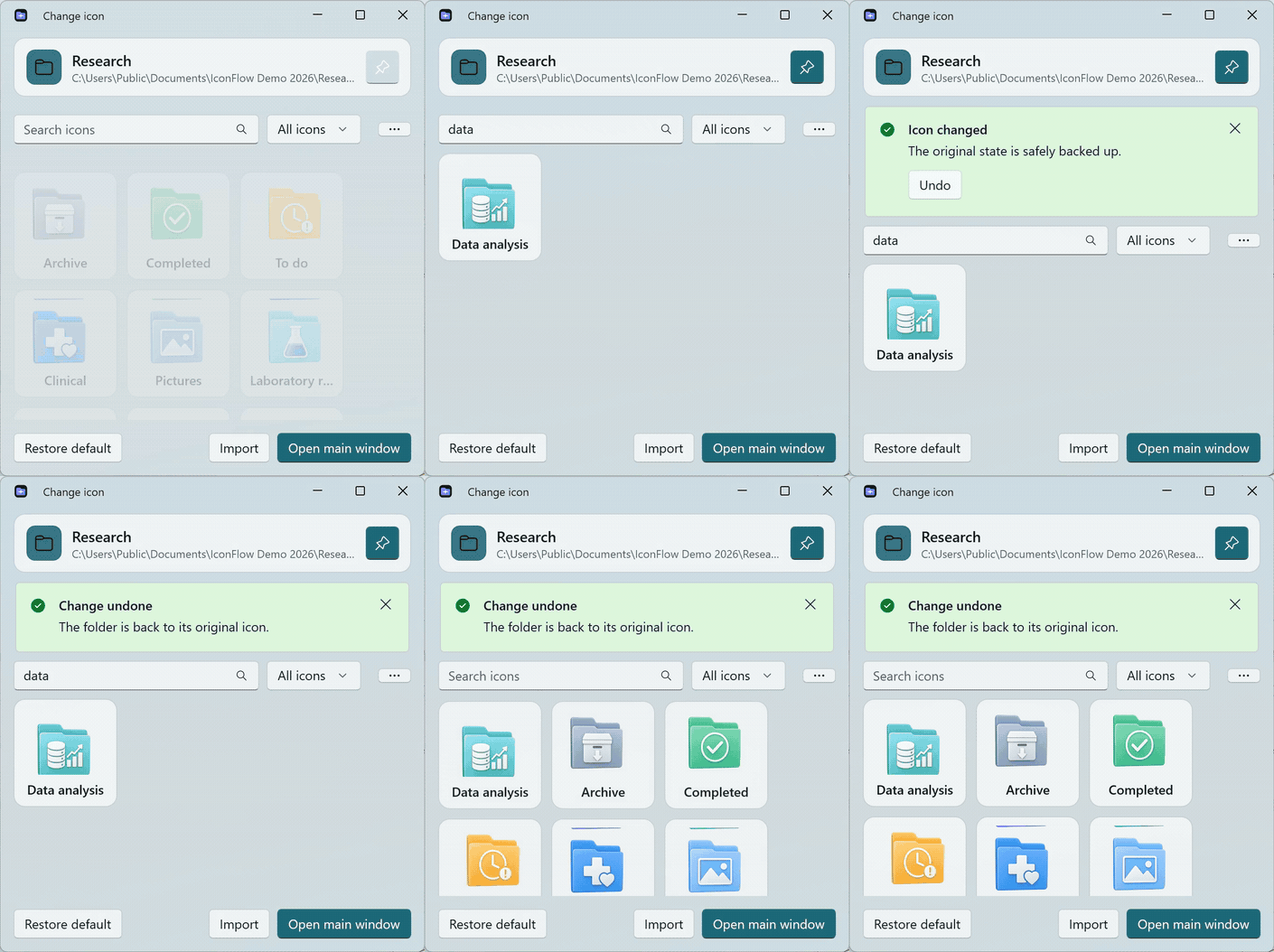
Why IconFlow
Windows icon customization is scattered across image conversion, shortcut settings, configuration files and Explorer cache behavior. IconFlow brings that work into one native WinUI 3 experience and keeps the original state recoverable.
The three-step flow
- Right-click a folder or shortcut.
- Search, import or choose an icon.
- Apply—and use Undo whenever you need it.
What is new in 0.8.2
- Fixed search for localized built-in icon names in the main library and compact picker.
- Added a clear, privacy-checked quick-change demonstration.
- Refined bilingual onboarding and documented the optional Windows 11 menu more precisely.
Included
- Native WinUI 3 interface with Mica, light/dark/system themes and compact always-on-top picker.
- Folder and
.lnkshortcut icon replacement with automatic Explorer refresh. - Seven-size ICO generation, sharp 256 px previews, editing and connected-background removal.
- Local icon folders, search, favorites and grouped recovery history.
- Locales for 11 interface languages, including Arabic RTL.
Download
Download IconFlow-0.8.2-win-x64-portable.zip, extract it to a stable writable folder and run IconFlow.exe.
Requirements: Windows 10 22H2 or Windows 11 23H2+, x64, .NET 8 Desktop Runtime and Windows App Runtime 2.4.
The portable app does not need administrator rights. The optional first-level Windows 11 context menu installs a project-local development certificate and sparse package, so Windows requests one UAC confirmation. The compatibility menu under Show more options does not require elevation.
Privacy
No account, telemetry, file upload or background network service is included. File names, paths, imported images and history stay on the device.
IconFlow 0.8.2 — 找到、应用、随时撤销
一套小巧的 Windows 原生图标工作流,本地处理,并把恢复能力放在第一位。
为什么做 IconFlow
Windows 图标更换长期分散在图片转换、快捷方式设置、配置文件和资源管理器缓存之间。IconFlow 用一个原生 WinUI 3 界面收拢这些步骤,并让原始状态始终可以恢复。
三步完成
- 右键文件夹或快捷方式。
- 搜索、导入或选择图标。
- 应用;需要时点击 撤销。
0.8.2 更新
- 修复主图标库和轻量窗口无法按本地化名称搜索内置图标的问题。
- 加入经过隐私检查的真实快速更换演示。
- 改进中英文上手说明,更准确地说明可选 Windows 11 一级菜单。
本版包含
- 原生 WinUI 3、Mica、浅色/深色/跟随系统主题,以及默认置顶的小窗口。
- 文件夹和
.lnk快捷方式更换,并自动刷新资源管理器。 - 七层 ICO、清晰 256 px 预览、裁剪编辑和边缘连通背景移除。
- 本地图标文件夹、搜索、收藏,以及按对象折叠的恢复历史。
- 随附 11 种语言资源,包括阿拉伯语 RTL。
下载
下载 IconFlow-0.8.2-win-x64-portable.zip,解压到稳定且可写的目录,然后运行 IconFlow.exe。
运行要求:Windows 10 22H2 或 Windows 11 23H2+、x64、.NET 8 Desktop Runtime、Windows App Runtime 2.4。
便携应用不需要管理员权限。可选的 Windows 11 一级菜单会安装项目本地开发证书和 sparse package,因此 Windows 会请求一次 UAC;“显示更多选项”中的兼容菜单无需提升权限。
隐私
不需要账号,不包含遥测、文件上传或后台联网服务。文件名、路径、导入图片和历史均留在本机。
SHA-256: 450ADC25B67B0B700359AD31CA31C038C504A043F283C8995C20CF3970D99297