Fix Date picker problems caused by different time zones and DST. - #605
Conversation


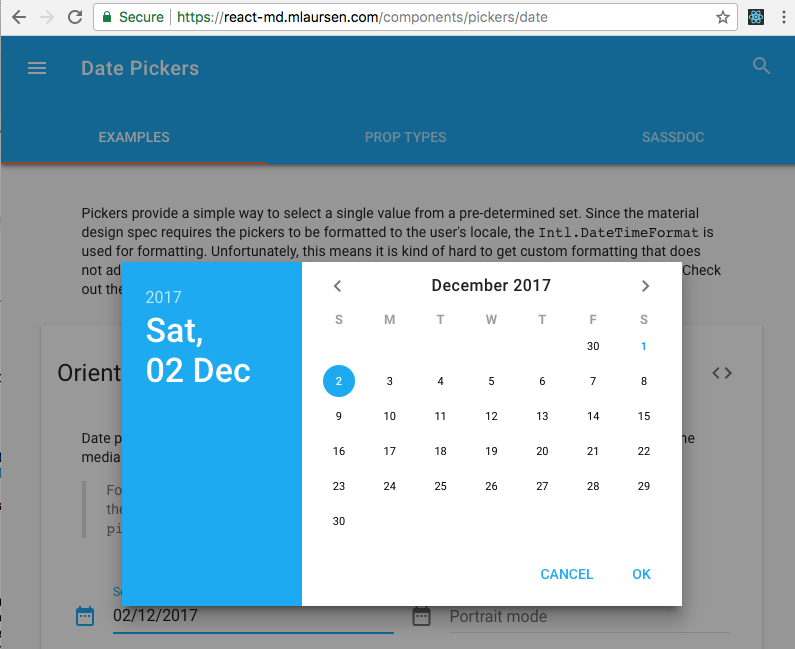
Due to different time zones, the Date picker presented inconsistencies in formatting
and also displaying of days of the month and days of weeks. For example, in some time zones,
when due to DST the time forwards one hour at midnight, the browser simply skips the 00:00
hours. For example, in Paraguay where the time is forwarded 1 hour on Oct 1st,
new Date(2017, 9, 1, 0) returns Sun Oct 01 2017 01:00:00 GMT-0300 (-03).
This was causing problems such as rendering 2017-11-1 on thursday and not on wednesday, and
also broke the active and today displaying in the calendar.

To fix this issues, this commit does the following:

- Add required string prop timeZone to DatePickerContainer which defaults to UTC.
- Propagates timeZone prop to child/descendant components such as DatePicker, CalendarHeader, DatePickerCalendar, CalendarMonth and CalendarDate
- Always strips time when calculating the next date in CalendarMonth to avoid not displaying active/today dates.
- Updates Date Pickers docs' Formatting section.

|
|
||
| days.push(date); | ||
| currentDate = addDate(currentDate, 1, 'D'); | ||
| // stripTime again to avoid problems when time is forwarded an hour for DST |
There was a problem hiding this comment.
This one is explained in the commit message.
| date: new Date(2016, 1, 1), | ||
| disabled: false, | ||
| onClick: jest.fn(), | ||
| index: 0, |
There was a problem hiding this comment.
I removed this because noticed that the prop wasn't actually used in the implementation
| /** | ||
| * The timeZone to be used in all formatting operations. | ||
| * For a full list of possible timeZone values check https://www.iana.org/time-zones. | ||
| */ |
There was a problem hiding this comment.
Could not make this appear in the PROP TYPES section of the Date Pickers docs. Please help with some guidance or instructions.

There was a problem hiding this comment.
This is something that I need to make a better flow for.. You'd need to run docgen or the docgen:create commands again from the /docs folder to see those updates. I currently don't have hot-reloading set up for server code.
There was a problem hiding this comment.
I think I tried all possible commands/scripts from the root dir and docs dir but I'm not sure. I'll take this into account for the next time :)

|
This looks good to me and thanks for updating a few of my tests to use enzyme! I've been meaning to migrate more of them over but never get the time. |


|
No problem, thanks for letting me change those tests ... It would've taken me more time trying to write those tests without enzyme. By the way, I also believe that tests run faster using enzyme than with the react-dom/test-utils. |


|
Hi,
|
|
We're working on this error in #634 ... thanks for the screenshot and your timezone info |
3 participants


Due to different time zones, the Date picker presented inconsistencies in formatting
and also displaying of days of the month and days of weeks. For example, in some time zones,
when due to DST the time forwards one hour at midnight, the browser simply skips the 00:00
hours. For example, in Paraguay where the time is forwarded 1 hour on Oct 1st,
new Date(2017, 9, 1, 0) returns Sun Oct 01 2017 01:00:00 GMT-0300 (-03).
This was causing problems such as rendering 2017-11-1 on thursday and not on wednesday, and
also broke the active and today displaying in the calendar.
To fix this issues, this commit does the following:
Screenshots of the problems taken from the docs page
Caveats