Merge adjacent clips feature#310
Conversation


|
Does it let you merge adjacent clips from different sources? |
|
It only allows it if the resource property is exactly the same if thats what you mean. Btw, i wondered if the join clips function that I found in mlt_playlist was something I should use for this, but when I tried it just made this weird clip instead... |
|
It is good to use MLT APIs where you can, but sometimes they are macro-like and make undo difficult to implement. It all depends. I will review your change soon. As far as keyboard shortcut, we can wait. If you want to be proactive about that, some times I see what some other tools such Premiere or Avid use for that, if available, and see if there is no conflict and makes sense in the context of our other shortcuts. |
|
Oh, one more thing to discuss. What happens with the filters when merging? |

| playlist.clip_info(clipIndex, &clip1); | ||
| playlist.clip_info(clipIndex + 1, &clip2); | ||
|
|
||
| if (QString::fromUtf8(clip1.resource) != QString::fromUtf8(clip2.resource)) |

There was a problem hiding this comment.
I prefer to use qstrcmp() when comparing C strings.
It does not take filters into account yet. The easiest way out is just to refuse merging if they have filters applied (maybe show an error message), otherwise we'd maybe try comparing filter xml or something like that and I'm unsure how that would work out? |
|
We now have copy/paste filters, but there is something broken at the moment on it for timeline clips. I will get that working and then I will apply it on top of the change to preserve clip A's filters only. Then, I will see about making out filters on clip B special case handling. |

|
Way, way back I did an icon for this function. If you want to add a button, maybe it could be used as a placeholder(until someone with talents for making icons comes along). It's called "splice": tin2tin_icons8 (1).zip |
|
I just tested it and already filters on A clip are preserved. |


|
It did not work correctly for me. I am splitting to be able to mute some part of the audio and when I merge back, the audio is back... I suppose I have to apply the audio changes before the merge. But I wanted to mention that. Testing further. |
|
@AlexisWilke This is a merge, not a grouping function. Merging cannot keep different filters on the different sections of footage. |
|
Just an idea (and probably requires another issue?)... maybe you could warn the user if the list of filters is different in the clips being merged. |

|
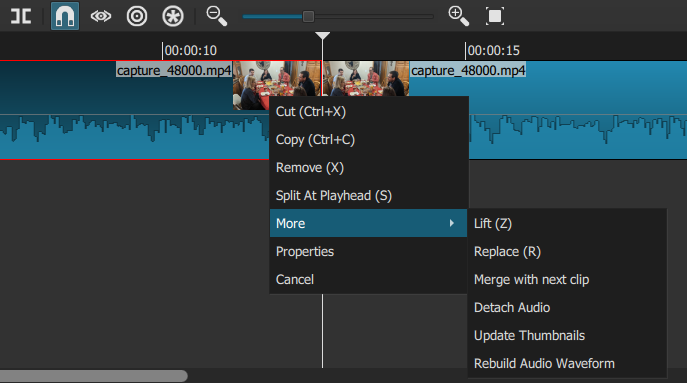
Has this feature been removed ? Couldn't find it in the "Clip" context menu. |

|
It is under the "More" submenu: |
6 participants


Available through the clip context menu for now, unsure if there should be a keyboard shortcut for this or not.