Architecture
Spring XD is a unified, distributed, and extensible service for data ingestion, real time analytics, batch processing, and data export. The foundations of XD’s architecture are based on the over 100+ man years of work that have gone into the Spring Batch, Integration and Data projects. Building upon these projects, Spring XD provides servers and a configuration DSL that you can immediately use to start processing data. You do not need to build an application yourself from a collection of jars to start using Spring XD.
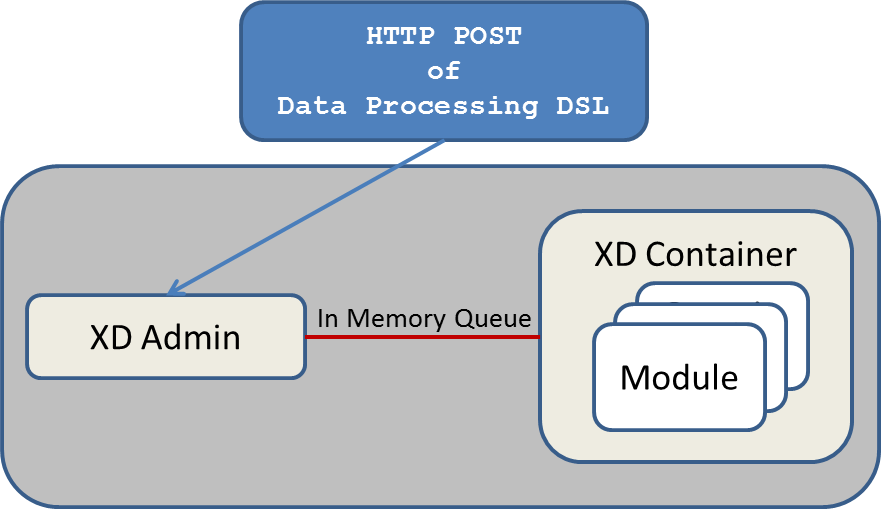
Spring XD has two modes of operation - single and multi-node. The first is a single process that is responsible for all processing and administration. This mode helps you get started easily and simplifies the development and testing of your application. The second is a distributed mode, where processing tasks can be spread across a cluster of machines and an administrative server sends commands to control processing tasks executing on the cluster.
The key components in Spring XD are the XD Admin and XD Container Servers. Using a high-level DSL, you post the description of the required processing tasks to the Admin server over HTTP. The Admin server then maps the processing tasks into processing modules. A module is a unit of execution and is implemented as a Spring ApplicationContext. A simple distributed runtime is provided that will assign modules to execute across multiple XD Container servers. A single XD Container server can run multiple modules. When using the single node runtime, all modules are run in a single XD Container and the XD Admin server is run in the same process.
A simple distributed runtime, called Distributed Integration Runtime, aka DIRT, will distribute the processing tasks across multiple XD Container instances. The distribution strategy in the M1 release is extremely simple. The XD Admin server breaks up a processing task into individual module defintions and publishes them to a shared Redis queue. Each container picks up a module definition off the queue, in a round-robin like manner, and creates a Spring ApplicationContext to run that module. This is a very simple strategy and not optimal for many use-cases, so support for defining grouping of modules will be introduced in later releases.
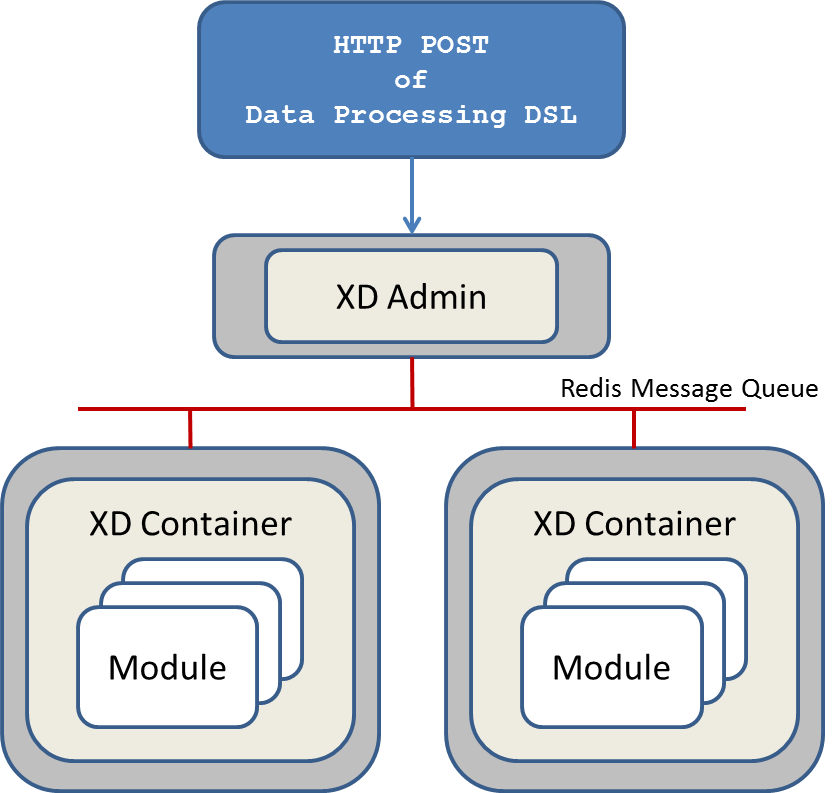
How the processing task is broken down into modules is discussed in the section [container-server-architecture].
In the M1 release, you are responsible for starting up a single XD Admin server and one or more XD Containers. As we progress towards a final release, the goal is to support running XD on top of other distributed runtime environments such as Hadoop’s YARN architecture and CloudFoundry.
For testing and development purposes, a single node runtime is provided that runs the Admin and Container servers in the same process. The communication to the XD Admin server is over HTTP and the XD Admin server communicates to an in-process XD Container using an in-memory queue.
The Admin Server in the M1 release uses an embedded servlet container and exposes two endpoints for creating and deleting the modules required to perform data processing tasks as declared in the DSL. For the M2 release, the Admin Server will be implemented using Spring’s MVC framework and the Spring HATEOAS library to create REST representations that follow the HATEOAS principle. The Admin Server communicates with the Container Servers using a pluggable transport based, the default uses Redis queues.
The key components of data processing in Spring XD are
-
Streams
-
Jobs
-
Taps
Streams define how event driven data is collected, processed, and stored or forwarded. For example, a stream might collect syslog data, filter, and store it in HDFS.
Jobs define how coarse grained and time consuming batch processing steps are orchestrated, for example a job could be be defined to coordinate performing HDFS operations and the subsequent execution of multiple MapReduce processing tasks.
Taps are used to process data in a non-invasive way as data is being processed by a Stream or a Job. Much like wiretaps used on telephones, a Tap on a Stream lets you consume data at any point along the Stream’s processing pipeline. The behavior of the original stream is unaffected by the presence of the Tap.

The programming model for processing event streams in Spring XD is based on the well known Enterprise Integration Patterns as implemented by components in the Spring Integration project. The programming model was designed to be easy to test components.
Streams consist of the following types of modules: * Input sources * Processing steps * Output sinks
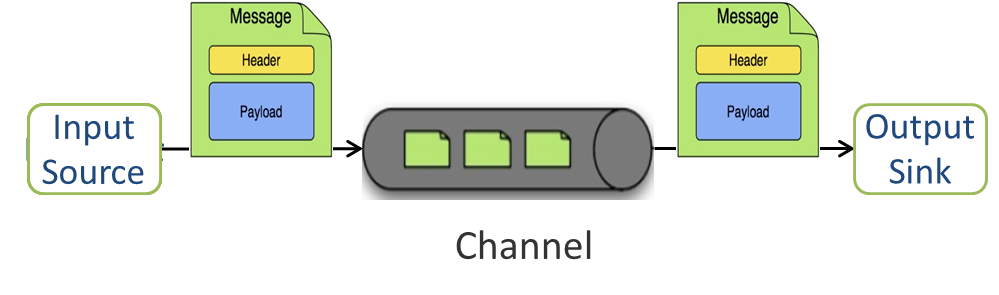
Input sources produce messages from a variety of sources, e.g. syslog, tcp, http. A message contains a payload of data and a collection of key-value headers. Messages flow through message channels from the source, through optional processing steps, to the output sink. The output sink will often write the message to a file system, such as HDFS, but may also forward the message over tcp, http, or another type of middleware. The M1 release supports message forwarding over tcp. Subsequent releases will support forwarding over RabbitMQ, HTTP, JMS, and the many other transports supported by Spring Integration. A guide to extending Spring XD for other transports is shown here.
A stream that consists of a input source and a output sink is shown below
A stream that incorporates processing steps is shown below
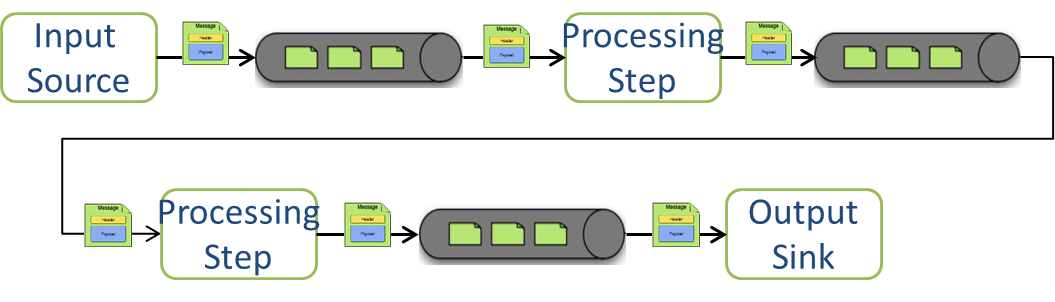
For simple linear processing streams, an analogy can be made with the UNIX pipes and filters model. Filters represent any component that produces, processes or consumes events. This corresponds to sources, processing steps, and sinks in a stream. Pipes represent the way data is transported between the Filters. This corresponds to the Message Channel that moves data through a stream.
A simple stream definition using UNIX pipes and filters syntax that takes data sent via a HTTP post and writes it to a file (with no processing done in between) can be expressed as
http | file
The pipe symbol represents a message channel that passes data from the HTTP source to the File sink. In the M1 release, the message channel implementation can either be backed with a local in-memory transport or use Redis queues. Future releases will support backing the message channel with other transports such as RabbitMQ and JMS.
Note that the UNIX pipes and filter syntax is the basis for the DSL that Spring XD uses to describe simple linear flows, but we will significantly extend the syntax to cover non-linear flow in a subsequent release.
The programming model for processing steps in a stream comes from the Spring Integration project. The central concept is one of a Message Handler class, which relies on simple coding conventions to Map incoming messages to processing methods. For example, using an http source you can process the body of an HTTP POST request using the following class
public class SimpleProcessor {

  public String process(String payload) {
    return payload.toUpperCase();
  }

}
The payload of the incoming Message is passed as a string to the method process. The contents of the payload is the body of the http request as we are using a http source. The non-void return value is used as the payload of the Message passed to the next step. These programming conventions make it very easy to test your Processor component in isolation. There are several processing components provided in Spring XD that do not require you to write any code, such as a filter and transformer that use the Spring Expression Language or Groovy. For example, adding a processing step, such as a transformer, in a stream processing definition can be as simple as
http | transformer --expression=payload.toUpperCase() | file
For more information on processing modules, refer to the section Processors
The Container Server listens for module deployment requests sent from the Admin Server. In the http | file example, a module deployment request sent for the http module and another request is sent for the file module. The definition of a module is stored in a Module Registry, which is a Spring XML configuration file. The module definition contains variable placeholders that allow you to customize the behavior of the module. For example, setting the http listening port would be done by passing in the option --port, e.g. http --port=8090 | file, which is in turn used to substitute a placeholder value in the module definition.
The Module Registry is backed by the filesystem in the M1 release and corresponds to the directory <xd-install-directory>/modules. When a module deployment request is processed by the Container, the module definition is loaded from the registry and a Spring ApplicationContext is created.
Using the DIRT runtime, the http | file example would map onto the following runtime architecture
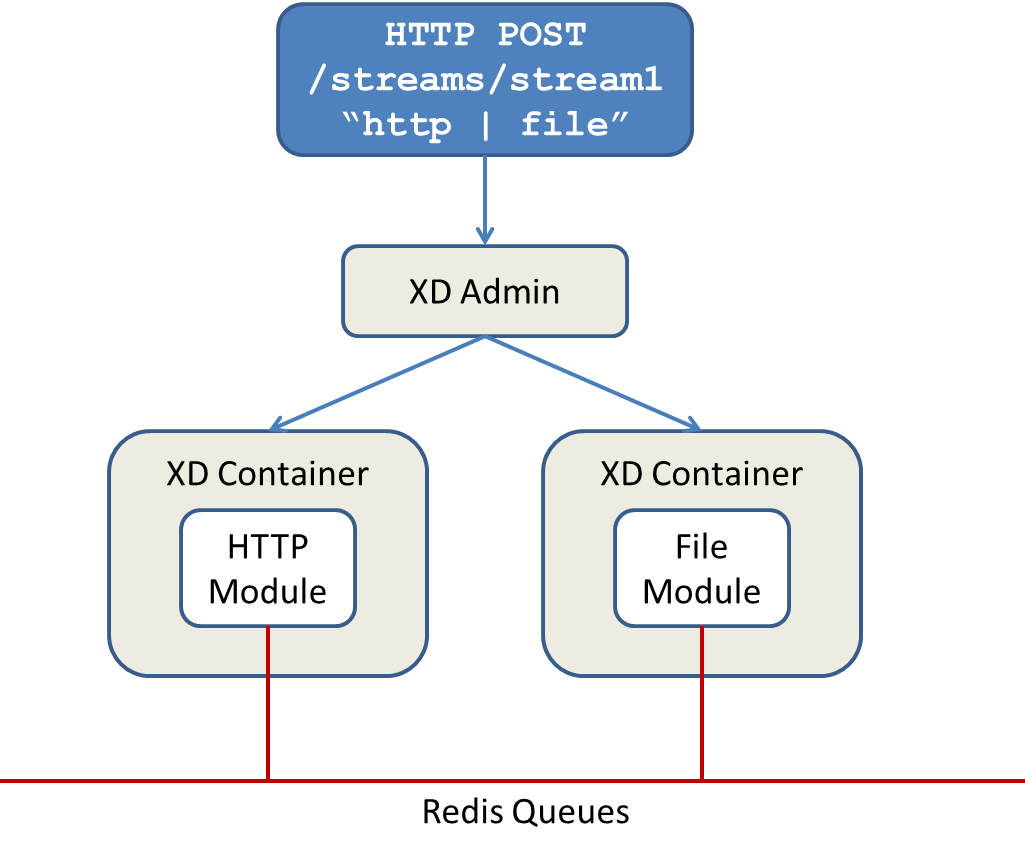
Data produced by the HTTP module is sent over a Redis Queue and is consumed by the File module. If there was a filter processing module in the steam definition, e.g http | filter | file that would map onto the following DIRT runtime architecture.
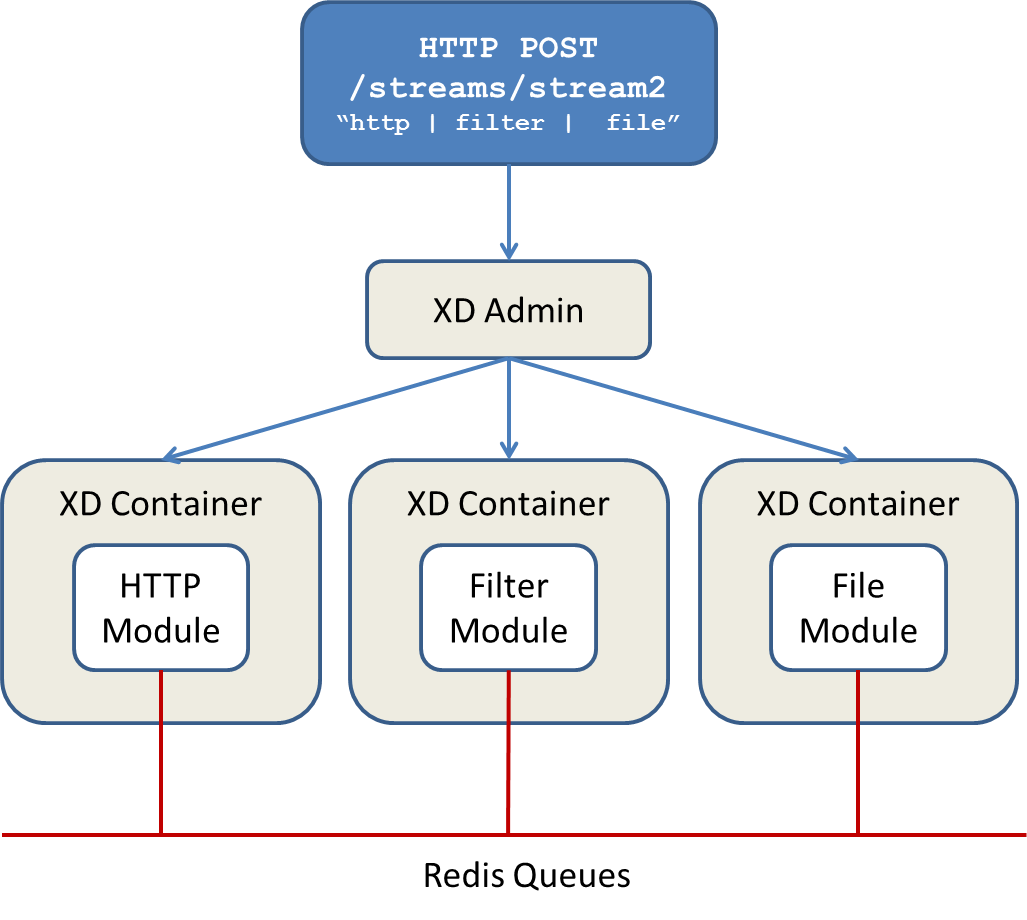
The creation and execution of Jobs is not part of the M1 release and will be included in the M2 release. Spring XD’s job functionality builds on the Spring Batch project and also the Spring for Apache Hadoop project that adds support for Hadoop based workflows.
Taps provide a non-invasive way to consume the data that is being processed by either a Stream or a Job, much like a real time telephone wire tap lets you eavesdrop on telephone conversations. Taps are recommended as way to collect metrics and perform analytics on a Stream of data. See the section Taps for more information.