Developer Document
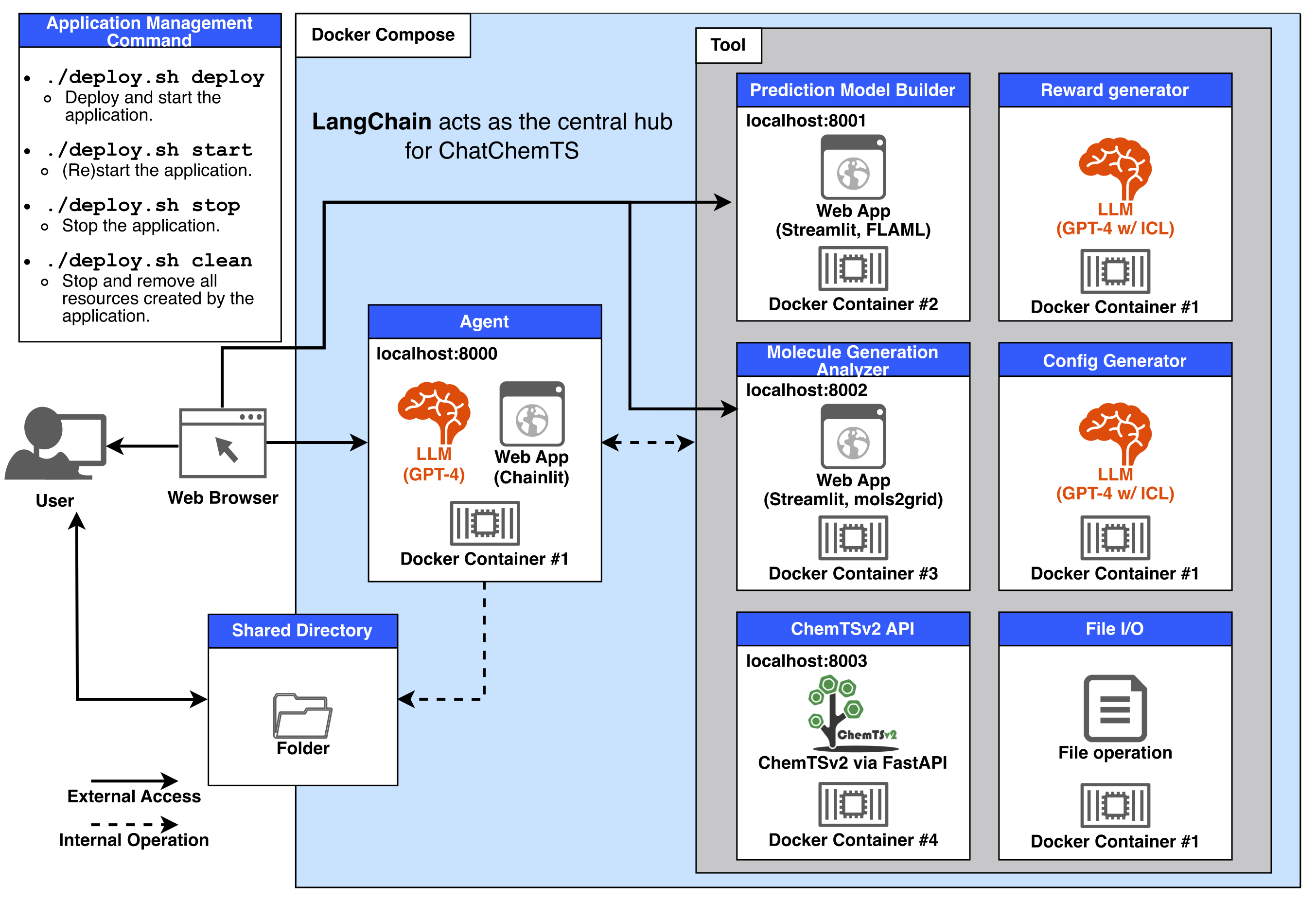
Each component is implemented in the following files:
- Agent: chatbot_app/app.py
- Prediction Model Builder: model_builder_app/app.py
- Molecule Generation Analyzer: analysis_app/analysis.py
- ChemTSv2 API: api_chemtsv2/main.py
- Reward generator, Config generator, and File I/O tools: chatbot_app/tools.py
- Shared Directory: shared_dir/
- Application Management Command: manage_app.sh
- Docker Compose: docker-compose.yaml
The .env file contains the port information for each Web App and the API key.
Below is the current configuration:
OPENAI_API_KEY=''
CHATBOT_PORT=8000
MODEL_BUILDER_PORT=8001
ANALYSIS_PORT=8002
CHEMTS_PORT=8003
This configuration information is used during Docker Compose operations.
Each component manages its dependencies using Poetry, and Docker images are built based on the poetry.lock file.
So, when adding or updating packages, please follow the steps below:
- Update the
[tool.poetry.dependencies]section inpyproject.toml - Run the
poetry lockcommand to update thepoetry.lockfile.
This ensures the changes are properly reflected in the dependency management and Docker image builds.
Note
If Docker containers or images already exist, make sure to remove them by running bash manage_app.sh clean before deploying the updated version.
Note
A GUI feature to switch between LLM models from different providers is planned for future implementation.
As such, the method described here is intended as a temporary solution.
To switch the LLM used in ChatChemTS to another provider's LLM, you will need to make modifications to at least two functions:
-
start()inchatbot_app/app.py -
prepare_chat_model()inchatbot_app/util.py
In the start() function, you define the settings passed to the LLM model that can be adjusted via the GUI. Update these settings to match the requirements of the LLM you wish to use.
Note
Ensure that the setting with id="NumConversationMemory" is retained, as it is a shared requirement across all LLMs.
In the prepare_chat_model() function, update the section where ChatOpenAI() is called.
Modify it to align with the specifications of the chat model you intended to implement.
The settings argument passed to this function contains the configurations defined in start().
For a list of chat models supported by LangChain, refer to the following documentation:
https://python.langchain.com/docs/integrations/chat/
If additional Python packages are required for the new LLM, you must update the following files:
-
pyproject.tomlandpoetry.lockinchatbot_app/
Add the required package to chatbot_app/pyproject.toml, then run the command poetry lock to update the chatbot_app/poetry.lock file. Refer to the Poetry CLI documentation for more details.
If the new LLM requires API keys or other credentials to be defined as environment variables, you need to update the relevant sections in the following files to suit your requirements:
manage_app.shdocker-compose.yaml.env
Replace the references to OPENAI_API_KEY with the corresponding keys or environment variables for your chosen LLM.
Under construction.
Under construction.
You can inspect the raw logs using the docker logs command if you encounter errors or unexpected behaviors.
docker container ls  # List running containers to find the container names related to ChatChemTS
docker logs [CONTAINER_NAME]  # Example: chatchemts-chatbot-1 or chatchemts-api_chemtsv2-1