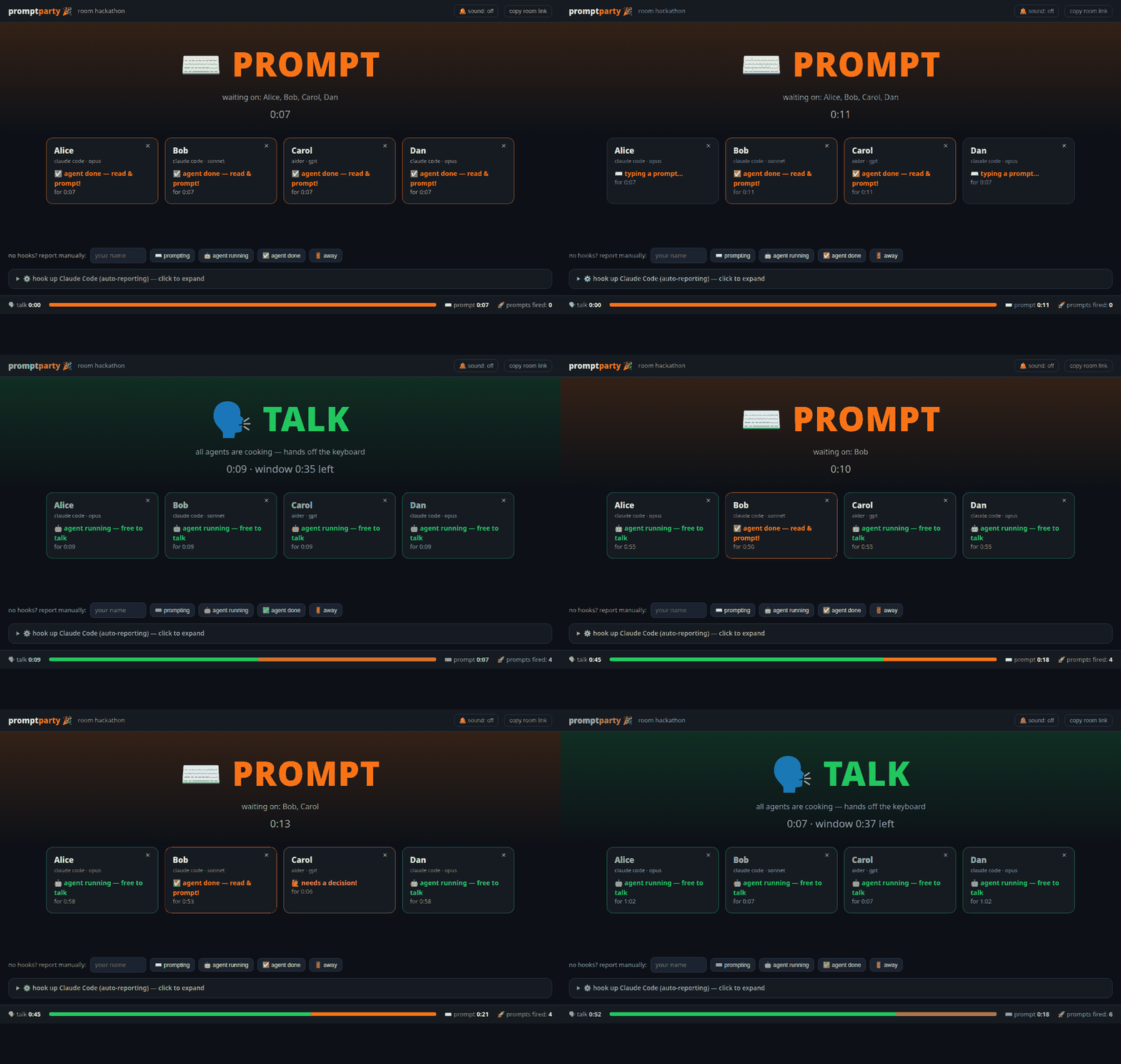
Cadence sync for teams agent-coding in the same room. One shared dashboard that tells everyone when it's time to ⌨️ PROMPT and when it's time to 🗣️ TALK — because the worst part of group agentic coding is everyone heads-down at different moments, waiting on each other, and the conversation dying.
The rhythm promptparty gives you:
- ⌨️ PROMPT — someone's agent finished (or needs a permission). Read the output, fire the next prompt.
- 🗣️ TALK — all agents are generating. Hands off the keyboard: discuss what's coming, plan the next move, actually talk to each other.
- Agents finish → the dashboard flips back to PROMPT (with an optional chime).
Everyone keeps their own terminal, own Claude Code session, own model — promptparty never calls a model and needs no API key. It only watches the states.
One person starts the server and opens a room (put it on a big screen or a spare browser tab):
uvx promptparty # or: pipx install promptparty && promptpartyEach teammate runs one command inside the project they're coding in:
uvx promptparty hooks --server http://192.168.1.20:8765 --room a1b2c3 --name Katka(The dashboard's ⚙️ panel shows this exact command with your room pre-filled.)
That installs Claude Code hooks into
./.claude/settings.json that report automatically:
| you do | dashboard shows |
|---|---|
submit a prompt (UserPromptSubmit) |
🤖 agent running — free to talk |
agent finishes its turn (Stop) |
✅ agent done — read & prompt! |
agent asks for permission (Notification) |
🙋 needs a decision |
Restart your Claude Code session (or reload hooks) and you're live.
Instead of per-person installs, one person can write a shared, committable config into the repo:
uvx promptparty hooks --shared --server http://SERVER:8765 --room a1b2c3
git add .claude/settings.json && git commit -m "promptparty hooks"
Teammates' names are resolved at runtime from $PROMPTPARTY_NAME (falling
back to $USER), and the server/room can be overridden with
$PROMPTPARTY_SERVER / $PROMPTPARTY_ROOM — so after git pull, everyone is
hooked up with zero setup.
Any tool can report with one request — wire it into whatever hooks your tool has, or an alias:
curl -X POST http://SERVER:8765/api/ROOM/event \
     -H 'content-type: application/json' \
     -d '{"name":"Katka","state":"generating"}'
# states: prompting | generating | ready | blocked | away
There are also manual buttons at the bottom of the dashboard.
- 🚦 A giant phase banner: TALK (all agents cooking) / PROMPT (with who the room is waiting on).
- 🃏 A card per person: state, model, how long they've been in it. Blocked agents pulse red so permission prompts stop rotting unnoticed.
- 🔔 Optional chime on phase flips — you don't even need the screen in view.
- 📊 Session stats: talk time vs prompt time and total prompts fired. (Great post-hackathon bragging material.)
- 🧹 Zero config, zero database, zero API keys. Rooms live in memory.
A single FastAPI process keeps per-room state and pushes it to dashboards over WebSockets. Hook reports are plain HTTP POSTs. The phase rule is one line:
if every non-away member's agent is generating → TALK, otherwise → PROMPT.
That's the whole trick. It works because agent turns are long enough (tens of seconds to minutes) that "all agents running" is a genuine conversational window.
promptparty [serve] [--port 8765] [--host 0.0.0.0] [--min-talk 120]
promptparty hooks --server URL --room SLUG --name YOU [--settings PATH]
promptparty hooks --remove [--settings PATH]
The server has no auth — anyone who can reach it can join the room. So the best way to play across networks is to not put it on the public internet at all:
Tailscale gives your group a private network between your devices, invisible to the internet and to whatever café Wi-Fi you're on.
-
Everyone installs Tailscale and joins the same tailnet — the host invites the others from the admin console (the free plan is plenty for a party).
-
The host starts the server bound to their Tailscale address only:
promptparty serve --host $(tailscale ip -4) -
Share the room URL using that address —
http://<tailscale-ip>:8765/r/<slug>— and pass the same address as--serverwhen installing hooks. Works from any network; unreachable from everywhere else.
No installs for your friends, just a link — good for a one-off session:
-
The host runs the server as usual, then in a second terminal:
cloudflared tunnel --url http://localhost:8765
(or
ngrok http 8765— same idea). It prints a random public URL likehttps://lamp-warren-poker-sunset.trycloudflare.com. -
Share the room as
https://<tunnel-url>/r/<slug>. -
Hooks must point at the tunnel too, not localhost:
promptparty hooks --server https://<tunnel-url> --room SLUG --name YOU
Heads-up: that URL is on the public internet, and anyone who obtains it can watch the room and post fake states. It's presence data, not code — but prefer Tailscale for anything beyond a one-off.
-
PreCompact/SubagentStophook nuances (long multi-agent turns) - Per-room history graph (talk/prompt timeline you can screenshot)
- Minimum TALK window (
--min-talk, default 120 s) — an early-finished agent waits out the window - Full pomodoro mode: enforced fixed windows
- Adapters for aider / codex / opencode hooks out of the box
PRs welcome — this was born at a hackathon and stays intentionally tiny: one Python file of server, one HTML file of dashboard, no build step.
- Anyone with the room URL can view and post states. It's presence data, not code — but run it on a network you trust (see Playing from different networks).
- Rooms are in-memory and vanish on restart.
MIT © moudrkat