Repository navigation
Releases: movacx/bc250-control-center
Release list
BC250 Control Center 1.21.2

What's Changed
SteamOS
- Fan control works. A working nct6687 is no longer reported as failed.
- Memory, swap and TTM unlocked. ZRAM + 16 GB swap, or ZSWAP with 16/32 GB, and the GPU memory limit (TTM), applied in a safe writable window. No failed
dev-zram0.swapafter switching to ZSWAP. - Compatibility. Cyan points above 2230 MHz are turned off after confirmation before the kernel is installed, and the GPU frequency selector stops at 2230 MHz.
- ACPI and mitigations are available on SteamOS.
- Profile export from Game Mode. GPU, CPU and fan profiles, including the CPU thermal cap and a fixed GPU clock.
Full Debian support
- Debian 13 is fully supported. Preparation, fan control (PWM), the GFX1013 fix, HelixSR with frame generation, memory and reports were tested end to end on a BC-250.
- The GFX1013 fix builds on Debian (
modinfois found outside the user's PATH). The deb and RPM packages require Python 3.11.
Upscaling
- Reworked Upscaling tab, now part of the guided tour.
- HelixSR 2.0 with Scaler, frame generation and updates; 2.0.0 is the recommended release. Pick older releases or pre-releases on request, non-Steam games added to Steam are found, and the Int8 setting is fixed.
- Frame generation builds reliably. Its button reads "Turn off frame generation" while it is on.
- OptiScaler Client. Back up and restore the games it set up, undo fixes, build picker for FSR4 INT8.
Audio and TV
- 5.1 audio and TV control over HDMI.
Desktop app
- GDDR6 temperatures from the bc250_memory driver, with the bounded upstream payload: a chip that does not answer is reported instead of shown as a temperature.
- Security. The GDDR6 and core-unlock helpers run from a SHA-256-verified copy under
/run, never from the user's folder. - Cyan v0.4.14 installed as upstream publishes it, with an update warning and a temperature reading option (desktop and Decky).
- Processes page built around applications, with pause and resume. Performance page in tabs. zram and zswap compressors shown.
- Faster UI. Unchanged widgets are not restyled, and hidden pages draw when shown. No more kernel log flood of "Unsupported clock type".
- Fan loop reads only the chips the curve uses (thanks to thefriendlyhedgehog, PR #24).
- I2C mod photo guide. The GPU operations console is gone, the voltage laboratory is cleaner, lists select across the whole row, and scrollbars and menus are fixed.
- Decky. More error codes with details and a copy button, an outdated helper is reported as such, and 1.21.0 and 1.21.1 plugins keep working.
- Telegram group link on the dashboard, rewritten README and third-party notices, and translations in 30 languages.
Problem reports and diagnosis
- Report from inside the app. "Report this problem" in error windows, the dashboard footer and the terminal toolbar opens the form already filled: code, origin, raw error, specs, recent errors and the full terminal output. Home paths become
~. - Hardware diagnosis attached. Kernel and headers, sensor modules and kernel messages, hwmon and
sensors, GPU and crash lines, how the previous boot ended, services, packages, Vulkan/RADV, SteamOS state, the memory helper and the last workflow log. No root needed; when the kernel log is closed, polkit asks once and the form explains why.
Black box (freezes and resets) · Beta
bc250-control-center-cli black-boxrecords GPU clock, load, temperatures, voltage, power, fans, CPU clock and free memory 4 times a second, bounded on disk. The next report shows the board's last seconds before a freeze.bc250-control-center-cli diagnoseprints the diagnosis.
New Contributors
- @thefriendlyhedgehog made their first contribution in #24
Packages
- Arch / CachyOS / SteamOS:
.pkg.tar.zst - Fedora / Nobara / Bazzite:
.rpm - Ubuntu / Debian:
.deb - Universal source archive:
.tar.gz
Contributors

Assets 7
BC250 Control Center 1.21.1
Highlights
New Upscaling tab
FSR4 and HelixSR now have their own tab in Additional settings, side by side.
- FSR4 INT8 (OptiScaler Client). Install it, open the client, and add the Steam launch option to all your games in one click. The launch option is always visible at the top of the games list, with a copy button.
- HelixSR 1.3.0. Runs DLSS's Model E network on the BC-250 in games that use FSR 3.1. It works through OptiScaler or by replacing the game's FSR file, and you can undo it per game.
- One games table for both. Each game shows whether it has FSR4, HelixSR or both, with its buttons on the same row. Games outside Steam can be added by choosing their folder, and games where you installed OptiScaler by hand are found too.
- HelixSR settings. Sharpening, sharpening in motion, network resolution, wave size and compatibility options, grouped and folded like the Compatibility section. "Apply to games again" writes them back to every game, for example after a game update.
- Uses the DLSS file you already have. If OptiScaler Client is installed, HelixSR uses its DLSS file after checking it, so nothing is downloaded from NVIDIA.
- Better game detection. No more duplicated games, Steam libraries from Flatpak and Snap are found, and the list refreshes by itself after every action.
Hardware video (VA-API) · Beta
- Video for streaming and recording. The BC-250 has no working video block, so apps fall back to software video. Compatibility › Video now installs simpmix's VA-API driver: H.264 is encoded on the GPU, HEVC mostly on the CPU, and both can be decoded. Sunshine, OBS, Steam Remote Play, ffmpeg and browsers can use it.
- Checked before it is turned on. The driver is built on your PC from a reviewed version and only switched on after it passes a check. "Test" shows the real speed on your board. On ours: H.264 at 179 fps and HEVC at 113 fps at 1080p.
- For streaming while you play, choose H.264. HEVC uses a lot of CPU.
- Available on SteamOS, Bazzite, Arch, CachyOS, Manjaro, Fedora, Debian 13+ and Ubuntu 24.04+. Flatpak apps (OBS or Firefox from Flathub) cannot use it yet.
SteamOS
- Memory and swap (Beta). The Memory & Swap section now works on SteamOS: ZRAM with a 16 GB emergency swap file, or ZSWAP with 16 or 32 GB. The swap file goes in /home, and the settings stay after SteamOS updates. It follows the method of keyboardspecialist's bc250-steamos toolkit.
- GPU memory limit (TTM). Now works on SteamOS, from the desktop app and from the Game Mode panel. The boot menu is only changed when every entry carries the new limit.
Bazzite
- CPU power management (ACPI) · Beta. The ACPI fix can now be installed on Bazzite. Every boot entry loads the tables, and the entry "Bazzite without the BC250 ACPI tables (recovery)" at the end of the boot menu starts without them if anything goes wrong.
Desktop app
- ACPI fix v1.1.1. Removes the C3 idle state that could freeze the board. If you have the earlier version, "Update correction" replaces it in place.
- MastaG kernels. The RC (7.3) and BORE kernels are now recognized, not just the stable one, and the kernel row shows which one is in use.
- Drop-down lists stay put when you scroll. Scrolling a page over a list no longer changes its value by accident. Click the list to choose.
- Corsair fix. Installing the Corsair fans and RGB driver (OpenLinkHub) no longer opens the controller interface when no controller is connected.
- Report and update buttons. The button to report a problem glows softly every 2 seconds so it is easy to find. You can turn this off in Settings › General. The update button glows the same way when a new version is out.
- Translations for all new text in 30 languages.
Screenshot

Packages
- Arch / CachyOS / SteamOS:
.pkg.tar.zst - Fedora / Nobara / Bazzite:
.rpm - Ubuntu / Debian:
.deb - Universal source archive:
.tar.gz
BC250 Control Center 1.21.0
Highlights
Decky plugin
The biggest update is in the Game Mode panel.
- Better support for SteamOS, Bazzite and CachyOS Handheld. The plugin was checked on all three, so it should work the same wherever you play.
- New look. Simple icons for GPU, CPU, CU and fans, your accent colour everywhere, and the same switch design in every section. Everything works with the controller.
- CPU monitoring. Each core has its own load bar, grouped by physical core, and locked cores are shown too. When a CPU test runs, the panel follows it live and tells you what is happening.
- GPU monitoring. Same card style as the CPU. GPU usage now shows even when the kernel does not report it. Fans and board info are under "All".
- Memory temperature (GDDR6). One "Memory monitoring" switch. You can apply the patch for this boot right from Game Mode.
- Profiles. GPU and CPU cards show GHz and an ACTUAL tag on the one in use. Per-game profiles are redesigned, and "Unlock frequencies" now sits next to its points.
- Cyan. Kernel compatibility options, faster GPU changes, and a way to recover Cyan if it gets stuck.
- Governor service. A simple card with just the title and its two buttons.
- CPU overclock. The manual value is stress-tested before it is saved, and applying it no longer throws you back to Monitoring.
- GPU memory limit (TTM). You can set it from the panel. It works the same way as in the desktop app.
- Async compute. The row works with any driver.
- Clearer errors. When something fails, the panel tells you what happened instead of showing a generic message.
- Translations reviewed for English, Spanish, Latin American Spanish, Portuguese, German, Polish, Russian and Ukrainian.
SteamOS
- Uses keyboardspecialist's bc250-steamos toolkit as is, with Mesa RADV 26.2.2.
- With that toolkit's kernel, the GPU goes up to 2230 MHz. The app warns you before going higher, and the install tells you which points to turn off.
- The BC-250 Telemetry service now works on SteamOS and stays after system updates.
Desktop app
New page and layout
- New "Additional settings" page under GPU Governor. Compatibility, memory and swap, drivers and boot options (mitigations, read-only mode, kernel options) now live there. The Dashboard keeps Components and Decky.
- The Compatibility section is easier to read: one list per topic, details when you click, and buttons lined up.
- Compute Units now comes before GPU Governor in the sidebar.
Compute Units and kernel
- Up to date with the latest MastaG linux-cachyos-bc250 kernel. When that kernel handles the Compute Units, the page only shows them and does not try to change them.
- The kernel's own 40 CU unlock is offered as a boot option you can turn on and off. With it you do not need UMR or the live CU manager.
- Checked against the latest changes in that kernel: a heat warning for 40 CUs (cap the GPU at about 1500 MHz), power readings from its bc250_vrm driver, and a warning when bc250_memory is loaded before a CPU test.
Telemetry and power
- You can install the BC-250 Telemetry service from Settings, and Settings › Telemetry is grouped by topic.
- The long GDDR6 explanation is behind a "Details" button.
- Power delivery has a help button that explains how to turn it on.
CPU and GPU
- CPU changes retry if the SMU is slow to answer, and other readers wait while a CPU test is running.
- Turning on Cyan resets its fix options, so a leftover setting cannot stop it from starting.
- The sensors button in Performance has an arrow, so it is clear it opens another screen.
UMR and distributions
- If UMR stops working after an update, the app tells you how to reinstall it for your distribution and gives you the command to copy.
- On Arch and CachyOS, "Prepare dependencies" rebuilds UMR by itself when it stops working.
- Building Cyan on Arch and CachyOS no longer runs a full system update, and works even without a default Rust toolchain.
- The GFX1013 card is hidden on Debian and Ubuntu kernels older than 6.14, where it cannot be built.
- Async compute fixes for Fedora and Bazzite. The async compute card is shorter, translated into 30 languages, and its graph is always measured.
System
- Safer changes to GRUB and Limine, and the package cannot be removed while one of its boot options is still set.
- Updated Cyan, OptiScaler Client and bc250_smu_oc.


Packages
- Arch / CachyOS / SteamOS:
.pkg.tar.zst - Fedora / Nobara / Bazzite:
.rpm - Ubuntu / Debian:
.deb - Universal source archive:
.tar.gz
BC250 Control Center 1.20.4
Highlights
- New dashboard notices that say what the installed tools need: outdated helpers, missing base or 40CU dependencies, async compute or FSR4 repairs, and a pending Bazzite restart.
- Bazzite: after the first Prepare dependencies, the app now says to restart and prepare again, and the async compute card explains the launch option, the always-on command and the F4 terminal.
- In-app updater that downloads the right package for your system, checks its SHA-256 before installing, and now works on SteamOS.
- SteamOS: the app stays installed after OS updates, with a read-only switch and a recovery path.
- Core unlock: new option for boards whose core mask is not 0x77, and the GPU governor comes back on if the unlock is refused.
- New telemetry guide for 8-core boards on current kernels (MeiMeiDXE v3 "SMU Reporting Patch").
- One OptiScaler launch option for the whole Steam library.
- New Settings › Diagnostics page that keeps every error code with its time and probable cause, ready to copy into a report.
- Built-in terminal now shows real progress for git, APT, cargo and make (fixes the frozen UMR build on Ubuntu 26.04).
- Live GDDR6 temperature monitoring with a single authorization per session.
- Profile names now follow the interface language instead of staying in Spanish.
- Thermalright and OpenLinkHub case accessories in the Drivers tab.
- Ubuntu fixes and installer fixes for minimal Arch, CachyOS and openSUSE (missing
cmp). - Packages are now built automatically by GitHub Actions.
Packages
- Arch / CachyOS / steamOs:
.pkg.tar.zst - Fedora / Nobara / Bazzite:
.rpm - Ubuntu / Debian:
.deb - Universal source archive:
.tar.gz
Contributors

Assets 7
BC250 Control Center 1.20.3

Fixes in 1.20.3
- SteamOS, Prepare dependencies: fixed the
BC250-RANGE-001error. The UMR register database now installs correctly, including register files that upstream ships as symlinks inside the database (for exampleip/smuio_13_0_11.reg). Symlinks pointing outside the database are still refused. - SteamOS kernel patch: added support for the new SteamOS 6.18 kernel (
6.18.50-valve2-1-neptune-618). The high-OC telemetry overlay (500–2400 MHz readings) no longer fails with "unexpected kernel source". - SteamOS kernel patch, retries: the patch can now be run again after a failed or interrupted attempt. It no longer stops with "GPU telemetry patch neither applies nor reverses cleanly — tree has drifted".
Fixes in 1.20.2
- FSR4 (OptiScaler Client): the client now opens correctly on Bazzite and other Fedora Atomic systems, where /home is a link to /var/home. It used to stop at "Setup needs attention ... linked path: /home".
- FSR4 game list: a game whose library is reached through a link (for example /mnt on Fedora Atomic) now shows "Linked folder", with the real folder to add in the launcher instead, so the client does not refuse it.
- Firmware (BIOS): the USB is no longer ejected at the end. The drive is left unmounted and ready to pull out, without powering it off.
Fixes in 1.20.1
- Controller navigation, component preparation: each card is now a single stop. Left and right follow the order of the cards instead of jumping to the panel above, A toggles the card, and the A badge sits next to the checkbox instead of on top of it.
- Controller navigation, fans: the Silent, Balanced and Aggressive profiles of the automatic curve can now be reached and chosen with the controller. Left and right stay on the profile row.
- Fans: choosing an automatic curve profile switches the curve on, running the same checks as the switch.
Highlights in 1.20.0
- New Firmware (BIOS) module: prepares a BIOS update USB with P3.00 Chipset Menu, MeiMeiDXE v3, P5.00, P3.00 or P2.00, every file verified by SHA-256.
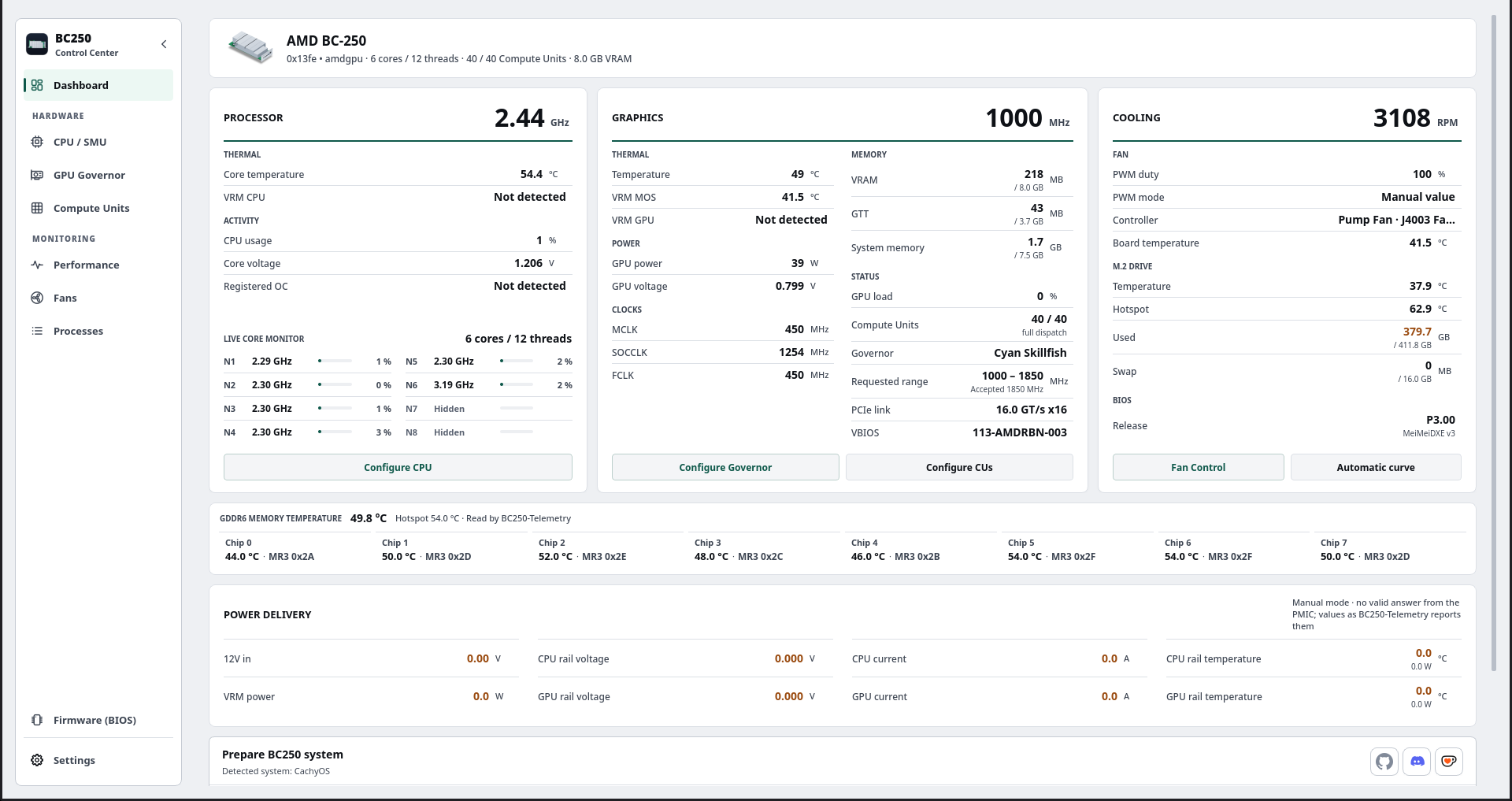
- Redesigned dashboard with Processor, Graphics and Cooling panels, live per-core monitor, GDDR6 memory temperature, Power delivery rails and the installed BIOS.
- New Performance module with charts per resource and a full Sensors view.
- Themes and styles: Light, Dark and Night blue themes, Standard and Formal styles, 10 accent colors.
- Decky Quick Access: automatic per-game profiles (GPU and fans), live async compute usage and fan presets from the desktop.
- Fans: manual speed survives reboots, profiles export to a file and to Decky, fewer confirmation windows.
- In-app updates: the application tells you when a new version is out and installs the right package for your system.
- New first-run welcome screen and guided tour.
What's new
Dashboard and monitoring
- Instrument panels for Processor, Graphics and Cooling, under a BC-250 board header with its own artwork for light and dark themes.
- Live core monitor with frequency and load per core, including cores hidden by the firmware.
- GDDR6 memory temperature for all eight chips, in one authenticated live session; BC250-Telemetry's collector readings are shown when it is running.
- Power delivery band with the PMIC rails (12 V input, VRM power, voltage, current and temperature per rail) for boards with the I2C mod, and a manual mode in Settings › Telemetry for testing the wiring.
- The installed BIOS is shown under Cooling: P2.00, P3.00 or P5.00, and MeiMeiDXE v3 or Chipset Menu when it can be identified.
- Performance module: CPU, GPU, VRAM, RAM, disk and network charts with total, per-core, per-thread, clock and temperature views, plus a Sensors view with list and graphs, min/avg/max and filters.
- Telemetry repair for the eight-core AMDGPU metrics layout.
Firmware (BIOS)
- Builds a bootable BIOS update USB from the published images: P3.00 Chipset Menu (recommended), P3.00 MeiMeiDXE v3 with 16 boot logos, P5.00, P3.00 and P2.00.
- Every download is pinned to an upstream commit and its SHA-256, and the USB is verified after writing.
- Optional custom boot logo for the images that support it.
- Tested on real boards with P2.00, P3.00, P5.00 and MeiMeiDXE v3.
GPU
- Oberon now uses the same GPU screen as Cyan.
- Async compute on CachyOS with Linux 7.2 through a RADV-only route; improved GFX1013 workflow and launcher on Fedora.
- Export GPU profiles to Decky, now confirmed with a notification.
CPU / SMU
- Rebuilt CPU overview with live per-core readings.
- Shows whether an active core unlock will survive the next power off.
Fans
- A manual speed is applied on the click and reported with a notification; only speeds low enough to overheat the board ask first.
- The manual speed is kept after a reboot while the optional daemon or control from boot is enabled.
- Fan profiles can be exported to and imported from a file, and exported to Decky.
- Fan PWM helper and persistence fixes (#15).
Memory, VRAM and swap
- VRAM size can be set from the application, including from Steam Game Mode.
- Improved ZRAM, ZSWAP and swapfile management.
Appearance
- Themes: System, Light, Dark and Night blue. Styles: Standard and Formal, available in every theme.
- 10 accent colors, comfortable and compact density, interface scale from 70 % to 150 %.
- Light mode contrast raised to WCAG AA across the application.
- New application icon.
- Results appear as notifications instead of extra windows after each click.
- 30 languages.
Decky Quick Access (Steam Game Mode)
- Per-game profiles: a game's GPU profile and fan preset are applied when it starts and the previous state comes back when it closes.
- Live async compute (ACE) usage with the game using it.
- Fan presets with the names and speeds exported from the desktop.
- VRAM split and GPU points above 2000 MHz from the panel; the 2000 MHz switch lives in the plugin settings.
- New monitoring sections for CPU, GPU, VRM and VRAM.
- The plugin version now follows the application version.
Setup, updates and installation
- First-run welcome screen: language, theme, style, accent, density, sidebar, dependency installation in an embedded terminal, and a guided tour.
- Embedded console with tabs, so several workflows can run at once.
- Update notification on the dashboard and an in-app updater for pacman, dnf, rpm-ostree, APT and AUR, with SHA-256 verification and the release notes shown in the application.
- Per-game FSR4 through the BC250 build of OptiScaler Client, with the Steam launch option set for you.
- Bazzite: reversible
mitigations=offoption. - Drivers: Debian and Ubuntu install only the packages their release offers, and Debian can add Wi-Fi and Bluetooth firmware from non-free-firmware after asking.
Fixes
- GRUB entries with tab-separated commands (#2), Cyan D-Bus dependency recovery (#3) and waiting for background tasks before closing (#4). Thanks to @Ninnix.
- Themes corrected for KDE Plasma and Fedora.
- Warm, hot and invalid readings are painted in their warning colors again.
- Many interface, performance and translation fixes.
Packages
- Arch / CachyOS / SteamOs:
bc250-control-center-1.20.3-any.pkg.tar.zst - Fedora / Nobara / Bazzite:
bc250-control-center-1.20.3.noarch.rpm - Ubuntu / Debian:
bc250-control-center_1.20.3_all.deb - Universal source archive:
bc250-control-center-1.20.3.tar.gz - AUR:
yay -S bc250-control-center-git
Check SHA256SUMS.txt to verify downloaded files.
Notes
- Reinstall the Decky Quick Access plugin from the application after updating: the plugin and its helper must be the same version.
- GDDR6 memory temperature needs BIOS P3.00 (stock, Chipset Menu or MeiMeiDXE); the SMU patch was not verified on other firmware.
- Flashing a BIOS is at your own risk. After an ASRock image the board shows no picture until the CMOS is cleared.
Screenshots
| ❮ |
|
❯ |
Contributors
Assets 7
BC250 Control Center 1.19.0
Highlights
- New dashboard with clearer navigation, an improved layout, and refreshed telemetry.
- Improved interface across GPU, CPU, fans, Compute Units, performance, processes, and settings.
- Redesigned GPU/Cyan backend that separates the requested range, thermal limit, and observed frequency for safer control.
- New GPU safe points and voltage laboratory with additional validation.
- Added the GFX1013 fix, including a kernel/Mesa repair and compatibility flow for CachyOS and compatible systems.
- Improved fan control with persistent curves, experimental PWM support, and health checks.
- Improved CPU/SMU tuning, stability testing, persistent profiles, and custom CPU overclock scaling.
- Improved Compute Units monitoring and actions, including 24 CU and 40 CU configurations.
- New BC250 Quick Access for Decky, available from Steam Game Mode and Big Picture.
- Expanded dependency preparation and support for Arch, SteamOS, Bazzite, Fedora, Debian/Ubuntu, Gentoo, and Alpine.
- SteamOS, Bazzite, and CachyOS improvements for runtime support, telemetry, memory/swap, and kernel compatibility.
- Optional per-game FSR4 integration, isolated from system Mesa and libdrm.
- New CLI mode and user daemon for telemetry and compatible configuration restoration.
- Support for 30 languages and improved gamepad navigation.
Packages
- Arch / CachyOS / Manjaro:
.pkg.tar.zst - Fedora / Nobara / Bazzite:
.rpm - Ubuntu / Debian:
.deb - Universal source archive:
.tar.gz
BC250 Quick Access

NOTE
Note: I overlooked a telemetry error. If you apply the kernel patch in CachyOS and notice that application sensors are returning incorrect data or failing to detect a sensor, don't worry. Your system is working correctly; it is an application compatibility issue. I will release the fix on September 25th. That’s all. Apologies in advance.
BC250 Control Center 1.18.2
BC250 Control Center 1.18.2
This update fixes the GPU governor voltage laboratory while retaining the CPU core-unlock, interface, controller, fan, and multi-distribution improvements introduced in 1.18.1.
Highlights
- Restored the exact
cyan-skillfish-governor-smupackaged voltage curve as the single source of truth, including the previously omitted 2230 MHz point. - Level 0 now restores all 17 original voltages and disables the +2000 MHz TOML points.
- Level 3 now adds exactly +30 mV and Level 6 exactly +60 mV to every safe-point from 2000 MHz, without skipped or capped points.
- Added GUI and backend protection that blocks ranges or fixed frequencies above 2000 MHz until the complete Level 3 or Level 6 curve is active.
- Preserved and verified the active D-Bus range after governor restarts, with safe clamping when Level 0 disables high-frequency points.
- Replaced the voltage laboratory's proposed-value column with the original packaged voltage and exact added amount.
- Added experimental hidden CPU core unlocking through the official
rw-r-r-0644/bc250-core-unlockrepository, with hardware checks, guarded privileged execution, governor compatibility handling, and restart guidance. - Redesigned the CPU / SMU workspace with processor overview, live per-core monitoring, CPU configuration tabs, and clearer persistence state.
- Fixed GPU laboratory combo-box selection and Xbox controller numeric-pad activation.
- Improved fan persistence guidance, dependency preparation, privileged helper validation, and multi-distribution packaging.
Packages
- Arch / CachyOS / Manjaro:
.pkg.tar.zst - Fedora / Nobara:
.rpm - Bazzite / Fedora Atomic:
.rpm - Ubuntu / Debian:
.deb
Check SHA256SUMS.txt to verify downloaded files.
Important notes
- GPU frequencies above 2000 MHz remain experimental and hardware-dependent. A complete voltage curve prevents incomplete configuration, but cannot guarantee silicon stability.
- CPU core unlocking is experimental, requires a restart, and has only been tested with a limited set of BIOS/kernel combinations.
cyan-skillfish-governor-smuis disabled for the upstream core-unlock action and can be enabled again from GPU Governor → Enable service after restarting.
BC250 Control Center 1.17.23
BC250 Control Center 1.17.23
This release focuses on SteamOS/Game Mode compatibility and a smoother public installation flow.
Highlights
- SteamOS Game Mode hardware actions are supported through the limited helper path.
- Compute Units support was validated on a clean SteamOS installation.
- README installation commands are clearer for users new to GitHub.
- GPU governor guidance now explains that the service may need to be enabled from the app.
- Fan PWM preparation now warns users not to close the terminal while boot persistence is being configured.
- Gamepad navigation demo video is attached to this release.
Packages
- Arch / CachyOS / Manjaro:
.pkg.tar.zst - Fedora / Nobara:
.rpm - Bazzite / Fedora Atomic:
.rpm - Ubuntu / Debian:
.deb
Check SHA256SUMS.txt to verify downloaded files.
BC250 Control Center v0.1.0
BC250 Control Center 0.1.0-60
Changes:
- Added Ubuntu/Debian package support with a
.debbuild. - Added Ubuntu/Debian dependency preparation for the SMU governor and fan PWM driver.
- Improved fan PWM path report and restart notice translations.
- Kept Arch/Fedora/Bazzite flows unchanged.
Packages:
- Arch/CachyOS/Manjaro:
.pkg.tar.zst - Fedora/Nobara:
.fedora.rpm - Ubuntu/Debian:
.deb - Universal:
.tar.gz
For Bazzite/Fedora Atomic, use the Bazzite RPM generated from Bazzite.