Modules_v0.90.0
Fennec Fox protocol stack consists of four layers: application, network, MAC and radio. Each layer runs with one or more modules implementing its layer functionality. Different modules from the same layer implement their layer's service in a different way to meet various objectives. For example, one MAC module may minimize power consumption, while another MAC may achieve high throughput.
Fennec Fox has Standard Library, a set of Fennec Fox modules that are already implemented and ready to be used in a Swift Fox program. The Swift Fox compiles uses library .sfl files to find the location of the Fennec Fox modules' source code. The Fennec Fox Standard Library file is located in src/support/sfc/fennec.sfl file. Let's look at one example of a Fennec Fox application module: Blink.
The Blink application source code is in src/apps/tests/Blink. The fennec.sfl has the following definition of this application module:
use application blink $(FENNEC_FOX_LIB)/Application/tests/Blink (
		uint8_t led=1,
		uint16_t delay=1024 )
This code from the Fennec Fox standard library says that there is a Fennec Fox module in src/apps/tests/Blink. This module is an application (use application) and once it is used in a Swift Fox program, it is called blink. The Blink module takes two parameters of type uint8_t and uint16_t, and by default these parameters have values of 1 and 1024.
During Swift Fox program compilation, the compiler will link to the nesC configuration file called BlinkC.nc.
Each Fennec Fox module is implemented in nesC. TinyOS Programming is one of the good examples of learning how to program in nesC.
When implementing a new Fennec Fox module, one must keep in mind the following steps:
- Add new module location into Swift Fox libraries. (More about this can be found in the Swift Fox Wiki)
- Create a folder with the module name, and inside of this folder create top nesC configuration file called with the module name followed by 'C.nc'. For example, if we create a new module called 'temp' then we need to store the module's implementation in 'temp' directory, inside of which we need to have 'tempC.nc' top configuration file.
- Each module must implement interfaces of its layer. The complete list of each layer interfaces can be found here.
The simplest way of creating a new module is by copying an existing module and modify it for your needs. Fennec Fox has scripts that help to create a new module template based on a simple module implementation. For example, in src/apps, we can find create.sh bash script that makes a copy of the nullApp application module. Using this script we can quickly add a new module to the Fennec Fox standard library. For example, let's assume we create a new application called foo, then we do the following:
user@linux $ cd src/apps
user@linux $ ./create.sh foo
Looks like SUCCESS

Don't forget to add the following line to $(FENNEC_FOX_LIB)/src/support/sfc/fennec.sfl

use  <layer> <give_it_a_name> $(FENNEC_FOX_LIB)/src/apps/foo()

user@linux $
Now, if we add this line:
use application myFoo $(FENNEC_FOX_LIB)/src/apps/foo()
to $(FENNEC_FOX_LIB)/src/support/sfc/fennec.sfl, we can use the myFoo module in a Swift Fox program. For example, the following Swift Fox program should successfully compile:
process hello { myFoo()     # Application layer module
        nullNet()       # Network layer module
        nullAM()        # MAC & Radio layer module
        }
start hello
Each Fennec Fox module can receive multiple parameters that are passed from the Swift Fox program level. One example of parameters passed to a module is the TelosbSensors application. This application expects to receive two parameters: the address of the mote to which the sensor measurements should be send to and the millisecond delay between consecutive rounds of sensors' sampling. When the parameters are not specified, Swift Fox will assign the default values for these parameters according to the module's definition in the Swift Fox library file. For example, the TelosbSensors application module definition is specified in the Fennec Fox standard library, in src/support/sfc/fennec.sfl file:
use application telosSens $(FENNEC_FOX_LIB)/apps/tests/TelosbSensors (
		uint16_t dest = 0,
		uint16_t sampling_rate = 1024)
From this definition we learn that the application takes two parameters, which default values are 0 and 1024. Importantly, from this module definition we also learn the names of the parameters. We need to know those names to be able to get and set values of these variables from the module's implementation level. In the module's implementation, the parameters are accessible through the Params interface, which complete name is defined as < module_name >Params. For example, the TelosbSensors application module wires to TelosbSensorsParams interface.
uses interface TelosbSensorsParams;
This interface will provide get and set function to the parameter variables, following the syntax:
< get >_< variable name >
and
< set >_< variable_name >
Therefore, in the TelosbSensorsP.nc module implementation file we see calls to the Parameter interface such as;
call TelosbSensorsParams.get_dest()
or
call TelosbSensorsParams.get_sampling_rate()
In the following example we ask to implement a new Fennec Fox application module. Consider the following problem:
Many motes have buttons on their boards. For example, TelosB and Zolertia Z1 have buttons to reset the mote and to let a user to enter input by pressing the second button. The user buttons are usually marked as USR. We would like to implement a Fennec Fox application that will receive input N from a user, which is the number of times the USR button is pressed and display that number (N) on its LEDs as well as on all the LEDs of all the motes in the network.
The figure below shows an example of the problem:
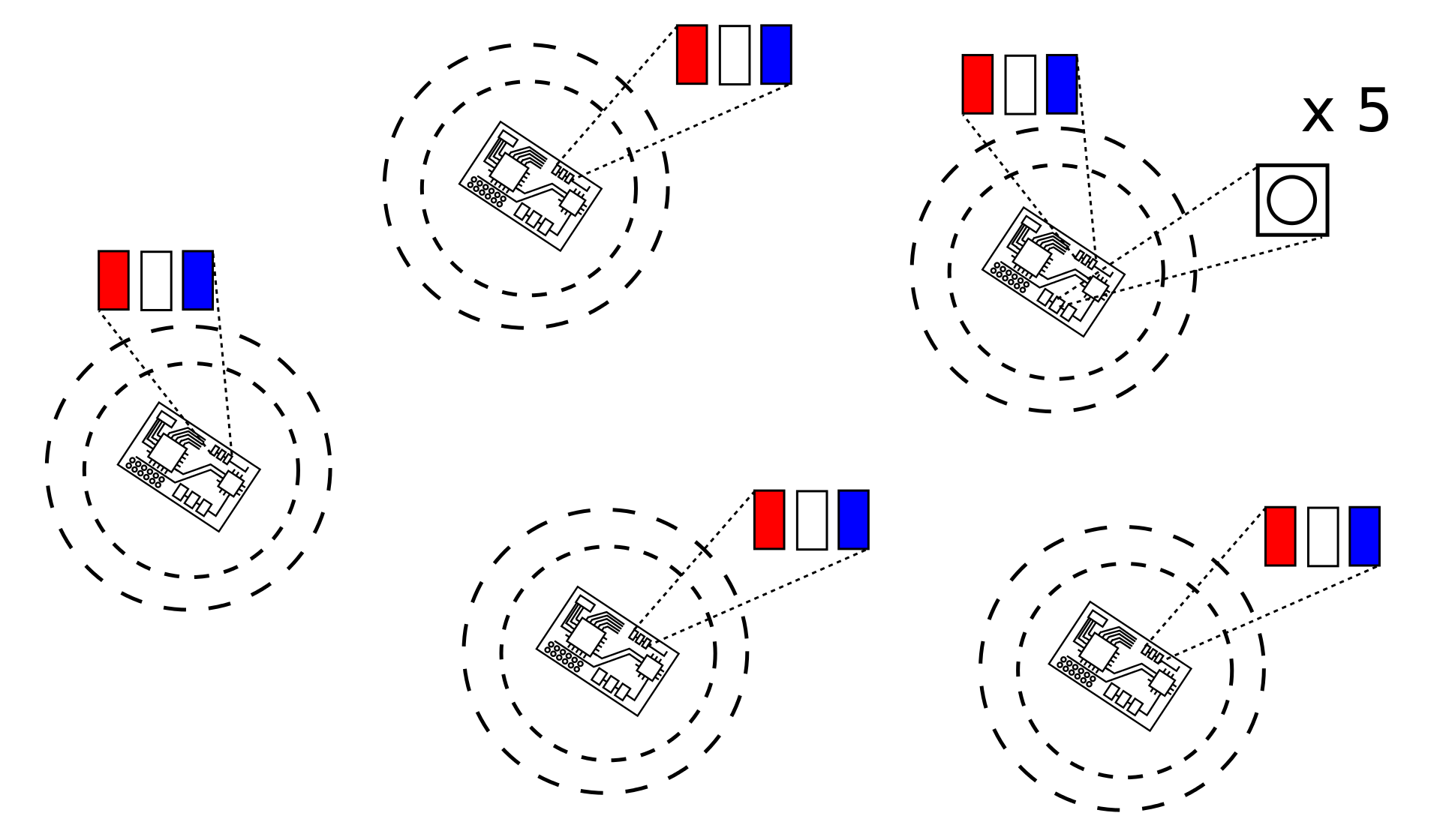 In the figure, a user takes one of the motes and presses the USR button for 5 times; N = 5. Assuming that the motes have LEDs with colors red, yellow, and blue set to LED 0, LED 1, and LED 2, respectively, then all the motes in the network will light up the LED 0 and LED 2 (red and blue) since 2^0 + 2^2 = 5.
Keep in mind the following requirements:
- The Fennec Fox application module should be called ButtonToLed. It should be defined for Swift Fox language as buttonLed.
- User should be required to keep pressing button at least once every 1000ms. If a user stops pressing button (more than 1000ms passed since she/he clicked for the last time), the application should send a message to all the motes in the network with the number of times the user pressed the button (send N to all other motes).
- When transmission is successful, the mote should set LEDs to N.
- Every mote that receives the message with the N value, should set its LEDs to N.
- The LEDs should be turned off after 5000ms since they were set to N.
Consider the following hints:
- LEDs can be controlled by LedsC module, which provides interface Leds.
- LEDs can be set to display 5 by calling:
call Leds.set(5); - LEDs can be turned off by calling
call Leds.set(0); - To set timer that will measure time between button clicks and since the LEDs output was modified, use generic module TimerMilliC().
- TimerMilliC() provides interface Timer< TMilli >;
- To access button, wire to UserButtonC, which provides interfaces Get and Notify.
- By calling
call Notify.enable();the application will receiveevent void Notify.notify( button_state_t state )event whenever the user button is pressed. - button_state_t is defined in UserButton.h.
- Leds, Timer, Get, and Notify are TinyOS interfaces and they are defined in the TinyOS source code.
- Network data dissemination can be done with Trickle protocol.
Finally, please use the following Swift Fox program to compile your new module with the rest of the system:
process disseminate { buttonLed()
        trickle(1, 1024, 1, 6)
        cc2420(r26, 31, 0, 20, 1)
}

state test {disseminate}

start test
and save it as buttonDisseminate.sfp file. Then, in the same directory, create buttonDisseminate.sfl file with the following line:
use application buttonLed < ABSOLUTE PATH >/ButtonToLed ()
where < ABSOLUTE_PATH > is your system's absolute path to the directory where you store the buttonDisseminate.sfp and buttonDisseminate.sfl files. For example, if you store your module in /tmp/ButtonToLed then the path should be /tmp and the whole definition line would be:
use application buttonLed /tmp/ButtonToLed ()
So far this module does not take any parameters. Consider passing some parameters to the ButtonToLed module from the Swift Fox program and define this parameter meaning.
Good Luck!